
最开始接触java的时候,前端页面基本都是用jsp来写,最近公司项目要使用SpringBoot重构,查看SpringBoot文档,发现SpringBoot不建议使用JSP,因为jsp在使用内嵌servlet容器时会有一些限制

虽然以后项目中也会将jsp替换成Template Engines,而且这都是前端的事情,其实与后端并无比较大的联系,但比较好奇Springboot中对jsp的使用,故根据官方文档进行了简单测试验证
如果使用JSP,则需要将项目打包成war包,jar包不支持JSP。
打开JSP sample,这是一个github上的项目,点击Code标签页,clone or download下载源码,这里下载的代码中包含有很多个springboot项目,其中spring-boot-samples中包含有我们需要的spring-boot-sample-web-jsp
解压下载的文件,spring-boot-samples下项目很多,我们根据需要在eclipse中只导入spring-boot-sample-web-jsp项目,导入时可能出现以下异常
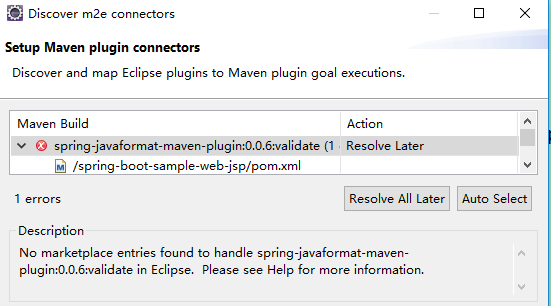
点击finish -- ok,pom.xml文件中出现异常
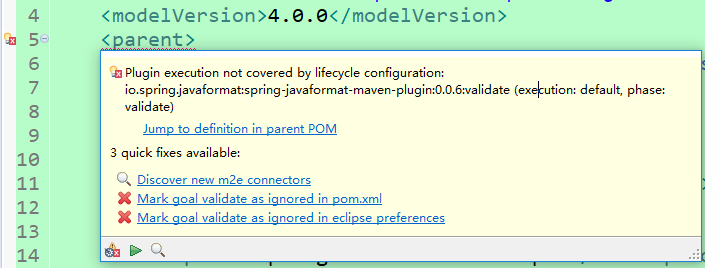
选择Mark goal validate as ignored in pom.xml忽略掉该信息
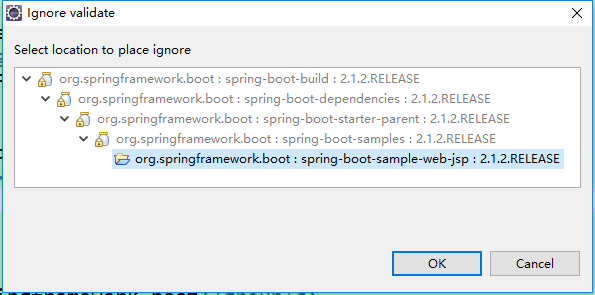
点击OK
此时若项目上还有红色的叉号,则在项目名称上右键 -- Maven -- Update Project -- OK。
项目结构
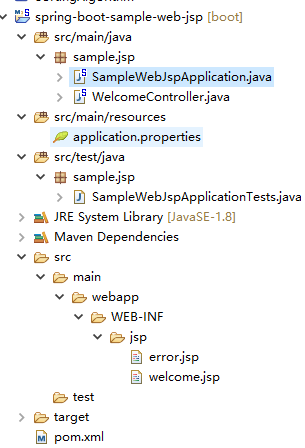
包sample.jsp下有两个类
控制器WelcomeController
1package sample.jsp;
2
3import java.util.Date;
4import java.util.Map;
5
6import org.springframework.beans.factory.annotation.Value;
7import org.springframework.stereotype.Controller;
8import org.springframework.web.bind.annotation.GetMapping;
9import org.springframework.web.bind.annotation.RequestMapping;
10
11@Controller
12public class WelcomeController {
13
14    @Value("${application.message:Hello World}")
15    private String message = "Hello World";
16
17    @GetMapping("/")
18    public String welcome(Map<String, Object> model) {
19        model.put("time", new Date());
20        model.put("message", this.message);
21        return "welcome";
22    }
23
24    @RequestMapping("/foo")
25    public String foo(Map<String, Object> model) {
26        throw new RuntimeException("Foo");
27    }
28}
启动类SampleWebJspApplication.java
1package sample.jsp;
2
3import org.springframework.boot.SpringApplication;
4import org.springframework.boot.autoconfigure.SpringBootApplication;
5import org.springframework.boot.builder.SpringApplicationBuilder;
6import org.springframework.boot.web.servlet.support.SpringBootServletInitializer;
7
8@SpringBootApplication
9public class SampleWebJspApplication extends SpringBootServletInitializer {
10
11    @Override
12    protected SpringApplicationBuilder configure(SpringApplicationBuilder application) {
13        return application.sources(SampleWebJspApplication.class);
14    }
15
16    public static void main(String[] args) {
17        SpringApplication.run(SampleWebJspApplication.class, args);
18    }
19}
两个jsp页面
welcome.jsp
1<!DOCTYPE html>
2
3<%@ taglib prefix="spring" uri="http://www.springframework.org/tags"%>
4<%@ taglib prefix="c" uri="http://java.sun.com/jsp/jstl/core"%>
5
6<html lang="en">
7
8<body>
9    <c:url value="/resources/text.txt" var="url"/>
10    <spring:url value="/resources/text.txt" htmlEscape="true" var="springUrl" />
11    Spring URL: ${springUrl} at ${time}
12    <br>
13    JSTL URL: ${url}
14    <br>
15    Message: ${message}
16</body>
17
18</html>
error.jsp
1<!DOCTYPE html>
2<html lang="en">
3<body>
4Something went wrong: ${status} ${error}
5</body>
6</html>
pom.xml


1<?xml version="1.0" encoding="UTF-8"?>
2<project xmlns="http://maven.apache.org/POM/4.0.0" xmlns:xsi="http://www.w3.org/2001/XMLSchema-instance"
3    xsi:schemaLocation="http://maven.apache.org/POM/4.0.0 http://maven.apache.org/xsd/maven-4.0.0.xsd">
4    <modelVersion>4.0.0</modelVersion>
5    <parent>
6        <!-- Your own application should inherit from spring-boot-starter-parent -->
7        <groupId>org.springframework.boot</groupId>
8        <artifactId>spring-boot-samples</artifactId>
9        <version>${revision}</version>
10    </parent>
11    <artifactId>spring-boot-sample-web-jsp</artifactId>
12    <packaging>war</packaging>
13    <name>Spring Boot Web JSP Sample</name>
14    <description>Spring Boot Web JSP Sample</description>
15    <properties>
16        <main.basedir>${basedir}/../..</main.basedir>
17        <m2eclipse.wtp.contextRoot>/</m2eclipse.wtp.contextRoot>
18    </properties>
19    <dependencies>
20        <!-- Compile -->
21        <dependency>
22            <groupId>org.springframework.boot</groupId>
23            <artifactId>spring-boot-starter-web</artifactId>
24        </dependency>
25        <dependency>
26            <groupId>javax.servlet</groupId>
27            <artifactId>jstl</artifactId>
28        </dependency>
29        <!-- Provided -->
30        <dependency>
31            <groupId>org.springframework.boot</groupId>
32            <artifactId>spring-boot-starter-tomcat</artifactId>
33            <scope>provided</scope>
34        </dependency>
35        <dependency>
36            <groupId>org.apache.tomcat.embed</groupId>
37            <artifactId>tomcat-embed-jasper</artifactId>
38            <scope>provided</scope>
39        </dependency>
40        <!-- Test -->
41        <dependency>
42            <groupId>org.springframework.boot</groupId>
43            <artifactId>spring-boot-starter-test</artifactId>
44            <scope>test</scope>
45        </dependency>
46    </dependencies>
47    <build>
48        <plugins>
49            <plugin>
50                <groupId>org.springframework.boot</groupId>
51                <artifactId>spring-boot-maven-plugin</artifactId>
52            </plugin>
53            <plugin>
54                <groupId>org.apache.maven.plugins</groupId>
55                <artifactId>maven-surefire-plugin</artifactId>
56                <configuration>
57                    <useSystemClassLoader>false</useSystemClassLoader>
58                </configuration>
59            </plugin>
60        </plugins>
61        <pluginManagement>
62            <plugins>
63                <!--This plugin's configuration is used to store Eclipse m2e settings only. It has no influence on the Maven build itself.-->
64                <plugin>
65                    <groupId>org.eclipse.m2e</groupId>
66                    <artifactId>lifecycle-mapping</artifactId>
67                    <version>1.0.0</version>
68                    <configuration>
69                        <lifecycleMappingMetadata>
70                            <pluginExecutions>
71                                <pluginExecution>
72                                    <pluginExecutionFilter>
73                                        <groupId>
74                                            io.spring.javaformat
75                                        </groupId>
76                                        <artifactId>
77                                            spring-javaformat-maven-plugin
78                                        </artifactId>
79                                        <versionRange>
80                                            [0.0.6,)
81                                        </versionRange>
82                                        <goals>
83                                            <goal>validate</goal>
84                                        </goals>
85                                    </pluginExecutionFilter>
86                                    <action>
87                                        <ignore></ignore>
88                                    </action>
89                                </pluginExecution>
90                            </pluginExecutions>
91                        </lifecycleMappingMetadata>
92                    </configuration>
93                </plugin>
94            </plugins>
95        </pluginManagement>
96    </build>
97</project>
View Code
以上为该Demo官网pom文件,但其中内容个人觉得有多余,spring-boot-starter-tomcat和tomcat-embed-jasper在spring-boot-starter-web中已经有引用,所以可以去掉
启动主函数
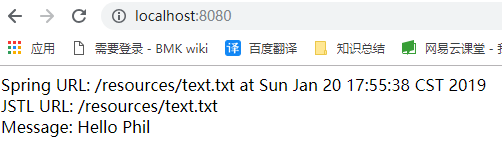
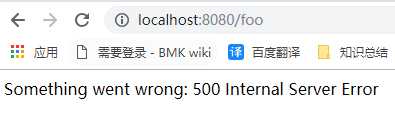
页面访问:http://localhost:8080/foo
一、本例中启动类继承了SpringBootServletInitializer,重写了configure方法,如果去掉该类的集成,能不能正常运行程序,其实是可以的(添加server.port=8081端口,与8080区分,测试)
二、SpringBootServletInitializer是做什么用处的?
springboot官方文档中 “91.1 Create a Deployable War File”有对该类的具体描述

三、按照当前pom.xml中配置,打包(eclipse中执行package),出现以下异常
[ERROR] Failed to execute goal io.spring.javaformat:spring-javaformat-maven-plugin:0.0.6:validate (default) on project spring-boot-sample-web-jsp: Formatting violations found in the following files:
日志中也给出了建议,使用:spring-javaformat:apply修复该问题
spring-javaformat:apply执行结束后,再次执行package,打包成功,打包过程中,会有很多的jar包下载。
进入到target目录,执行:java -jar .\spring-boot-sample-web-jsp-2.1.2.RELEASE.war,程序启动后,页面访问正常。
四、上面官方文档已经讲,打成可执行jar包,不支持JSP,下面尝试一下,是否如此,首先去掉主函数中集成SpringBootServletInitializer类,去掉重写的方法,pom.xml中war改为jar
1、运行主函数,jsp可正常访问
2、执行clean package打包,打包时出现异常,也许此异常与JSP无关,但此处就不在进行处理重新打包,毕竟官网也已经声明可执行jar不支持JSP
[ERROR] Failed to execute goal org.apache.maven.plugins:maven-checkstyle-plugin:3.0.0:check (checkstyle-validation) on project spring-boot-sample-web-jsp: You have 2 Checkstyle violations. -> [Help 1]
五、以上demo跑通后,也需要自己新建一个使用jsp的web项目,来运行测试下。