
恰逢项目中要实现excel表格上传,度娘甚久,得此一文,留之。 原文:https://blog.csdn.net/qq_36718999/article/details/95387542
需求
vue-cli 搭建前端项目,并使用element-ui实现本地excel表格上传。 (1) 限制上传文件只能是 xls、xlsx格式; (2) 限制上传文件大小不能超过 2MB!
图示
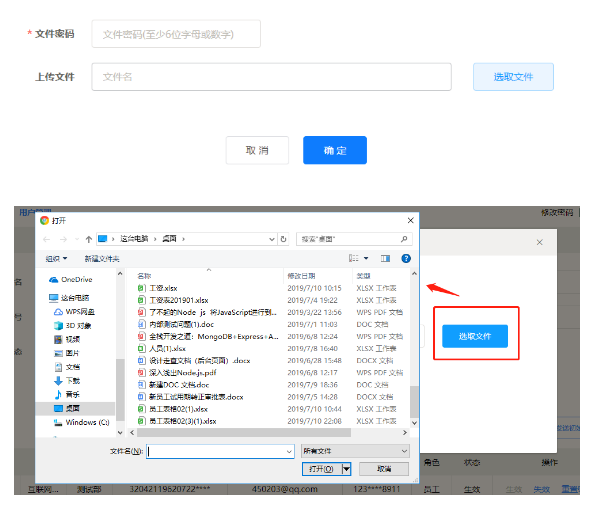
代码实现
1  <el-form
2        ref="newUploadForm"
3        :model="newUploadForm"
4        :rules="formRules"
5        label-width="140px"
6        label-position="right">
7            <el-row class="mb-4">
8                <el-col :span="24">
9                    <el-form-item label="文件密码" prop="password" >
10                        <el-input v-model="newUploadForm.password" clearable
11                        placeholder="文件密码(至少6位字母或数字)"  ></el-input>
12                    </el-form-item>
13                </el-col>
14            </el-row>
15            <el-row >
16                <el-col :span="19">
17                    <el-form-item label="上传文件" prop="fileName">
18                        <el-input v-model="fileName"
19                        :readonly='true'
20                        placeholder="文件名"
21                        style="width:510px;"></el-input>
22                    </el-form-item>
23                </el-col>
24                <el-col :span="4">
25                    <el-upload
26                    class="upload-demo"
27                    ref="upload"
28                    action="doUpload"
29                    :limit="1"
30                    :file-list="fileList"
31                    :before-upload="beforeUpload"
32                    >
33                    <el-button slot="trigger"  type="primary" plain>选取文件</el-button>
34                    <!-- <div slot="tip" class="el-upload__tip">只能上传excel文件,且不超过100MB</div>
35                    <div slot="tip" class="el-upload-list__item-name">{{fileName}}</div> -->
36                    </el-upload>
37                </el-col>
38            </el-row>
39            <el-row>
40                <el-col :span="24">
41                    <div class="btns-center mb-48 pt-48">
42                        <el-button  @click="handleClose">取 消</el-button>
43                        <el-button type="primary"
44                        @click="submitUpload()">确 定</el-button>
45                    </div>
46                </el-col>
47            </el-row>
48        </el-form>
1  export default {
2    data() {
3        return {
4            fileList:[],
5            fileName:'',
6            newUploadForm:{
7                password:'',
8                fileName:''
9            },
10            formRules:{ // 表单 校验
11                password:{required:true, trigger: 'blur',validator: validateFilePassword},
12            },
13        }
14    },
15    methods:{
16        beforeUpload(file){ // 上传前 文件校验
17            this.files = file;
18            const extension = file.name.split('.')[1] === 'xls'
19            const extension2 = file.name.split('.')[1] === 'xlsx'
20            const isLt2M = file.size / 1024 / 1024 < 2
21            if (!extension && !extension2) {
22              this.$message.warning('上传文件只能是 xls、xlsx格式!')
23              return
24            }
25            if (!isLt2M) {
26              this.$message.warning('上传文件大小不能超过 2MB!')
27              return
28            }
29            this.fileName = file.name;
30            return false // 返回false不会自动上传
31      },
32      submitUpload() { // 确认上传
33        this.$refs['newUploadForm'].validate(valid => { // 是否通过 表单验证
34            if(valid){
35                if(this.fileName == ""){
36                    this.$message({
37                        message:'请选择要上传的文件!',
38                        type:'warning',
39                        showClose:true
40                    })
41                    return false;
42                }
43
44                let fileFormData = new FormData();
45                fileFormData.append('file', this.files, this.fileName);  // 上传的文件
46                fileFormData.append('period', this.newUploadForm.password); // 文件密码
47                fileFormData.append('fileName', this.newUploadForm.fileName); // 文件名
48
49                uploadEmployee(fileFormData).then(res => { // 上传请求
50                    this.fileName = '';
51                    // console.log(res)
52                    if(res.code == 200){
53
54                    }else{
55                    }
56                }).catch(err => {
57                    this.fileName = '';
58                    console.log('err')
59                })
60            }else{
61                this.$message({
62                    type:'warning',
63                    message:'新增条件有误!',
64                    showClose:true
65                })
66            }
67        })
68      },
69      handleClose() {
70          this.fileName = '';
71      }
72    }
73}
74
1  // 上传接口
2export function uploadEmployee(params) {
3    return request({
4      url: '/apis/upload/uploadEmployee',
5      method: 'post',
6      headers: {
7        'Content-Type': 'multipart/form-data'
8        },
9      processData: false,
10      data:params
11    })
12  }
13