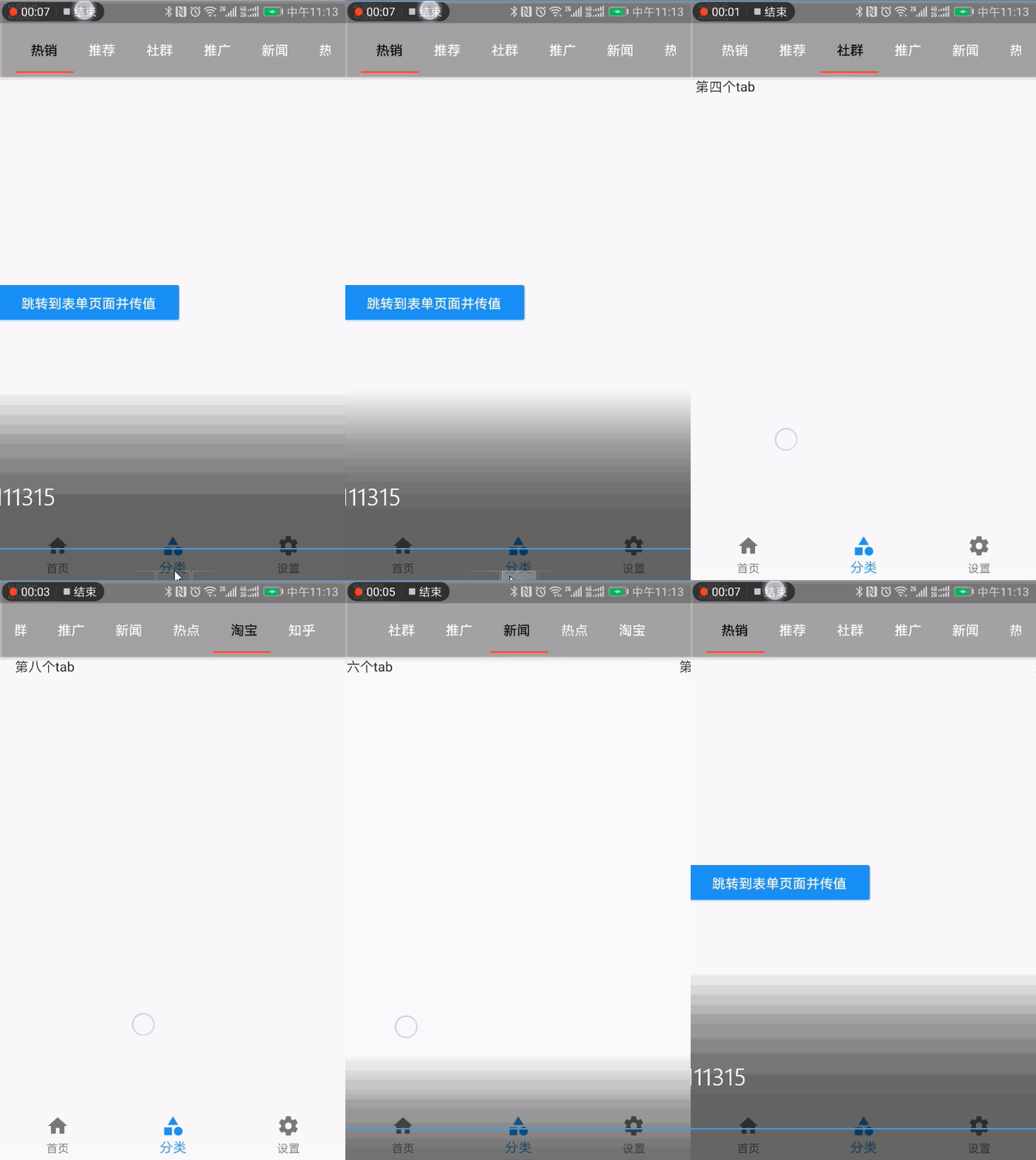
* TabBar(顶部导航)
1import 'package:flutter/material.dart';
2
3class CategoryPage extends StatefulWidget {
4  CategoryPage({Key key}) : super(key: key);
5
6  @override
7  _CategoryPageState createState() => _CategoryPageState();
8}
9
10class _CategoryPageState extends State<CategoryPage> {
11  @override
12  Widget build(BuildContext context) {
13    return DefaultTabController(
14      length: 8,
15      child: Scaffold(
16        appBar: AppBar(
17          backgroundColor: Colors.black12,
18          title: Row(
19            children: <Widget>[
20              Expanded(
21                child: TabBar(
22                  indicatorColor: Colors.red,
23                  labelColor: Colors.black,
24                  unselectedLabelColor: Colors.white,
25                  isScrollable: true,
26                  tabs: <Widget>[
27                    Tab(text: "热销"),
28                    Tab(text: "推荐"),
29                    Tab(text: "社群"),
30                    Tab(text: "推广"),
31                    Tab(text: "新闻"),
32                    Tab(text: "热点"),
33                    Tab(text: "淘宝"),
34                    Tab(text: "知乎"),
35                  ],
36                ),
37              )
38            ],
39          ),
40        ),
41        body: TabBarView(
42          children: <Widget>[
43            Column(
44              crossAxisAlignment: CrossAxisAlignment.start,
45              mainAxisAlignment: MainAxisAlignment.center,
46              children: <Widget>[
47                RaisedButton(
48                  child: Text("跳转到表单页面并传值"),
49                  onPressed: () {
50                    //普通路由的写法
51                    // Navigator.of(context)
52                    //     .push(MaterialPageRoute(builder: (context) => FormPage(title: "我是跳转传值",)));
53                    //命名路由的写法
54                    Navigator.pushNamed(context, '/form');
55                  },
56                  color: Theme.of(context).accentColor,
57                  textTheme: ButtonTextTheme.primary,
58                ),
59              ],
60            ),
61            Text("第三个tab"),
62            Text("第四个tab"),
63            Text("第五个tab"),
64            Text("第六个tab"),
65            Text("第七个tab"),
66            Text("第八个tab"),
67            Text("第九个tab"),
68          ],
69        ),
70      ),
71    );
72  }
73}
效果图:
* 自定义TabController(上面的是默认TabController)
自定义的好处是可以在addListener中增加监听,通过setState修改状态
1import 'package:flutter/material.dart';
2
3class TabBarControllerPage extends StatefulWidget {
4  TabBarControllerPage({Key key}) : super(key: key);
5
6  @override
7  _TabBarControllerPageState createState() => _TabBarControllerPageState();
8}
9
10class _TabBarControllerPageState extends State<TabBarControllerPage>
11    with SingleTickerProviderStateMixin {
12  TabController _tabController;
13  @override
14  void dispose() {
15    super.dispose();
16    _tabController.dispose();
17  }
18
19  @override
20  void initState() {
21    super.initState();
22    _tabController = new TabController(
23      vsync: this,
24      length: 2,
25    );
26    _tabController.addListener(() {
27      print(_tabController.index);
28    });
29  }
30
31  @override
32  Widget build(BuildContext context) {
33    return Scaffold(
34      appBar: AppBar(
35        title: Text("TabBarControllerPage"),
36        bottom: TabBar(
37          controller: this._tabController,
38          tabs: <Widget>[
39            Tab(text: "热销"),
40            Tab(text: "推荐"),
41          ],
42        ),
43      ),
44      body: TabBarView(
45        controller: this._tabController,
46        children: <Widget>[
47          Center(child: Text("热销")),
48          Center(child: Text("推荐")),
49        ],
50      ),
51    );
52  }
53}
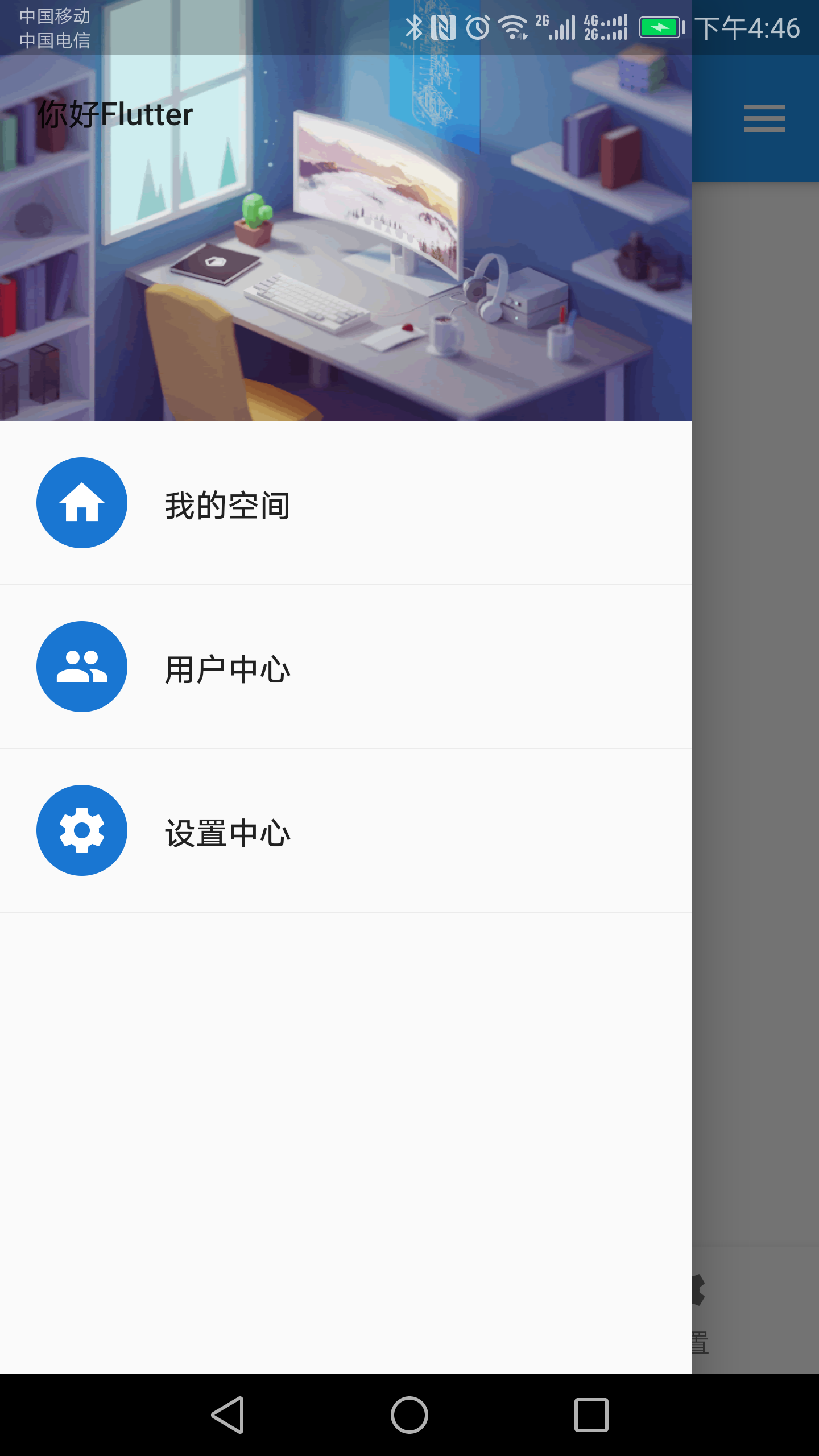
* Drawer(侧边栏)
1import 'package:flutter/material.dart';
2import 'tabs/Home.dart';
3import 'tabs/Category.dart';
4import 'tabs/Setting.dart';
5
6class Tabs extends StatefulWidget {
7  final int index;
8  Tabs({Key key, this.index = 0}) : super(key: key);
9
10  @override
11  _TabsState createState() => _TabsState(index);
12}
13
14class _TabsState extends State<Tabs> {
15  int _currentIndex;
16  _TabsState(index) {
17    this._currentIndex = index;
18  }
19  List _pageList = [HomePage(), CategoryPage(), SettingPage()];
20  @override
21  Widget build(BuildContext context) {
22    return Scaffold(
23      appBar: AppBar(
24        title: Text('Flutter Demo'),
25      ),
26      body: this._pageList[this._currentIndex],
27      bottomNavigationBar: BottomNavigationBar(
28        currentIndex: this._currentIndex,
29        onTap: (int index) {
30          setState(() {
31            this._currentIndex = index;
32          });
33        },
34        // type: BottomNavigationBarType.fixed,//可以配置超过4个以上的icon
35        items: [
36          BottomNavigationBarItem(
37            icon: Icon(Icons.home),
38            title: Text("首页"),
39          ),
40          BottomNavigationBarItem(
41            icon: Icon(Icons.category),
42            title: Text("分类"),
43          ),
44          BottomNavigationBarItem(
45            icon: Icon(Icons.settings),
46            title: Text("设置"),
47          ),
48        ],
49      ),
50      //左侧边栏
51      drawer: Drawer(
52        child: Column(
53          children: <Widget>[
54            //头部
55            Row(
56              children: <Widget>[
57                Expanded(
58                  child: DrawerHeader(
59                    child: Text("你好Flutter"),
60                    decoration: BoxDecoration(
61                        image: DecorationImage(
62                            image: NetworkImage(
63                                "https://www.itying.com/images/flutter/2.png"),
64                            fit: BoxFit.cover)),
65                  ),
66                )
67              ],
68            ),
69            ListTile(
70              leading: CircleAvatar(
71                child: Icon(Icons.home),
72              ),
73              title: Text("我的空间"),
74            ),
75            Divider(),
76            ListTile(
77              leading: CircleAvatar(
78                child: Icon(Icons.people),
79              ),
80              title: Text("用户中心"),
81            ),
82            Divider(),
83            ListTile(
84              leading: CircleAvatar(
85                child: Icon(Icons.settings),
86              ),
87              title: Text("设置中心"),
88            ),
89            Divider(),
90          ],
91        ),
92      ),
93      //右侧边栏
94      endDrawer: Drawer(
95        child: Text("右侧侧边栏"),
96      ),
97    );
98  }
99}
效果图
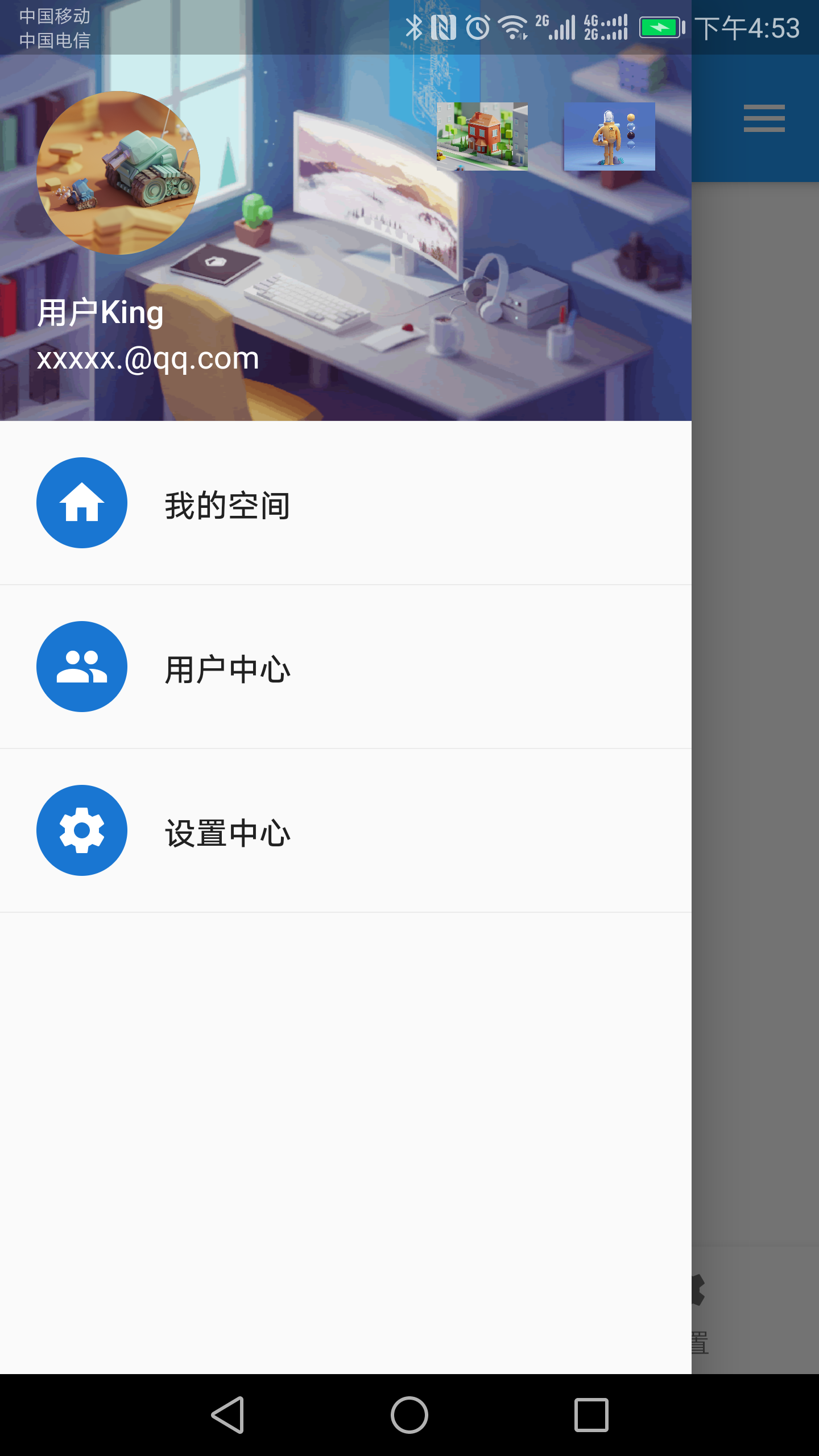
* UserAccountsDrawerHeader (用户信息侧边栏)
1import 'package:flutter/material.dart';
2import 'tabs/Home.dart';
3import 'tabs/Category.dart';
4import 'tabs/Setting.dart';
5
6class Tabs extends StatefulWidget {
7  final int index;
8  Tabs({Key key, this.index = 0}) : super(key: key);
9
10  @override
11  _TabsState createState() => _TabsState(index);
12}
13
14class _TabsState extends State<Tabs> {
15  int _currentIndex;
16  _TabsState(index) {
17    this._currentIndex = index;
18  }
19  List _pageList = [HomePage(), CategoryPage(), SettingPage()];
20  @override
21  Widget build(BuildContext context) {
22    return Scaffold(
23      appBar: AppBar(
24        title: Text('Flutter Demo'),
25      ),
26      body: this._pageList[this._currentIndex],
27      bottomNavigationBar: BottomNavigationBar(
28        currentIndex: this._currentIndex,
29        onTap: (int index) {
30          setState(() {
31            this._currentIndex = index;
32          });
33        },
34        // type: BottomNavigationBarType.fixed,//可以配置超过4个以上的icon
35        items: [
36          BottomNavigationBarItem(
37            icon: Icon(Icons.home),
38            title: Text("首页"),
39          ),
40          BottomNavigationBarItem(
41            icon: Icon(Icons.category),
42            title: Text("分类"),
43          ),
44          BottomNavigationBarItem(
45            icon: Icon(Icons.settings),
46            title: Text("设置"),
47          ),
48        ],
49      ),
50      //左侧边栏
51      drawer: Drawer(
52        child: Column(
53          children: <Widget>[
54            //头部
55            Row(
56              children: <Widget>[
57                Expanded(
58                  child: UserAccountsDrawerHeader(
59                    accountName: Text("用户King"),
60                    accountEmail: Text("xxxxx.@qq.com"),
61                    currentAccountPicture: CircleAvatar(
62                      backgroundImage: NetworkImage(
63                          "https://www.itying.com/images/flutter/3.png"),
64                    ),
65                    decoration: BoxDecoration(
66                      image: DecorationImage(
67                          image: NetworkImage(
68                              "https://www.itying.com/images/flutter/2.png"),
69                          fit: BoxFit.cover),
70                    ),
71                    otherAccountsPictures: <Widget>[
72                      Image.network(
73                          "https://www.itying.com/images/flutter/4.png"),
74                      Image.network(
75                          "https://www.itying.com/images/flutter/5.png"),
76                    ],
77                  ),
78                )
79              ],
80            ),
81            ListTile(
82              leading: CircleAvatar(
83                child: Icon(Icons.home),
84              ),
85              title: Text("我的空间"),
86            ),
87            Divider(),
88            ListTile(
89              leading: CircleAvatar(
90                child: Icon(Icons.people),
91              ),
92              title: Text("用户中心"),
93              onTap: () {
94                Navigator.of(context).pop(); //隐藏侧边栏
95                Navigator.pushNamed(context, '/user');
96              },
97            ),
98            Divider(),
99            ListTile(
100              leading: CircleAvatar(
101                child: Icon(Icons.settings),
102              ),
103              title: Text("设置中心"),
104            ),
105            Divider(),
106          ],
107        ),
108      ),
109      //右侧边栏
110      endDrawer: Drawer(
111        child: Text("右侧侧边栏"),
112      ),
113    );
114  }
115}
效果图
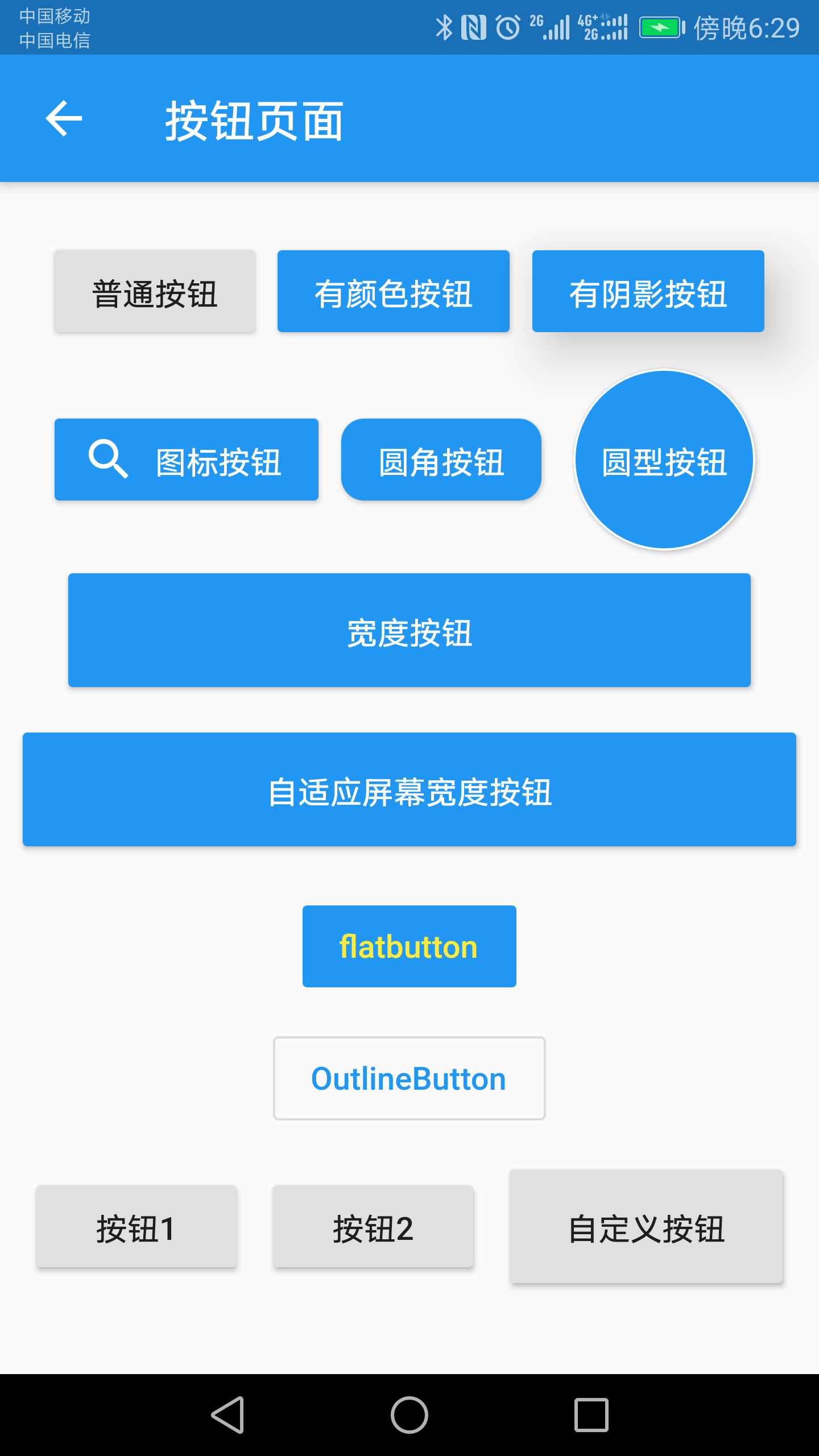
* 各种按钮
1import 'package:flutter/material.dart';
2
3class ButtonPage extends StatelessWidget {
4  const ButtonPage({Key key}) : super(key: key);
5
6  @override
7  Widget build(BuildContext context) {
8    return Scaffold(
9      appBar: AppBar(
10        title: Text("按钮页面"),
11      ),
12      body: Column(
13        mainAxisAlignment: MainAxisAlignment.center,
14        children: <Widget>[
15          Row(
16            mainAxisAlignment: MainAxisAlignment.center,
17            children: <Widget>[
18              RaisedButton(
19                child: Text("普通按钮"),
20                onPressed: () {
21                  print("普通按钮");
22                },
23              ),
24              SizedBox(width: 10),
25              RaisedButton(
26                child: Text("有颜色按钮"),
27                color: Colors.blue,
28                textColor: Colors.white,
29                onPressed: () {
30                  print("有颜色按钮");
31                },
32              ),
33              SizedBox(width: 10),
34              RaisedButton(
35                child: Text("有阴影按钮"),
36                color: Colors.blue,
37                textColor: Colors.white,
38                elevation: 20,
39                onPressed: () {
40                  print("有阴影按钮");
41                },
42              ),
43            ],
44          ),
45          SizedBox(height: 10),
46          Row(
47            mainAxisAlignment: MainAxisAlignment.center,
48            children: <Widget>[
49              RaisedButton.icon(
50                icon: Icon(Icons.search),
51                label: Text("图标按钮"),
52                color: Colors.blue,
53                textColor: Colors.white,
54                onPressed: () {
55                  print("按钮图标");
56                },
57              ),
58              SizedBox(width: 10),
59              RaisedButton(
60                child: Text("圆角按钮"),
61                color: Colors.blue,
62                textColor: Colors.white,
63                shape: RoundedRectangleBorder(
64                    borderRadius: BorderRadius.circular(10)),
65                onPressed: () {
66                  print("圆角按钮");
67                },
68              ),
69              SizedBox(width: 10),
70              Container(
71                height: 80,
72                child: RaisedButton(
73                  child: Text("圆型按钮"),
74                  color: Colors.blue,
75                  textColor: Colors.white,
76                  splashColor: Colors.yellow,
77                  shape: CircleBorder(
78                      side: BorderSide(
79                    color: Colors.white,
80                  )),
81                  onPressed: () {
82                    print("圆型按钮");
83                  },
84                ),
85              ),
86            ],
87          ),
88          SizedBox(height: 10),
89          Row(
90            mainAxisAlignment: MainAxisAlignment.center,
91            children: <Widget>[
92              Container(
93                width: 300,
94                height: 50,
95                child: RaisedButton(
96                  child: Text("宽度按钮"),
97                  color: Colors.blue,
98                  textColor: Colors.white,
99                  splashColor: Colors.yellow,
100                  onPressed: () {
101                    print("宽度按钮");
102                  },
103                ),
104              ),
105            ],
106          ),
107          SizedBox(height: 10),
108          Row(
109            mainAxisAlignment: MainAxisAlignment.center,
110            children: <Widget>[
111              Expanded(
112                child: Container(
113                  height: 50,
114                  margin: EdgeInsets.all(10),
115                  child: RaisedButton(
116                    child: Text("自适应屏幕宽度按钮"),
117                    color: Colors.blue,
118                    textColor: Colors.white,
119                    onPressed: () {
120                      print("自适应屏幕宽度按钮");
121                    },
122                  ),
123                ),
124              )
125            ],
126          ),
127          SizedBox(height: 10),
128          FlatButton(
129            child: Text("flatbutton"),
130            color: Colors.blue,
131            textColor: Colors.yellow,
132            onPressed: () {
133              print("flatbutton");
134            },
135          ),
136          SizedBox(height: 10),
137          //无背景色效果
138          OutlineButton(
139            child: Text("OutlineButton"),
140            color: Colors.blue, //没有效果
141            textColor: Colors.blue,
142            onPressed: () {
143              print("OutlineButton");
144            },
145          ),
146          Row(
147            mainAxisAlignment: MainAxisAlignment.center,
148            children: <Widget>[
149              //按钮组
150              ButtonBar(
151                children: <Widget>[
152                  RaisedButton(
153                    child: Text("按钮1"),
154                    onPressed: () {
155                      print("按钮1");
156                    },
157                  ),
158                  RaisedButton(
159                    child: Text("按钮2"),
160                    onPressed: () {
161                      print("按钮2");
162                    },
163                  ),
164                  MyButton(
165                    text: "自定义按钮",
166                    pressed: () {
167                      print("自定义按钮");
168                    },
169                  )
170                ],
171              )
172            ],
173          )
174        ],
175      ),
176    );
177  }
178}
179
180//自定义按钮组件
181class MyButton extends StatelessWidget {
182  final text;
183  final pressed;
184  const MyButton({this.text = '', this.pressed = null});
185
186  @override
187  Widget build(BuildContext context) {
188    return Container(
189      height: 50,
190      width: 120,
191      child: RaisedButton(
192        child: Text(this.text),
193        onPressed: this.pressed,
194      ),
195    );
196  }
197}
效果图
* 类似闲鱼app底部导航
1import 'package:flutter/material.dart';
2import 'tabs/Home.dart';
3import 'tabs/Category.dart';
4import 'tabs/Setting.dart';
5
6class Tabs2 extends StatefulWidget {
7  final index;
8  Tabs2({Key key, this.index = 0}) : super(key: key);
9
10  _TabsState createState() => _TabsState(this.index);
11}
12
13class _TabsState extends State<Tabs2> {
14  int _currentIndex;
15  _TabsState(index) {
16    this._currentIndex = index;
17  }
18
19  List _pageList = [
20    HomePage(),
21    CategoryPage(),
22    SettingPage(),
23  ];
24  @override
25  Widget build(BuildContext context) {
26    return Scaffold(
27      appBar: AppBar(
28        title: Text("Flutter App"),
29      ),
30      floatingActionButton: Container(
31        height: 80,
32        width: 80,
33        padding: EdgeInsets.all(8),
34        margin: EdgeInsets.only(top: 10),
35        decoration: BoxDecoration(
36          borderRadius: BorderRadius.circular(40),
37          color: Colors.white,
38        ),
39        child: FloatingActionButton(
40          child: Icon(Icons.add),
41          onPressed: () {
42            setState(() {
43              //改变状态
44              this._currentIndex = 2;
45            });
46          },
47          backgroundColor: this._currentIndex == 2 ? Colors.red : Colors.yellow,
48        ),
49      ),
50      floatingActionButtonLocation: FloatingActionButtonLocation.centerDocked,
51      body: this._pageList[this._currentIndex],
52      bottomNavigationBar: BottomNavigationBar(
53        currentIndex: this._currentIndex, //配置对应的索引值选中
54        onTap: (int index) {
55          setState(() {
56            //改变状态
57            this._currentIndex = index;
58          });
59        },
60        iconSize: 36.0, //icon的大小
61        fixedColor: Colors.red, //选中的颜色
62        type: BottomNavigationBarType.fixed, //配置底部tabs可以有多个按钮
63        items: [
64          BottomNavigationBarItem(icon: Icon(Icons.home), title: Text("首页")),
65          BottomNavigationBarItem(icon: Icon(Icons.message), title: Text("消息")),
66          BottomNavigationBarItem(
67              icon: Icon(Icons.category), title: Text("分类")),
68          BottomNavigationBarItem(icon: Icon(Icons.settings), title: Text("设置")),
69          BottomNavigationBarItem(icon: Icon(Icons.card_giftcard), title: Text("分享"))
70        ],
71      ),
72      drawer: Drawer(
73        child: Column(
74          children: <Widget>[
75            Row(
76              children: <Widget>[
77                Expanded(
78                    child: UserAccountsDrawerHeader(
79                  accountName: Text("大地老师"),
80                  accountEmail: Text("dadi@itying.com"),
81                  currentAccountPicture: CircleAvatar(
82                    backgroundImage: NetworkImage(
83                        "https://www.itying.com/images/flutter/3.png"),
84                  ),
85                  decoration: BoxDecoration(
86                      image: DecorationImage(
87                    image: NetworkImage(
88                        "https://www.itying.com/images/flutter/2.png"),
89                    fit: BoxFit.cover,
90                  )),
91                  otherAccountsPictures: <Widget>[
92                    Image.network(
93                        "https://www.itying.com/images/flutter/4.png"),
94                    Image.network(
95                        "https://www.itying.com/images/flutter/5.png"),
96                  ],
97                ))
98              ],
99            ),
100            ListTile(
101              leading: CircleAvatar(child: Icon(Icons.home)),
102              title: Text("我的空间"),
103            ),
104            Divider(),
105            ListTile(
106              leading: CircleAvatar(child: Icon(Icons.people)),
107              title: Text("用户中心"),
108              onTap: () {
109                Navigator.of(context).pop(); //隐藏侧边栏
110                Navigator.pushNamed(context, '/user');
111              },
112            ),
113            Divider(),
114            ListTile(
115              leading: CircleAvatar(child: Icon(Icons.settings)),
116              title: Text("设置中心"),
117            ),
118            Divider(),
119          ],
120        ),
121      ),
122      endDrawer: Drawer(
123        child: Text('右侧侧边栏'),
124      ),
125    );
126  }
127}
效果图

欢迎关注我的微信公众号:安卓圈