
在Spring中提供了非常好用的 JavaMailSender接口实现邮件发送,在SpringBoot的Starter模块中也为此提供了自动化配置。
项目源码已托管在Gitee-SpringBoot_Guide
几个名词解释
Spring Boot中发送邮件步骤
Spring Boot中发送邮件具体的使用步骤如下
- 1、添加Starter模块依赖
- 2、添加Spring Boot配置(QQ/网易系/Gmail)
- 3、调用JavaMailSender接口发送邮件
添加Starter模块依赖
1<dependency>
2    <groupId>org.springframework.boot</groupId>
3    <artifactId>spring-boot-starter-mail</artifactId>
4</dependency>
添加Spring Boot配置
在application.yml中添加邮件相关的配置,这里分别罗列几个常用邮件的配置比如QQ邮箱、网易系邮箱、Gmail邮箱。
QQ邮箱配置
官方配置说明:参考官方帮助中心
获取客户端授权码:参考官方帮助中心
详细的配置如下:
1spring:
2  mail:
3    host: smtp.qq.com #发送邮件服务器
4    username: xx@qq.com #QQ邮箱
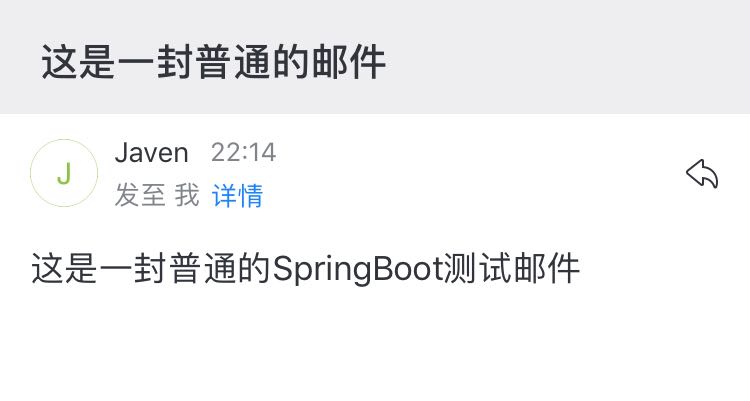
5    password: xxxxxxxxxxx #客户端授权码
6    protocol: smtp #发送邮件协议
7    properties.mail.smtp.auth: true
8    properties.mail.smtp.port: 465 #端口号465或587
9    properties.mail.display.sendmail: Javen #可以任意
10    properties.mail.display.sendname: Spring Boot Guide Email #可以任意
11    properties.mail.smtp.starttls.enable: true
12    properties.mail.smtp.starttls.required: true
13    properties.mail.smtp.ssl.enable: true
14    default-encoding: utf-8
15    from: xx@qq.com #与上面的username保持一致
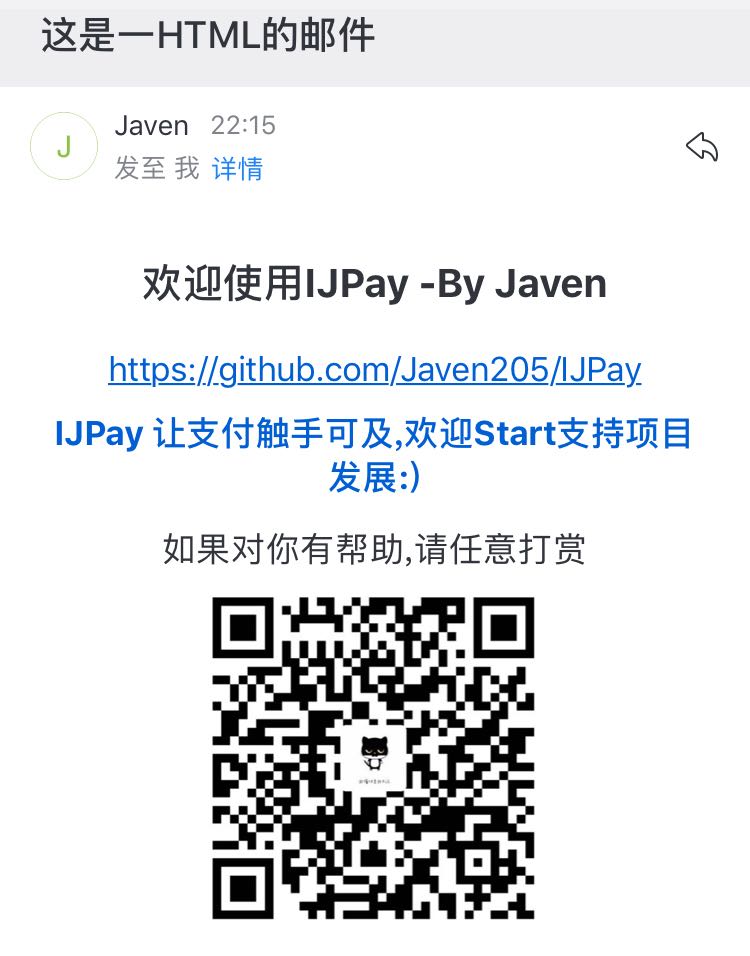
说明:开启SSL时使用587端口时无法连接QQ邮件服务器
网易系(126/163/yeah)邮箱配置
网易邮箱客户端授码:参考官方帮助中心
客户端端口配置说明:参考官方帮助中心
详细的配置如下:
1spring:
2  mail:
3    host: smtp.126.com
4    username: xx@126.com
5    password: xxxxxxxx
6    protocol: smtp
7    properties.mail.smtp.auth: true
8    properties.mail.smtp.port: 994 #465或者994
9    properties.mail.display.sendmail: Javen
10    properties.mail.display.sendname: Spring Boot Guide Email
11    properties.mail.smtp.starttls.enable: true
12    properties.mail.smtp.starttls.required: true
13    properties.mail.smtp.ssl.enable: true
14    default-encoding: utf-8
15    from: xx@126.com
特别说明:
- 126邮箱SMTP服务器地址:smtp.126.com,端口号:465或者994
- 163邮箱SMTP服务器地址:smtp.163.com,端口号:465或者994
- yeah邮箱SMTP服务器地址:smtp.yeah.net,端口号:465或者994
Gmail邮箱配置
Gmail 客户端设置说明:参考官方Gmail帮助
以上链接需要自行搭梯子,这里截几张图参考下
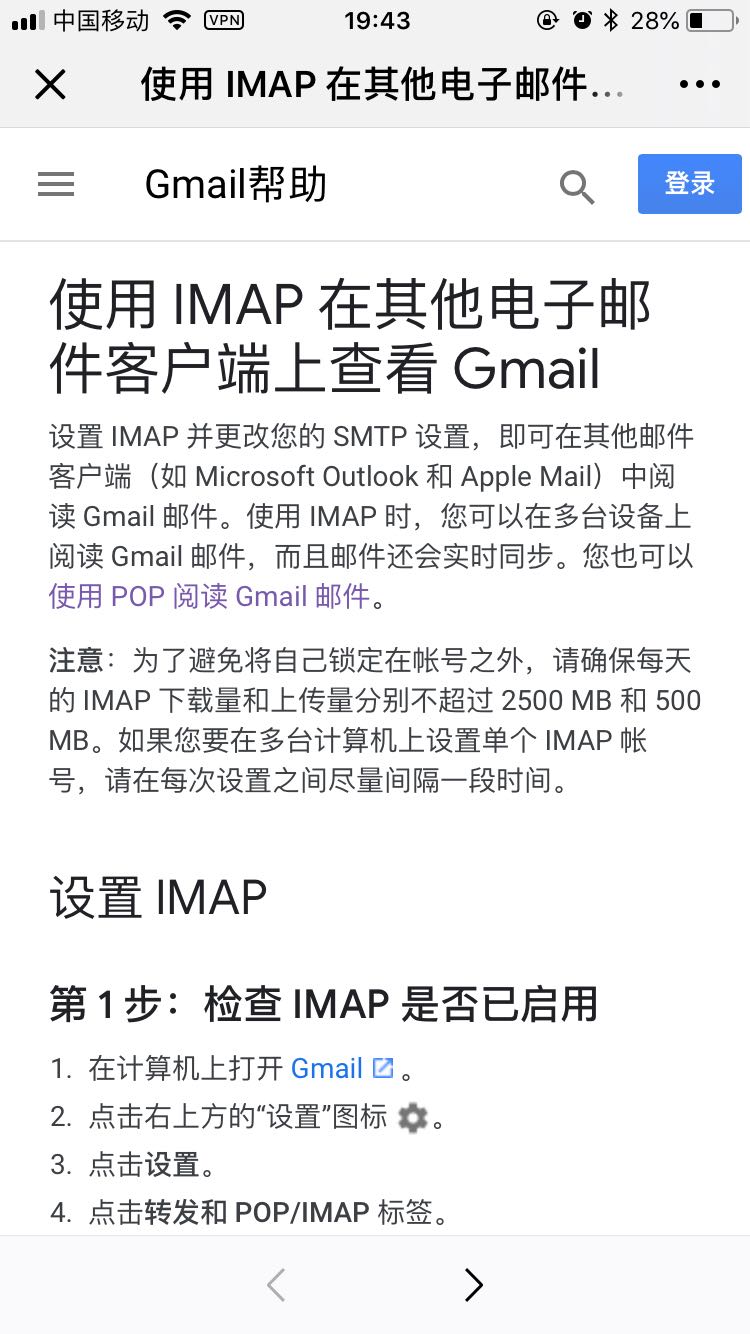
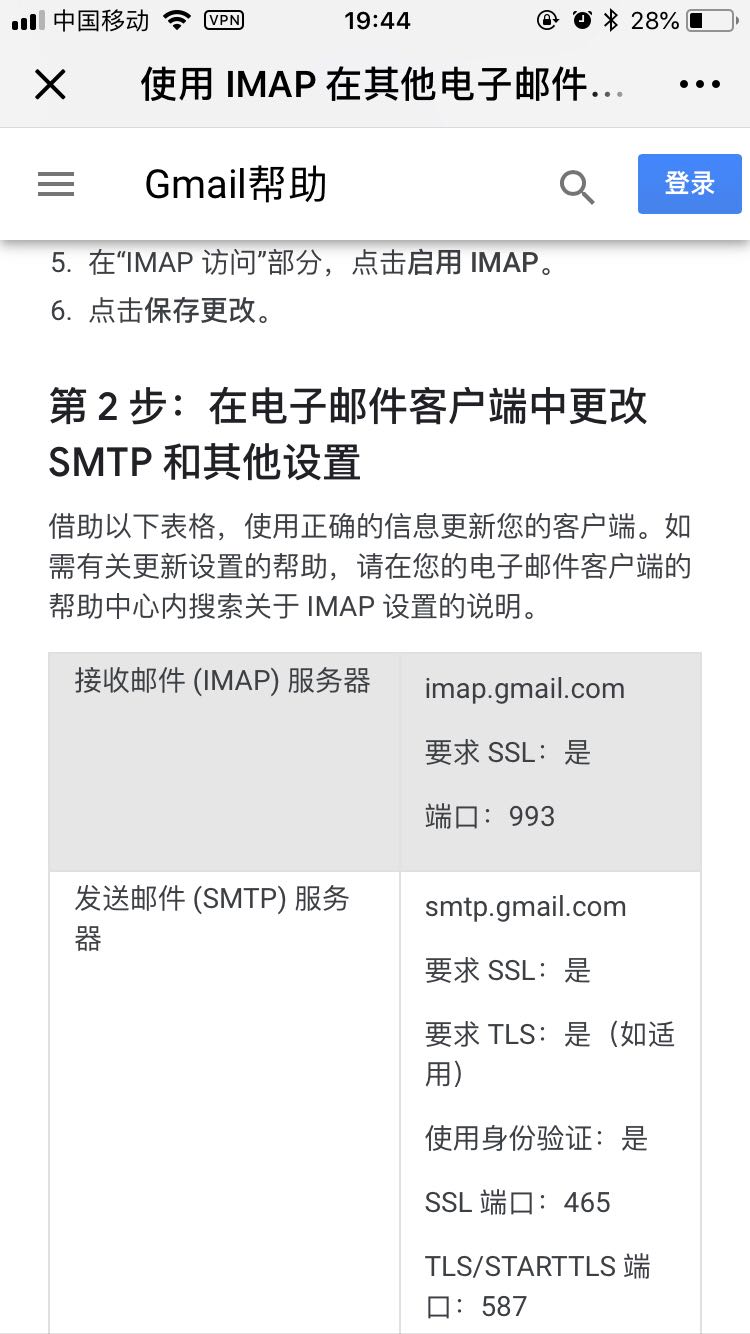
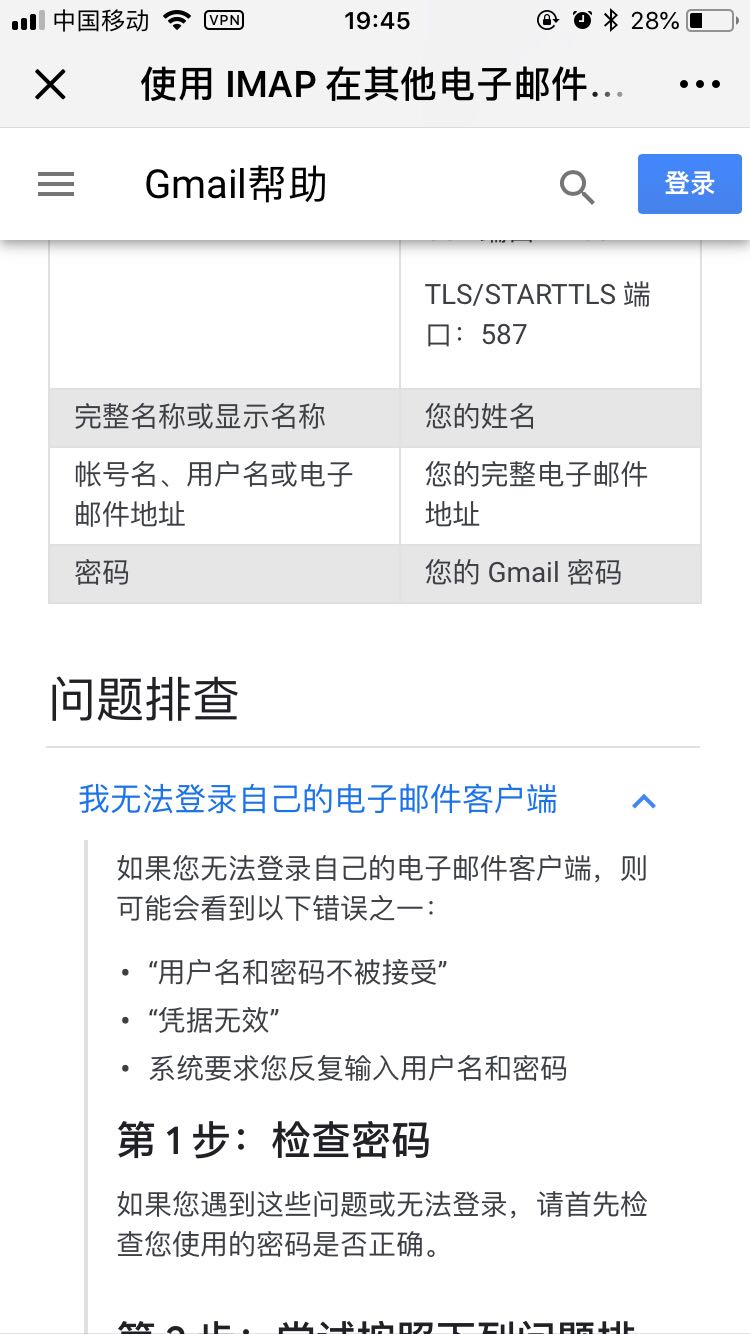
总结: Gmail 发送邮件服务器为:smtp.gmail.com,端口号:465。客户端授权码为Gmail账号的密码,必须使用使用SSL。
还需要开启允许不够安全的应用 ,不然会出现
Authentication failed的异常 选择登录与安全滑到底部有个允许不够安全的应用开启即可
详细的配置如下:
1spring:
2  mail:
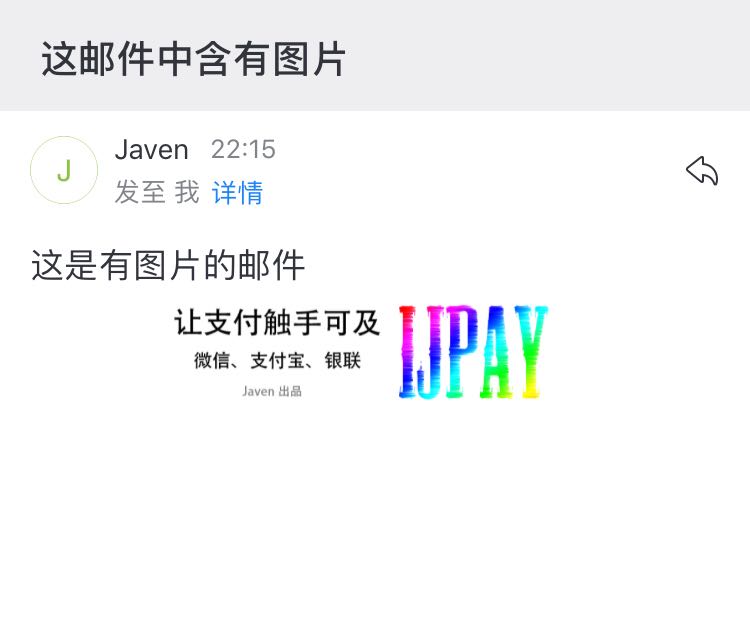
3    host: smtp.gmail.com
4    username:xxx@gmail.com
5    password: xxxxx #Gmail账号密码
6    protocol: smtp
7    properties.mail.smtp.auth: true
8    properties.mail.smtp.port: 465
9    properties.mail.display.sendmail: Javen
10    properties.mail.display.sendname: Spring Boot Guide Email
11    properties.mail.smtp.starttls.enable: true
12    properties.mail.smtp.starttls.required: true
13    properties.mail.smtp.ssl.enable: true
14    from: xxx@gmail.com
15    default-encoding: utf-8
调用JavaMailSender接口发送邮件
常用几种邮件形式接口的封装
1import javax.mail.MessagingException;
2
3public interface IMailService {
4    /**
5     * 发送文本邮件
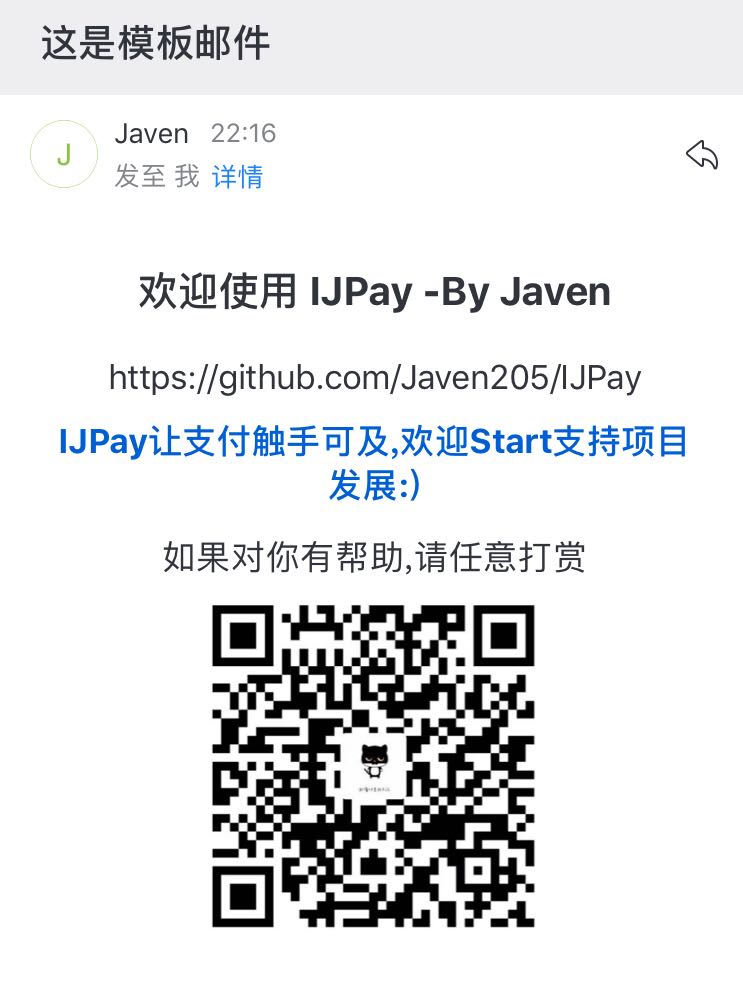
6     * @param to
7     * @param subject
8     * @param content
9     */
10    public void sendSimpleMail(String to, String subject, String content);
11
12    public void sendSimpleMail(String to, String subject, String content, String... cc);
13
14    /**
15     * 发送HTML邮件
16     * @param to
17     * @param subject
18     * @param content
19     * @throws MessagingException
20     */
21    public void sendHtmlMail(String to, String subject, String content) throws MessagingException;
22
23    public void sendHtmlMail(String to, String subject, String content, String... cc);
24
25    /**
26     * 发送带附件的邮件
27     * @param to
28     * @param subject
29     * @param content
30     * @param filePath
31     * @throws MessagingException
32     */
33    public void sendAttachmentsMail(String to, String subject, String content, String filePath) throws MessagingException;
34
35    public void sendAttachmentsMail(String to, String subject, String content, String filePath, String... cc);
36
37    /**
38     * 发送正文中有静态资源的邮件
39     * @param to
40     * @param subject
41     * @param content
42     * @param rscPath
43     * @param rscId
44     * @throws MessagingException
45     */
46    public void sendResourceMail(String to, String subject, String content, String rscPath, String rscId) throws MessagingException;
47
48    public void sendResourceMail(String to, String subject, String content, String rscPath, String rscId, String... cc);
49
50}
再写一个组件实现上面的接口并注入JavaMailSender
1@Component
2public class IMailServiceImpl implements IMailService {
3	@Autowired
4    private JavaMailSender mailSender;
5	@Value("${spring.mail.from}")
6    private String from;
7	//具体实现请继续向下阅读
8}
发送文本邮件
1 /**
2     * 发送文本邮件
3     * @param to
4     * @param subject
5     * @param content
6     */
7    @Override
8    public void sendSimpleMail(String to, String subject, String content) {
9        SimpleMailMessage message = new SimpleMailMessage();
10        message.setFrom(from);
11        message.setTo(to);
12        message.setSubject(subject);
13        message.setText(content);
14        mailSender.send(message);
15    }
16
17    @Override
18    public void sendSimpleMail(String to, String subject, String content, String... cc) {
19        SimpleMailMessage message = new SimpleMailMessage();
20        message.setFrom(from);
21        message.setTo(to);
22        message.setCc(cc);
23        message.setSubject(subject);
24        message.setText(content);
25        mailSender.send(message);
26    }
发送html邮件
1 /**
2     * 发送HTML邮件
3     * @param to
4     * @param subject
5     * @param content
6     */
7    @Override
8    public void sendHtmlMail(String to, String subject, String content) throws MessagingException {
9        MimeMessage message = mailSender.createMimeMessage();
10        MimeMessageHelper helper = new MimeMessageHelper(message, true);
11        helper.setFrom(from);
12        helper.setTo(to);
13        helper.setSubject(subject);
14        helper.setText(content, true);
15
16        mailSender.send(message);
17    }
省略实现带有抄送方法的实现
发送带附件的邮件
1 /**
2     * 发送带附件的邮件
3     * @param to
4     * @param subject
5     * @param content
6     * @param filePath
7     */
8    public void sendAttachmentsMail(String to, String subject, String content, String filePath) throws MessagingException {
9        MimeMessage message = mailSender.createMimeMessage();
10
11        MimeMessageHelper helper = new MimeMessageHelper(message, true);
12        helper.setFrom(from);
13        helper.setTo(to);
14        helper.setSubject(subject);
15        helper.setText(content, true);
16
17        FileSystemResource file = new FileSystemResource(new File(filePath));
18        String fileName = filePath.substring(filePath.lastIndexOf(File.separator));
19        helper.addAttachment(fileName, file);
20
21        mailSender.send(message);
22    }
省略实现带有抄送方法的实现
发送正文中有静态资源的邮件
1/**
2     * 发送正文中有静态资源的邮件
3     * @param to
4     * @param subject
5     * @param content
6     * @param rscPath
7     * @param rscId
8     */
9    public void sendResourceMail(String to, String subject, String content, String rscPath, String rscId) throws MessagingException {
10        MimeMessage message = mailSender.createMimeMessage();
11
12        MimeMessageHelper helper = new MimeMessageHelper(message, true);
13        helper.setFrom(from);
14        helper.setTo(to);
15        helper.setSubject(subject);
16        helper.setText(content, true);
17
18        FileSystemResource res = new FileSystemResource(new File(rscPath));
19        helper.addInline(rscId, res);
20
21        mailSender.send(message);
22    }
省略实现带有抄送方法的实现
发送模板邮件
发送模板邮件使用的方法与发送HTML邮件的方法一致。只是发送邮件时使用到的模板引擎,这里使用的模板引擎为Thymeleaf。
1<dependency>
2            <groupId>org.springframework.boot</groupId>
3            <artifactId>spring-boot-starter-thymeleaf</artifactId>
4</dependency>
模板HTML代码如下:
1<!DOCTYPE html>
2<html lang="en" xmlns:th="http://www.thymeleaf.org">
3<head>
4    <meta charset="UTF-8">
5    <title>IJPay让支付触手可及</title>
6    <style>
7        body {
8            text-align: center;
9            margin-left: auto;
10            margin-right: auto;
11        }
12        #welcome {
13            text-align: center;
14            position: absolute;
15        }
16    </style>
17</head>
18<body>
19<div id="welcome">
20    <h3>欢迎使用 <span th:text="${project}"></span> -By <span th:text=" ${author}"></span></h3>
21    <span th:text="${url}"></span>
22    <div style="text-align: center; padding: 10px">
23        <a style="text-decoration: none;" href="#" th:href="@{${url}}" target="_bank">
24            <strong>IJPay让支付触手可及,欢迎Start支持项目发展:)</strong>
25        </a>
26    </div>
27    <div style="text-align: center; padding: 4px">
28        如果对你有帮助,请任意打赏
29    </div>
30    <img width="180px" height="180px"
31         src="https://oscimg.oschina.net/oscnet/8e86fed2ee9571eb133096d5dc1b3cb2fc1.jpg">
32</div>
33</body>
34</html>
如何使用请看测试中实现的代码。
测试
1package com.javen.controller;
2
3import com.javen.email.impl.IMailServiceImpl;
4import com.javen.vo.JsonResult;
5import org.springframework.beans.factory.annotation.Autowired;
6import org.springframework.web.bind.annotation.RequestMapping;
7import org.springframework.web.bind.annotation.RestController;
8import org.thymeleaf.TemplateEngine;
9import org.thymeleaf.context.Context;
10
11@RestController
12@RequestMapping("email")
13public class EmailController {
14
15    @Autowired
16    private IMailServiceImpl mailService;//注入发送邮件的各种实现方法
17    @Autowired
18    private TemplateEngine templateEngine;//注入模板引擎
19
20    @RequestMapping
21    public JsonResult index(){
22        try {
23            mailService.sendSimpleMail("xxx@126.com","SpringBoot Email","这是一封普通的SpringBoot测试邮件");
24        }catch (Exception ex){
25            ex.printStackTrace();
26            return new JsonResult(-1,"邮件发送失败!!");
27        }
28        return new JsonResult();
29    }
30
31    @RequestMapping("/htmlEmail")
32    public JsonResult htmlEmail(){
33        try {
34            mailService.sendHtmlMail(""xxx@126.com","IJPay让支付触手可及","<body style=\"text-align: center;margin-left: auto;margin-right: auto;\">\n"
35                    + "	<div id=\"welcome\" style=\"text-align: center;position: absolute;\" >\n"
36                    +"		<h3>欢迎使用IJPay -By Javen</h3>\n"
37                    +"		<span>https://github.com/Javen205/IJPay</span>"
38                    + "		<div\n"
39                    + "			style=\"text-align: center; padding: 10px\"><a style=\"text-decoration: none;\" href=\"https://github.com/Javen205/IJPay\" target=\"_bank\" ><strong>IJPay 让支付触手可及,欢迎Start支持项目发展:)</strong></a></div>\n"
40                    + "		<div\n" + "			style=\"text-align: center; padding: 4px\">如果对你有帮助,请任意打赏</div>\n"
41                    + "		<img width=\"180px\" height=\"180px\"\n"
42                    + "			src=\"https://javen205.gitbooks.io/ijpay/content/assets/wxpay.png\">\n"
43                    + "	</div>\n" + "</body>");
44        }catch (Exception ex){
45            ex.printStackTrace();
46            return new JsonResult(-1,"邮件发送失败!!");
47        }
48        return new JsonResult();
49    }
50
51    @RequestMapping("/attachmentsMail")
52    public JsonResult attachmentsMail(){
53        try {
54            String filePath = "/Users/Javen/Desktop/IJPay.png";
55            mailService.sendAttachmentsMail("xxx@126.com", "这是一封带附件的邮件", "邮件中有附件,请注意查收!", filePath);
56        }catch (Exception ex){
57            ex.printStackTrace();
58            return new JsonResult(-1,"邮件发送失败!!");
59        }
60        return new JsonResult();
61    }
62
63    @RequestMapping("/resourceMail")
64    public JsonResult resourceMail(){
65        try {
66            String rscId = "IJPay";
67            String content = "<html><body>这是有图片的邮件<br/><img src=\'cid:" + rscId + "\' ></body></html>";
68            String imgPath = "/Users/Javen/Desktop/IJPay.png";
69            mailService.sendResourceMail("xxx@126.com", "这邮件中含有图片", content, imgPath, rscId);
70
71        }catch (Exception ex){
72            ex.printStackTrace();
73            return new JsonResult(-1,"邮件发送失败!!");
74        }
75        return new JsonResult();
76    }
77
78    @RequestMapping("/templateMail")
79    public JsonResult templateMail(){
80        try {
81            Context context = new Context();
82            context.setVariable("project", "IJPay");
83            context.setVariable("author", "Javen");
84            context.setVariable("url", "https://github.com/Javen205/IJPay");
85            String emailContent = templateEngine.process("emailTemp", context);
86
87            mailService.sendHtmlMail("xxx@126.com", "这是模板邮件", emailContent);
88        }catch (Exception ex){
89            ex.printStackTrace();
90            return new JsonResult(-1,"邮件发送失败!!");
91        }
92        return new JsonResult();
93    }
94}
95
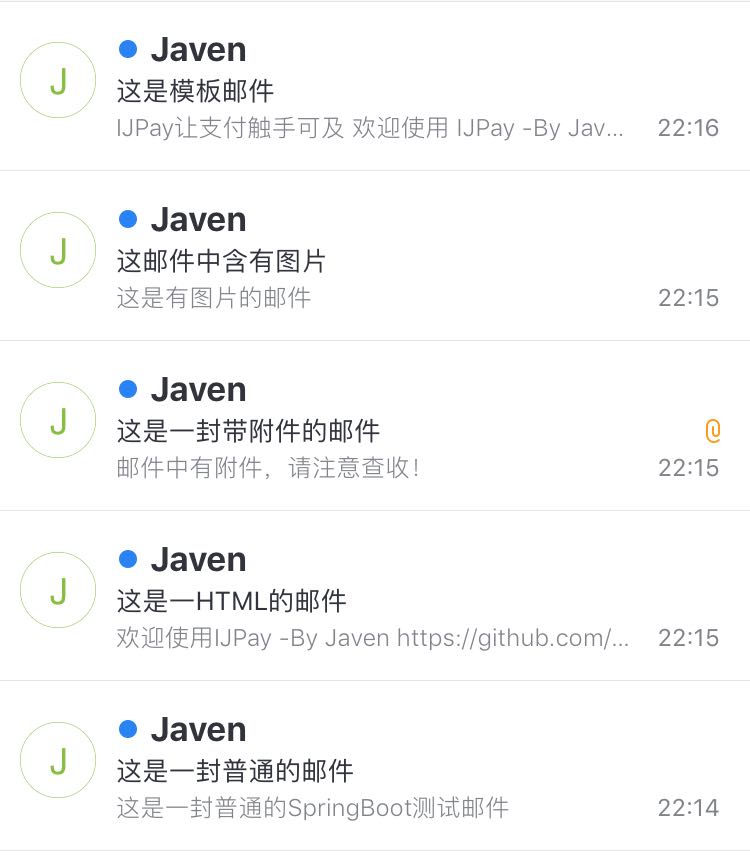
效果图
[

项目地址
项目源码已托管在Gitee-SpringBoot_Guide
完
使用 Spring Boot 发送邮件到这里就介绍完了。个人能力有限如有错误欢迎指正。你有更好的解决方案或者建议欢迎一起交流讨论,如有疑问欢迎留言。