
一、Spring Data JPA 介绍
JPA(Java Persistence API)Java持久化API,是 Java 持久化的标准规范,Hibernate是持久化规范的技术实现,而Spring Data JPA是在 Hibernate 基础上封装的一款框架。
开发环境
- Spring Boot 2.0.4
- Spring Data JPA 2.0.4
- MySQL 8.0.12
- JDK 8
- IDEA 2018.2
- Windows 10
二、集成步骤
2.1 配置依赖
添加Spring Data JPA 和 MySQL Connector,配置pom.xml文件,代码如下:
1<dependency>
2    <groupId>org.springframework.boot</groupId>
3    <artifactId>spring-boot-starter-data-jpa</artifactId>
4    <version>2.0.4.RELEASE</version>
5</dependency>
6
7<dependency>
8    <groupId>mysql</groupId>
9    <artifactId>mysql-connector-java</artifactId>
10    <version>8.0.12</version>
11</dependency>
更多JPA版本:http://mvnrepository.com/artifact/org.springframework.boot/spring-boot-starter-data-jpa
更多Mysql版本:http://mvnrepository.com/artifact/mysql/mysql-connector-java
2.2 application.properties 设置配置文件
1## 数据源配置
2spring.datasource.url=jdbc:mysql://172.16.10.79:3306/mytestdb?serverTimezone=UTC&useSSL=false&allowPublicKeyRetrieval=true
3spring.datasource.username=root
4spring.datasource.password=123456
5spring.datasource.driver-class-name=com.mysql.cj.jdbc.Driver
6
7spring.jpa.hibernate.ddl-auto=update
8spring.jpa.database-platform=org.hibernate.dialect.MySQL5InnoDBDialect
9spring.jpa.show-sql=true
- hbm2ddl.auto:自动创建|更新|验证数据库表结构
- dialect:设置数据库引擎为InnoDB
- show-sql:打印sql语句,方便调试
hbm2ddl.auto有四个属性:
-
create:每次加载 hibernate 时都会删除上一次的生成的表,然后根据你的 model 类再重新来生成新表,哪怕两次没有任何改变也要这样执行,这就是导致数据库表数据丢失的一个重要原因。[删除-创建-操作]
-
create-drop :每次加载 hibernate 时根据 model 类生成表,但是 sessionFactory 一关闭,表就自动删除。[删除-创建-操作-再删除]
-
update:最常用的属性,第一次加载 hibernate 时根据 model 类会自动建立起表的结构(前提是先建立好数据库),以后加载 hibernate 时根据 model 类自动更新表结构,即使表结构改变了,但表中的行仍然存在,不会删除以前的行。要注意的是当部署到服务器后,表结构是不会被马上建立起来的,是要等应用第一次运行起来后才会。[没表-创建-操作 | 有表-更新没有的属性列-操作]
-
validate:每次加载 hibernate 时,验证创建数据库表结构,只会和数据库中的表进行比较,不会创建新表,但是会插入新值。[启动验证表结构,验证不成功,项目启动失败]
2.3 增加实体类(Entity)
1@Entity
2public class User implements Serializable {
3    @Id
4    @GeneratedValue
5    private Long id;
6    @Column(name = "name", nullable = false)
7    private String name;
8    @Column(nullable = false)
9    private int age;
10    @Column(nullable = false)
11    private String pwd;
12    public User(){}
13    public User(String name, int age, String pwd) {
14        this.name = name;
15        this.age = age;
16        this.pwd = pwd;
17    }
18	//...忽略set、get方法
19}
- @GeneratedValue 自动生成id
- @Column 设置列属性(name="数据库列名")
- @Transient 不会映射到数据库
2.4 创建 Repository 接口构建业务方法
1public interface UserRepository extends JpaRepository<User,Long> {
2    public User findByName(String name);
3}
继承JpaRepository之后就继承了:
- Repository.save(user); // 插入或保存
- Repository.saveFlush(user); // 保存并刷新
- Repository.exists(1) // 主键查询是否存在
- Repository.findOne(1); // 主键查询单条
- Repository.delete(1); // 主键删除
- Repository.findByUsername("stone"); // 查询单条
- Repository.findAll(pageable); // 带排序和分页的查询列表
- Repository.saveState(1, 0); // 更新单个字段
这些方法,可以不写一行代码就可以实现对一个表的操作,当然你也可以扩展一些自己的方法,只需要在UserRepository里面添加方法即可。
2.5 添加、查询数据库
1@Controller
2@RequestMapping("/")
3public class UserController {
4
5    @Autowired
6    private UserRepository userRepository;
7
8    @RequestMapping("/")
9    public ModelAndView index() {
10        userRepository.save(new User("老王",18,"123456"));
11        ModelAndView modelAndView = new ModelAndView("/index");
12        modelAndView.addObject("dataSize", userRepository.findAll().size());
13        return modelAndView;
14    }
15}
到现在为止,集成 Spring Data JPA 已经全部完成了,启动调试,查看运行效果吧。
三、高级使用
本节高级使用将会涉及的知识点如下:
- 事务实现
- 根据名称自动生成SQL
- 自定义Sql语句查询
3.1 事务实现
3.1.1 Spring事务实现步骤
实现事务,只需要两步即可:
步骤一、在application.properties配置数据库引擎为InnoDB:
spring.jpa.database-platform=org.hibernate.dialect.MySQL5InnoDBDialect
步骤二、在方法或类上标识事务@Transactional
示例代码:
1@Transactional
2public void saveGroup(){
3    userRepository.save(user);
4    userRepository.save(user2);
5}
如果出现错误,就会进行事务回滚。
3.1.2 事务不生效的原因
3.1.2.1 确认数据库引擎
在application.properties配置数据库引擎为InnoDB:
spring.jpa.database-platform=org.hibernate.dialect.MySQL5InnoDBDialect
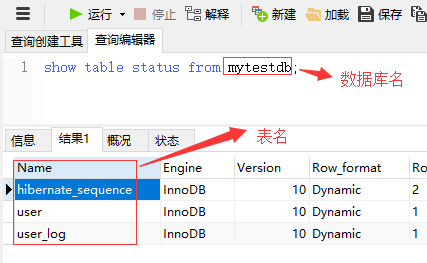
3.1.2.2 查看表的引擎必须为InnoDB
通过命令:
show table status from mytestdb;
修改表的引擎:
alter table table_name engine=innodb;
3.1.2.3 注意引入@Transactional的命名空间
@Transactional注解来自org.springframework.transaction.annotation包,而不是javax.transaction.
3.2 根据名称自动生成SQL
JPA支持根据简单的关键字自动生成Sql查询的方法,比如根据name和age的组合查询,代码如下:
public User findByNameAndAge(String name,int age);
使用关键字“And”即可,或者查询时间区间的:
public User findByStartDateBetween(Long startDate);
使用关键字“Between”即可。
更多内部支持的关键字,如下表:
Keyword
Sample
JPQL snippet
And
findByLastnameAndFirstname
… where x.lastname = ?1 and x.firstname = ?2
Or
findByLastnameOrFirstname
… where x.lastname = ?1 or x.firstname = ?2
Is,Equals
findByFirstname,findByFirstnameIs
… where x.firstname = ?1
Between
findByStartDateBetween
… where x.startDate between ?1 and ?2
LessThan
findByAgeLessThan
… where x.age < ?1
LessThanEqual
findByAgeLessThanEqual
… where x.age <= ?1
GreaterThan
findByAgeGreaterThan
… where x.age > ?1
GreaterThanEqual
findByAgeGreaterThanEqual
… where x.age >= ?1
After
findByStartDateAfter
… where x.startDate > ?1
Before
findByStartDateBefore
… where x.startDate < ?1
IsNull
findByAgeIsNull
… where x.age is null
IsNotNull,NotNull
findByAge(Is)NotNull
… where x.age not null
Like
findByFirstnameLike
… where x.firstname like ?1
NotLike
findByFirstnameNotLike
… where x.firstname not like ?1
StartingWith
findByFirstnameStartingWith
… where x.firstname like ?1(parameter bound with appended %)
EndingWith
findByFirstnameEndingWith
… where x.firstname like ?1(parameter bound with prepended %)
Containing
findByFirstnameContaining
… where x.firstname like ?1(parameter bound wrapped in %)
OrderBy
findByAgeOrderByLastnameDesc
… where x.age = ?1 order by x.lastname desc
Not
findByLastnameNot
… where x.lastname <> ?1
In
findByAgeIn(Collection<Age> ages)
… where x.age in ?1
NotIn
findByAgeNotIn(Collection<Age> ages)
… where x.age not in ?1
True
findByActiveTrue()
… where x.active = true
False
findByActiveFalse()
… where x.active = false
IgnoreCase
findByFirstnameIgnoreCase
… where UPPER(x.firstame) = UPPER(?1)
官方文档:https://docs.spring.io/spring-data/jpa/docs/2.0.9.RELEASE/reference/html/#jpa.repositories
3.3 自定义Sql语句查询
对于用户自己编写sql,Spring Boot JPA也有很好的支持,只需要添加@Query(sql)即可。
示例代码:
1@Transactional
2@Modifying
3@Query("update User set name=?1 where id=?2")
4public int modifyName(String name,Long id);
注意:在执行修改和删除的时候必须添加@Modifying注解,ORM才知道要执行写操作,update/delete query 的时候,也必须需要加上@Transactional(事务)才能正常操作。
四、常见错误
在 Spring Data JPA 的使用当中,可能会遇到如下的一些错误。
1.No default constructor for entity
实体类Entity没有空参数的默认构造函数,新增即可解决。
2.java.sql.SQLException: Access denied for user ''@'172.17.0.1' (using password: NO)
启动项目报错,用户名和密码配置的key有误,MySQL8的用户名和密码配置和之前的不一样,MySQL 8 正确的用户名密码配置如下:
1spring.datasource.username=root
2spring.datasource.password=123456
3# 以下为配置老数据库驱动配置
4#spring.datasource.data-username=root
5#spring.datasource.data-password=123456
3.Caused by: java.lang.IllegalStateException: Cannot load driver class: com.mysql.jdbc.Driver
MySQL 8 的spring.datasource.driver-class-name配置需要改为“com.mysql.cj.jdbc.Driver”而不是“com.mysql.jdbc.Driver”,正确配置如下:
spring.datasource.driver-class-name=com.mysql.cj.jdbc.Driver