
一简介
1、凸包
凸包(Convex Hull)是一个计算机几何图形学中的概念, 简单来说, 给定二维平面点集, 凸包就是能够将最外层的点连接起来构成的凸多边形, 它能够包含点集中所有的点。物体的凸包检测场应用在物体识别、手势识别及边界检测等领域。
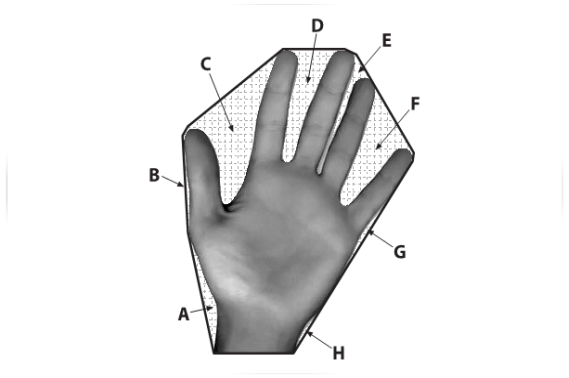
A-H是被标出的凸包缺陷
2、寻找凸包---convexHull()
1 CV_EXPORTS_W void convexHull(InputArray points, OutputArray hull, bool clockwise=false, bool returnPoints = true);
points: 输入的二维点集, 可以填Mat类型或std::vector
hull: 函数调用后找到的凸包
clockwise: 操作方向标志符, 当为true时, 输出的凸包为顺时针方向, false为逆时针方向(假定坐标系x轴指向右,y轴指向上方)
returnPoints: 操作标志符, 默认值true. 当标志符为true时, 函数返回凸包各个点, 否则返回凸包各点的指数, 当输出数组是std::vector时, 此标志被忽略
示例:
11 vector<int> hull;
22 convexHull(Mat(points), hull, true);
3
41 vector<vector<Point>> hull(contours.size());
52 for(int i = 0; i < contours.size(); i++)
63 {
74     convexHull(Mat(contours[i]), hull[i], true);
85 }
3、凸包缺陷分析---convexityDefects()
1 CV_EXPORTS_W void convexityDefects(InputArray contour, InputArray convexhull, OutputArray convexityDefects);
contour: 表示输入参数检测到的轮廓, 可以用findContours函数获得
convexhull: 输入参数表示检测到的凸包, 可以用convexHull函数获得
convexityDefects: 检测到的最终结果, 应为vector<vector<Vec4i>>类型, Vec4i存储了起始点、结束点、距离及最远点到凸包的距离
二、绘制点集的凸包
1 1 //绘制点集的凸包
2 2 #include<opencv2/opencv.hpp>
3 3
4 4 using namespace cv;
5 5
6 6 int main()
7 7 {
8 8     //---绘制点集的凸包
9 9     Mat img(400, 400, CV_8UC3, Scalar::all(0));  //定义绘制图像
1010     RNG rng;  //定义随机数对象
1111     while(1)
1212     {
1313         char key;
1414         int count = (unsigned int)rng % 100;  //定义点的个数
1515         vector<Point> points;  //定义点集
1616         for(int i=0; i<count; i++)
1717         {
1818             Point pt;
1919             pt.x = rng.uniform(img.cols/4, img.cols*3/4);  //设定点的x范围
2020             pt.y = rng.uniform(img.rows/4, img.rows*3/4);  //设定点的y范围
2121             points.push_back(pt);
2222         }
2323
2424         //检测凸包
2525         vector<int> hull;
2626         convexHull(Mat(points), hull, true);
2727
2828         img = Scalar::all(0);
2929         for(int i = 0; i < count; i++ )
3030             circle(img, points[i], 3, Scalar(rng.uniform(0, 255), rng.uniform(0, 255), rng.uniform(0, 255)), CV_FILLED, CV_AA);
3131
3232         //准备参数
3333         int hullcount = (int)hull.size(); //凸包的边数
3434         Point point0 = points[hull[hullcount-1]]; //连接凸包边的坐标点
3535
3636         //绘制凸包的边
3737         for(int  i = 0; i < hullcount; i++ )
3838         {
3939             Point point = points[hull[i]];
4040             circle(img, point, 8, Scalar(0, 255, 0), 2, 8);
4141             line(img, point0, point, Scalar(255, 255, 255), 2, CV_AA);
4242             point0 = point;
4343         }
4444
4545         //显示效果图
4646         imshow("img", img);
4747
4848         //按下ESC,Q,或者q,程序退出
4949         key = (char)waitKey();
5050         if( key == 27 || key == 'q' || key == 'Q' )
5151             break;
5252     }
5353     return 0;
5454 }
三、绘制轮廓的凸包
1 1 //绘制轮廓的凸包
2 2 #include<opencv2/opencv.hpp>
3 3
4 4 using namespace cv;
5 5
6 6 int main()
7 7 {
8 8     Mat srcImg = imread("12.jpg");
9 9     imshow("src", srcImg);
1010     Mat dstImg2 = srcImg.clone();
1111     Mat tempImg(srcImg.rows, srcImg.cols, CV_8UC3, Scalar::all(0));  //用于绘制凸包
1212     Mat dstImg(srcImg.rows, srcImg.cols, CV_8UC3, Scalar::all(0));  //用于绘制轮廓
1313     cvtColor(srcImg, srcImg, CV_BGR2GRAY);
1414     threshold(srcImg, srcImg, 100, 255, CV_THRESH_BINARY); //二值化
1515
1616     vector<vector<Point>> contours;
1717     vector<Vec4i> hierarcy;
1818     findContours(srcImg, contours, hierarcy, CV_RETR_EXTERNAL, CV_CHAIN_APPROX_NONE);
1919     vector<vector<Point>> hull(contours.size());
2020     for(int i=0; i<contours.size(); i++)
2121     {
2222         convexHull(Mat(contours[i]), hull[i], true);     //查找凸包
2323         drawContours(dstImg, contours, i, Scalar(255, 255, 255), -1, 8);  //绘制轮廓
2424         //drawContours(dstImg, hull, i, Scalar(rand()%255, rand()%255, rand()%255), 2, 8);
2525         drawContours(tempImg, hull, i, Scalar(255, 255, 255), -1, 8);
2626     }
2727     imshow("hull", tempImg);
2828     imshow("contours", dstImg);
2929
3030     Mat diffImg;
3131     absdiff(tempImg, dstImg, diffImg);  //图像相减
3232     Mat element = getStructuringElement(MORPH_RECT, Size(3, 3), Point(-1, -1));
3333     erode(diffImg, diffImg, element);
3434     imshow("diff", diffImg);
3535
3636     vector<vector<Point>> contours2;
3737     vector<Vec4i> hierarcy2;
3838     cvtColor(diffImg, diffImg, CV_BGR2GRAY); //转为灰度图
3939     threshold(diffImg, diffImg, 100, 255, CV_THRESH_BINARY); //二值化
4040     findContours(diffImg, contours2, hierarcy2, CV_RETR_EXTERNAL, CV_CHAIN_APPROX_NONE);
4141     drawContours(dstImg2, contours2, -1, Scalar(0, 0, 255), 2, 8);  //红色绘制缺陷轮廓
4242     imshow("defects", dstImg2);
4343     waitKey(0);
4444     return 0;
4545 }