
Unblocking IO(New IO): 同步非阻塞的编程方式
NIO 本身是基于事件驱动思想来完成的,其主要想解决的是 BIO 的大并发问题,NIO 基 于 Reactor,当 socket 有流可读或可写入 socket 时,操作系统会相应的通知引用程序进行处 理,应用再将流读取到缓冲区或写入操作系统。也就是说,这个时候,已经不是一个连接就 要对应一个处理线程了,而是有效的请求,对应一个线程,当连接没有数据时,是没有工作 线程来处理的。
NIO 的最重要的地方是当一个连接创建后,不需要对应一个线程,这个连接会被注册到 多路复用器上面,所以所有的连接只需要一个线程就可以搞定,当这个线程中的多路复用器 进行轮询的时候,发现连接上有请求的话,才开启一个线程进行处理,也就是一个请求一个 线程模式
在 NIO 的处理方式中,当一个请求来的话,开启线程进行处理,可能会等待后端应用的 资源(JDBC 连接等),其实这个线程就被阻塞了,当并发上来的话,还是会有 BIO 一样的问题。
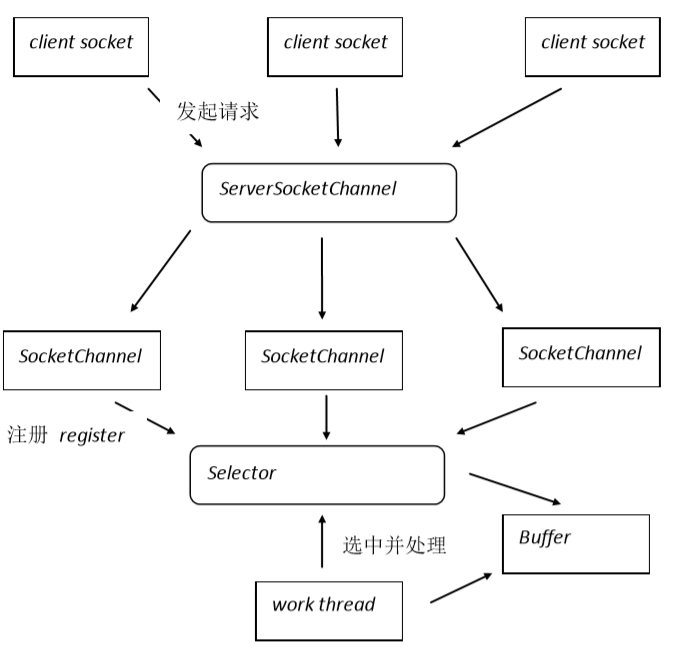
同步非阻塞,服务器实现模式为一个请求一个通道,即客户端发送的连接请求都会注册 到多路复用器上,多路复用器轮询到连接有 I/O 请求时才启动一个线程进行处理。 NIO 方式适用于连接数目多且连接比较短(轻操作)的架构,比如聊天服务器,并发局 限于应用中,编程复杂,JDK1.4 开始支持。
Buffer:ByteBuffer,CharBuffer,ShortBuffer,IntBuffer,LongBuffer,FloatBuffer,DoubleBuffer
Channel:SocketChannel,ServerSocketChannel 。
Selector:Selector,AbstractSelector SelectionKey:OP_READ,OP_WRITE,OP_CONNECT,OP_ACCEPT
1import java.io.IOException;
2import java.net.InetSocketAddress;
3import java.nio.ByteBuffer;
4import java.nio.channels.SocketChannel;
5import java.util.Scanner;
6
7public class NIOClient {
8	public static void main(String[] args) {
9		// 远程地址创建
10		InetSocketAddress remote =new InetSocketAddress("localhost",  9999);
11		SocketChannel channel = null;
12
13		// 定义缓存
14		ByteBuffer buffer =ByteBuffer.allocate(1024);
15
16		try {
17			// 开启通道
18			channel=SocketChannel.open();
19			// 连接远程服务器。
20			channel.connect(remote);
21			Scanner reader = new Scanner(System.in);
22			while(true){
23				System.out.print("put message for send to server > ");
24				String line = reader.nextLine();
25				if(line.equals("exit")){
26					break;
27				}
28				// 将控制台输入的数据写入到缓存。
29				 buffer.put(line.getBytes("UTF-8"));
30				// 重置缓存游标
31				 buffer.flip();
32				// 将数据发送给服务器
33				channel.write(buffer);
34				// 清空缓存数据。
35				buffer.clear();
36
37				// 读取服务器返回的数据
38				int readLength=channel.read(buffer);
39				if(readLength==-1) break;
40				// 重置缓存游标
41				buffer.flip();
42				byte[] datas=new byte[buffer.remaining()];
43				// 读取数据到字节数组。
44				buffer.get(datas);
45				System.out.println("from server : " + new String(datas, "UTF-8"));
46				// 清空缓存。
47				buffer.clear();
48			}
49		} catch (IOException  e) {
50			e.printStackTrace();
51		}finally{
52			if(null != channel){
53				try {
54					channel.close();
55				} catch (IOException e) {
56					e.printStackTrace();
57				}
58			}
59		}
60	}
61}
62
63import java.io.IOException;
64import java.net.InetSocketAddress;
65import java.nio.ByteBuffer;
66import java.nio.channels.CancelledKeyException;
67import java.nio.channels.SelectionKey;
68import java.nio.channels.Selector;
69import java.nio.channels.ServerSocketChannel;
70import java.nio.channels.SocketChannel;
71import java.util.Iterator;
72import java.util.Scanner;
73
74public class NioService implements Runnable {
75
76	// 多路复用器, 选择器。 用于注册通道的。
77	private Selector selector;
78	// 定义了两个缓存。分别用于读和写。 初始化空间大小单位为字节。
79	private ByteBuffer readBuffer = ByteBuffer.allocate(1024);
80	private ByteBuffer writeBuffer = ByteBuffer.allocate(1024);
81
82	public static void main(String[] args) {
83        new Thread(new NioService(9999)).start();
84	}
85
86	public NioService(int port){
87		init(port);
88	}
89
90	private void init(int port){
91		try {
92			System.out.println("server starting at port " + port + " ...");
93			// 开启多路复用器
94			this.selector=Selector.open();
95			// 开启服务通道
96			ServerSocketChannel serverChannel =ServerSocketChannel.open();
97			// 非阻塞, 如果传递参数true,为阻塞模式。
98			serverChannel.configureBlocking(false);
99			// 绑定端口
100			serverChannel.bind(new InetSocketAddress(port));
101
102			// 注册,并标记当前服务通道状态
103
104			/*
105			 * register(Selector, int)
106			 * int - 状态编码
107			 *  OP_ACCEPT : 连接成功的标记位。
108			 *  OP_READ : 可以读取数据的标记
109			 *  OP_WRITE : 可以写入数据的标记
110			 *  OP_CONNECT : 连接建立后的标记
111			 */
112			serverChannel.register(this.selector, SelectionKey.OP_ACCEPT);
113			System.out.println("server started.");
114		} catch (IOException e) {
115			e.printStackTrace();
116		}
117	}
118
119	public void run(){
120		while(true){
121			try {
122				// 阻塞方法,当至少一个通道被选中,此方法返回。
123				// 通道是否选择,由注册到多路复用器中的通道标记决定。
124				this.selector.select();
125				// 返回以选中的通道标记集合, 集合中保存的是通道的标记。相当于是通道的ID。
126				Iterator<SelectionKey> keys = this.selector.selectedKeys().iterator();
127				while(keys.hasNext()){
128					SelectionKey key = keys.next();
129					// 将本次要处理的通道从集合中删除,下次循环根据新的通道列表再次执行必要的业务逻辑
130					keys.remove();
131					// 通道是否有效
132					if(key.isValid()){
133						// 阻塞状态
134						try{
135							if(key.isAcceptable()){
136								accept(key);
137							}
138						}catch(CancelledKeyException cke){
139							// 断开连接。 出现异常。
140							key.cancel();
141						}
142						// 可读状态
143						try{
144							if(key.isReadable()){
145								read(key);
146							}
147						}catch(CancelledKeyException cke){
148							key.cancel();
149						}
150						// 可写状态
151						try{
152							if(key.isWritable()){
153								write(key);
154							}
155						}catch(CancelledKeyException cke){
156							key.cancel();
157						}
158					}
159				}
160			} catch (IOException e) {
161				e.printStackTrace();
162			}
163
164		}
165	}
166
167	private void write(SelectionKey key){
168		this.writeBuffer.clear();
169		SocketChannel  channel =(SocketChannel) key.channel();
170		Scanner reader=new Scanner(System.in);
171		try {
172			System.out.print("put message for send to client > ");
173			String line=reader.nextLine();
174			// 将控制台输入的字符串写入Buffer中。 写入的数据是一个字节数组。
175			writeBuffer.put(line.getBytes("UTF-8"));
176			writeBuffer.flip();
177			channel.write(writeBuffer);
178
179			channel.register(this.selector, SelectionKey.OP_READ);
180		} catch (Exception e) {
181			// TODO: handle exception
182		}
183	}
184
185    private void read(SelectionKey key){
186    	try {
187    		// 清空读缓存。
188    		this.readBuffer.clear();
189    		//获取通道
190    		SocketChannel  channel =(SocketChannel)key.channel();
191    		// 将通道中的数据读取到缓存中。通道中的数据,就是客户端发送给服务器的数据。
192    		int readLength =channel.read(readBuffer);
193    		// 检查客户端是否写入数据。
194    		if(readLength==-1){
195    			// 关闭通道
196    			key.channel().close();
197    			// 关闭连接
198    			key.cancel();
199    			return;
200    		}
201    		/*
202			 * flip, NIO中最复杂的操作就是Buffer的控制。
203			 * Buffer中有一个游标。游标信息在操作后不会归零,如果直接访问Buffer的话,数据有不一致的可能。
204			 * flip是重置游标的方法。NIO编程中,flip方法是常用方法。
205			 */
206    		this.readBuffer.flip();
207    		// 字节数组,保存具体数据的。 Buffer.remaining() -> 是获取Buffer中有效数据长度的方法。
208    		byte[] datas=new byte[readBuffer.remaining()];
209    		// 是将Buffer中的有效数据保存到字节数组中。
210    		readBuffer.get(datas);
211    		System.out.println("from " + channel.getRemoteAddress() + " client : " + new String(datas, "UTF-8"));
212
213    		// 注册通道, 标记为写操作。
214    		channel.register(this.selector, SelectionKey.OP_WRITE);
215		} catch (IOException  e) {
216			e.printStackTrace();
217			try {
218				key.channel().close();
219				key.cancel();
220			} catch (IOException e1) {
221				e1.printStackTrace();
222			}
223		}
224    }
225
226    private void accept(SelectionKey key){
227    	try {
228    		// 此通道为init方法中注册到Selector上的ServerSocketChannel
229    		ServerSocketChannel serverChannel =(ServerSocketChannel)key.channel();
230    		// 阻塞方法,当客户端发起请求后返回。 此通道和客户端一一对应。
231    		SocketChannel channel = serverChannel.accept();
232    		channel.configureBlocking(false);
233    		// 设置对应客户端的通道标记状态,此通道为读取数据使用的。
234    		channel.register(this.selector, SelectionKey.OP_READ);
235		} catch (IOException  e) {
236			e.printStackTrace();
237		}
238    }
239
240}
241
242/**
243 *
244 * Buffer的应用固定逻辑
245 * 写操作顺序
246 * 1. clear()
247 * 2. put() -> 写操作
248 * 3. flip() -> 重置游标
249 * 4. SocketChannel.write(buffer); -> 将缓存数据发送到网络的另一端
250 * 5. clear()
251 *
252 * 读操作顺序
253 * 1. clear()
254 * 2. SocketChannel.read(buffer); -> 从网络中读取数据
255 * 3. buffer.flip() -> 重置游标
256 * 4. buffer.get() -> 读取数据
257 * 5. buffer.clear()
258 *
259 */
260public class TestBuffer {
261	public static void main(String[] args) throws Exception {
262
263		ByteBuffer buffer = ByteBuffer.allocate(8);
264
265		byte[] temp = new byte[]{3,2,1};
266
267		// 写入数据之前 : java.nio.HeapByteBuffer[pos=0 lim=8 cap=8]
268		// pos - 游标位置, lim - 限制数量, cap - 最大容量
269		System.out.println("写入数据之前 : " + buffer);
270
271		// 写入字节数组到缓存
272		buffer.put(temp);
273
274		// 写入数据之后 : java.nio.HeapByteBuffer[pos=3 lim=8 cap=8]
275		// 游标为3, 限制为8, 容量为8
276		System.out.println("写入数据之后 : " + buffer);
277
278		// 重置游标 , lim = pos ;  pos = 0;
279		buffer.flip();
280
281		// 重置游标之后 : java.nio.HeapByteBuffer[pos=0 lim=3 cap=8]
282		// 游标为0, 限制为3, cap为8
283		System.out.println("重置游标之后 : " + buffer);
284
285		// 清空Buffer, pos = 0; lim = cap;
286		// buffer.clear();
287
288		// get() -> 获取当前游标指向的位置的数据。
289		// System.out.println(buffer.get());
290
291		/*for(int i = 0; i < buffer.remaining(); i++){
292			// get(int index) -> 获取指定位置的数据。
293			int data = buffer.get(i);
294			System.out.println(i + " - " + data);
295		}*/
296	}
297}