
直奔重点
高楼大厦寻关键线索
Js文件中关于网络请求最典型的就是异步回调,将原本简单的操作复杂化,非要你等我,我等他,他还等着他的她.
最终直接结果就是整个请求流程反过来了,假设正常流程:是 A->B->C-D-E-F,那么异步请求很可能陷入这样的陷阱: F <- E <- D <- C <- B <- A
所以一层又一层的回调函数真的是难以维护,这种技术也在慢慢淘汰更新成更容易维护的方式,还是不再展开了,回到正题上来,还是先找到程序到底什么时候开始调用的吧!
1ja.prototype = {
2  initEc: function(a) {
3      var b = ""
4        , c = this
5        , d = void 0 != a && void 0 != a.localAddr ? a.localAddr : "";
6      c.checkWapOrWeb();
7      this.ec.get("RAIL_OkLJUJ", function(a) {
8          b = a;
9          c.getDfpMoreInfo(function() {
10              if (!(9E5 < F("RAIL_EXPIRATION") - (new Date).getTime() & null != F("RAIL_DEVICEID") & void 0 != F("RAIL_DEVICEID") & !c.NeedUpdate())) {
11                  for (var a = "", e = "", g = c.getpackStr(b), m = [], q = [], t = [], k = [], n = 0; n < g.length; n++)
12                      "new" != g[n].value && -1 == Fb.indexOf(g[n].key) && (-1 != Gb.indexOf(g[n].key) ? q.push(g[n]) : -1 != Ib.indexOf(g[n].key) ? t.push(g[n]) : -1 != Hb.indexOf(g[n].key) ? k.push(g[n]) : m.push(g[n]));
13                  g = "";
14                  for (n = 0; n < q.length; n++)
15                      g = g + q[n].key.charAt(0) + q[n].value;
16                  q = "";
17                  for (n = 0; n < k.length; n++)
18                      q = 0 == n ? q + k[n].value : q + "x" + k[n].value;
19                  k = "";
20                  for (n = 0; n < t.length; n++)
21                      k = 0 == n ? k + t[n].value : k + "x" + t[n].value;
22                  m.push(new l("storeDb",g));
23                  m.push(new l("srcScreenSize",q));
24                  m.push(new l("scrAvailSize",k));
25                  "" != d && m.push(new l("localCode",pb(d)));
26                  e = c.hashAlg(m, a, e);
27                  a = e.key;
28                  e = e.value;
29                  a += "\x26timestamp\x3d" + (new Date).getTime();
30                  $a.getJSON("https://kyfw.12306.cn/otn/HttpZF/logdevice" + ("?algID\x3drblubbXDx3\x26hashCode\x3d" + e + a), null, function(a) {
31                      var b = JSON.parse(a);
32                      void 0 != lb && lb.postMessage(a, r.parent);
33                      for (var d in b)
34                          "dfp" == d ? F("RAIL_DEVICEID") != b[d] && (W("RAIL_DEVICEID", b[d], 1E3),
35                          c.deviceEc.set("RAIL_DEVICEID", b[d])) : "exp" == d ? W("RAIL_EXPIRATION", b[d], 1E3) : "cookieCode" == d && (c.ec.set("RAIL_OkLJUJ", b[d]),
36                          W("RAIL_OkLJUJ", "", 0))
37                  })
38              }
39          })
40      }, 1)
41  }
42}
核心代码最外层函数是 initEc 函数,而该函数的写法明显是传统 js 的属性方法,因此判断挂载于该对象的属性方法应该都是完成某些相同的功能.
暂时先不着急继续寻找谁在调用 initEc 函数,先搞懂整个函数结构是什么轮廓.
1function ja() {
2    this.ec = new evercookie;
3    this.deviceEc = new evercookie;
4    this.cfp = new aa;
5    this.packageString = "";
6    this.moreInfoArray = []
7}
8
9ja.prototype = {
10  getScrWidth: function() {
11      return new l("scrWidth",r.screen.width.toString())
12  },
13  ...
14  ,
15   checkWapOrWeb: function() {
16      return "WindowsPhone" == Ha() || "iOS" == Ha() || "Android" == Ha() ? !0 : !1
17  }
18}
如果熟悉 web 开发,那么你一定不难发现这是标准的面向对象的写法,ja 函数作为构造函数内置了一大堆成员变量,并且在原型链上继承了一大堆方法.
更何况,对象属性中还有三个带有 new 关键字的构造函数,估计也是类似于 ja 这种设计思路,高楼大厦平地起,还原相关算法之路预期并不简单!
但是想一想车票真难抢还动不动访问错误,是可忍孰不可忍,还是要研究算法一劳永逸搞定 RAIL_DEVICEID 的生成逻辑,自己用算法计算实现完美伪装浏览器!
现在以 initEc 函数名继续搜素,寻找到底是谁在调用,轻而易举又找到了新的函数名: getFingerPrint
1ja.prototype = {
2  getFingerPrint: function() {
3      var a = this;
4      r.RTCPeerConnection || r.webkitRTCPeerConnection || r.mozRTCPeerConnection ? nb(function(b) {
5          a.initEc(b)
6      }) : a.initEc()
7  }
8}
同样地,不再过多停留,继续以 getFingerPrint 为关键字搜索,找到了 Pa 函数,终于不再是 ja 的方法了.
1function Pa() {
2    if (-1 == F("RAIL_EXPIRATION"))
3        for (var a = 0; 10 > a; a++)
4            G(function() {
5                (new ja).getFingerPrint()
6            }, 20 + 2E3 * Math.pow(a, 2));
7    else
8        (new ja).getFingerPrint();
9    G(function() {
10        r.setInterval(function() {
11            (new ja).getFingerPrint()
12        }, 3E5)
13    }, 3E5)
14}
与此同时,Pa 函数也是 js 文件的第一行代码,来都来了,那就顺便看一眼 js 的整体结构代码吧!
1(function() {
2
3})();
自执行的匿名函数实现的闭包,这样的好处在于函数内的变量不会污染其他文件,更何况混淆之后的变量名称充斥着大量的变量 a,b,c,d,e,f之类的,不用闭包也不行啊!
现在继续以 Pa 为线索搜索,最终发现了函数入口,除此之外再无其他.
1var mb = !1;
2u.addEventListener ? u.addEventListener("DOMContentLoaded", function b() {
3    u.removeEventListener("DOMContentLoaded", b, !1);
4    Pa()
5}, !1) : u.attachEvent && u.attachEvent("onreadystatechange", function c() {
6    mb || "interactive" != u.readyState && "complete" != u.readyState || (u.detachEvent("onreadystatechange", c),
7    Pa(),
8    mb = !0)
9})
js 是典型的事件驱动型编程语言,当发生什么什么事件后我要干这个,页面加载时我要开始工作了,按钮被点击了我要登录了,页面关闭时我要下班了等等诸如此类的逻辑.
上述代码实现的就是页面元素加载成功后开始执行 Pa() 函数,而 Pa 函数又会执行 (new ja).getFingerPrint() ,紧接着又会执行 initEc 函数.
现在基本流程已经大致清楚了,总结一下基本代码逻辑如下:
1(function() {
2   var mb = !1;
3  u.addEventListener ? u.addEventListener("DOMContentLoaded", function b() {
4      u.removeEventListener("DOMContentLoaded", b, !1);
5      Pa()
6  }, !1) : u.attachEvent && u.attachEvent("onreadystatechange", function c() {
7      mb || "interactive" != u.readyState && "complete" != u.readyState || (u.detachEvent("onreadystatechange", c),
8      Pa(),
9      mb = !0)
10  })
11
12  function Pa() {
13    if (-1 == F("RAIL_EXPIRATION"))
14        for (var a = 0; 10 > a; a++)
15            G(function() {
16                (new ja).getFingerPrint()
17            }, 20 + 2E3 * Math.pow(a, 2));
18    else
19        (new ja).getFingerPrint();
20    G(function() {
21        r.setInterval(function() {
22            (new ja).getFingerPrint()
23        }, 3E5)
24    }, 3E5)
25  }
26
27  function ja() {
28    this.ec = new evercookie;
29    this.deviceEc = new evercookie;
30    this.cfp = new aa;
31    this.packageString = "";
32    this.moreInfoArray = []
33  }
34
35  ja.prototype = {
36    getFingerPrint: function() {
37        var a = this;
38        r.RTCPeerConnection || r.webkitRTCPeerConnection || r.mozRTCPeerConnection ? nb(function(b) {
39            a.initEc(b)
40        }) : a.initEc()
41    },
42    initEc: function(a) {
43      var b = ""
44        , c = this
45        , d = void 0 != a && void 0 != a.localAddr ? a.localAddr : "";
46      c.checkWapOrWeb();
47      this.ec.get("RAIL_OkLJUJ", function(a) {
48          b = a;
49          c.getDfpMoreInfo(function() {
50              if (!(9E5 < F("RAIL_EXPIRATION") - (new Date).getTime() & null != F("RAIL_DEVICEID") & void 0 != F("RAIL_DEVICEID") & !c.NeedUpdate())) {
51                  for (var a = "", e = "", g = c.getpackStr(b), m = [], q = [], t = [], k = [], n = 0; n < g.length; n++)
52                      "new" != g[n].value && -1 == Fb.indexOf(g[n].key) && (-1 != Gb.indexOf(g[n].key) ? q.push(g[n]) : -1 != Ib.indexOf(g[n].key) ? t.push(g[n]) : -1 != Hb.indexOf(g[n].key) ? k.push(g[n]) : m.push(g[n]));
53                  g = "";
54                  for (n = 0; n < q.length; n++)
55                      g = g + q[n].key.charAt(0) + q[n].value;
56                  q = "";
57                  for (n = 0; n < k.length; n++)
58                      q = 0 == n ? q + k[n].value : q + "x" + k[n].value;
59                  k = "";
60                  for (n = 0; n < t.length; n++)
61                      k = 0 == n ? k + t[n].value : k + "x" + t[n].value;
62                  m.push(new l("storeDb",g));
63                  m.push(new l("srcScreenSize",q));
64                  m.push(new l("scrAvailSize",k));
65                  "" != d && m.push(new l("localCode",pb(d)));
66                  e = c.hashAlg(m, a, e);
67                  a = e.key;
68                  e = e.value;
69                  a += "\x26timestamp\x3d" + (new Date).getTime();
70                  $a.getJSON("https://kyfw.12306.cn/otn/HttpZF/logdevice" + ("?algID\x3drblubbXDx3\x26hashCode\x3d" + e + a), null, function(a) {
71                      var b = JSON.parse(a);
72                      void 0 != lb && lb.postMessage(a, r.parent);
73                      for (var d in b)
74                          "dfp" == d ? F("RAIL_DEVICEID") != b[d] && (W("RAIL_DEVICEID", b[d], 1E3),
75                          c.deviceEc.set("RAIL_DEVICEID", b[d])) : "exp" == d ? W("RAIL_EXPIRATION", b[d], 1E3) : "cookieCode" == d && (c.ec.set("RAIL_OkLJUJ", b[d]),
76                          W("RAIL_OkLJUJ", "", 0))
77                  })
78              }
79          })
80      }, 1)
81    }
82  }
83})();
从以上代码分析中,相信你会发现相关逻辑应该兼容 IE 浏览器,同时设置了定时程序反复更新 cookie 值,并且还有远程 RTC 保持通信,不得不说做得还真不错,不愧是国民出行的代步工具啊!
精力有限,这里选择最简单的一种情况进行算法还原过程的研究,浏览器选择谷歌 Chrome 浏览器,这样就可以屏蔽关于 IE 的兼容性补丁处理,同时也不考虑 RTCPeerConnection 的情况,于是乎,代码逻辑简化成这样:
1(function() {
2  document.addEventListener("DOMContentLoaded", Pa,false)
3
4  function Pa() {
5    (new ja).getFingerPrint();
6  }
7
8  function ja() {
9    this.ec = new evercookie;
10    this.deviceEc = new evercookie;
11    this.cfp = new aa;
12    this.packageString = "";
13    this.moreInfoArray = []
14  }
15
16  ja.prototype = {
17    getFingerPrint: function() {
18        this.initEc()
19    },
20    initEc: function(a) {
21      var b = ""
22        , c = this
23        , d = void 0 != a && void 0 != a.localAddr ? a.localAddr : "";
24      c.checkWapOrWeb();
25      this.ec.get("RAIL_OkLJUJ", function(a) {
26          b = a;
27          c.getDfpMoreInfo(function() {
28              if (!(9E5 < F("RAIL_EXPIRATION") - (new Date).getTime() & null != F("RAIL_DEVICEID") & void 0 != F("RAIL_DEVICEID") & !c.NeedUpdate())) {
29                  for (var a = "", e = "", g = c.getpackStr(b), m = [], q = [], t = [], k = [], n = 0; n < g.length; n++)
30                      "new" != g[n].value && -1 == Fb.indexOf(g[n].key) && (-1 != Gb.indexOf(g[n].key) ? q.push(g[n]) : -1 != Ib.indexOf(g[n].key) ? t.push(g[n]) : -1 != Hb.indexOf(g[n].key) ? k.push(g[n]) : m.push(g[n]));
31                  g = "";
32                  for (n = 0; n < q.length; n++)
33                      g = g + q[n].key.charAt(0) + q[n].value;
34                  q = "";
35                  for (n = 0; n < k.length; n++)
36                      q = 0 == n ? q + k[n].value : q + "x" + k[n].value;
37                  k = "";
38                  for (n = 0; n < t.length; n++)
39                      k = 0 == n ? k + t[n].value : k + "x" + t[n].value;
40                  m.push(new l("storeDb",g));
41                  m.push(new l("srcScreenSize",q));
42                  m.push(new l("scrAvailSize",k));
43                  "" != d && m.push(new l("localCode",pb(d)));
44                  e = c.hashAlg(m, a, e);
45                  a = e.key;
46                  e = e.value;
47                  a += "\x26timestamp\x3d" + (new Date).getTime();
48                  $a.getJSON("https://kyfw.12306.cn/otn/HttpZF/logdevice" + ("?algID\x3drblubbXDx3\x26hashCode\x3d" + e + a), null, function(a) {
49                      var b = JSON.parse(a);
50                      void 0 != lb && lb.postMessage(a, r.parent);
51                      for (var d in b)
52                          "dfp" == d ? F("RAIL_DEVICEID") != b[d] && (W("RAIL_DEVICEID", b[d], 1E3),
53                          c.deviceEc.set("RAIL_DEVICEID", b[d])) : "exp" == d ? W("RAIL_EXPIRATION", b[d], 1E3) : "cookieCode" == d && (c.ec.set("RAIL_OkLJUJ", b[d]),
54                          W("RAIL_OkLJUJ", "", 0))
55                  })
56              }
57          })
58      }, 1)
59    }
60  }
61})();
所以现在问题的核心在于搞清楚 initEc 函数的数据流向,还原算法实现过程不是梦!
断点调试追踪调用栈
静态分析程序结构后开始断电调试观察一下数据流向,做到心中有数,同时为了该过程具有可重复性需要保持每一次操作环境一致.
具体而言,首先 Chrome 浏览器处于无痕模式,接着是每次试验时清空站点缓存,最后就可以愉快刷新当前网页等待进入下一轮断电调试了.
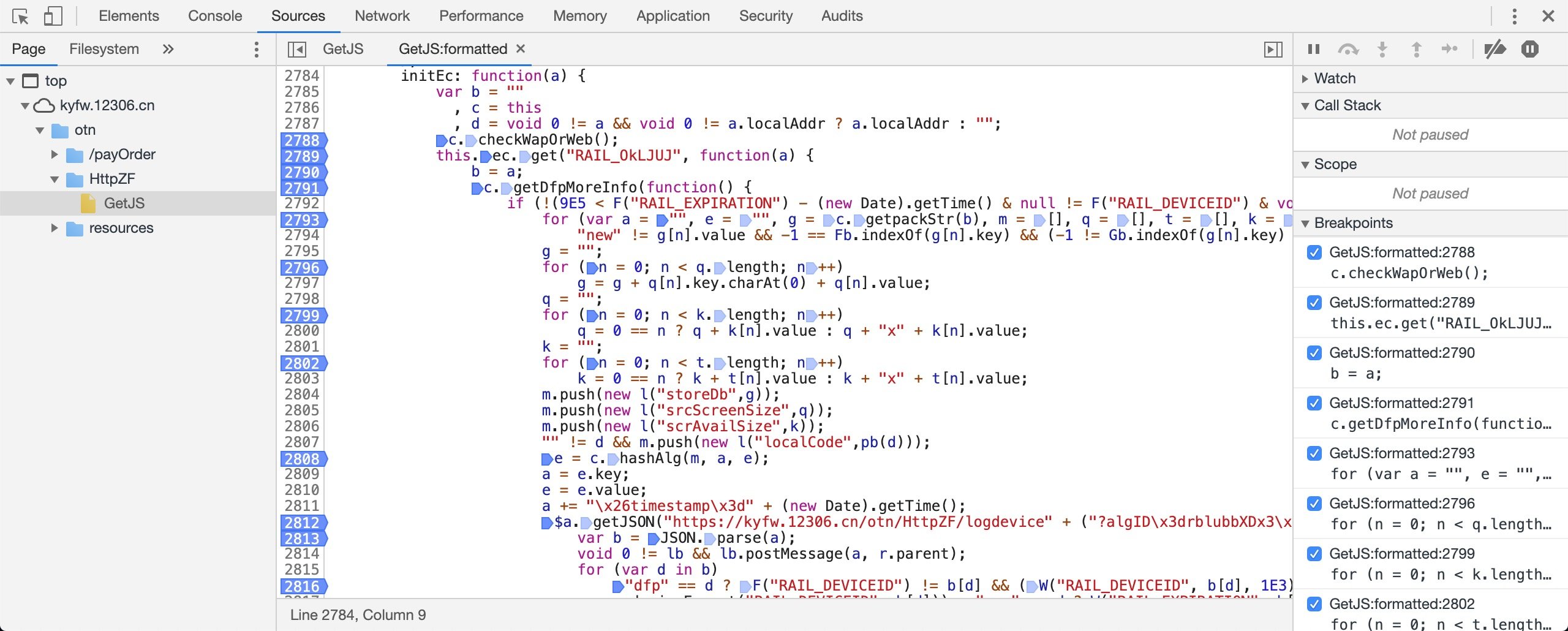
提前在关键点打入断点(鼠标左键点击行号),然后等待程序进入调试模式,稍等一会后进入断点可以一步一步看到程序运行的值,在调试区还可以监控变量的值.
当然也可以有函数调用栈的关系,这一切只是辅助手段,最关键还是要靠自己分析弄清楚函数的调用顺序流程,原则上先大后小,先整体再细节.
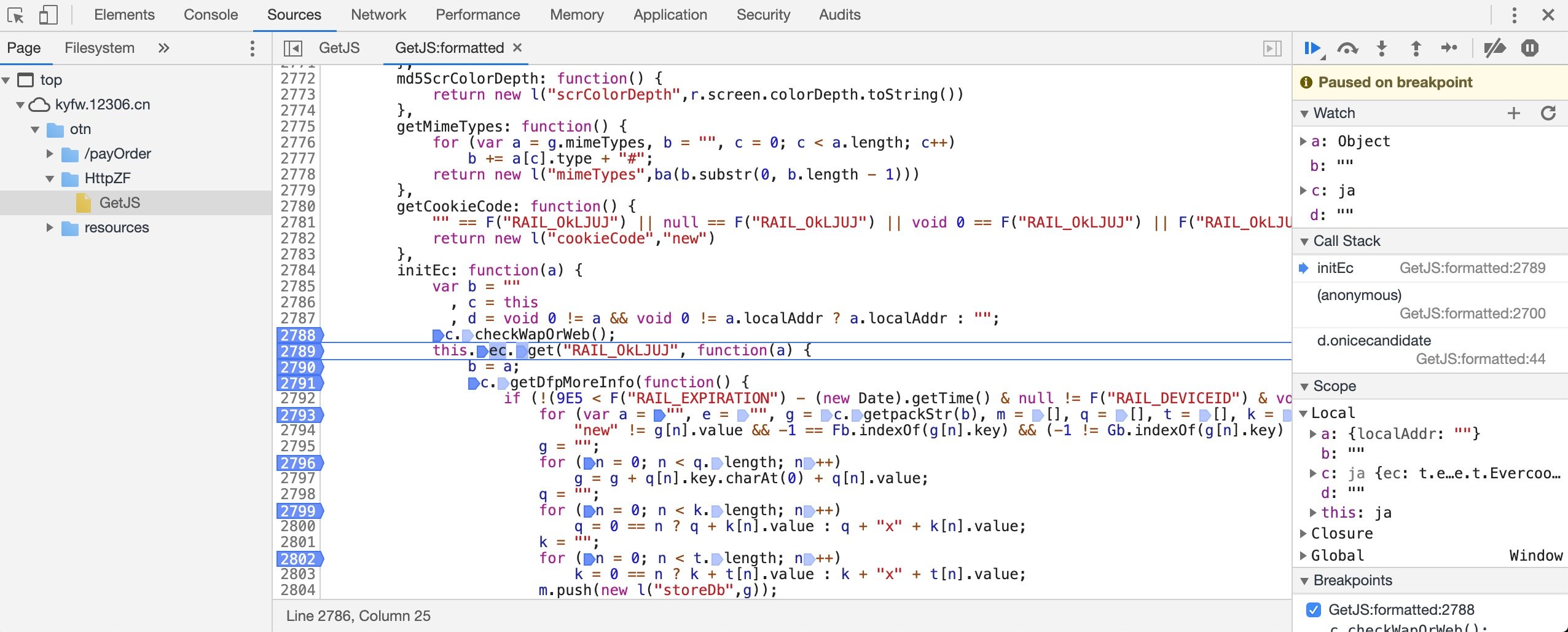
函数最后会发送 ajax 请求获取 cookie 并写入本地以及 cookie 中,亲测数据如下:
{"exp":"1582097104310","cookieCode":"FGH8SO9zGaWtwuld2jrurRzwmZKeXABx","dfp":"EKLLyLS1K7tqtcuZ6LEPYoUKsxmVNyrAlWNLDi3P-gA-tJMLkTxMuhsRNHEhbk7ntCFCsIpymD57I4AyfPUoWB4D_a_Fe5usS8sfJxP_OJjoun5QjAfgDBBmDLh_m2OeRVN2NnRK0-paM6dCSVKdjFGILKUOJYWT"}
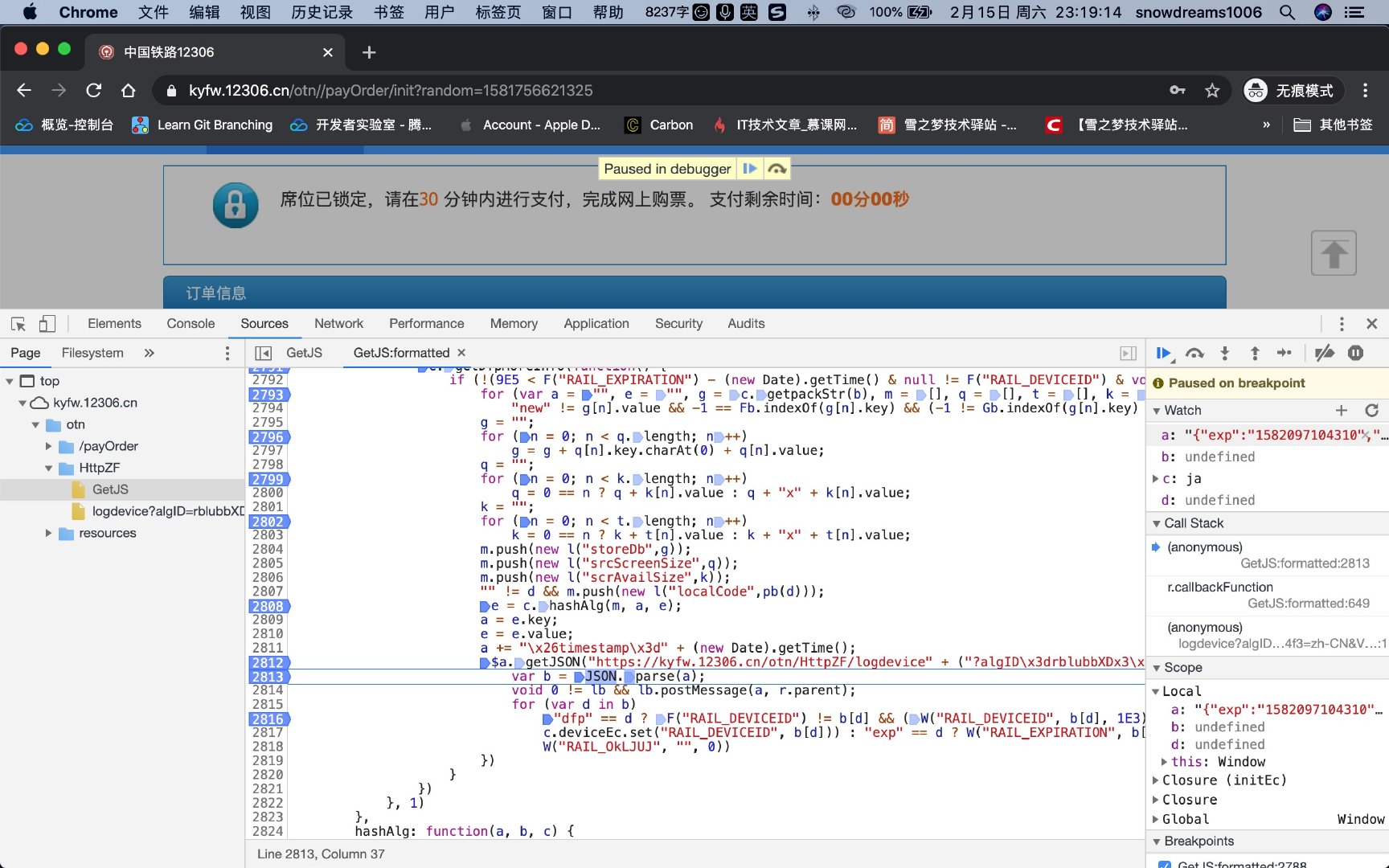
一次请求完成后顺利生成了 cookie 也写入了本地缓存中,如果不清空那么进入下一次断点的流程就和这一次不一样了,所以为了可重复操作,再次断点调试时需要还原操作环境.
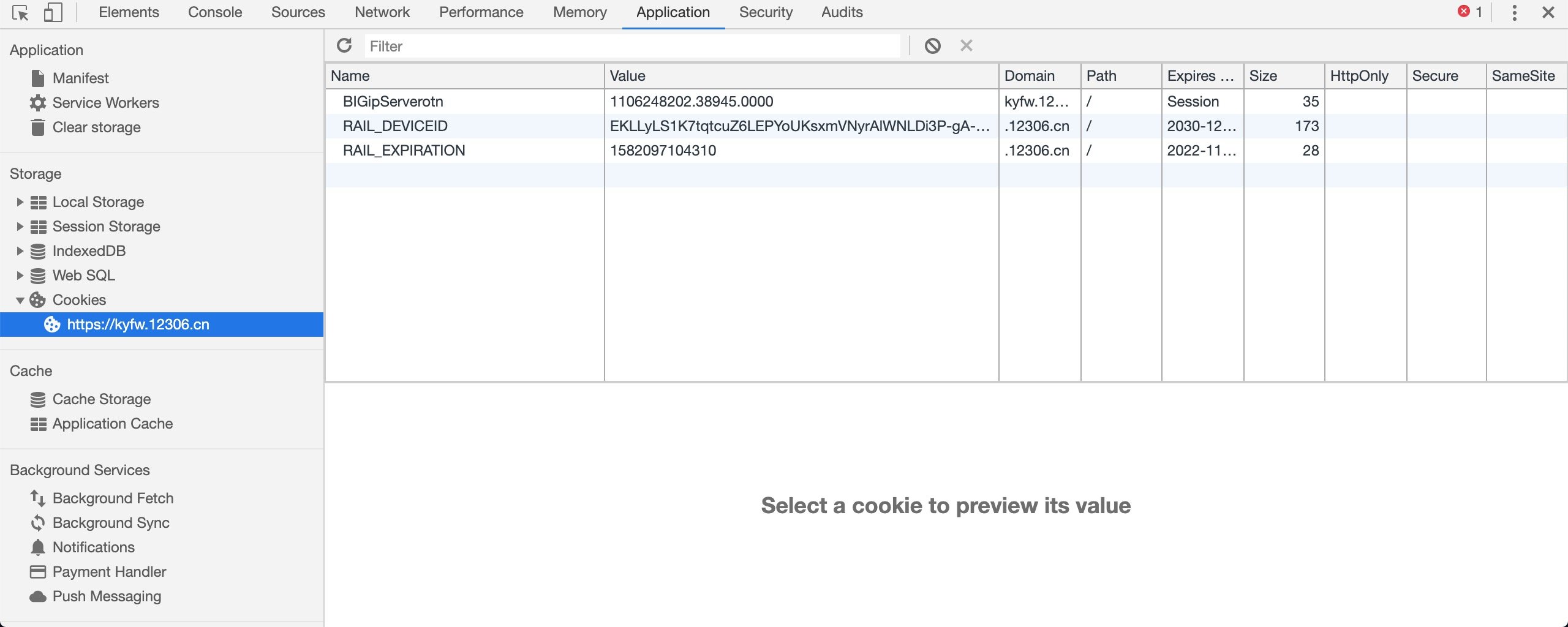
首次加载时变量 a 并没有值,一不小心进入下一个过程时,这一次 a 已经有值了,多次试验后搞清楚了数据流向也明白了如何还原操作环境,保持实验结果的一致性.
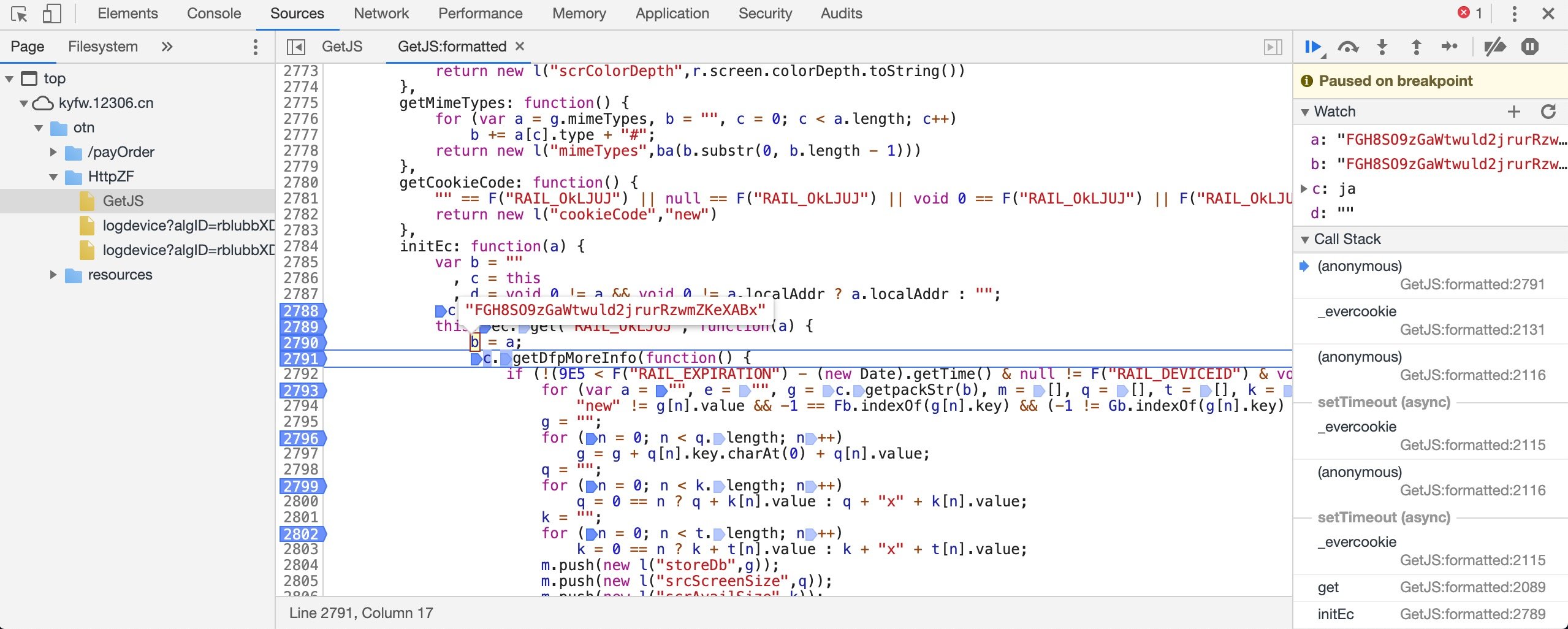
经过多次重复试验,先将基本数据流向还原如下:
1(function() {
2  ja.prototype = {
3    // C:initEc
4    initEc: function(a) {
5      this.ec.get("RAIL_OkLJUJ", function(a) {
6          c.getDfpMoreInfo(function() {
7
8          })
9      }, 1)
10    },
11    // c.getDfpMoreInfo:A
12    getDfpMoreInfo: function(a) {
13
14    }
15  }
16
17  // this.ec.get("RAIL_OkLJUJ":B
18  window.evercookie = window.Evercookie = function(a) {
19      this.get = function(a, b, c) {
20
21      }
22  }
23})();
异步请求 C <- B <- A 换算成实际情况是 : initEc 函数依赖于 this.ec.get("RAIL_OkLJUJ" 函数,等到 window.evercookie.get 运行完成后会调用 c.getDfpMoreInfo 函数,等到 getDfpMoreInfo 函数运行结束后会调用函数核心关键代码.
除了总的来看是各种异步请求相互回调之外,不少细节中也充斥着大量的回调函数,以 getDfpMoreInfo 函数为例,居然要收集这么多信息才开始做自己的事情!
1  ja.prototype = {
2    getDfpMoreInfo: function(a) {
3        var b = this;
4        this.moreInfoArray = [];
5        b.cfp.get(function(c, d) {
6            b.moreInfoArray.push(b.getCanvansCode(c + ""));
7            for (var e in d) {
8                c = d[e].key;
9                var f = d[e].value + "";
10                switch (c) {
11                case "session_storage":
12                    b.moreInfoArray.push(b.getSessionStorage(f));
13                    break;
14                case "local_storage":
15                    b.moreInfoArray.push(b.getLocalStorage(f));
16                    break;
17                case "indexed_db":
18                    b.moreInfoArray.push(b.getIndexedDb(f));
19                    break;
20                case "open_database":
21                    b.moreInfoArray.push(b.getOpenDatabase(f));
22                    break;
23                case "do_not_track":
24                    b.moreInfoArray.push(b.getDoNotTrack(f));
25                    break;
26                case "ie_plugins":
27                    b.moreInfoArray.push(b.getPlugins(f));
28                    break;
29                case "regular_plugins":
30                    b.moreInfoArray.push(b.getPlugins());
31                    break;
32                case "adblock":
33                    b.moreInfoArray.push(b.getAdblock(f));
34                    break;
35                case "has_lied_languages":
36                    b.moreInfoArray.push(b.getHasLiedLanguages(f));
37                    break;
38                case "has_lied_resolution":
39                    b.moreInfoArray.push(b.getHasLiedResolution(f));
40                    break;
41                case "has_lied_os":
42                    b.moreInfoArray.push(b.getHasLiedOs(f));
43                    break;
44                case "has_lied_browser":
45                    b.moreInfoArray.push(b.getHasLiedBrowser(f));
46                    break;
47                case "touch_support":
48                    b.moreInfoArray.push(b.getTouchSupport(f));
49                    break;
50                case "js_fonts":
51                    b.moreInfoArray.push(b.getJsFonts(f))
52                }
53            }
54            "function" == typeof a && a()
55        })
56      }
57  }
58
59  function aa(a) {
60      if (!(this instanceof aa))
61          return new aa(a);
62      this.options = this.extend(a, {
63          detectScreenOrientation: !0,
64          swfPath: "flash/compiled/FontList.swf",
65          sortPluginsFor: [/palemoon/i],
66          swfContainerId: "fingerprintjs2",
67          userDefinedFonts: []
68      });
69      this.nativeForEach = Array.prototype.forEach;
70      this.nativeMap = Array.prototype.map
71  }
72
73  aa.prototype = {
74    get: function(a) {
75        var b = []
76          , b = this.userAgentKey(b)
77          , b = this.languageKey(b)
78          , b = this.colorDepthKey(b)
79          , b = this.pixelRatioKey(b)
80          , b = this.screenResolutionKey(b)
81          , b = this.availableScreenResolutionKey(b)
82          , b = this.timezoneOffsetKey(b)
83          , b = this.sessionStorageKey(b)
84          , b = this.localStorageKey(b)
85          , b = this.indexedDbKey(b)
86          , b = this.addBehaviorKey(b)
87          , b = this.openDatabaseKey(b)
88          , b = this.cpuClassKey(b)
89          , b = this.platformKey(b)
90          , b = this.doNotTrackKey(b)
91          , b = this.pluginsKey(b)
92          , b = this.canvasKey(b)
93          , b = this.webglKey(b)
94          , b = this.adBlockKey(b)
95          , b = this.hasLiedLanguagesKey(b)
96          , b = this.hasLiedResolutionKey(b)
97          , b = this.hasLiedOsKey(b)
98          , b = this.hasLiedBrowserKey(b)
99          , b = this.touchSupportKey(b)
100          , c = this;
101        this.fontsKey(b, function(b) {
102            var d = [];
103            c.each(b, function(a) {
104                var b = a.value;
105                "undefined" !== typeof a.value.join && (b = a.value.join(";"));
106                d.push(b)
107            });
108            var f = c.x64hash128(d.join("~~~"), 31);
109            return a(f, b)
110        })
111    }
112  }
getDfpMoreInfo 函数的执行过程中首先会运行 b.cfp.get 函数,通过搜索追根溯源发现是 aa.prototype.get 函数,这个函数除了获取浏览器简单信息外还涉及到字体的加密处理: var f = c.x64hash128(d.join("~~~"), 31);
然而想要继续分析 getDfpMoreInfo 函数需要先弄清楚 b.cfp.get(function(c, d) { 和 getDfpMoreInfo: function(a) { 中的回调函数参数到底是什么,因此必须从头到尾逐一分析,这也是异步请求的陷阱.
看似请求逻辑一气呵成,真的要维护时却困难重重,想要分析 C 必须先分析 B,没想到 B 又要依赖于 A.
所以下一步的操作就是先从突破口 initEc 函数顺藤摸瓜,找到最初的函数 A 再根据断点调试看看是如何回调一步步回到 initEc 函数的,也就是将异步请求改造成同步请求的过程.
一步一步慢慢转同步
1(function() {
2  ja.prototype = {
3    // C:initEc
4    initEc: function(a) {
5      this.ec.get("RAIL_OkLJUJ", function(a) {
6          c.getDfpMoreInfo(function() {
7
8          })
9      }, 1)
10    },
11    // c.getDfpMoreInfo:A
12    getDfpMoreInfo: function(a) {
13
14    }
15  }
16
17  // this.ec.get("RAIL_OkLJUJ":B
18  window.evercookie = window.Evercookie = function(a) {
19      this.get = function(a, b, c) {
20
21      }
22  }
23})();
顺着这条路继续分析 getDfpMoreInfo 的调用过程,可以添加更多的调用细节,因此现在完善成如下代码:
其中约定标记为字母表 A,B,C的同步调用顺序,对应异步请求 C <- B <- A,深入分析其中的 A 时,依然采用 C,B,A的标记方式.
为了表现出层次性,第二层的 C,B,A 可以表示为 AC,AB,AA,以此类推.
这样最终技能通过层级调用关系形成调用树状图,最终效果大致如下:
1.
2├── C
3│   ├── CC
4│   ├── CB
5│   └── CA
6├── B
7│   ├── BC
8│   ├── BB
9│   └── BA
10└── A
11    ├── AC
12    ├── AB
13    └── AA
调用栈树状图浏览异步函数调用顺序一目了然,仿照数据结构的栈结构进行设计,后进先出是最外层的 C,然后发现 C 还要依赖B,B 要依赖 A,执行完返回上一层继续执行,这个设计感觉很棒啊,为自己点赞!
1(function() {
2  ja.prototype = {
3    // C
4    initEc: function(a) {
5      this.ec.get("RAIL_OkLJUJ", function(a) {
6          c.getDfpMoreInfo(function() {
7
8          })
9      }, 1)
10    },
11    // A
12    getDfpMoreInfo: function(a) {
13
14    }
15  }
16
17  // AC
18  aa.prototype = {
19    get: function(a) {
20
21    }
22  }
23
24  // B
25  window.evercookie = window.Evercookie = function(a) {
26      this.get = function(a, b, c) {
27
28      }
29  }
30
31})();
然而实际分析过程中发现同级请求不总是三级 ABC的形式,这里可以根据实际情况按照这个思路自行分析研究再结合断点调试验证猜想.
-
step 1 : 获取基本信息并在获取加密字体后回调
aa.prototype = { get: function(a) { var b = [] , b = this.userAgentKey(b) , b = this.languageKey(b) , b = this.colorDepthKey(b) , b = this.pixelRatioKey(b) , b = this.screenResolutionKey(b) , b = this.availableScreenResolutionKey(b) , b = this.timezoneOffsetKey(b) , b = this.sessionStorageKey(b) , b = this.localStorageKey(b) , b = this.indexedDbKey(b) , b = this.addBehaviorKey(b) , b = this.openDatabaseKey(b) , b = this.cpuClassKey(b) , b = this.platformKey(b) , b = this.doNotTrackKey(b) , b = this.pluginsKey(b) , b = this.canvasKey(b) , b = this.webglKey(b) , b = this.adBlockKey(b) , b = this.hasLiedLanguagesKey(b) , b = this.hasLiedResolutionKey(b) , b = this.hasLiedOsKey(b) , b = this.hasLiedBrowserKey(b) , b = this.touchSupportKey(b) , c = this; this.fontsKey(b, function(b) { var d = []; c.each(b, function(a) { var b = a.value; "undefined" !== typeof a.value.join && (b = a.value.join(";")); d.push(b) }); var f = c.x64hash128(d.join("~~~"), 31); return a(f, b) }) } }
> var f = c.x64hash128(d.join("~~~"), 31); 涉及到一系列的加密操作,暂时不用管,最重要的下面这句 return a(f, b) 会执行回调函数继续下一个逻辑.
-
step 2 : 获取浏览器更多信息并在最后回调
ja.prototype = { getDfpMoreInfo: function(a) { var b = this; this.moreInfoArray = []; b.cfp.get(function(c, d) { b.moreInfoArray.push(b.getCanvansCode(c + "")); for (var e in d) { c = d[e].key; var f = d[e].value + ""; switch (c) { case "session_storage": b.moreInfoArray.push(b.getSessionStorage(f)); break; case "local_storage": b.moreInfoArray.push(b.getLocalStorage(f)); break; case "indexed_db": b.moreInfoArray.push(b.getIndexedDb(f)); break; case "open_database": b.moreInfoArray.push(b.getOpenDatabase(f)); break; case "do_not_track": b.moreInfoArray.push(b.getDoNotTrack(f)); break; case "ie_plugins": b.moreInfoArray.push(b.getPlugins(f)); break; case "regular_plugins": b.moreInfoArray.push(b.getPlugins()); break; case "adblock": b.moreInfoArray.push(b.getAdblock(f)); break; case "has_lied_languages": b.moreInfoArray.push(b.getHasLiedLanguages(f)); break; case "has_lied_resolution": b.moreInfoArray.push(b.getHasLiedResolution(f)); break; case "has_lied_os": b.moreInfoArray.push(b.getHasLiedOs(f)); break; case "has_lied_browser": b.moreInfoArray.push(b.getHasLiedBrowser(f)); break; case "touch_support": b.moreInfoArray.push(b.getTouchSupport(f)); break; case "js_fonts": b.moreInfoArray.push(b.getJsFonts(f)) } } "function" == typeof a && a() }) } }
> b.cfp.get(function(c, d) {}) 函数就是上一步的 aa.prototype.get() 函数.
-
step 3 : 打包参数前先获取浏览器机器码
ja.prototype = { getMachineCode: function() { return [this.getUUID(), this.getCookieCode(), this.getUserAgent(), this.getScrHeight(), this.getScrWidth(), this.getScrAvailHeight(), this.getScrAvailWidth(), this.md5ScrColorDepth(), this.getScrDeviceXDPI(), this.getAppCodeName(), this.getAppName(), this.getJavaEnabled(), this.getMimeTypes(), this.getPlatform(), this.getAppMinorVersion(), this.getBrowserLanguage(), this.getCookieEnabled(), this.getCpuClass(), this.getOnLine(), this.getSystemLanguage(), this.getUserLanguage(), this.getTimeZone(), this.getFlashVersion(), this.getHistoryList(), this.getCustId(), this.getSendPlatform()] } }
> 该函数来自于 initEc 函数中 c.getDfpMoreInfo( 回调函数里的 g = c.getpackStr(b),this.getMachineCode() 心机很深,暗藏玄机.
-
step 4 : 打包参数前再组合更多信息并重新排序
ja.prototype = { getpackStr: function(a) { var b = [] , b = [] , b = this.getMachineCode() , b = b.concat(this.moreInfoArray); null != a && void 0 != a && "" != a && 32 == a.length && b.push(new l("cookieCode",a)); b.sort(function(a, b) { var c, d; if ("object" === typeof a && "object" === typeof b && a && b) return c = a.key, d = b.key, c === d ? 0 : typeof c === typeof d ? c < d ? -1 : 1 : typeof c < typeof d ? -1 : 1; throw "error"; }); return b } }
> 该函数同样来自于 initEc 函数中 c.getDfpMoreInfo( 回调函数里的 g = c.getpackStr(b),值得学习研究!
-
step 5 : 重新分类浏览器信息并加密生成请求参数
ja.prototype = { initEc: function(a) { var b = "" , c = this , d = void 0 != a && void 0 != a.localAddr ? a.localAddr : ""; c.checkWapOrWeb(); this.ec.get("RAIL_OkLJUJ", function(a) { b = a; c.getDfpMoreInfo(function() { if (!(9E5 < F("RAIL_EXPIRATION") - (new Date).getTime() & null != F("RAIL_DEVICEID") & void 0 != F("RAIL_DEVICEID") & !c.NeedUpdate())) { for (var a = "", e = "", g = c.getpackStr(b), m = [], q = [], t = [], k = [], n = 0; n < g.length; n++) "new" != g[n].value && -1 == Fb.indexOf(g[n].key) && (-1 != Gb.indexOf(g[n].key) ? q.push(g[n]) : -1 != Ib.indexOf(g[n].key) ? t.push(g[n]) : -1 != Hb.indexOf(g[n].key) ? k.push(g[n]) : m.push(g[n])); g = ""; for (n = 0; n < q.length; n++) g = g + q[n].key.charAt(0) + q[n].value; q = ""; for (n = 0; n < k.length; n++) q = 0 == n ? q + k[n].value : q + "x" + k[n].value; k = ""; for (n = 0; n < t.length; n++) k = 0 == n ? k + t[n].value : k + "x" + t[n].value; m.push(new l("storeDb",g)); m.push(new l("srcScreenSize",q)); m.push(new l("scrAvailSize",k)); "" != d && m.push(new l("localCode",pb(d))); e = c.hashAlg(m, a, e); a = e.key; e = e.value; a += "\x26timestamp\x3d" + (new Date).getTime(); $a.getJSON("https://kyfw.12306.cn/otn/HttpZF/logdevice" + ("?algID\x3drblubbXDx3\x26hashCode\x3d" + e + a), null, function(a) { var b = JSON.parse(a); void 0 != lb && lb.postMessage(a, r.parent); for (var d in b) "dfp" == d ? F("RAIL_DEVICEID") != b[d] && (W("RAIL_DEVICEID", b[d], 1E3), c.deviceEc.set("RAIL_DEVICEID", b[d])) : "exp" == d ? W("RAIL_EXPIRATION", b[d], 1E3) : "cookieCode" == d && (c.ec.set("RAIL_OkLJUJ", b[d]), W("RAIL_OkLJUJ", "", 0)) }) } }) }, 1) } }
> e = c.hashAlg(m, a, e); 加密过程比基本信息的加密更加复杂,但是总体来说难度也不大,主要涉及到字符串反转,分段组装,哈希算法以及 base64 编码等等.
遇到瓶颈则略过细节
通读全文并结合断点调试反复验证猜想后,我们发现为了最终请求https://kyfw.12306.cn/otn/HttpZF/logdevice 时的参数可真的为呕心沥血,费心尽力啊!
总体来说,获取浏览器各种信息并且还涉及兼容 IE 浏览器而处理的各种补丁,对于原始信息较长时采用独特的加密算法进行加密处理,仅此还不够,还存在判断是否伪造浏览器参数的相关逻辑判断,真的是大写的服!
关于获取浏览器的相关信息反而很简单,只要结合如何识别是否说谎的代码一起设置就能绕过这部分逻辑,比如说常见的设置浏览器用户代码如下:
1  aa.prototype = {
2    userAgentKey: function(a) {
3        this.options.excludeUserAgent || a.push({
4            key: "user_agent",
5            value: this.getUserAgent()
6        });
7        return a
8    },
9    getUserAgent: function() {
10        var a = g.userAgent;
11        return a = a.replace(/\&|\+|\?|\%|\#|\/|\=/g, "")
12    }
13  }
14
15  ja.prototype = {
16    getUserAgent: function() {
17        var a = g.userAgent
18          , a = a.replace(/\&|\+/g, "");
19        return new l("userAgent",a.toString())
20    }
21  }
不同对象对同一个用户代理的处理逻辑不同,类似上述例子还有很多,简单到处都是陷阱,不看源码根本就不知道,看完以后你还会吐槽 12306 技术垃圾吗?
接下来的是三个加密算法,一个是最初基本信息加密,一个字体信息加密,还有一个是最终分类信息加密.
1  function ba(a) {
2      for (var b = [], c = (1 << ca) - 1, d = 0; d < a.length * ca; d += ca)
3          b[d >> 5] |= (a.charCodeAt(d / ca) & c) << d % 32;
4      a = a.length * ca;
5      b[a >> 5] |= 128 << a % 32;
6      b[(a + 64 >>> 9 << 4) + 14] = a;
7      a = 1732584193;
8      for (var c = -271733879, d = -1732584194, e = 271733878, f = 0; f < b.length; f += 16) {
9          var h = a
10            , p = c
11            , g = d
12            , m = e;
13          a = D(a, c, d, e, b[f + 0], 7, -680876936);
14          e = D(e, a, c, d, b[f + 1], 12, -389564586);
15          d = D(d, e, a, c, b[f + 2], 17, 606105819);
16          c = D(c, d, e, a, b[f + 3], 22, -1044525330);
17          a = D(a, c, d, e, b[f + 4], 7, -176418897);
18          e = D(e, a, c, d, b[f + 5], 12, 1200080426);
19          d = D(d, e, a, c, b[f + 6], 17, -1473231341);
20          c = D(c, d, e, a, b[f + 7], 22, -45705983);
21          a = D(a, c, d, e, b[f + 8], 7, 1770035416);
22          e = D(e, a, c, d, b[f + 9], 12, -1958414417);
23          d = D(d, e, a, c, b[f + 10], 17, -42063);
24          c = D(c, d, e, a, b[f + 11], 22, -1990404162);
25          a = D(a, c, d, e, b[f + 12], 7, 1804603682);
26          e = D(e, a, c, d, b[f + 13], 12, -40341101);
27          d = D(d, e, a, c, b[f + 14], 17, -1502002290);
28          c = D(c, d, e, a, b[f + 15], 22, 1236535329);
29          a = C(a, c, d, e, b[f + 1], 5, -165796510);
30          e = C(e, a, c, d, b[f + 6], 9, -1069501632);
31          d = C(d, e, a, c, b[f + 11], 14, 643717713);
32          c = C(c, d, e, a, b[f + 0], 20, -373897302);
33          a = C(a, c, d, e, b[f + 5], 5, -701558691);
34          e = C(e, a, c, d, b[f + 10], 9, 38016083);
35          d = C(d, e, a, c, b[f + 15], 14, -660478335);
36          c = C(c, d, e, a, b[f + 4], 20, -405537848);
37          a = C(a, c, d, e, b[f + 9], 5, 568446438);
38          e = C(e, a, c, d, b[f + 14], 9, -1019803690);
39          d = C(d, e, a, c, b[f + 3], 14, -187363961);
40          c = C(c, d, e, a, b[f + 8], 20, 1163531501);
41          a = C(a, c, d, e, b[f + 13], 5, -1444681467);
42          e = C(e, a, c, d, b[f + 2], 9, -51403784);
43          d = C(d, e, a, c, b[f + 7], 14, 1735328473);
44          c = C(c, d, e, a, b[f + 12], 20, -1926607734);
45          a = A(c ^ d ^ e, a, c, b[f + 5], 4, -378558);
46          e = A(a ^ c ^ d, e, a, b[f + 8], 11, -2022574463);
47          d = A(e ^ a ^ c, d, e, b[f + 11], 16, 1839030562);
48          c = A(d ^ e ^ a, c, d, b[f + 14], 23, -35309556);
49          a = A(c ^ d ^ e, a, c, b[f + 1], 4, -1530992060);
50          e = A(a ^ c ^ d, e, a, b[f + 4], 11, 1272893353);
51          d = A(e ^ a ^ c, d, e, b[f + 7], 16, -155497632);
52          c = A(d ^ e ^ a, c, d, b[f + 10], 23, -1094730640);
53          a = A(c ^ d ^ e, a, c, b[f + 13], 4, 681279174);
54          e = A(a ^ c ^ d, e, a, b[f + 0], 11, -358537222);
55          d = A(e ^ a ^ c, d, e, b[f + 3], 16, -722521979);
56          c = A(d ^ e ^ a, c, d, b[f + 6], 23, 76029189);
57          a = A(c ^ d ^ e, a, c, b[f + 9], 4, -640364487);
58          e = A(a ^ c ^ d, e, a, b[f + 12], 11, -421815835);
59          d = A(e ^ a ^ c, d, e, b[f + 15], 16, 530742520);
60          c = A(d ^ e ^ a, c, d, b[f + 2], 23, -995338651);
61          a = E(a, c, d, e, b[f + 0], 6, -198630844);
62          e = E(e, a, c, d, b[f + 7], 10, 1126891415);
63          d = E(d, e, a, c, b[f + 14], 15, -1416354905);
64          c = E(c, d, e, a, b[f + 5], 21, -57434055);
65          a = E(a, c, d, e, b[f + 12], 6, 1700485571);
66          e = E(e, a, c, d, b[f + 3], 10, -1894986606);
67          d = E(d, e, a, c, b[f + 10], 15, -1051523);
68          c = E(c, d, e, a, b[f + 1], 21, -2054922799);
69          a = E(a, c, d, e, b[f + 8], 6, 1873313359);
70          e = E(e, a, c, d, b[f + 15], 10, -30611744);
71          d = E(d, e, a, c, b[f + 6], 15, -1560198380);
72          c = E(c, d, e, a, b[f + 13], 21, 1309151649);
73          a = E(a, c, d, e, b[f + 4], 6, -145523070);
74          e = E(e, a, c, d, b[f + 11], 10, -1120210379);
75          d = E(d, e, a, c, b[f + 2], 15, 718787259);
76          c = E(c, d, e, a, b[f + 9], 21, -343485551);
77          a = N(a, h);
78          c = N(c, p);
79          d = N(d, g);
80          e = N(e, m)
81      }
82      b = [a, c, d, e];
83      a = rb ? "0123456789ABCDEF" : "0123456789abcdef";
84      c = "";
85      for (d = 0; d < 4 * b.length; d++)
86          c += a.charAt(b[d >> 2] >> d % 4 * 8 + 4 & 15) + a.charAt(b[d >> 2] >> d % 4 * 8 & 15);
87      return c
88  }
89
90  aa.prototype = {
91    x64hash128: function(a, b) {
92          a = a || "";
93          b = b || 0;
94          for (var c = a.length % 16, d = a.length - c, e = [0, b], f = [0, b], h, p, g = [2277735313, 289559509], m = [1291169091, 658871167], l = 0; l < d; l += 16)
95              h = [a.charCodeAt(l + 4) & 255 | (a.charCodeAt(l + 5) & 255) << 8 | (a.charCodeAt(l + 6) & 255) << 16 | (a.charCodeAt(l + 7) & 255) << 24, a.charCodeAt(l) & 255 | (a.charCodeAt(l + 1) & 255) << 8 | (a.charCodeAt(l + 2) & 255) << 16 | (a.charCodeAt(l + 3) & 255) << 24],
96              p = [a.charCodeAt(l + 12) & 255 | (a.charCodeAt(l + 13) & 255) << 8 | (a.charCodeAt(l + 14) & 255) << 16 | (a.charCodeAt(l + 15) & 255) << 24, a.charCodeAt(l + 8) & 255 | (a.charCodeAt(l + 9) & 255) << 8 | (a.charCodeAt(l + 10) & 255) << 16 | (a.charCodeAt(l + 11) & 255) << 24],
97              h = this.x64Multiply(h, g),
98              h = this.x64Rotl(h, 31),
99              h = this.x64Multiply(h, m),
100              e = this.x64Xor(e, h),
101              e = this.x64Rotl(e, 27),
102              e = this.x64Add(e, f),
103              e = this.x64Add(this.x64Multiply(e, [0, 5]), [0, 1390208809]),
104              p = this.x64Multiply(p, m),
105              p = this.x64Rotl(p, 33),
106              p = this.x64Multiply(p, g),
107              f = this.x64Xor(f, p),
108              f = this.x64Rotl(f, 31),
109              f = this.x64Add(f, e),
110              f = this.x64Add(this.x64Multiply(f, [0, 5]), [0, 944331445]);
111          h = [0, 0];
112          p = [0, 0];
113          switch (c) {
114          case 15:
115              p = this.x64Xor(p, this.x64LeftShift([0, a.charCodeAt(l + 14)], 48));
116          case 14:
117              p = this.x64Xor(p, this.x64LeftShift([0, a.charCodeAt(l + 13)], 40));
118          case 13:
119              p = this.x64Xor(p, this.x64LeftShift([0, a.charCodeAt(l + 12)], 32));
120          case 12:
121              p = this.x64Xor(p, this.x64LeftShift([0, a.charCodeAt(l + 11)], 24));
122          case 11:
123              p = this.x64Xor(p, this.x64LeftShift([0, a.charCodeAt(l + 10)], 16));
124          case 10:
125              p = this.x64Xor(p, this.x64LeftShift([0, a.charCodeAt(l + 9)], 8));
126          case 9:
127              p = this.x64Xor(p, [0, a.charCodeAt(l + 8)]),
128              p = this.x64Multiply(p, m),
129              p = this.x64Rotl(p, 33),
130              p = this.x64Multiply(p, g),
131              f = this.x64Xor(f, p);
132          case 8:
133              h = this.x64Xor(h, this.x64LeftShift([0, a.charCodeAt(l + 7)], 56));
134          case 7:
135              h = this.x64Xor(h, this.x64LeftShift([0, a.charCodeAt(l + 6)], 48));
136          case 6:
137              h = this.x64Xor(h, this.x64LeftShift([0, a.charCodeAt(l + 5)], 40));
138          case 5:
139              h = this.x64Xor(h, this.x64LeftShift([0, a.charCodeAt(l + 4)], 32));
140          case 4:
141              h = this.x64Xor(h, this.x64LeftShift([0, a.charCodeAt(l + 3)], 24));
142          case 3:
143              h = this.x64Xor(h, this.x64LeftShift([0, a.charCodeAt(l + 2)], 16));
144          case 2:
145              h = this.x64Xor(h, this.x64LeftShift([0, a.charCodeAt(l + 1)], 8));
146          case 1:
147              h = this.x64Xor(h, [0, a.charCodeAt(l)]),
148              h = this.x64Multiply(h, g),
149              h = this.x64Rotl(h, 31),
150              h = this.x64Multiply(h, m),
151              e = this.x64Xor(e, h)
152          }
153          e = this.x64Xor(e, [0, a.length]);
154          f = this.x64Xor(f, [0, a.length]);
155          e = this.x64Add(e, f);
156          f = this.x64Add(f, e);
157          e = this.x64Fmix(e);
158          f = this.x64Fmix(f);
159          e = this.x64Add(e, f);
160          f = this.x64Add(f, e);
161          return ("00000000" + (e[0] >>> 0).toString(16)).slice(-8) + ("00000000" + (e[1] >>> 0).toString(16)).slice(-8) + ("00000000" + (f[0] >>> 0).toString(16)).slice(-8) + ("00000000" + (f[1] >>> 0).toString(16)).slice(-8)
162      }
163  }
164
165  ja.prototype = {
166    hashAlg: function(a, b, c) {
167          a.sort(function(a, b) {
168              var c, d;
169              if ("object" === typeof a && "object" === typeof b && a && b)
170                  return c = a.key,
171                  d = b.key,
172                  c === d ? 0 : typeof c === typeof d ? c < d ? -1 : 1 : typeof c < typeof d ? -1 : 1;
173              throw "error";
174          });
175          for (var d = 0; d < a.length; d++) {
176              var e = a[d].key.replace(RegExp("%", "gm"), "")
177                , f = ""
178                , f = "string" == typeof a[d].value ? a[d].value.replace(RegExp("%", "gm"), "") : a[d].value;
179              "" !== f && (c += e + f,
180              b += "\x26" + (void 0 == hb[e] ? e : hb[e]) + "\x3d" + f)
181          }
182          a = c;
183          c = "";
184          d = a.length;
185          for (e = 0; e < d; e++)
186              f = a.charAt(e).charCodeAt(0),
187              c = 127 === f ? c + String.fromCharCode(0) : c + String.fromCharCode(f + 1);
188          a = c;
189          c = a.length;
190          d = 0 == c % 3 ? parseInt(c / 3) : parseInt(c / 3) + 1;
191          3 > c || (e = a.substring(0, 1 * d),
192          f = a.substring(1 * d, 2 * d),
193          a = a.substring(2 * d, c) + e + f);
194          a = Qa(a);
195          a = Qa(a);
196          c = R.SHA256(a).toString(R.enc.Base64);
197          c = R.SHA256(c).toString(R.enc.Base64);
198          return new l(b,c)
199      }
200  }
这三个算法看起来比较吓人,实际上只要耐心调试是可以慢慢还原的,不过是字母的各种排列组合顺序而已,谁让他没有加密能让我们看到源码呢,仅仅的变量名称替换是难不倒聪明才智的开发者的,更何况这部分和业务逻辑关心不大,暂且略过吧.
算法复现
算法整体采用闭包设计面向对象的编程风格,基于原型链特性实现原始对象的加密逻辑,添加特有方法用于临时修改浏览器相关信息,最后将自定义对象 chromeHelper 直接挂载于 window 属性,方便外部调用.
1/**
2 * chrome 浏览器简化版,主要还原初次加载 RAIL_OkLJUJ 和 RAIL_DEVICEID 的基本流程,如许更新 RAIL_DEVICEID 需要结合 RAIL_OkLJUJ 一起加密,仅仅多增加一个 cookieCode 参数而已,除此之外并无特殊之处,不再赘述.
3 * @author: snowdreams1006
4 * @wechat: snowdreams1006(雪之梦技术驿站)
5 */
6(function(window) {
7
8  /**
9   * 默认空构造函数
10   */
11  function chromeHelper() {
12
13  }
14
15  /**
16   * 设置用户代理,检测方式: navigator.userAgent
17   */
18  chromeHelper.setUserAgent = function(userAgent) {
19    if (!userAgent) {
20      userAgent = "Mozilla5.0 (Macintosh; Intel Mac OS X 10_15_2) AppleWebKit537.36 (KHTML, like Gecko) Chrome80.0.3987.87 Safari537.36";
21    }
22    Object.defineProperty(navigator, "userAgent", {
23      value: userAgent,
24      writable: false
25    });
26  }
27
28  /**
29   * 基于原型链实现面向对象编程的继承特性
30   */
31  chromeHelper.prototype = {
32    /**
33     * 获取初始化浏览器设备信息,来源于initEc中的e = c.hashAlg(k, a, e);
34     */
35    encryptedFingerPrintInfo: function() {
36      // 获取分类后的浏览器指纹信息
37      classifiedBrowserFingerPrintInfoArr = this.getClassifiedBrowserFingerPrintInfo();
38      encryptedFingerPrintInfoMap = this.hashAlg(classifiedBrowserFingerPrintInfoArr, "", "");
39
40      return encryptedFingerPrintInfoMap;
41    }
42  }
43
44  /**
45   * 直接挂载在全局变量 window 对象方便直接调用.
46   */
47  window.chromeHelper = chromeHelper;
48})(window);
step 1 : 获取基本信息
1chromeHelper.prototype = {
2    /**
3     * 获取浏览器基本信息,来源于getDfpMoreInfo中的b.cfp.get和aa的get
4     */
5    getBasicInfoArr: function() {
6      // 基本信息,若数据无效则返回 void 0,即 undefined
7      var basicInfoArr = [];
8
9      // 用户代理
10      basicInfoArr.push(this.getUserAgentKeyAndValue(1));
11      // 语言
12      basicInfoArr.push(this.getLanguageKeyAndValue(1));
13      // 颜色深度
14      basicInfoArr.push(this.getColorDepthKeyAndValue(1));
15      // 像素比例
16      basicInfoArr.push(this.getPixelRatioKeyAndValue(1));
17      // 屏幕分辨率
18      basicInfoArr.push(this.getScreenResolutionKeyAndValue(1));
19      // 可用屏幕分辨率
20      basicInfoArr.push(this.getAvailableScreenResolutionKeyAndValue(1));
21      // 时区偏移量
22      basicInfoArr.push(this.getTimezoneOffsetKeyAndValue(1));
23      // Session存储
24      basicInfoArr.push(this.getSessionStorageKeyAndValue(1));
25      // Local存储
26      basicInfoArr.push(this.getLocalStorageKeyAndValue(1));
27      // IndexedDb存储
28      basicInfoArr.push(this.getIndexedDbKeyAndValue(1));
29      // websql存储
30      basicInfoArr.push(this.getOpenDatabaseKeyAndValue(1));
31      // cpu类型
32      basicInfoArr.push(this.getCpuClassKeyAndValue(1));
33      // 平台类型
34      basicInfoArr.push(this.getPlatformKeyAndValue(1));
35      // 反追踪
36      basicInfoArr.push(this.getDoNotTrackKeyAndValue(1));
37      // 插件
38      basicInfoArr.push(this.getPluginsKeyAndValue(1));
39      // TODO 画布
40      basicInfoArr.push(this.getCanvasKeyAndValue(0));
41      // webgl画布
42      basicInfoArr.push(this.getWebglKeyAndValue(1));
43      // adBlock广告拦截
44      basicInfoArr.push(this.getAdBlockKeyAndValue(1));
45      // 说谎语言
46      basicInfoArr.push(this.getHasLiedLanguagesKeyAndValue(1));
47      // 说谎分辨率
48      basicInfoArr.push(this.getHasLiedResolutionKeyAndValue(1));
49      // 说谎操作系统
50      basicInfoArr.push(this.getHasLiedOsKeyAndValue(1));
51      // 说谎浏览器
52      basicInfoArr.push(this.getHasLiedBrowserKeyAndValue(1));
53      // 触摸支持
54      basicInfoArr.push(this.getTouchSupportKeyAndValue(1));
55      // 字体
56      basicInfoArr.push(this.getFontsKeyAndValue(1));
57
58      return basicInfoArr;
59    }
60}
step 2 : 加密基本信息
1chromeHelper.prototype = {
2    /**
3     * 加密浏览器基本信息,来源于aa的get中var f = c.x64hash128(d.join("~~~"), 31);
4     */
5    encryptedBasicInfoArr: function(basicInfoArr) {
6      // 剔除无效 undefined 数据并处理数组对象
7      concatArr = [];
8      for (i = 0; i < basicInfoArr.length; i++) {
9        var basicInfoValue = basicInfoArr[i].value;
10
11        // 值对应的也有可能是数组,针对这种情况也转成字符串.
12        if ("undefined" !== typeof basicInfoValue) {
13          if (Object.prototype.toString.call(basicInfoValue) === '[object Array]') {
14            basicInfoValue = basicInfoValue.join(";");
15          }
16          concatArr.push(basicInfoValue);
17        }
18      }
19
20      // 加密基本信息
21      return this.x64hash128(concatArr.join("~~~"), 31);
22    }
23}
step 3 : 获取更多信息
1chromeHelper.prototype = {
2    /**
3     * 获取浏览器更多信息,来源于getpackStr中的b = b.concat(this.moreInfoArray);
4     */
5    getDfpMoreInfo: function(basicInfoArr, encryptedStr) {
6      // 更多信息
7      var moreInfoArr = [];
8
9      // 添加画布信息
10      moreInfoArr.push(this.getCanvansCode(encryptedStr + ""));
11
12      // 添加浏览器本地存储累以及语言插件类信息
13      for (var index in basicInfoArr) {
14        var name = basicInfoArr[index].key;
15        var value = basicInfoArr[index].value + "";
16
17        switch (name) {
18          case "session_storage":
19            moreInfoArr.push(this.getSessionStorageCode(value));
20            break;
21          case "local_storage":
22            moreInfoArr.push(this.getLocalStorageCode(value));
23            break;
24          case "indexed_db":
25            moreInfoArr.push(this.getIndexedDbCode(value));
26            break;
27          case "open_database":
28            moreInfoArr.push(this.getOpenDatabaseCode(value));
29            break;
30          case "do_not_track":
31            moreInfoArr.push(this.getDoNotTrackCode(value));
32            break;
33          case "regular_plugins":
34            moreInfoArr.push(this.getPluginsCode());
35            break;
36          case "adblock":
37            moreInfoArr.push(this.getAdblockCode(value));
38            break;
39          case "has_lied_languages":
40            moreInfoArr.push(this.getHasLiedLanguagesCode(value));
41            break;
42          case "has_lied_resolution":
43            moreInfoArr.push(this.getHasLiedResolutionCode(value));
44            break;
45          case "has_lied_os":
46            moreInfoArr.push(this.getHasLiedOsCode(value));
47            break;
48          case "has_lied_browser":
49            moreInfoArr.push(this.getHasLiedBrowserCode(value));
50            break;
51          case "touch_support":
52            moreInfoArr.push(this.getTouchSupportCode(value));
53            break;
54          case "js_fonts":
55            moreInfoArr.push(this.getJsFontsCode(value));
56            break;
57        }
58      }
59
60      return moreInfoArr;
61    }
62}
step 4 : 获取机器信息
1chromeHelper.prototype = {
2    /**
3     * 机器码信息,来源于getpackStr中的this.getMachineCode()
4     */
5    getMachineCode: function() {
6      // 机器码信息,若数据无效则返回 new
7      var machineCodeArr = [];
8
9      // uuid代码
10      machineCodeArr.push(this.getUUIDCode());
11      // cookie代码
12      machineCodeArr.push(this.getCookieCode());
13      // 用户代理代码
14      machineCodeArr.push(this.getUserAgentCode(1));
15      // 源高度代码
16      machineCodeArr.push(this.getScrHeightCode(1));
17      // 源宽度代码
18      machineCodeArr.push(this.getScrWidthCode(1));
19      // 可用高度代码
20      machineCodeArr.push(this.getScrAvailHeightCode(1));
21      // 可用宽度代码
22      machineCodeArr.push(this.getScrAvailWidthCode(1));
23      // 颜色深度代码
24      machineCodeArr.push(this.getMd5ScrColorDepthCode(1));
25      // 源设备XDPI代码
26      machineCodeArr.push(this.getScrDeviceXDPICode());
27      // app代码名称代码
28      machineCodeArr.push(this.getAppCodeNameCode(1));
29      // app名称代码
30      machineCodeArr.push(this.getAppNameCode(1));
31      // Java是否启用代码
32      machineCodeArr.push(this.getJavaEnabledCode(1));
33      // 媒体类型代码
34      machineCodeArr.push(this.getMimeTypesCode(1));
35      // 平台代码
36      machineCodeArr.push(this.getPlatformCode(1));
37      // app次版本代码
38      machineCodeArr.push(this.getAppMinorVersionCode());
39      // 浏览器语言代码
40      machineCodeArr.push(this.getBrowserLanguageCode(1));
41      // Cookie是否启用代码
42      machineCodeArr.push(this.getCookieEnabledCode(1));
43      // Cpu类型代码
44      machineCodeArr.push(this.getCpuClassCode());
45      // 是否在线代码
46      machineCodeArr.push(this.getOnLineCode(1));
47      // 系统语言代码
48      machineCodeArr.push(this.getSystemLanguageCode());
49      // 用户语言代码
50      machineCodeArr.push(this.getUserLanguageCode());
51      // 时区偏移代码
52      machineCodeArr.push(this.getTimeZoneCode(1));
53      // flash版本代码
54      machineCodeArr.push(this.getFlashVersionCode(1));
55      // 历史记录条数代码
56      machineCodeArr.push(this.getHistoryListCode(1));
57      // 自定义ID代码
58      machineCodeArr.push(this.getCustIdCode());
59      // 发送平台代码
60      machineCodeArr.push(this.getSendPlatformCode());
61
62      return machineCodeArr;
63    }
64}
step 5 : 合成指纹信息
1chromeHelper.prototype = {
2    /**
3     * 获取浏览器原始指纹信息,来源于initEc中的l = c.getpackStr(b)
4     */
5    getOriginBrowserFingerPrintInfo: function() {
6      // 浏览器指纹信息
7      var originBrowserFingerPrintArr = [];
8
9      // 基本信息,用于生成更多信息
10      var basicInfoArr = this.getBasicInfoArr();
11      // 基本信息加密摘要
12      var encryptedStr = this.encryptedBasicInfoArr(basicInfoArr);
13      // 更多信息,用于组合机器码信息
14      var moreInfoArr = this.getDfpMoreInfo(basicInfoArr, encryptedStr);
15      // 机器码信息
16      var machineCodeArr = this.getMachineCode(moreInfoArr);
17      // 组合信息并重新排序
18      originBrowserFingerPrintArr = this.concatMachineCodeAndDfpMoreInfo(machineCodeArr, moreInfoArr);
19
20      return originBrowserFingerPrintArr;
21    }
22}
23
24
25chromeHelper.prototype = {
26    /**
27     * 组合机器码和浏览器更多信息构成原始指纹,来源于getpackStr中的getpackStr
28     */
29    concatMachineCodeAndDfpMoreInfo: function(machineCodeArr, moreInfoArr) {
30      // 机器码合并更多信息
31      var tempArr = machineCodeArr.concat(moreInfoArr);
32      // 重新排序
33      tempArr.sort(function(a, b) {
34        var c, d;
35        if ("object" === typeof a && "object" === typeof b && a && b)
36          return c = a.key,
37            d = b.key,
38            c === d ? 0 : typeof c === typeof d ? c < d ? -1 : 1 : typeof c < typeof d ? -1 : 1;
39        throw "error";
40      });
41      return tempArr;
42    }
43}
step 6 : 重新分类指纹
1chromeHelper.prototype = {
2    /**
3     * 获取浏览器指纹信息,来源于initEc中的k.push(new p("scrAvailSize",h));
4     */
5    getClassifiedBrowserFingerPrintInfo: function() {
6      // 浏览器指纹信息
7      var originBrowserFingerPrintArr = this.getOriginBrowserFingerPrintInfo();
8
9      // 分类键名
10      var Gb = "appCodeName appMinorVersion appName cpuClass onLine systemLanguage userLanguage historyList hasLiedLanguages hasLiedResolution hasLiedOs hasLiedBrowser".split(" "),
11        Hb = ["scrAvailWidth", "scrAvailHeight"],
12        Ib = ["scrDeviceXDPI", "scrColorDepth", "scrWidth", "scrHeight"],
13        Jb = ["sessionStorage", "localStorage", "indexedDb", "openDatabase"];
14
15      // 本地存储类,键名对应 Jb
16      var storeDbArr = [];
17      // 屏幕实际尺寸类,键名对应 Ib
18      var srcScreenSizeArr = [];
19      // 屏幕可用尺寸类,键名对应 Hb
20      var scrAvailSizeArr = [];
21      // 其他类也是分类后的浏览器指纹信息
22      var classifiedBrowserFingerPrintArr = []
23
24      // 提取出本地存储类,屏幕实际尺寸类,屏幕可用尺寸类以及其他类
25      for (var i = 0; i < originBrowserFingerPrintArr.length; i++) {
26        var browserFingerPrint = originBrowserFingerPrintArr[i];
27        var name = browserFingerPrint.key;
28        var value = browserFingerPrint.value;
29        "new" != value && -1 == Gb.indexOf(name) && (-1 != Jb.indexOf(name) ? storeDbArr.push(browserFingerPrint) : -1 != Hb.indexOf(name) ? scrAvailSizeArr.push(browserFingerPrint) : -1 != Ib.indexOf(name) ? srcScreenSizeArr.push(browserFingerPrint) : classifiedBrowserFingerPrintArr.push(browserFingerPrint));
30      }
31
32      // 本地存储
33      storeDb = "";
34      for (i = 0; i < storeDbArr.length; i++) {
35        storeDb = storeDb + storeDbArr[i].key.charAt(0) + storeDbArr[i].value;
36      }
37
38      // 屏幕实际尺寸
39      srcScreenSize = "";
40      for (i = 0; i < srcScreenSizeArr.length; i++) {
41        srcScreenSize = 0 == i ? srcScreenSize + srcScreenSizeArr[i].value : srcScreenSize + "x" + srcScreenSizeArr[i].value;
42      }
43
44      // 屏幕可用尺寸
45      scrAvailSize = "";
46      for (i = 0; i < scrAvailSizeArr.length; i++) {
47        scrAvailSize = 0 == i ? scrAvailSize + scrAvailSizeArr[i].value : scrAvailSize + "x" + scrAvailSizeArr[i].value;
48      }
49
50      // 添加到其他类构成完整的指纹信息
51      classifiedBrowserFingerPrintArr.push({
52        "key": "storeDb",
53        "value": storeDb
54      });
55      classifiedBrowserFingerPrintArr.push({
56        "key": "srcScreenSize",
57        "value": srcScreenSize
58      });
59      classifiedBrowserFingerPrintArr.push({
60        "key": "scrAvailSize",
61        "value": scrAvailSize
62      });
63
64      return classifiedBrowserFingerPrintArr;
65    }
66}
step 7 : 加密分类指纹
1chromeHelper.prototype = {
2    /**
3     * 获取初始化浏览器设备信息,来源于initEc中的e = c.hashAlg(k, a, e);
4     */
5    encryptedFingerPrintInfo: function() {
6      // 获取分类后的浏览器指纹信息
7      classifiedBrowserFingerPrintInfoArr = this.getClassifiedBrowserFingerPrintInfo();
8      encryptedFingerPrintInfoMap = this.hashAlg(classifiedBrowserFingerPrintInfoArr, "", "");
9
10      return encryptedFingerPrintInfoMap;
11    }
12}
未完待续
实际上通过上中两篇文章已经分析差不多了,但是为了教程的严谨性还是决定再更新最后一篇,下一篇将介绍如何使用以及回顾展望整个流程,感谢你的阅读.
关注雪之梦技术驿站不迷路,动动小手期待最后一篇哟!
如果本文对你有所帮助,不用赞赏直接点赞就是最大的鼓励,顺便关注下微信公众号「 雪之梦技术驿站 」那就更好啦!