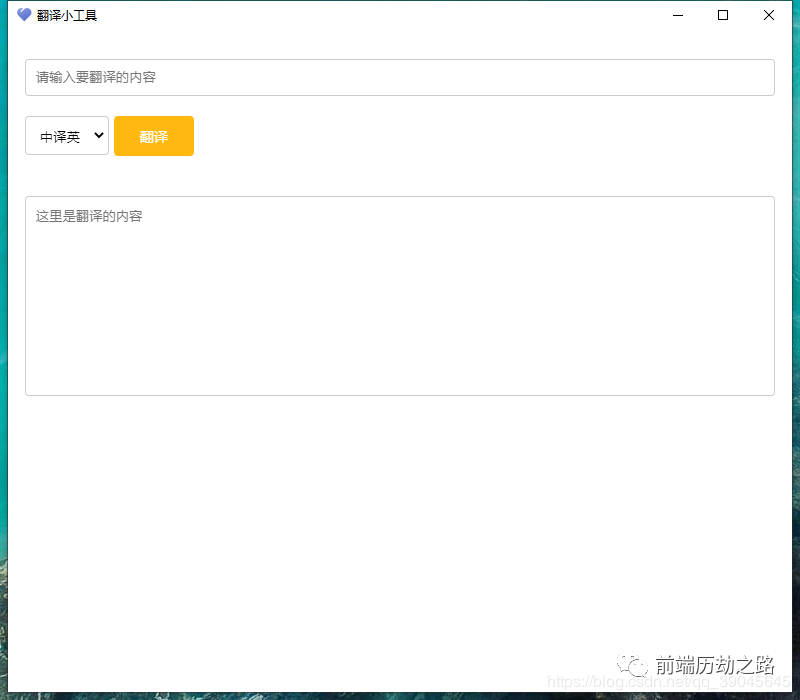
初始化项目
npm init
修改package.json
1{
2  "name": "trans",
3  "version": "1.0.0",
4  "main": "main.js",
5  "license": "MIT",
6  "scripts": {
7    "start": "electron .",
8    "build":"electron-packager . --overwrite --icon=./favicon.ico"
9  },
10  "devDependencies": {
11    "electron": "^9.0.5"
12  }
13}
安装electron依赖
因为之前我们在package.json已经编辑过了devDependencies,所以我们直接。
npm install
创建编辑文件
分别创建两个文件index.html和main.js。appid 与 key 需要自己去申请。这是网址:百度翻译编辑平台
index.html
1<!DOCTYPE html>
2<html>
3
4<head>
5  <meta charset="UTF-8">
6  <title>翻译小工具</title>
7  <!-- https://electronjs.org/docs/tutorial/security#csp-meta-tag -->
8  <meta http-equiv="Content-Security-Policy" content="script-src 'self' 'unsafe-inline';" />
9  <style>
10    input,textarea,select{ border: 1px solid #ccc;border-radius: 4px;font-family: Helvetica Neue,Helvetica,PingFang SC,Hiragino Sans GB,Microsoft YaHei,SimSun,sans-serif; }
11    input { width: 100%; padding: 10px;box-sizing: border-box; margin: 20px 0;}
12    textarea { display: block;padding: 10px ;  margin-top: 20px; width: 100%; height: 200px; text-align: left; resize: none; box-sizing: border-box; overflow: auto; }
13    button{ width: 80px; height: 40px;border: none; background: #FFB90F; color: white; font-size: 14px; text-align: center; line-height: 40px; border-radius: 4px; cursor: pointer; margin-bottom:20px; }
14    button:hover{ filter:brightness(110%); }
15    button:active{ filter:brightness(60%); }
16    select{padding: 10px;}
17    .box { width: 750px; height: 600px; margin: 0 auto; }
18  </style>
19</head>
20
21<body>
22  <div class="box">
23    <input placeholder="请输入要翻译的内容" class="int">
24    <select>
25      <option value="中译英">中译英</option>
26      <option value="英译中">英译中</option>
27    </select>
28    <button>翻译</button>
29    <textarea placeholder="这里是翻译的内容"></textarea>
30  </div>
31  <script src="md5.js"></script>
32  <script>
33    var btn = document.querySelector("button");
34    var int = document.querySelector("input");
35    var te = document.querySelector("textarea");
36    var myselect=document.querySelector("select");
37    var textarea = document.querySelector("textarea");
38    btn.onclick=function(){
39      english();
40    }
41    document.onkeyup = function (e) {
42      if (e.keyCode == "13" && int.value != "") {
43        english();
44      }
45    }
46
47    function english() {
48      var index=myselect.selectedIndex;
49      var value = myselect.options[index].value;
50      console.log(int.value);
51      if (value === "中译英") {
52        var appid = ''; // 需要自己申请
53        var key = ''; // 需要自己申请
54        var salt = (new Date).getTime();
55        var query = int.value;
56        var str1 = appid + query + salt + key;
57        var sign = MD5(str1);
58        var url = `http://api.fanyi.baidu.com/api/trans/vip/translate?q=${query}&appid=${appid}&salt=${salt}&from=zh&to=en&sign=${sign}`;
59        fetch(url).then(res =>res.json() ).then(response => textarea.value = response.trans_result[0].dst).catch(error => console.error('Error:', error))
60      } else {
61        var appid = ''; // 需要自己申请
62        var key = ''; // 需要自己申请
63        var salt = (new Date).getTime();
64        var query = int.value;
65        var str1 = appid + query + salt + key;
66        var sign = MD5(str1);
67        var url = `http://api.fanyi.baidu.com/api/trans/vip/translate?q=${query}&appid=${appid}&salt=${salt}&from=en&to=zh&sign=${sign}`;
68        fetch(url).then(res =>res.json() ).then(response => textarea.value = response.trans_result[0].dst).catch(error => console.error('Error:', error))
69      }
70    }
71  </script>
72</body>
73
74</html>
main.js
1// main.js
2const { app, BrowserWindow,Menu } = require('electron')
3
4function createWindow () {
5  // 创建浏览器窗口
6
7  Menu.setApplicationMenu(null)
8  const win = new BrowserWindow({
9    width: 800,
10    height: 700,
11    webPreferences: {
12      nodeIntegration: true
13    }
14  })
15
16  // 并且为你的应用加载index.html
17  win.loadFile('index.html')
18
19  // 打开开发者工具
20  // win.webContents.openDevTools()
21}
22
23// Electron会在初始化完成并且准备好创建浏览器窗口时调用这个方法
24// 部分 API 在 ready 事件触发后才能使用。
25app.whenReady().then(createWindow)
26
27//当所有窗口都被关闭后退出
28app.on('window-all-closed', () => {
29  // 在 macOS 上,除非用户用 Cmd + Q 确定地退出,
30  // 否则绝大部分应用及其菜单栏会保持激活。
31  if (process.platform !== 'darwin') {
32    app.quit()
33  }
34})
35
36app.on('activate', () => {
37  // 在macOS上,当单击dock图标并且没有其他窗口打开时,
38  // 通常在应用程序中重新创建一个窗口。
39  if (BrowserWindow.getAllWindows().length === 0) {
40    createWindow()
41  }
42})
43
44// 您可以把应用程序其他的流程写在在此文件中
45// 代码 也可以拆分成几个文件,然后用 require 导入。
46
引入md5.js
1var MD5 = function (string) {
2
3    function RotateLeft(lValue, iShiftBits) {
4        return (lValue<<iShiftBits) | (lValue>>>(32-iShiftBits));
5    }
6
7    function AddUnsigned(lX,lY) {
8        var lX4,lY4,lX8,lY8,lResult;
9        lX8 = (lX & 0x80000000);
10        lY8 = (lY & 0x80000000);
11        lX4 = (lX & 0x40000000);
12        lY4 = (lY & 0x40000000);
13        lResult = (lX & 0x3FFFFFFF)+(lY & 0x3FFFFFFF);
14        if (lX4 & lY4) {
15            return (lResult ^ 0x80000000 ^ lX8 ^ lY8);
16        }
17        if (lX4 | lY4) {
18            if (lResult & 0x40000000) {
19                return (lResult ^ 0xC0000000 ^ lX8 ^ lY8);
20            } else {
21                return (lResult ^ 0x40000000 ^ lX8 ^ lY8);
22            }
23        } else {
24            return (lResult ^ lX8 ^ lY8);
25        }
26    }
27
28    function F(x,y,z) { return (x & y) | ((~x) & z); }
29    function G(x,y,z) { return (x & z) | (y & (~z)); }
30    function H(x,y,z) { return (x ^ y ^ z); }
31    function I(x,y,z) { return (y ^ (x | (~z))); }
32
33    function FF(a,b,c,d,x,s,ac) {
34        a = AddUnsigned(a, AddUnsigned(AddUnsigned(F(b, c, d), x), ac));
35        return AddUnsigned(RotateLeft(a, s), b);
36    };
37
38    function GG(a,b,c,d,x,s,ac) {
39        a = AddUnsigned(a, AddUnsigned(AddUnsigned(G(b, c, d), x), ac));
40        return AddUnsigned(RotateLeft(a, s), b);
41    };
42
43    function HH(a,b,c,d,x,s,ac) {
44        a = AddUnsigned(a, AddUnsigned(AddUnsigned(H(b, c, d), x), ac));
45        return AddUnsigned(RotateLeft(a, s), b);
46    };
47
48    function II(a,b,c,d,x,s,ac) {
49        a = AddUnsigned(a, AddUnsigned(AddUnsigned(I(b, c, d), x), ac));
50        return AddUnsigned(RotateLeft(a, s), b);
51    };
52
53    function ConvertToWordArray(string) {
54        var lWordCount;
55        var lMessageLength = string.length;
56        var lNumberOfWords_temp1=lMessageLength + 8;
57        var lNumberOfWords_temp2=(lNumberOfWords_temp1-(lNumberOfWords_temp1 % 64))/64;
58        var lNumberOfWords = (lNumberOfWords_temp2+1)*16;
59        var lWordArray=Array(lNumberOfWords-1);
60        var lBytePosition = 0;
61        var lByteCount = 0;
62        while ( lByteCount < lMessageLength ) {
63            lWordCount = (lByteCount-(lByteCount % 4))/4;
64            lBytePosition = (lByteCount % 4)*8;
65            lWordArray[lWordCount] = (lWordArray[lWordCount] | (string.charCodeAt(lByteCount)<<lBytePosition));
66            lByteCount++;
67        }
68        lWordCount = (lByteCount-(lByteCount % 4))/4;
69        lBytePosition = (lByteCount % 4)*8;
70        lWordArray[lWordCount] = lWordArray[lWordCount] | (0x80<<lBytePosition);
71        lWordArray[lNumberOfWords-2] = lMessageLength<<3;
72        lWordArray[lNumberOfWords-1] = lMessageLength>>>29;
73        return lWordArray;
74    };
75
76    function WordToHex(lValue) {
77        var WordToHexValue="",WordToHexValue_temp="",lByte,lCount;
78        for (lCount = 0;lCount<=3;lCount++) {
79            lByte = (lValue>>>(lCount*8)) & 255;
80            WordToHexValue_temp = "0" + lByte.toString(16);
81            WordToHexValue = WordToHexValue + WordToHexValue_temp.substr(WordToHexValue_temp.length-2,2);
82        }
83        return WordToHexValue;
84    };
85
86    function Utf8Encode(string) {
87        string = string.replace(/\r\n/g,"\n");
88        var utftext = "";
89
90        for (var n = 0; n < string.length; n++) {
91
92            var c = string.charCodeAt(n);
93
94            if (c < 128) {
95                utftext += String.fromCharCode(c);
96            }
97            else if((c > 127) && (c < 2048)) {
98                utftext += String.fromCharCode((c >> 6) | 192);
99                utftext += String.fromCharCode((c & 63) | 128);
100            }
101            else {
102                utftext += String.fromCharCode((c >> 12) | 224);
103                utftext += String.fromCharCode(((c >> 6) & 63) | 128);
104                utftext += String.fromCharCode((c & 63) | 128);
105            }
106
107        }
108
109        return utftext;
110    };
111
112    var x=Array();
113    var k,AA,BB,CC,DD,a,b,c,d;
114    var S11=7, S12=12, S13=17, S14=22;
115    var S21=5, S22=9 , S23=14, S24=20;
116    var S31=4, S32=11, S33=16, S34=23;
117    var S41=6, S42=10, S43=15, S44=21;
118
119    string = Utf8Encode(string);
120
121    x = ConvertToWordArray(string);
122
123    a = 0x67452301; b = 0xEFCDAB89; c = 0x98BADCFE; d = 0x10325476;
124
125    for (k=0;k<x.length;k+=16) {
126        AA=a; BB=b; CC=c; DD=d;
127        a=FF(a,b,c,d,x[k+0], S11,0xD76AA478);
128        d=FF(d,a,b,c,x[k+1], S12,0xE8C7B756);
129        c=FF(c,d,a,b,x[k+2], S13,0x242070DB);
130        b=FF(b,c,d,a,x[k+3], S14,0xC1BDCEEE);
131        a=FF(a,b,c,d,x[k+4], S11,0xF57C0FAF);
132        d=FF(d,a,b,c,x[k+5], S12,0x4787C62A);
133        c=FF(c,d,a,b,x[k+6], S13,0xA8304613);
134        b=FF(b,c,d,a,x[k+7], S14,0xFD469501);
135        a=FF(a,b,c,d,x[k+8], S11,0x698098D8);
136        d=FF(d,a,b,c,x[k+9], S12,0x8B44F7AF);
137        c=FF(c,d,a,b,x[k+10],S13,0xFFFF5BB1);
138        b=FF(b,c,d,a,x[k+11],S14,0x895CD7BE);
139        a=FF(a,b,c,d,x[k+12],S11,0x6B901122);
140        d=FF(d,a,b,c,x[k+13],S12,0xFD987193);
141        c=FF(c,d,a,b,x[k+14],S13,0xA679438E);
142        b=FF(b,c,d,a,x[k+15],S14,0x49B40821);
143        a=GG(a,b,c,d,x[k+1], S21,0xF61E2562);
144        d=GG(d,a,b,c,x[k+6], S22,0xC040B340);
145        c=GG(c,d,a,b,x[k+11],S23,0x265E5A51);
146        b=GG(b,c,d,a,x[k+0], S24,0xE9B6C7AA);
147        a=GG(a,b,c,d,x[k+5], S21,0xD62F105D);
148        d=GG(d,a,b,c,x[k+10],S22,0x2441453);
149        c=GG(c,d,a,b,x[k+15],S23,0xD8A1E681);
150        b=GG(b,c,d,a,x[k+4], S24,0xE7D3FBC8);
151        a=GG(a,b,c,d,x[k+9], S21,0x21E1CDE6);
152        d=GG(d,a,b,c,x[k+14],S22,0xC33707D6);
153        c=GG(c,d,a,b,x[k+3], S23,0xF4D50D87);
154        b=GG(b,c,d,a,x[k+8], S24,0x455A14ED);
155        a=GG(a,b,c,d,x[k+13],S21,0xA9E3E905);
156        d=GG(d,a,b,c,x[k+2], S22,0xFCEFA3F8);
157        c=GG(c,d,a,b,x[k+7], S23,0x676F02D9);
158        b=GG(b,c,d,a,x[k+12],S24,0x8D2A4C8A);
159        a=HH(a,b,c,d,x[k+5], S31,0xFFFA3942);
160        d=HH(d,a,b,c,x[k+8], S32,0x8771F681);
161        c=HH(c,d,a,b,x[k+11],S33,0x6D9D6122);
162        b=HH(b,c,d,a,x[k+14],S34,0xFDE5380C);
163        a=HH(a,b,c,d,x[k+1], S31,0xA4BEEA44);
164        d=HH(d,a,b,c,x[k+4], S32,0x4BDECFA9);
165        c=HH(c,d,a,b,x[k+7], S33,0xF6BB4B60);
166        b=HH(b,c,d,a,x[k+10],S34,0xBEBFBC70);
167        a=HH(a,b,c,d,x[k+13],S31,0x289B7EC6);
168        d=HH(d,a,b,c,x[k+0], S32,0xEAA127FA);
169        c=HH(c,d,a,b,x[k+3], S33,0xD4EF3085);
170        b=HH(b,c,d,a,x[k+6], S34,0x4881D05);
171        a=HH(a,b,c,d,x[k+9], S31,0xD9D4D039);
172        d=HH(d,a,b,c,x[k+12],S32,0xE6DB99E5);
173        c=HH(c,d,a,b,x[k+15],S33,0x1FA27CF8);
174        b=HH(b,c,d,a,x[k+2], S34,0xC4AC5665);
175        a=II(a,b,c,d,x[k+0], S41,0xF4292244);
176        d=II(d,a,b,c,x[k+7], S42,0x432AFF97);
177        c=II(c,d,a,b,x[k+14],S43,0xAB9423A7);
178        b=II(b,c,d,a,x[k+5], S44,0xFC93A039);
179        a=II(a,b,c,d,x[k+12],S41,0x655B59C3);
180        d=II(d,a,b,c,x[k+3], S42,0x8F0CCC92);
181        c=II(c,d,a,b,x[k+10],S43,0xFFEFF47D);
182        b=II(b,c,d,a,x[k+1], S44,0x85845DD1);
183        a=II(a,b,c,d,x[k+8], S41,0x6FA87E4F);
184        d=II(d,a,b,c,x[k+15],S42,0xFE2CE6E0);
185        c=II(c,d,a,b,x[k+6], S43,0xA3014314);
186        b=II(b,c,d,a,x[k+13],S44,0x4E0811A1);
187        a=II(a,b,c,d,x[k+4], S41,0xF7537E82);
188        d=II(d,a,b,c,x[k+11],S42,0xBD3AF235);
189        c=II(c,d,a,b,x[k+2], S43,0x2AD7D2BB);
190        b=II(b,c,d,a,x[k+9], S44,0xEB86D391);
191        a=AddUnsigned(a,AA);
192        b=AddUnsigned(b,BB);
193        c=AddUnsigned(c,CC);
194        d=AddUnsigned(d,DD);
195    }
196
197    var temp = WordToHex(a)+WordToHex(b)+WordToHex(c)+WordToHex(d);
198
199    return temp.toLowerCase();
200}
引入图标文件
在项目文件夹引入一个ico文件,取名favicon.ico ,这样是为了与之前编辑的package.json编辑的内容匹配。你也可以改成其他的名字。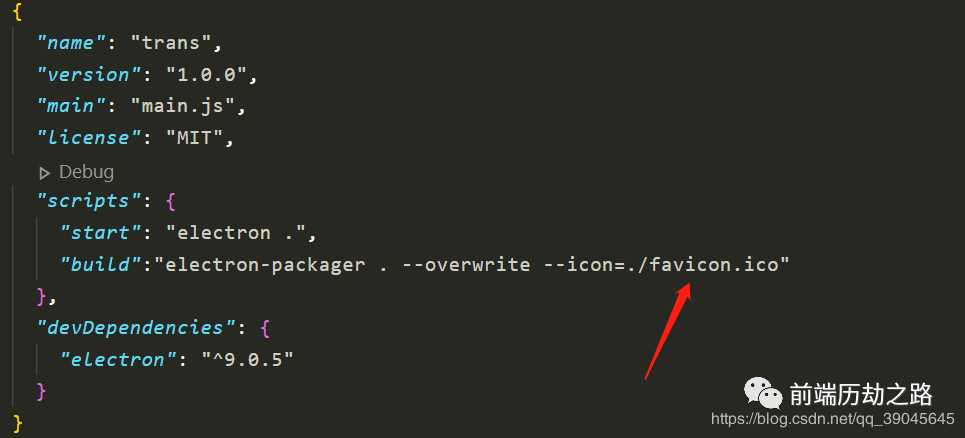
启动或者打包项目
- 启动项目
npm start
- 打包项目
npm build
作者:Vam的金豆之路
主要领域:前端开发
我的微信:maomin9761
微信公众号:前端历劫之路
本文转转自微信公众号前端历劫之路原创https://mp.weixin.qq.com/s/z3srMFYj3CiAMpovmHbzzw,如有侵权,请联系删除。