背景知识
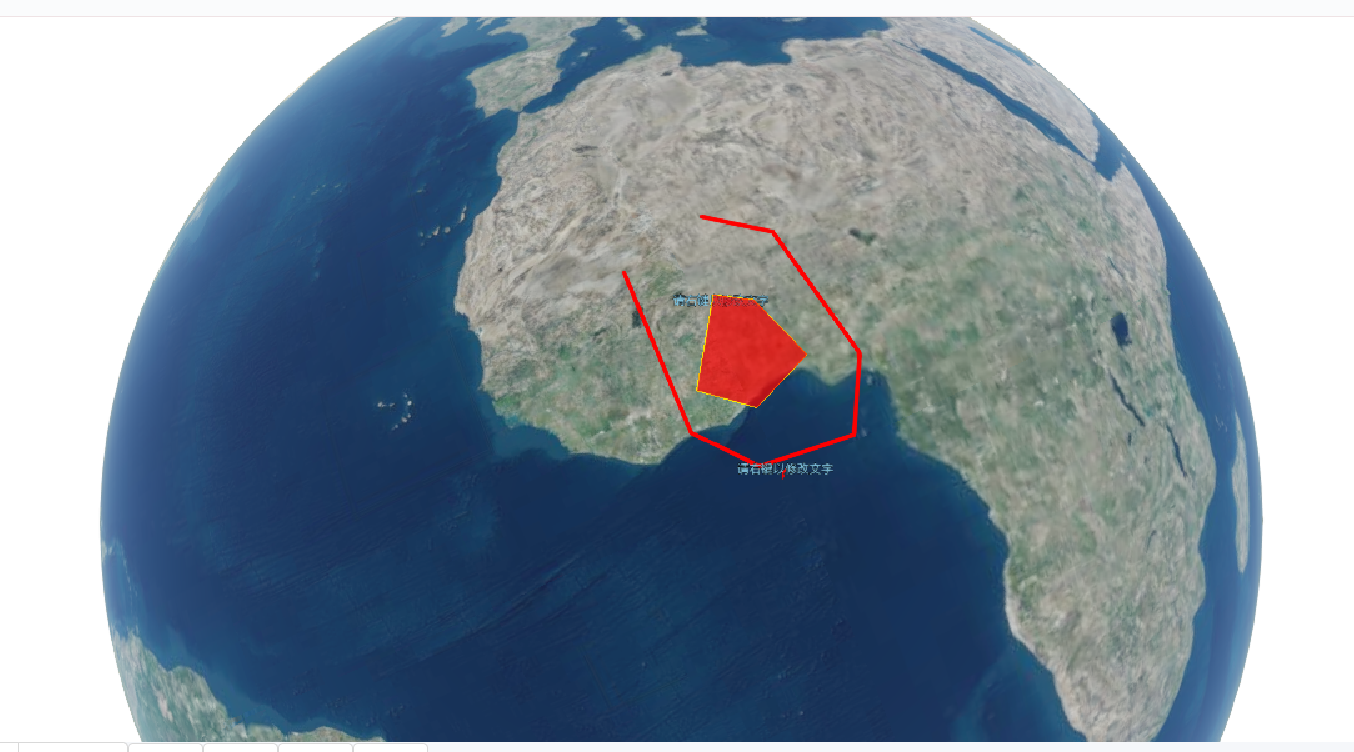
点、线、面以及文字的实时绘制是GIS很重要的一个功能,是用户对感兴趣区域标注的业务需要。同时Cesium提供了点、线(多段线)、面及文字(label)绘制的接口,绘制方式总共有两种,一种是通过Entity实体的方式,一种是通过Primitives的方式。第一种使用较为简单,是在Primitives基础上进行了封装;第二种则更加贴近WebGL底层,语法更复杂但是绘制效率更高效率。鉴于实时绘制数据量并不大,不需要使用复杂高效的方法,第一种方法完全适用。
Cesium通过ScreenSpaceEventHandler方法添加鼠标监听,包括鼠标的移动、点击等,同时会把鼠标的位置信息以回调函数方式返回。通过监听用户鼠标状态实现矢量图形及文字注记的位置记录。
CallbackProperty监听:当变量变化时触发该监听,通过监听鼠标拾取坐标的变化实现动态绘制。
代码实现
记录点位
1var location = {
2    latitude: 0,
3    longitude: 0,
4    height: 0,
5    endPosition: null,
6    cartesian : null
7};
8viewer.screenSpaceEventHandler.setInputAction(function onMouseMove(movement) {
9    //记录移动位置
10    location.endPosition = viewer.scene.pickPosition(movement.endPosition);
11},Cesium.ScreenSpaceEventType.MOUSE_MOVE);
12
13viewer.screenSpaceEventHandler.setInputAction(function onLeftClick(movement) {
14    var cartesian = viewer.scene.pickPosition(movement.position);
15    //记录点击位置
16    location.cartesian = cartesian;
17    var cartographic = Cesium.Cartographic.fromCartesian(cartesian);
18    location.latitude = Cesium.Math.toDegrees(cartographic.latitude);
19    location.longitude = Cesium.Math.toDegrees(cartographic.longitude);
20    location.height = cartographic.height;
21},Cesium.ScreenSpaceEventType.LEFT_CLICK);
绘制文字注记
1var handler = new Cesium.ScreenSpaceEventHandler(viewer.scene.canvas);
2    handler.setInputAction(function(movement) {
3        var label = new Cesium.Entity({
4            position : Cesium.Cartesian3.fromDegrees(location.longitude, location.latitude,location.height),
5            name : 'label',
6            label:{
7                text: '文字',
8                font: '24px Helvetica',
9                fillColor: Cesium.Color.SKYBLUE,
10                outlineColor: Cesium.Color.BLACK,
11                outlineWidth: 2,
12                style: Cesium.LabelStyle.FILL_AND_OUTLINE,
13                scaleByDistance: new Cesium.NearFarScalar(100, 1.0, 200, 0.4)
14            }
15        });
16        viewer.entities.add(label);
17        featureCollection.push(label);
18        handler.destroy();
19    }, Cesium.ScreenSpaceEventType.LEFT_CLICK);});
绘制点
1document.getElementById('point').onclick = function () {
2    var handler = new Cesium.ScreenSpaceEventHandler(viewer.scene.canvas);
3    handler.setInputAction(function(movement) {
4        var label = new Cesium.Entity({
5            position : Cesium.Cartesian3.fromDegrees(location.longitude, location.latitude,location.height),
6            name : 'point',
7            point:{
8                outlineColor: Cesium.Color.BLACK,
9            }
10        });
11        viewer.entities.add(label);
12        featureCollection.push(label);
13        handler.destroy();
14    }, Cesium.ScreenSpaceEventType.LEFT_CLICK);
15};
绘制多段线
1function drawPolyline() {
2    var floatingPoint;
3    var activePolyline;
4    var handler = new Cesium.ScreenSpaceEventHandler(viewer.scene.canvas);
5    handler.setInputAction(function(click) {
6        //var position = viewer.scene.pickPosition(click.position);
7        if(Cesium.defined(location.cartesian)){
8            var cartesian = location.cartesian;
9            if(activeShapePoints.length === 0){
10                floatingPoint = creatPoint(cartesian);
11                activeShapePoints.push(cartesian);
12                var dynamicPositions = new Cesium.CallbackProperty(function() {
13                    return activeShapePoints;
14                },false);
15                activePolyline = createPolyline(dynamicPositions);
16            }
17            activeShapePoints.push(cartesian);
18            creatPoint(cartesian);
19        }
20    },Cesium.ScreenSpaceEventType.LEFT_CLICK);
21    handler.setInputAction(function(movement) {
22        if(Cesium.defined(floatingPoint)){
23            if(Cesium.defined(location.endPosition)){
24                floatingPoint.position.setValue(location.endPosition);
25                activeShapePoints.pop();
26                activeShapePoints.push(location.endPosition);
27            }
28        }
29    },Cesium.ScreenSpaceEventType.MOUSE_MOVE);
30    handler.setInputAction(function(movement) {
31        handler.destroy();
32        for(var i=0;i<Points.length;i++){
33            viewer.entities.remove(Points[i]);
34        }
35        Points = [];
36    },Cesium.ScreenSpaceEventType.LEFT_DOUBLE_CLICK);
37
38    function createPolyline(positionData) {
39        var polyline;
40        polyline = viewer.entities.add({
41            name : 'polyline',
42            polyline : {
43                positions : positionData,
44                //在地形上绘制多段线,但是在3dtilset模型上无效
45                clampToGround : false,
46                followSurface : false,
47                material: Cesium.Color.RED,
48                width : 3
49            }
50        });
51        return polyline;
52    }
53}
绘制多边形
1function drawPolygon() {
2    var floatingPoint;
3    var activePolygon;
4    var handler = new Cesium.ScreenSpaceEventHandler(viewer.canvas);
5    handler.setInputAction(function(click) {
6        var position = viewer.scene.pickPosition(click.position);
7        if(Cesium.defined(location.cartesian)){
8            var cartesian = location.cartesian;
9            if(activeShapePoints.length === 0){
10                floatingPoint = creatPoint(cartesian);
11                activeShapePoints.push(cartesian);
12                var dynamicPositions = new Cesium.CallbackProperty(function() {
13                    return activeShapePoints;
14                },false);
15                activePolygon = createPolygon(dynamicPositions);
16            }
17            activeShapePoints.push(cartesian);
18            creatPoint(cartesian);
19        }
20    },Cesium.ScreenSpaceEventType.LEFT_CLICK);
21    handler.setInputAction(function(movement) {
22        if(Cesium.defined(floatingPoint)){
23            if(Cesium.defined(location.endPosition)){
24                floatingPoint.position.setValue(location.endPosition);
25                activeShapePoints.pop();
26                activeShapePoints.push(location.endPosition);
27            }
28        }
29    },Cesium.ScreenSpaceEventType.MOUSE_MOVE);
30    handler.setInputAction(function(movement) {
31        handler.destroy();
32        for(var i=0;i<Points.length;i++){
33            viewer.entities.remove(Points[i]);
34        }
35        Points = [];
36    },Cesium.ScreenSpaceEventType.LEFT_DOUBLE_CLICK);
37    function createPolygon(positionData) {
38        var polygon;
39        polygon = viewer.entities.add({
40            name: 'polygon',
41            positions : positionData,
42            polygon:{
43                hierarchy : positionData,
44                perPositionHeight: true,
45                material: Cesium.Color.RED.withAlpha(0.7),
46                outline: true,
47                outlineColor: Cesium.Color.YELLOW.withAlpha(1)
48            }
49        });
50        return polygon;
51    }
52}
效果图