1》导入包
jxl.jar下载地址:https://pan.baidu.com/s/10ijORF5sNdmZv3SyN8ImaQ密码:ue50
mysql的对应jar:https://pan.baidu.com/s/1ZiB3kPewCdMK\_WatNjUtiA密码:7afv
源码:
新建类
1public class excelTest {
2    int id;
3    String name;
4    String num;
5    public String getNum() {
6        return num;
7    }
8    public void setNum(String num) {
9        this.num = num;
10    }
11    public int getId() {
12        return id;
13    }
14    public void setId(int id) {
15        this.id = id;
16    }
17    public String getName() {
18        return name;
19    }
20    public void setName(String name) {
21        this.name = name;
22    }
23
24}
java代码:
1import java.io.File;
2import java.io.IOException;
3import java.sql.Connection;
4import java.sql.PreparedStatement;
5import java.sql.ResultSet;
6import java.sql.SQLException;
7import java.util.ArrayList;
8import java.util.List;
9import java.text.ParseException;
10import java.text.SimpleDateFormat;
11import java.util.Date;
12import java.util.GregorianCalendar;
13import java.util.Random;
14
15import org.java.team.Writeteam;
16import org.java.tianbao.Tianbao;
17import org.java.util.DBUtil;
18import org.java.xiaowailianjie.WriteXiaowailianjie;
19
20
21
22import jxl.Workbook;
23import jxl.write.Label;
24import jxl.write.WritableSheet;
25import jxl.write.WritableWorkbook;
26import jxl.write.WriteException;
27import jxl.write.biff.RowsExceededException;
28
29public class a {
30
31      public static void main(String[] args) throws RowsExceededException, WriteException, IOException {
32
33          //1. 导出Excel的路径
34          String filePath = "C:/export.xls";
35          WritableWorkbook wwb =null;
36          Connection connection=DBUtil.getConnection();
37            List<excelTest> excelTests=new ArrayList<excelTest>();
38            PreparedStatement preparedStatement=null;
39            String sql="select * from excelTest";
40            ResultSet resultSet=null;
41            excelTest exce=null;
42          try {
43              wwb = Workbook.createWorkbook(new File(filePath));
44          } catch (Exception e) {
45              e.printStackTrace();
46          }
47
48          //创建Excel表的"学生"区域的数据
49          WritableSheet sheet = wwb.createSheet("学生",0);//或者rwb.getSheet(0)获取第一个区域
50          try {
51              //2. 连接数据库的几行代码
52              preparedStatement=connection.prepareStatement(sql);
53
54                resultSet=preparedStatement.executeQuery();
55
56              while(resultSet.next())
57            {
58                  exce=new excelTest();
59                  exce.setId(resultSet.getInt("id"));
60                  exce.setName(resultSet.getString("name"));
61                exce.setNum(resultSet.getString("num"));
62                excelTests.add(exce);
63
64            }
65               sheet.addCell(new Label(0,0,"编号"));
66               sheet.addCell(new Label(1,0,"姓名"));
67               sheet.addCell(new Label(2,0,"学号"));
68              for(int i = 0; i<excelTests.size(); i++){
69                  //Number对应数据库的int类型数据
70                  sheet.addCell(new jxl.write.Number(0,i+1,excelTests.get(i).getId()));
71                  //Label对应数据库String类型数据
72                  sheet.addCell(new Label(1,i+1,excelTests.get(i).getName()));
73                  sheet.addCell(new Label(2,i+1,excelTests.get(i).getNum()));
74
75              }
76              wwb.write();
77
78          } catch (SQLException e) {
79              e.printStackTrace();
80          }finally{
81              wwb.close();
82          }
83
84
85      }
86
87}
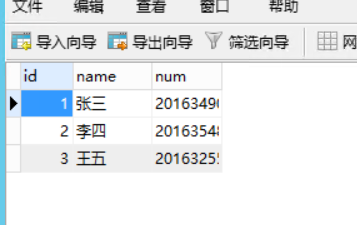
数据库截图
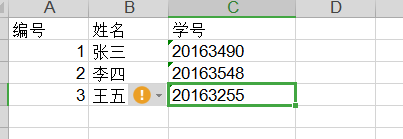
导出的excel表格截图