
PS一句:最终还是选择CSDN来整理发表这几年的知识点,该文章平行迁移到CSDN。因为CSDN也支持MarkDown语法了,牛逼啊!
【工匠若水 http://blog.csdn.net/yanbober】
本篇继续接上一篇,阅读上一篇EventBus使用之基础

背景
开始分析EventBus前可以下看下EventBus开源框架的工程目录结构:
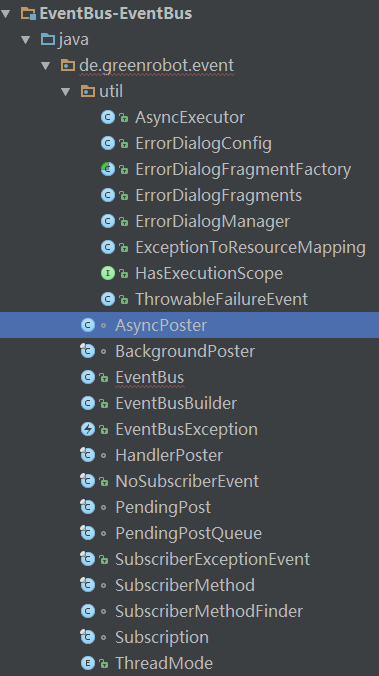
从上图可以发现,其实EventBus的代码量不是很大,还是很方便入手分析的。
开始分析
通过上一篇基础使用可以发现,使用EventBus框架第一步是得到EventBus实例,那我们就从EventBus类文件的getDefault()方法开始分析。如下:
1    /** Convenience singleton for apps using a process-wide EventBus instance. */
2    public static EventBus getDefault() {
3        if (defaultInstance == null) {
4            synchronized (EventBus.class) {
5                if (defaultInstance == null) {
6                    defaultInstance = new EventBus();
7                }
8            }
9        }
10        return defaultInstance;
11    }
这里就是设计模式的一个单例模式运用,使用了双重判断的方式,防止并发的问题,还能极大的提高效率。接着往下看EventBus()构造方法:
1    public EventBus() {
2        this(DEFAULT_BUILDER);
3    }
4
5    EventBus(EventBusBuilder builder) {
6        subscriptionsByEventType = new HashMap<Class<?>, CopyOnWriteArrayList<Subscription>>();
7        typesBySubscriber = new HashMap<Object, List<Class<?>>>();
8        stickyEvents = new ConcurrentHashMap<Class<?>, Object>();
9        mainThreadPoster = new HandlerPoster(this, Looper.getMainLooper(), 10);
10        backgroundPoster = new BackgroundPoster(this);
11        asyncPoster = new AsyncPoster(this);
12        subscriberMethodFinder = new SubscriberMethodFinder(builder.skipMethodVerificationForClasses);
13        logSubscriberExceptions = builder.logSubscriberExceptions;
14        logNoSubscriberMessages = builder.logNoSubscriberMessages;
15        sendSubscriberExceptionEvent = builder.sendSubscriberExceptionEvent;
16        sendNoSubscriberEvent = builder.sendNoSubscriberEvent;
17        throwSubscriberException = builder.throwSubscriberException;
18        eventInheritance = builder.eventInheritance;
19        executorService = builder.executorService;
20    }
这里的构造方法EventBus(EventBusBuilder builder)使用了建造者模式给EventBus设置一些基本参数标志。这里使用了DEFAULT_BUILDER,也即默认参数。
到这里一个默认的单例模式的EventBus对象实例获取完成。通过这段代码可以发现,我们也可以通过 EventBusBuilder或者EventBus的构造函数新建一个EventBus实例,但是每个新建的EventBus发布和订阅事件都是相互隔离的。
接着继续停留在EventBus类分析,可以看到该类的主要职责就是负责所有对外暴露的API。
按照上一篇的使用例子顺序来看,得到EventBus实例后需要在开始处调运register方法,结束处调运unregister方法,所以我们从register方法开始分析:
1    public void register(Object subscriber) {
2        register(subscriber, false, 0);
3    }
4
5    public void register(Object subscriber, int priority) {
6        register(subscriber, false, priority);
7    }
8
9    public void registerSticky(Object subscriber) {
10        register(subscriber, true, 0);
11    }
12
13    public void registerSticky(Object subscriber, int priority) {
14        register(subscriber, true, priority);
15    }
16
17    private synchronized void register(Object subscriber, boolean sticky, int priority) {
18        List<SubscriberMethod> subscriberMethods = subscriberMethodFinder.findSubscriberMethods(subscriber.getClass());
19        for (SubscriberMethod subscriberMethod : subscriberMethods) {
20            subscribe(subscriber, subscriberMethod, sticky, priority);
21        }
22    }
可以看到EventBus类提供了四个register方法,但是最终都调运了register(Object subscriber, boolean sticky, int priority)方法。
register(Object subscriber, boolean sticky, int priority)方法的三个参数含义如下:
- subscriber:传入要扫描类的类对象(订阅者)。
- sticky:是否是粘粘性消息。
- priority:优先级,优先级越高,在调用的时候会越先调用。
由此可以看出register(Object subscriber),registerSticky(Object subscriber)的默认优先级都是0,其他的register方法可自定义优先级。同理register的方法默认都是不粘粘性的事件,registerSticky的方法没人都是粘粘性的事件。
继续看register(Object subscriber, boolean sticky, int priority)方法,可以发现其中首先执行了List<SubscriberMethod> subscriberMethods = subscriberMethodFinder.findSubscriberMethods(subscriber.getClass());语句,这句话就是调运SubscriberMethodFinder类的findSubscriberMethods方法,传入了subscriber 的class,返回一个List<SubscriberMethod>。如下:
1    List<SubscriberMethod> findSubscriberMethods(Class<?> subscriberClass) {
2        String key = subscriberClass.getName();
3        List<SubscriberMethod> subscriberMethods;
4        synchronized (methodCache) {
5            subscriberMethods = methodCache.get(key);
6        }
7        if (subscriberMethods != null) {
8            return subscriberMethods;
9        }
10        subscriberMethods = new ArrayList<SubscriberMethod>();
11        Class<?> clazz = subscriberClass;
12        HashSet<String> eventTypesFound = new HashSet<String>();
13        StringBuilder methodKeyBuilder = new StringBuilder();
14        while (clazz != null) {
15            String name = clazz.getName();
16            if (name.startsWith("java.") || name.startsWith("javax.") || name.startsWith("android.")) {
17                // Skip system classes, this just degrades performance
18                break;
19            }
20
21            // Starting with EventBus 2.2 we enforced methods to be public (might change with annotations again)
22            Method[] methods = clazz.getDeclaredMethods();
23            for (Method method : methods) {
24                String methodName = method.getName();
25                if (methodName.startsWith(ON_EVENT_METHOD_NAME)) {
26                    int modifiers = method.getModifiers();
27                    if ((modifiers & Modifier.PUBLIC) != 0 && (modifiers & MODIFIERS_IGNORE) == 0) {
28                        Class<?>[] parameterTypes = method.getParameterTypes();
29                        if (parameterTypes.length == 1) {
30                            String modifierString = methodName.substring(ON_EVENT_METHOD_NAME.length());
31                            ThreadMode threadMode;
32                            if (modifierString.length() == 0) {
33                                threadMode = ThreadMode.PostThread;
34                            } else if (modifierString.equals("MainThread")) {
35                                threadMode = ThreadMode.MainThread;
36                            } else if (modifierString.equals("BackgroundThread")) {
37                                threadMode = ThreadMode.BackgroundThread;
38                            } else if (modifierString.equals("Async")) {
39                                threadMode = ThreadMode.Async;
40                            } else {
41                                if (skipMethodVerificationForClasses.containsKey(clazz)) {
42                                    continue;
43                                } else {
44                                    throw new EventBusException("Illegal onEvent method, check for typos: " + method);
45                                }
46                            }
47                            Class<?> eventType = parameterTypes[0];
48                            methodKeyBuilder.setLength(0);
49                            methodKeyBuilder.append(methodName);
50                            methodKeyBuilder.append('>').append(eventType.getName());
51                            String methodKey = methodKeyBuilder.toString();
52                            if (eventTypesFound.add(methodKey)) {
53                                // Only add if not already found in a sub class
54                                subscriberMethods.add(new SubscriberMethod(method, threadMode, eventType));
55                            }
56                        }
57                    } else if (!skipMethodVerificationForClasses.containsKey(clazz)) {
58                        Log.d(EventBus.TAG, "Skipping method (not public, static or abstract): " + clazz + "."
59                                + methodName);
60                    }
61                }
62            }
63            clazz = clazz.getSuperclass();
64        }
65        if (subscriberMethods.isEmpty()) {
66            throw new EventBusException("Subscriber " + subscriberClass + " has no public methods called "
67                    + ON_EVENT_METHOD_NAME);
68        } else {
69            synchronized (methodCache) {
70                methodCache.put(key, subscriberMethods);
71            }
72            return subscriberMethods;
73        }
74    }
上面就是获取传入对象class的方法的方法。其中前半部分是先去缓存查找是否有这个类的记录,如果有直接返回,没有继续执行。当没有时继续走到Method[] methods = clazz.getDeclaredMethods();语句得到该类的所有方法;接着那个大for循环就是遍历这个类匹配符合封装要求的method;其中,if (methodName.startsWith(ON_EVENT_METHOD_NAME))用来判断方法名是不是以“onEvent”开头;接着if ((modifiers & Modifier.PUBLIC) != 0 && (modifiers & MODIFIERS_IGNORE) == 0)用于继续判断是否是public且非static和abstract方法;if (parameterTypes.length == 1)用于继续判断是否是一个参数。如果都复合,才进入封装的部分;接着也比较简单,根据方法的后缀,来确定threadMode,threadMode是个四种情况的枚举类型(前面基础使用一篇解释过四种类型);接着通过subscriberMethods.add(new SubscriberMethod(method, threadMode, eventType));把method添加到subscriberMethods列表;接着通过clazz = clazz.getSuperclass();扫描父类的方法;接着while结束,扫描完后通过methodCache.put(key, subscriberMethods);将方法放入缓存,然后返回List<SubscriberMethod>的方法列表(订阅者方法至此查找完成)。
接着继续回到上一级方法:
1    private synchronized void register(Object subscriber, boolean sticky, int priority) {
2        List<SubscriberMethod> subscriberMethods = subscriberMethodFinder.findSubscriberMethods(subscriber.getClass());
3        for (SubscriberMethod subscriberMethod : subscriberMethods) {
4            subscribe(subscriber, subscriberMethod, sticky, priority);
5        }
6    }
通过for循环遍历List<SubscriberMethod>里的方法,同时传入suscribe方法。具体如下:
1    // Must be called in synchronized block
2    private void subscribe(Object subscriber, SubscriberMethod subscriberMethod, boolean sticky, int priority) {
3        //从订阅方法中拿到订阅事件的类型
4        Class<?> eventType = subscriberMethod.eventType;
5        通过订阅事件类型,找到所有的订阅(Subscription)
6        CopyOnWriteArrayList<Subscription> subscriptions = subscriptionsByEventType.get(eventType);
7        //创建一个新的订阅
8        Subscription newSubscription = new Subscription(subscriber, subscriberMethod, priority);
9        if (subscriptions == null) {
10            //如果该事件目前没有订阅列表,创建并加入该订阅
11            subscriptions = new CopyOnWriteArrayList<Subscription>();
12            subscriptionsByEventType.put(eventType, subscriptions);
13        } else {
14            //如果有订阅列表,检查是否已经加入过
15            if (subscriptions.contains(newSubscription)) {
16                throw new EventBusException("Subscriber " + subscriber.getClass() + " already registered to event "
17                        + eventType);
18            }
19        }
20
21        // Starting with EventBus 2.2 we enforced methods to be public (might change with annotations again)
22        // subscriberMethod.method.setAccessible(true);
23
24        int size = subscriptions.size();
25        for (int i = 0; i <= size; i++) {
26            //根据优先级插入订阅
27            if (i == size || newSubscription.priority > subscriptions.get(i).priority) {
28                subscriptions.add(i, newSubscription);
29                break;
30            }
31        }
32        //根据subscriber存储它所有的eventType
33        List<Class<?>> subscribedEvents = typesBySubscriber.get(subscriber);
34        if (subscribedEvents == null) {
35            subscribedEvents = new ArrayList<Class<?>>();
36            typesBySubscriber.put(subscriber, subscribedEvents);
37        }
38        //将这个订阅事件加入到订阅者的订阅事件列表中
39        subscribedEvents.add(eventType);
40        //判断sticky;如果为true,从stickyEvents中根据eventType去查找有没有stickyEvent,如果有则立即发布去执行。stickyEvent其实就是我们post时的参数
41        if (sticky) {
42            if (eventInheritance) {
43                // Existing sticky events of all subclasses of eventType have to be considered.
44                // Note: Iterating over all events may be inefficient with lots of sticky events,
45                // thus data structure should be changed to allow a more efficient lookup
46                // (e.g. an additional map storing sub classes of super classes: Class -> List<Class>).
47                Set<Map.Entry<Class<?>, Object>> entries = stickyEvents.entrySet();
48                for (Map.Entry<Class<?>, Object> entry : entries) {
49                    Class<?> candidateEventType = entry.getKey();
50                    if (eventType.isAssignableFrom(candidateEventType)) {
51                        Object stickyEvent = entry.getValue();
52                        checkPostStickyEventToSubscription(newSubscription, stickyEvent);
53                    }
54                }
55            } else {
56                Object stickyEvent = stickyEvents.get(eventType);
57                checkPostStickyEventToSubscription(newSubscription, stickyEvent);
58            }
59        }
60    }
到这里register方法分析完了,大致流程总结一下:
- 找到被注册者类中的所有的订阅方法。
- 遍历订阅方法,找到EventBus中eventType对应的订阅列表,然后根据当前订阅者和订阅方法创建一个新的订阅加入到订阅列表。
- 找到EvnetBus中subscriber订阅的事件列表,将eventType加入到这个事件列表。
所以对于任何一个订阅者,我们可以找到它的订阅事件类型列表,通过这个订阅事件类型,可以找到在订阅者中的订阅函数。
既然register函数分析完了,那么接下来就该分析unregister了,成对出现嘛!如下:
1    /** Unregisters the given subscriber from all event classes. */
2    public synchronized void unregister(Object subscriber) {
3        List<Class<?>> subscribedTypes = typesBySubscriber.get(subscriber);
4        if (subscribedTypes != null) {
5            for (Class<?> eventType : subscribedTypes) {
6                unubscribeByEventType(subscriber, eventType);
7            }
8            typesBySubscriber.remove(subscriber);
9        } else {
10            Log.w(TAG, "Subscriber to unregister was not registered before: " + subscriber.getClass());
11        }
12    }
可以看到,首先获取了subscribe函数中根据subscriber存储它的所有eventType保存到List<Class<?>> subscribedTypes;接着如果存在注册过的type则通过unubscribeByEventType(subscriber, eventType);循环遍历,完事remove掉所有,这样就完成了所有的unregister功能;至于unubscribeByEventType函数如何实现,具体如下:
1    /** Only updates subscriptionsByEventType, not typesBySubscriber! Caller must update typesBySubscriber. */
2    private void unubscribeByEventType(Object subscriber, Class<?> eventType) {
3        List<Subscription> subscriptions = subscriptionsByEventType.get(eventType);
4        if (subscriptions != null) {
5            int size = subscriptions.size();
6            for (int i = 0; i < size; i++) {
7                Subscription subscription = subscriptions.get(i);
8                if (subscription.subscriber == subscriber) {
9                    subscription.active = false;
10                    subscriptions.remove(i);
11                    i--;
12                    size--;
13                }
14            }
15        }
16    }
从上面代码可以看出,原来在register时真正存储EventBus事件的Map是subscriptionsByEventType成员。这里就是循环遍历找出需要unregister的remove掉。至此,整个EventBus的register与unregister函数都分析完毕。
依照前一篇使用来看,进行完register与unregister后剩下的就是post了,那么接下来分析分析post过程,如下:
1    /** Posts the given event to the event bus. */
2    public void post(Object event) {
3        PostingThreadState postingState = currentPostingThreadState.get();
4        List<Object> eventQueue = postingState.eventQueue;
5        eventQueue.add(event);
6
7        if (!postingState.isPosting) {
8            postingState.isMainThread = Looper.getMainLooper() == Looper.myLooper();
9            postingState.isPosting = true;
10            if (postingState.canceled) {
11                throw new EventBusException("Internal error. Abort state was not reset");
12            }
13            try {
14                while (!eventQueue.isEmpty()) {
15                    postSingleEvent(eventQueue.remove(0), postingState);
16                }
17            } finally {
18                postingState.isPosting = false;
19                postingState.isMainThread = false;
20            }
21        }
22    }
23
24
25    public void postSticky(Object event) {
26        synchronized (stickyEvents) {
27            stickyEvents.put(event.getClass(), event);
28        }
29        // Should be posted after it is putted, in case the subscriber wants to remove immediately
30        post(event);
31    }
如上postSticky(Object event)的实质是post了一个stickyEvents,而真正的post(Object event)方法里,currentPostingThreadState是一个ThreadLocal类型的,里面存储了PostingThreadState;PostingThreadState包含了一个eventQueue和一些标志位;eventQueue.add(event);就是把事件放入eventQueue队列,然后while循环遍历eventQueue通过postSingleEvent(eventQueue.remove(0), postingState);语句分发事件;那继续看下这条语句的实现:
1    private void postSingleEvent(Object event, PostingThreadState postingState) throws Error {
2        Class<?> eventClass = event.getClass();
3        boolean subscriptionFound = false;
4        if (eventInheritance) {
5            List<Class<?>> eventTypes = lookupAllEventTypes(eventClass);
6            int countTypes = eventTypes.size();
7            for (int h = 0; h < countTypes; h++) {
8                Class<?> clazz = eventTypes.get(h);
9                subscriptionFound |= postSingleEventForEventType(event, postingState, clazz);
10            }
11        } else {
12            subscriptionFound = postSingleEventForEventType(event, postingState, eventClass);
13        }
14        if (!subscriptionFound) {
15            if (logNoSubscriberMessages) {
16                Log.d(TAG, "No subscribers registered for event " + eventClass);
17            }
18            if (sendNoSubscriberEvent && eventClass != NoSubscriberEvent.class &&
19                    eventClass != SubscriberExceptionEvent.class) {
20                post(new NoSubscriberEvent(this, event));
21            }
22        }
23    }
如上代码通过List<Class<?>> eventTypes = lookupAllEventTypes(eventClass);语句传入eventClass得到eventClass对应的事件,包含父类对应的事件和接口对应的事件;接着通过循环遍历eventTypes执行subscriptionFound |= postSingleEventForEventType(event, postingState, clazz);语句;最后如果发现没有对应事件就通过post(new NoSubscriberEvent(this, event));post一个NoSubscriberEvent事件;接下来看下postSingleEventForEventType函数的实现:
1    private boolean postSingleEventForEventType(Object event, PostingThreadState postingState, Class<?> eventClass) {
2        CopyOnWriteArrayList<Subscription> subscriptions;
3        synchronized (this) {
4            subscriptions = subscriptionsByEventType.get(eventClass);
5        }
6        if (subscriptions != null && !subscriptions.isEmpty()) {
7            for (Subscription subscription : subscriptions) {
8                postingState.event = event;
9                postingState.subscription = subscription;
10                boolean aborted = false;
11                try {
12                    postToSubscription(subscription, event, postingState.isMainThread);
13                    aborted = postingState.canceled;
14                } finally {
15                    postingState.event = null;
16                    postingState.subscription = null;
17                    postingState.canceled = false;
18                }
19                if (aborted) {
20                    break;
21                }
22            }
23            return true;
24        }
25        return false;
26    }
如上可以发现,我们在register时扫面class把匹配的方法都存储在了subscriptionsByEventType,这里通过subscriptions = subscriptionsByEventType.get(eventClass);语句首先拿到register时扫描的匹配方法;然后判断是否有匹配的方法,如果有就继续遍历每个subscription,依次去调用postToSubscription(subscription, event, postingState.isMainThread);;
其实这个方法在register的subscribe的checkPostStickyEventToSubscription(Subscription newSubscription, Object stickyEvent)的方法中也调运过。所以我们继续来分析下这个方法,如下:
1    private void postToSubscription(Subscription subscription, Object event, boolean isMainThread) {
2        switch (subscription.subscriberMethod.threadMode) {
3            case PostThread:
4                invokeSubscriber(subscription, event);
5                break;
6            case MainThread:
7                if (isMainThread) {
8                    invokeSubscriber(subscription, event);
9                } else {
10                    mainThreadPoster.enqueue(subscription, event);
11                }
12                break;
13            case BackgroundThread:
14                if (isMainThread) {
15                    backgroundPoster.enqueue(subscription, event);
16                } else {
17                    invokeSubscriber(subscription, event);
18                }
19                break;
20            case Async:
21                asyncPoster.enqueue(subscription, event);
22                break;
23            default:
24                throw new IllegalStateException("Unknown thread mode: " + subscription.subscriberMethod.threadMode);
25        }
26    }
这个方法传入的三个参数含义分别是:第一个参数就是传入的订阅,第二个参数就是对于的分发事件,第三个参数表明是否在主线程;然后通过subscription.subscriberMethod.threadMode判断该在哪个线程去执行;这里通过switch分四种情况,如下:
-
case PostThread:直接在当前线程反射调用。
-
case MainThread:如果是(isMainThread)主UI线程则直接调用,否则把当前的方法加入到队列,然后直接通过handler去发送一个消息,通过Handler在主线程执行。
-
case BackgroundThread:如果当前不是主UI线程(!isMainThread)则直接调用,如果是UI线程则创建一个runnable加入到后台的一个队列,最终由Eventbus中的一个线程池去调用。
-
case Async:不论什么线程,直接丢入线程池,也就是将任务加入到后台的一个队列,最终由Eventbus中的一个线程池去调用;线程池与BackgroundThread用的是同一个。
-
default:抛出线程state状态非法异常。
继续分析可以发现mainThreadPoster是继承Handler实现的,其中Looper是MainLooper;invokeSubscriber与asyncPoster都是继承Runnable实现的,其中invokeSubscriber与asyncPoster的enqueue方法实质都差不多,如下:
1    public void enqueue(Subscription subscription, Object event) {
2        PendingPost pendingPost = PendingPost.obtainPendingPost(subscription, event);
3        queue.enqueue(pendingPost);
4        eventBus.getExecutorService().execute(this);
5    }
可以验证上面说的,invokeSubscriber与asyncPoster的enqueue方法都是扔到了一个线程池中执行。好了,继续看下mainThreadPoster的enqueue方法,如下:
1    void enqueue(Subscription subscription, Object event) {
2        PendingPost pendingPost = PendingPost.obtainPendingPost(subscription, event);
3        synchronized (this) {
4            queue.enqueue(pendingPost);
5            if (!handlerActive) {
6                handlerActive = true;
7                if (!sendMessage(obtainMessage())) {
8                    throw new EventBusException("Could not send handler message");
9                }
10            }
11        }
12    }
可以验证上面说的,mainThreadPoster的Looper是MainLooper,所以这里通过sendMessage(obtainMessage())将消息异步传入了主线程执行。
接下来看下上面switch中使用的invokeSubscriber方法:
1    void invokeSubscriber(Subscription subscription, Object event) {
2        try {
3            subscription.subscriberMethod.method.invoke(subscription.subscriber, event);
4        } catch (InvocationTargetException e) {
5            handleSubscriberException(subscription, event, e.getCause());
6        } catch (IllegalAccessException e) {
7            throw new IllegalStateException("Unexpected exception", e);
8        }
9    }
从上面可以看出invokeSubscriber方法实质就是invoke反射,对,就是java的反射调运,反射调运你onEvent开头的方法。
好了,到这里获取EventBus实例,register,unregister,post,onEventXXX的过程都分析完毕了。
总结
还是回到开源代码作者提供的这幅图:
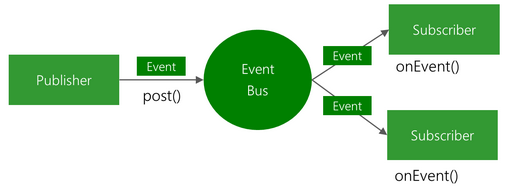
这下明白了吧,EventBus实质就是观察者模式。说俗点通过分析和上图可以直观认为上图中EventBus椭圆是一个具备存储匹配方法的一个单例对象;右侧Subscriber块的onEventXXX就是这些匹配方法;左侧的post就是根据参数去查找反射调运右侧那些已定义的onEventXXX方法。
本文同步分享在 博客“工匠若水”(CSDN)。
如有侵权,请联系 support@oschina.cn 删除。
本文参与“OSC源创计划”,欢迎正在阅读的你也加入,一起分享。