JSON是一种轻量级的数据交互格式,易于人阅读和编写,同时也易于机器解析和生成,并有效地提升网络传输效率,实际项目中经常用到,相比xml有很多优点,问问度娘,优点一箩筐。
第三方库
json解析选用jsoncpp作为第三方库,jsoncpp使用广泛,c++开发首选。
jsoncpp目前已经托管到了github上,地址:https://github.com/open-source-parsers/jsoncpp
使用
使用c++进行构造json和解析json,选用vs2010作为IDE。工程中使用jsoncpp的源码进行编译,没有使用jsoncpp的库,为方便大家使用把dll和lib库也放到了我的工程jsoncpplib文件夹下,有需要的可以直接引用库。
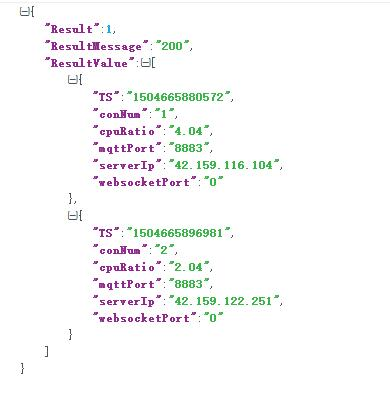
待解析的json数据格式如下图:
1/********************************************************
2Copyright (C), 2016-2017,
3FileName: 	main
4Author: 	woniu201
5Email: 		wangpengfei.201@163.com
6Created: 	2017/09/06
7Description:use jsoncpp src , not use dll, but i also provide dll and lib.
8********************************************************/
9
10#include "stdio.h"
11#include <string>
12#include "jsoncpp/json.h"
13
14using namespace std;
15
16/************************************
17@ Brief:		read file
18@ Author:		woniu201
19@ Created: 		2017/09/06
20@ Return:		file data
21************************************/
22char *getfileAll(char *fname)
23{
24	FILE *fp;
25	char *str;
26	char txt[1000];
27	int filesize;
28	if ((fp=fopen(fname,"r"))==NULL){
29		printf("open file %s fail \n",fname);
30		return NULL;
31	}
32
33	fseek(fp,0,SEEK_END);
34
35	filesize = ftell(fp);
36	str=(char *)malloc(filesize);
37	str[0]=0;
38
39	rewind(fp);
40	while((fgets(txt,1000,fp))!=NULL){
41		strcat(str,txt);
42	}
43	fclose(fp);
44	return str;
45}
46
47/************************************
48@ Brief:		write file
49@ Author:		woniu201
50@ Created: 		2017/09/06
51@ Return:
52************************************/
53int writefileAll(char* fname,const char* data)
54{
55	FILE *fp;
56	if ((fp=fopen(fname, "w")) == NULL)
57	{
58		printf("open file %s fail \n", fname);
59		return 1;
60	}
61
62	fprintf(fp, "%s", data);
63	fclose(fp);
64
65	return 0;
66}
67
68/************************************
69@ Brief:		parse json data
70@ Author:		woniu201
71@ Created: 		2017/09/06
72@ Return:
73************************************/
74int parseJSON(const char* jsonstr)
75{
76	Json::Reader reader;
77	Json::Value  resp;
78
79	if (!reader.parse(jsonstr, resp, false))
80	{
81		printf("bad json format!\n");
82		return 1;
83	}
84	int result = resp["Result"].asInt();
85	string resultMessage = resp["ResultMessage"].asString();
86	printf("Result=%d; ResultMessage=%s\n", result, resultMessage.c_str());
87
88	Json::Value & resultValue = resp["ResultValue"];
89	for (int i=0; i<resultValue.size(); i++)
90	{
91		Json::Value subJson = resultValue[i];
92		string cpuRatio = subJson["cpuRatio"].asString();
93		string serverIp = subJson["serverIp"].asString();
94		string conNum = subJson["conNum"].asString();
95		string websocketPort = subJson["websocketPort"].asString();
96		string mqttPort = subJson["mqttPort"].asString();
97		string ts = subJson["TS"].asString();
98
99		printf("cpuRatio=%s; serverIp=%s; conNum=%s; websocketPort=%s; mqttPort=%s; ts=%s\n",cpuRatio.c_str(), serverIp.c_str(),
100			conNum.c_str(), websocketPort.c_str(), mqttPort.c_str(), ts.c_str());
101	}
102	return 0;
103}
104
105/************************************
106@ Brief:		create json data
107@ Author:		woniu201
108@ Created: 		2017/09/06
109@ Return:
110************************************/
111int createJSON()
112{
113	Json::Value req;
114	req["Result"] = 1;
115	req["ResultMessage"] = "200";
116
117	Json::Value	object1;
118	object1["cpuRatio"] = "4.04";
119	object1["serverIp"] = "42.159.116.104";
120	object1["conNum"] = "1";
121	object1["websocketPort"] = "0";
122	object1["mqttPort"] = "8883";
123	object1["TS"] = "1504665880572";
124	Json::Value	object2;
125	object2["cpuRatio"] = "2.04";
126	object2["serverIp"] = "42.159.122.251";
127	object2["conNum"] = "2";
128	object2["websocketPort"] = "0";
129	object2["mqttPort"] = "8883";
130	object2["TS"] = "1504665896981";
131
132	Json::Value jarray;
133	jarray.append(object1);
134	jarray.append(object2);
135
136	req["ResultValue"] = jarray;
137
138	Json::FastWriter writer;
139	string jsonstr = writer.write(req);
140
141	printf("%s\n", jsonstr.c_str());
142
143	writefileAll("createJson.json", jsonstr.c_str());
144	return 0;
145}
146
147int main()
148{
149	char* json = getfileAll("parseJson.json");
150	parseJSON(json);
151	printf("===============================\n");
152	createJSON();
153
154	getchar();
155	return 1;
156}
<font color=red size=3 face="宋体">关注下面公众号,回复"104"获取源码</font>