
一、传统使用
1.将fastdfs_client.jar导入工程
2.加载配置文件(如conf.properties),配置文件中的内容就是tracker服务的地址。
配置文件内容:tracker_server=192.168.25.133:22122
3.把commons-io、fileupload 的jar包添加到工程中
4.页面代码
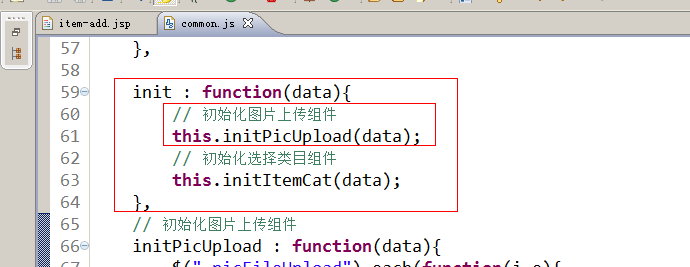
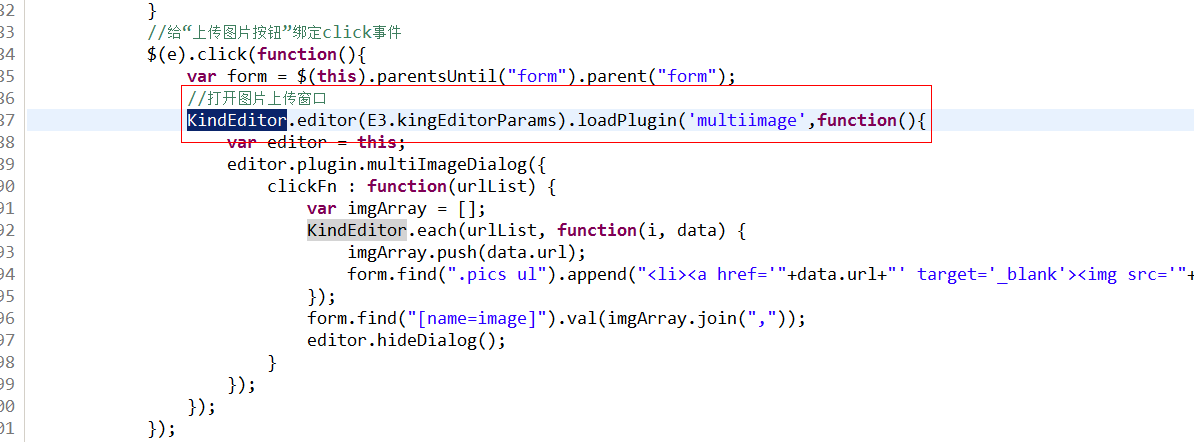
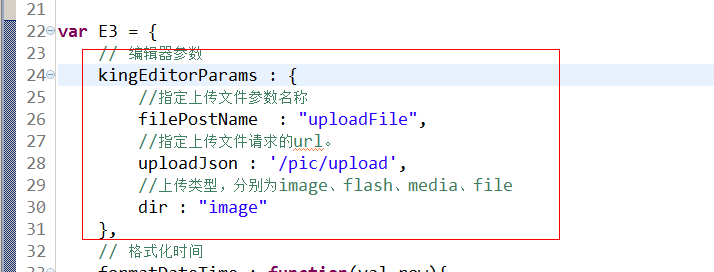
页面使用的是KindEditor的多图片上传插件
KindEditor 4.x 文档:http://kindeditor.net/doc.php
参数:MultiPartFile uploadFile
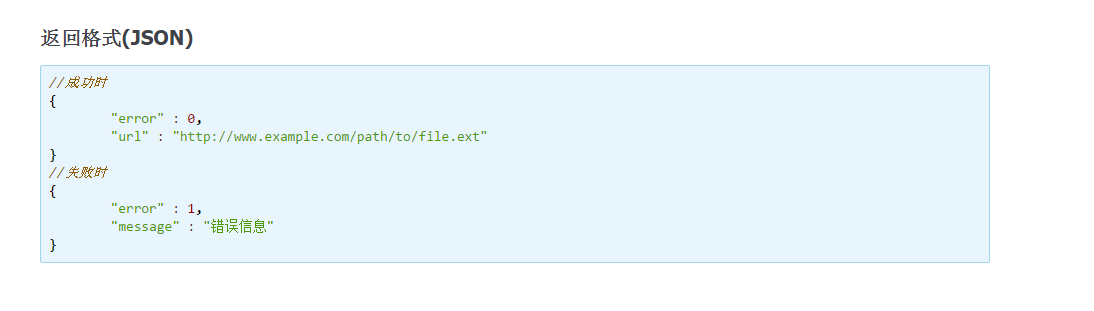
返回值:
5、spring文件配置多媒体解析器
1<!-- 定义文件上传解析器 -->
2    <bean id="multipartResolver"
3        class="org.springframework.web.multipart.commons.CommonsMultipartResolver">
4        <!-- 设定默认编码 -->
5        <property name="defaultEncoding" value="UTF-8"></property>
6        <!-- 设定文件上传的最大值5MB,5*1024*1024 -->
7        <property name="maxUploadSize" value="5242880"></property>
8    </bean>
6、上传代码(kindeditor对text/plain返回类型支持最好,如果返回json不兼容改为返回string)
1@Controller
2public class PictureController {
3    @Value("${IMAGE_SERVER_URL}")
4    private String IMAGE_SERVER_URL;
5
6    @RequestMapping("/pic/upload")
7    @ResponseBody
8    public Map fileUpload(MultipartFile uploadFile) {
9        try {
10            //1、取文件的扩展名
11            String originalFilename = uploadFile.getOriginalFilename();
12            String extName = originalFilename.substring(originalFilename.lastIndexOf(".") + 1);
13            //2、创建一个FastDFS的客户端
14            FastDFSClient fastDFSClient = new FastDFSClient("classpath:resource/client.conf");
15            //3、执行上传处理
16            String path = fastDFSClient.uploadFile(uploadFile.getBytes(), extName);
17            //4、拼接返回的url和ip地址,拼装成完整的url
18            String url = IMAGE_SERVER_URL + path;
19            //5、返回map
20            Map result = new HashMap<>();
21            result.put("error", 0);
22            result.put("url", url);
23            return result;
24        } catch (Exception e) {
25            e.printStackTrace();
26            //5、返回map
27            Map result = new HashMap<>();
28            result.put("error", 1);
29            result.put("message", "图片上传失败");
30            return result;
31        }
32    }
33}
二、SpringBoot使用FastDFS
1.新建viuman-upload微服务。pom.xml:
1<?xml version="1.0" encoding="UTF-8"?>
2<project xmlns="http://maven.apache.org/POM/4.0.0"
3         xmlns:xsi="http://www.w3.org/2001/XMLSchema-instance"
4         xsi:schemaLocation="http://maven.apache.org/POM/4.0.0 http://maven.apache.org/xsd/maven-4.0.0.xsd">
5    <parent>
6        <artifactId>viuman</artifactId>
7        <groupId>com.viuman</groupId>
8        <version>1.0-SNAPSHOT</version>
9    </parent>
10    <modelVersion>4.0.0</modelVersion>
11
12    <artifactId>viuman-upload</artifactId>
13
14    <dependencies>
15        <dependency>
16            <groupId>com.viuman</groupId>
17            <artifactId>viuman-common</artifactId>
18            <version>1.0-SNAPSHOT</version>
19        </dependency>
20        <dependency>
21            <groupId>org.springframework.cloud</groupId>
22            <artifactId>spring-cloud-starter-netflix-eureka-client</artifactId>
23        </dependency>
24        <dependency>
25            <groupId>org.springframework.boot</groupId>
26            <artifactId>spring-boot-starter-web</artifactId>
27        </dependency>
28        <dependency>
29            <groupId>com.github.tobato</groupId>
30            <artifactId>fastdfs-client</artifactId>
31            <version>1.26.2</version>
32        </dependency>
33        <dependency>
34            <groupId>org.springframework.boot</groupId>
35            <artifactId>spring-boot-starter-test</artifactId>
36        </dependency>
37    </dependencies>
38</project>
2.application.yml
1server:
2  port: 8082
3spring:
4  application:
5    name: upload
6  servlet:
7    multipart:
8      max-file-size: 5MB # 限制文件上传的大小
9# Eureka
10eureka:
11  client:
12    service-url:
13      defaultZone: http://127.0.0.1:10086/eureka
14  instance:
15    lease-renewal-interval-in-seconds: 5 # 每隔5秒发送一次心跳
16    lease-expiration-duration-in-seconds: 10 # 10秒不发送就过期
17    prefer-ip-address: true
18    ip-address: 127.0.0.1
19    instance-id: ${spring.application.name}:${server.port}
20# FastDFS
21fdfs:
22  so-timeout: 1501
23  connect-timeout: 601
24  thumb-image: # 缩略图
25    width: 60
26    height: 60
27  tracker-list: # tracker地址
28    - tracker.viuman.com:22122
29IMAGE_SERVER_DOMAIN: http://image.viuman.com/
3.启动类
1package com.viuman;
2
3import org.springframework.boot.SpringApplication;
4import org.springframework.boot.autoconfigure.SpringBootApplication;
5import org.springframework.cloud.client.discovery.EnableDiscoveryClient;
6
7@SpringBootApplication
8@EnableDiscoveryClient
9public class UploadApplication {
10    public static void main(String[] args) {
11        SpringApplication.run(UploadApplication.class);
12    }
13}
4.修改网关微服务的application.yml。忽略路由上传微服务
1zuul:
2  prefix: /api # 添加路由前缀
3  retryable: true
4  routes:
5    item-service: /item/** #将商品微服务映射到/item/**
6  ignored-services: upload #忽略路由该服务
5.创建Cors跨域配置类。详见https://www.cnblogs.com/naixin007/p/10420684.html
6.引入fdfs配置类
1package com.viuman.config;
2
3import com.github.tobato.fastdfs.FdfsClientConfig;
4import org.springframework.context.annotation.Configuration;
5import org.springframework.context.annotation.EnableMBeanExport;
6import org.springframework.context.annotation.Import;
7import org.springframework.jmx.support.RegistrationPolicy;
8
9@Configuration
10@Import(FdfsClientConfig.class)
11//解决jmx重复注册bean的问题
12@EnableMBeanExport(registration = RegistrationPolicy.IGNORE_EXISTING)
13public class FastClientImporter {
14}
7.service层上传代码
1package com.viuman.upload.service.impl;
2
3import com.github.tobato.fastdfs.domain.StorePath;
4import com.github.tobato.fastdfs.domain.ThumbImageConfig;
5import com.github.tobato.fastdfs.service.FastFileStorageClient;
6import com.viuman.entity.Status;
7import com.viuman.exception.BusinessException;
8import com.viuman.upload.service.UploadService;
9import org.apache.commons.lang3.StringUtils;
10import org.springframework.beans.factory.annotation.Autowired;
11import org.springframework.beans.factory.annotation.Value;
12import org.springframework.stereotype.Service;
13import org.springframework.web.multipart.MultipartFile;
14
15import javax.imageio.ImageIO;
16import java.awt.image.BufferedImage;
17import java.io.IOException;
18import java.util.Arrays;
19import java.util.List;
20
21@Service
22public class UploadServiceImpl implements UploadService {
23    @Autowired
24    private FastFileStorageClient storageClient;
25    @Autowired
26    private ThumbImageConfig thumbImageConfig;
27
28    @Value("${IMAGE_SERVER_DOMAIN}")
29    private String IMAGE_SERVER_DOMAIN;
30
31    //支持的文件类型
32    List<String> suffixes = Arrays.asList("image/png", "image/jpeg");
33
34    @Override
35    public String upload(MultipartFile file) {
36        if (null == file) {
37            throw new BusinessException(Status.PARAM_LACK_ERROR);
38        }
39        if (!suffixes.contains(file.getContentType())) {
40            throw new BusinessException(Status.PARAM_ILLEGAL_ERROR.setMsg("文件类型不支持"));
41        }
42        try {
43            BufferedImage image = ImageIO.read(file.getInputStream());
44            if (null == image) {
45                throw new BusinessException(Status.PARAM_ILLEGAL_ERROR.setMsg("文件内容不符合要求"));
46            }
47        } catch (IOException e) {
48            e.printStackTrace();
49        }
50
51        StorePath storePath = null;
52        String extension = StringUtils.substringAfterLast(file.getOriginalFilename(), ".");
53        try {
54            storePath = storageClient.uploadImageAndCrtThumbImage(file.getInputStream(),
55                    file.getSize(), extension, null);
56        } catch (IOException e) {
57            e.printStackTrace();
58        }
59        if (null == storePath || StringUtils.isBlank(storePath.getFullPath())) {
60            throw new BusinessException(Status.REMOTE_ERROR.setMsg("上传失败"));
61        }
62
63        String url = IMAGE_SERVER_DOMAIN + storePath.getFullPath();
64        return url;
65    }
66}
8.上传返回结果
原图路径:http://image.viuman.com/group1/M00/00/00/rBHRQl2UbEWAWsRwAAFWAkILswQ447.png


缩略图路径:http://image.viuman.com/group1/M00/00/00/rBHRQl2UbEWAWsRwAAFWAkILswQ447_60x60.png
