
原文: .NET一个线程更新另一个线程的UI(两种实现方法及若干简化)
本片博文接上一篇:**.NET多线程执行函数,**给出实现一个线程更新另一个线程UI的两种方法。
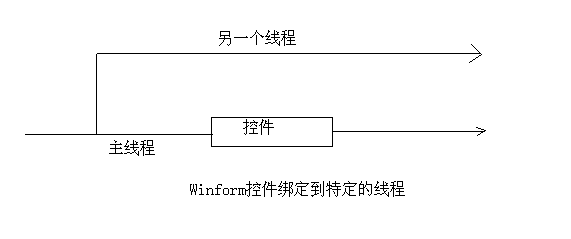
Winform中的控件是绑定到特定的线程的(一般是主线程),这意味着从另一个线程更新主线程的控件不能直接调用该控件的成员。
控件绑定到特定的线程这个概念如下:
为了从另一个线程更新主线程的Windows Form控件,可用的方法有:
首先用一个简单的程序来示例,这个程序的功能是:在Winfrom窗体上,通过多线程用label显示时间。给出下面的两种实现方式
1.结合使用特定控件的如下成员
InvokeRequired属性:返回一个bool值,指示调用者在不同的线程上调用控件时是否必须使用Invoke()方法。如果主调线程不是创建该控件的线程,或者还没有为控件创建窗口句柄,则返回true。
Invoke()方法:在拥有控件的底层窗口句柄的线程上执行委托。
BeginInvoke()方法:异步调用Invoke()方法。
EndInvoke()方法:获取BeginInvoke()方法启动的异步操作返回值。
1using System;
2using System.Collections.Generic;
3using System.ComponentModel;
4using System.Data;
5using System.Drawing;
6using System.Linq;
7using System.Text;
8using System.Windows.Forms;
9using System.Threading;
10
11namespace 一个线程更新另一个线程UI2
12{
13    /// <summary>
14    /// DebugLZQ
15    /// http://www.cnblogs.com/DebugLZQ
16    /// </summary>
17    public partial class Form1 : Form
18    {
19        public Form1()
20        {
21            InitializeComponent();
22        }
23
24        private void UpdateLabel(Control ctrl, string s)
25        {
26            ctrl.Text = s;
27        }
28        private delegate void UpdateLabelDelegate(Control ctrl, string s);
29
30        private void PrintTime()
31        {
32            if (label1.InvokeRequired == true)
33            {
34                UpdateLabelDelegate uld = new UpdateLabelDelegate(UpdateLabel);
35                while(true)
36                {
37                    label1.Invoke(uld, new object[] { label1, DateTime.Now.ToString() });
38                }
39            }
40            else
41            {
42                while (true)
43                {
44                    label1.Text = DateTime.Now.ToString();
45                }
46            }
47        }
48
49        private void Form1_Load(object sender, EventArgs e)
50        {
51            //PrintTime();//错误的单线程调用
52
53            Thread t = new Thread(new ThreadStart(PrintTime));
54            t.Start();
55        }
56    }
57}
比较和BackgroundWorker控件方式的异同点。
2.使用BackgroundWorker控件。
1using System;
2using System.Collections.Generic;
3using System.ComponentModel;
4using System.Data;
5using System.Drawing;
6using System.Linq;
7using System.Text;
8using System.Windows.Forms;
9
10namespace 一个线程更新另一个线程UI
11{
12    /// <summary>
13    /// DebugLZQ
14    /// http://www.cnblogs.com/DebugLZQ
15    /// </summary>
16    public partial class Form1 : Form
17    {
18        public Form1()
19        {
20            InitializeComponent();
21        }
22
23        private void UpdateLabel(Control ctrl, string s)
24        {
25            ctrl.Text = s;
26        }
27
28        private delegate void UpdateLabelDelegate(Control ctrl, string s);
29
30        private void PrintTime()
31        {
32            if (label1.InvokeRequired == true)
33            {
34                UpdateLabelDelegate uld = new UpdateLabelDelegate(UpdateLabel);
35                while (true)
36                {
37                    label1.Invoke(uld, new object[] { label1, DateTime.Now.ToString() });
38                }
39            }
40            else
41            {
42                while (true)
43                {
44                    label1.Text = DateTime.Now.ToString();
45                }
46            }
47        }
48
49        private void backgroundWorker1_DoWork(object sender, DoWorkEventArgs e)
50        {
51            PrintTime();
52        }
53
54        private void Form1_Load(object sender, EventArgs e)
55        {
56            backgroundWorker1.RunWorkerAsync();
57        }
58    }
59}
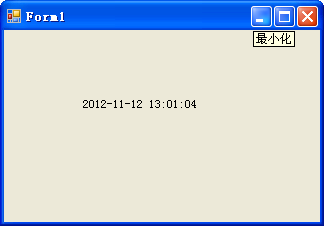
程序的运行结果如下:
--------------------
Update:请参考后续博文:WPF: Cancel an Command using BackgroundWorker
--------------------
更新另一个线程的进度条示例(第一种方法实现)
DebugLZQ觉得第一种方法要更直观一点,或是更容易理解一点。下面再用第一种方法来做一个Demo:输入一个数,多线程计算其和值更新界面上的Label,并用进度条显示计算的进度。实际上就是,更新另一个线程的两个UI控件。
1using System;
2using System.Collections.Generic;
3using System.ComponentModel;
4using System.Data;
5using System.Drawing;
6using System.Linq;
7using System.Text;
8using System.Windows.Forms;
9using System.Threading;
10
11namespace 一个线程更新另一个线程的UI3
12{
13    /// <summary>
14    /// DebugLZQ
15    /// http://www.cnblogs.com/DebugLZQ
16    /// </summary>
17    public partial class Form1 : Form
18    {
19        public Form1()
20        {
21            InitializeComponent();
22        }
23
24
25        private static long result = 0;
26
27
28        //更新Label
29        private void UpdateLabel(Control ctrl, string s)
30        {
31            ctrl.Text = s;
32        }
33
34        private delegate void UpdateLabelDelegate(Control ctrl, string s);
35
36        //更新ProgressBar
37        private void UpdateProgressBar(ProgressBar ctrl, int n)
38        {
39            ctrl.Value = n;
40        }
41
42        private delegate void UpdateProgressBarDelegate(ProgressBar ctrl, int n);
43
44
45        private void Sum(object o)
46        {
47            result = 0;
48
49            long num = Convert.ToInt64(o);
50
51            UpdateProgressBarDelegate upd = new UpdateProgressBarDelegate(UpdateProgressBar);
52
53            for (long i = 1; i <= num; i++)
54            {
55                result += i;
56                //更新ProcessBar1
57                if (i % 10000 == 0)//这个数值要选的合适,太小程序会卡死
58                {
59                    if (progressBar1.InvokeRequired == true)
60                    {
61                        progressBar1.Invoke(upd, new object[] { progressBar1, Convert.ToInt32((100 * i) / num) });//若是(i/num)*100,为什么进度条会卡滞?
62                    }
63                    else
64                    {
65                        progressBar1.Value = Convert.ToInt32(i / num * 100);
66                    }
67                }
68
69            }
70
71            //更新lblResult
72            if (lblResult.InvokeRequired == true)
73            {
74                UpdateLabelDelegate uld = new UpdateLabelDelegate(UpdateLabel);
75                lblResult.Invoke(uld, new object[] { lblResult, result.ToString() });
76            }
77            else
78            {
79                lblResult.Text = result.ToString();
80            }
81
82        }
83
84        private void btnStart_Click(object sender, EventArgs e)
85        {
86            Thread t = new Thread(new ParameterizedThreadStart(Sum));
87            t.Start(txtNum.Text);
88        }
89
90
91    }
92}
程序的运行结果如下:
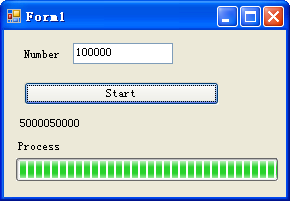
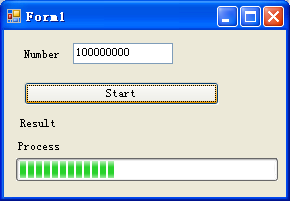
用BackgroundWorker控件可以实现相同的功能,个人觉得这样更容易理解~
第一种方法的若干简化
和异步方法调用一样,我们可以使用delegate、匿名方法、Action/Function等系统提供委托、Lambda表达式等进行简化。
如,第一种方法,更新界面时间,我们可以简化如下:
1using System;
2using System.Windows.Forms;
3using System.Threading;
4
5namespace WindowsFormsApplication1
6{
7    public partial class FormActionFunction : Form
8    {
9        public FormActionFunction()
10        {
11            InitializeComponent();
12        }
13
14        private void UpdateLabel()
15        {
16            label1.Text = DateTime.Now.ToString();
17            label2.Text = DateTime.Now.ToString();
18        }
19
20        private void PrintTime()
21        {
22            while (true)
23            {
24                PrintTime(UpdateLabel);
25            }
26        }
27
28        private void PrintTime(Action action)
29        {
30            if (InvokeRequired)
31            {
32                Invoke(action);
33            }
34            else
35            {
36                action();
37            }
38        }
39
40
41        private void FormActionFunction_Load(object sender, EventArgs e)
42        {
43            Thread t = new Thread(new ThreadStart(PrintTime));
44            t.IsBackground = true;
45            t.Start();
46        }
47    }
48}
也可以再简化:
1using System;
2using System.Windows.Forms;
3using System.Threading;
4
5namespace WindowsFormsApplication1
6{
7    public partial class FormActionFunction : Form
8    {
9        public FormActionFunction()
10        {
11            InitializeComponent();
12        }
13
14        private void PrintTime()
15        {
16            while (true)
17            {
18                PrintTime(() => { label1.Text = DateTime.Now.ToString(); label2.Text = DateTime.Now.ToString(); });//Lambda简写
19            }
20        }
21
22        private void PrintTime(Action action)
23        {
24            if (InvokeRequired)
25            {
26                Invoke(action);
27            }
28            else
29            {
30                action();
31            }
32        }
33
34
35        private void FormActionFunction_Load(object sender, EventArgs e)
36        {
37            Thread t = new Thread(new ThreadStart(PrintTime));
38            t.IsBackground = true;
39            t.Start();
40        }
41    }
42}
进一步简化:
1using System;
2using System.Windows.Forms;
3using System.Threading;
4
5namespace WindowsFormsApplication1
6{
7    public partial class FormBestPractice : Form
8    {
9        public FormBestPractice()
10        {
11            InitializeComponent();
12        }
13
14        private void PrintTime()
15        {
16            while (true)
17            {
18                Invoke(new Action(() => { label1.Text = DateTime.Now.ToString(); label2.Text = DateTime.Now.ToString(); }));
19            }
20        }
21
22
23        private void FormBestPractice_Load(object sender, EventArgs e)
24        {
25            Thread t = new Thread(new ThreadStart(PrintTime));
26            t.IsBackground = true;
27            t.Start();
28        }
29    }
30}
再进一步简化:
1using System;
2using System.Windows.Forms;
3using System.Threading;
4
5namespace WindowsFormsApplication1
6{
7    public partial class FormBestPractice2 : Form
8    {
9        public FormBestPractice2()
10        {
11            InitializeComponent();
12        }
13
14        private void FormBestPractice2_Load(object sender, EventArgs e)
15        {
16            Thread t = new Thread(new ThreadStart(() => {
17                while (true)
18                {
19                    Invoke(new Action(() => { label1.Text = DateTime.Now.ToString(); label2.Text = DateTime.Now.ToString(); }));
20                }
21            }));
22            t.IsBackground = true;
23            t.Start();
24        }
25
26    }
27}
可根据代码风格要求,去掉 new ThreadStart()、new Action(),程序也可以正常运行,但是这样DebugLZQ不推荐这样,因为多线程调用方法参数不够清晰,可参考DebugLZQ关于多线程执行函数的博文。
根据个人编码习惯,可选择合适的编码方法。以上代码由DebugLZQ编写,可正常运行,就不附上界面截图了。
-----------------
说明:以上所有更新方法均默认为同步方法。
若需要异步执行,则把Invoke换成BeginInvoke即可,其优点是不会阻塞当前线程。
============================================
若是WPF程序,则只要把在Winform中用于更新拥有控件的线程使用的Invoke方法换成
Dispatcher.Invoke
即可。也给出一个Demo:
MainWindow.xaml, MainWindow.xaml.cs如下:


1<Window x:Class="WpfApplication1.MainWindow"
2        xmlns="http://schemas.microsoft.com/winfx/2006/xaml/presentation"
3        xmlns:x="http://schemas.microsoft.com/winfx/2006/xaml"
4        Title="MainWindow" Height="350" Width="525">
5    <Grid>
6        <StackPanel>
7            <Button Content="Start" Click="ButtonBase_OnClick" Height="40" Margin="40"/>
8            <Grid>
9                <ProgressBar x:Name="ProgressBar1" Height="60"/>
10                <TextBlock x:Name="TextBlock1" FontSize="40" HorizontalAlignment="Center" VerticalAlignment="Center"/>
11            </Grid>
12        </StackPanel>
13    </Grid>
14</Window>
View Code


1using System;
2using System.Threading;
3using System.Windows;
4
5namespace WpfApplication1
6{
7    /// <summary>
8    /// Interaction logic for MainWindow.xaml
9    /// </summary>
10    public partial class MainWindow : Window
11    {
12        public MainWindow()
13        {
14            InitializeComponent();
15        }
16
17        private void ButtonBase_OnClick(object sender, RoutedEventArgs e)
18        {
19            ProgressBar1.Minimum = 0;
20            ProgressBar1.Maximum = 100;
21
22            Thread t = new Thread(() =>
23            {
24                for (int i = 0; i <= 100 * 1000; i++)
25                {
26                    Dispatcher.Invoke(() =>
27
28                    {
29                        if (i % 1000 == 0)
30                        {
31                            ProgressBar1.Value = i / 1000;
32                            TextBlock1.Text = i/1000 + "%";
33                        }
34                    });
35                }
36            });
37            t.IsBackground = true;
38            t.Start();
39        }
40    }
41}
View Code
效果如下:
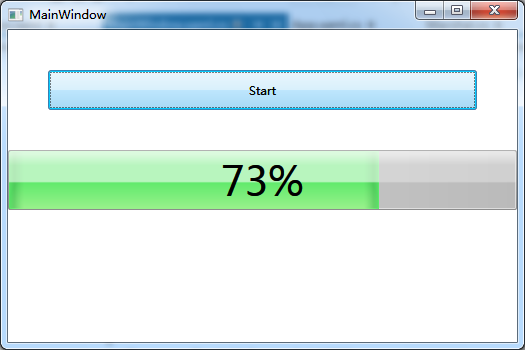
若不想阻塞当前线程(注意:是当前线程,非UI线程,Dispatcher.BeginInvoke可能会阻塞UI线程,因为其做的事情是:将执行扔给UI线程去执行,立即返回当前线程~其不管UI线程死活),则可使用异步Invoke:
Dispatcher.BeginInvoke
.NET Framework 4.5 提供了新的异步模式Async,因此开发平台若为.NET 4.5,也可以使用:
Dispatcher.InvokeAsync
详细请参考DebugLZQ后续博文:WPF: Updating the UI from a non-UI thread
或是直接对同步方法进行异步封装,请参考DebugLZQ后续相关博文:从C#5.0说起:再次总结C#异步调用方法发展史。
小结
无论WPF还是WinForm,UI都是由单个线程负责更新~
Invoke解决的问题是:非UI线程无法更新UI线程的问题. 其实现方法是将方法扔给UI线程执行(To UI Thread),Invoke等待UI线程执行完成才返回;BeginInvoke不等待UI线程执行完立刻返回~
Invoke/BeginInvoke可能会阻塞UI线程.(Invoke/BeginInvoke的区别是:是否等待UI线程执行完才返回当前线程继续执行~)
不阻塞UI线程:其解决方法是将耗时的非更新UI的操作操作放到后台线程里去,与Invoke/BeginInvoke没有半毛钱关系~也就是:别给UI线程太大压力!
希望对你有帮助~