
中间件:一种提供在不同技术、不同的软件之间共享资源的程序,更大化了利用了数据库的性能,可以无限扩展(注:真实环境中并非如此)
数据库的中间件:
mysql proxy (官方版本)性能低,需要lua 脚本
atlas 性能低,响应时间长
amoeba 陈思儒研发
一、 先搭建一个主从关系的服务器
在主、从服务器上安装mysql mysql-server
1. 开启二进制日志
1[root@localhost ~]# vim /etc/my.cnf
2...
3log-bin=mysql-bin
4server-id = 132
5...
6
7[root@localhost ~]# vim /etc/my.cnf
8...l
9og-bin=mysql-bin
10server-id = 134
11...
2. 在主服务器上授权,从服务器上保存授权信息,并开启从服务线程
1mysql> grant replication slave on *.* to root@'192.168.80.134' identified by '123456';
2
3mysql> show master status;
4
5mysql> change master to
6    -> master_user='root',
7    -> master_password='123456',
8    -> master_host='192.168.80.132',
9    -> master_log_file='mysql-bin.000008',
10    -> master_log_pos=260;
11Query OK, 0 rows affected (0.35 sec)
12
13mysql> start slave;
14Query OK, 0 rows affected (0.01 sec)
15
16mysql> show slave status\G;
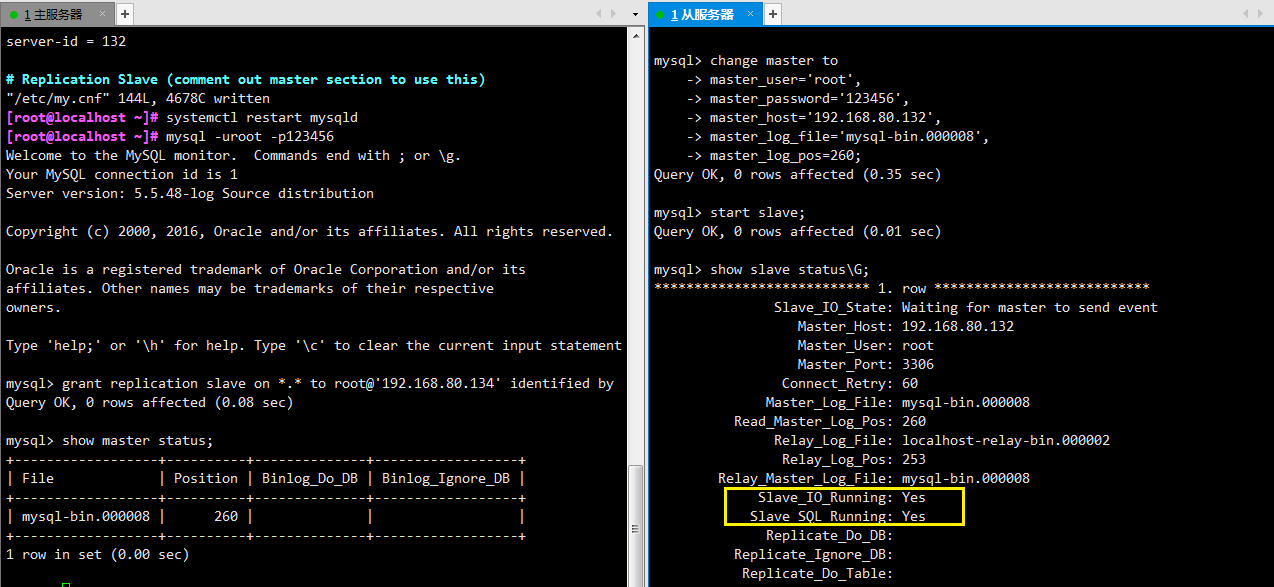
二、配置读写分离
1. 安装 gcc 环境
[root@localhost ~]# yum -y install gcc*
2. 安装jdk
前往官网下载:https://www.oracle.com/technetwork/java/javase/downloads/jdk8-downloads-2133151.html
1[root@localhost ~]# tar -zxvf jdk-8u231-linux-x64.tar.gz /amoeba/
2[root@localhost /amoeba]# ln -s jdk1.8.0_231/ jdk
3[root@localhost /amoeba]# vim /etc/profile
4
5JAVA_HOME=/amoeba/jdk
6export JAVA_HOME
7
8PATH=$JAVA_HOME/bin:$PATH
9export PATH
10
11
12[root@localhost /amoeba]# source /etc/profile
3. 安装amoeba
1[root@localhost ~]# wget https://jaist.dl.sourceforge.net/project/amoeba/Amoeba%20for%20mysql/3.x/amoeba-mysql-3.0.5-RC-distribution.zip
2[root@localhost ~]# mkdir /amoeba
3[root@localhost ~]# unzip amoeba-mysql-3.0.5-RC-distribution.zip -d /amoeba
4. 配置amoeba
amoeba 的配置文件位于安装目录下的conf目录中,实现读写分离功能,只需修改两个配置文件,dbServers.xml和amoeba.xml。
1[root@localhost /amoeba/amoeba-mysql-3.0.5-RC/conf]# cat dbServers.xml <?xml version="1.0" encoding="gbk"?>
2
3<!DOCTYPE amoeba:dbServers SYSTEM "dbserver.dtd">
4<amoeba:dbServers xmlns:amoeba="http://amoeba.meidusa.com/">
5
6        <!--
7            Each dbServer needs to be configured into a Pool,
8            If you need to configure multiple dbServer with load balancing that can be simplified by the following configuration:
9             add attribute with name virtual = "true" in dbServer, but the configuration does not allow the element with name factoryConfig
10             such as 'multiPool' dbServer
11        -->
12
13    <dbServer name="abstractServer" abstractive="true">
14        <factoryConfig class="com.meidusa.amoeba.mysql.net.MysqlServerConnectionFactory">
15            <property name="connectionManager">${defaultManager}</property>
16            <property name="sendBufferSize">64</property>
17            <property name="receiveBufferSize">128</property>
18
19            <!-- mysql port -->
20            <property name="port">3306</property>  #数据库端口
21
22            <!-- mysql schema -->
23            <property name="schema">test</property>  #指定连接的数据库
24
25            <!-- mysql user -->
26            <property name="user">root</property>  #登录使用的用户名
27
28            <property name="password">123456</property>  #登录使用的密码
29        </factoryConfig>
30
31        <poolConfig class="com.meidusa.toolkit.common.poolable.PoolableObjectPool">
32            <property name="maxActive">500</property>           #最大连接数
33            <property name="maxIdle">500</property>          #最大空闲连接数
34            <property name="minIdle">1</property>           #最下空闲连接数
35            <property name="minEvictableIdleTimeMillis">600000</property>
36            <property name="timeBetweenEvictionRunsMillis">600000</property>
37            <property name="testOnBorrow">true</property>
38            <property name="testOnReturn">true</property>
39            <property name="testWhileIdle">true</property>
40        </poolConfig>
41    </dbServer>
42
43    <dbServer name="server1"  parent="abstractServer">    #改名字可任意命名,后续有用
44        <factoryConfig>
45            <!-- mysql ip -->
46            <property name="ipAddress">192.168.80.132</property>  #数据库ip
47        </factoryConfig>
48    </dbServer>
49
50    <dbServer name="server2"  parent="abstractServer">
51        <factoryConfig>
52            <!-- mysql ip -->
53            <property name="ipAddress">192.168.80.134</property>  #数据库ip
54        </factoryConfig>
55    </dbServer>
56
57    <dbServer name="write" virtual="true">    #定义一个dbserver 组名
58        <poolConfig class="com.meidusa.amoeba.server.MultipleServerPool">
59            <!-- Load balancing strategy: 1=ROUNDROBIN , 2=WEIGHTBASED , 3=HA-->
60            <property name="loadbalance">1</property>    #选择调度算法
61
62            <!-- Separated by commas,such as: server1,server2,server1 -->
63            <property name="poolNames">server1</property>  #write组成员
64        </poolConfig>
65    </dbServer>
66    <dbServer name="read" virtual="true">
67        <poolConfig class="com.meidusa.amoeba.server.MultipleServerPool">
68            <!-- Load balancing strategy: 1=ROUNDROBIN , 2=WEIGHTBASED , 3=HA-->
69            <property name="loadbalance">1</property>
70
71            <!-- Separated by commas,such as: server1,server2,server1 -->
72            <property name="poolNames">server1,server2</property>
73        </poolConfig>
74    </dbServer>
75
76</amoeba:dbServers>
77
78[root@localhost /amoeba/amoeba-mysql-3.0.5-RC/conf]# cat amoeba.xml
79<?xml version="1.0" encoding="gbk"?>
80
81<!DOCTYPE amoeba:configuration SYSTEM "amoeba.dtd">
82<amoeba:configuration xmlns:amoeba="http://amoeba.meidusa.com/">
83
84    <proxy>
85
86        <!-- service class must implements com.meidusa.amoeba.service.Service -->
87        <service name="Amoeba for Mysql" class="com.meidusa.amoeba.mysql.server.MySQLService">
88            <!-- port -->
89            <property name="port">8066</property>    #amoeba监听端口,默认8066
90
91            <!-- bind ipAddress -->
92            <property name="ipAddress">192.168.80.133</property>  #amoeba安装地址
93
94            <property name="connectionFactory">
95                <bean class="com.meidusa.amoeba.mysql.net.MysqlClientConnectionFactory">
96                    <property name="sendBufferSize">128</property>
97                    <property name="receiveBufferSize">64</property>
98                </bean>
99            </property>
100
101            <property name="authenticateProvider">
102                <bean class="com.meidusa.amoeba.mysql.server.MysqlClientAuthenticator">
103
104                    <property name="user">root</property>  #设置客户端连接amoeba所需的用户名和密码
105
106                    <property name="password">123456</property>
107
108                    <property name="filter">
109                        <bean class="com.meidusa.toolkit.net.authenticate.server.IPAccessController">
110                            <property name="ipFile">${amoeba.home}/conf/access_list.conf</property>
111                        </bean>
112                    </property>
113                </bean>
114            </property>
115
116        </service>
117
118        <runtime class="com.meidusa.amoeba.mysql.context.MysqlRuntimeContext">
119
120            <!-- proxy server client process thread size -->
121            <property name="executeThreadSize">128</property>
122
123            <!-- per connection cache prepared statement size  -->
124            <property name="statementCacheSize">500</property>
125
126            <!-- default charset -->
127            <property name="serverCharset">utf8</property>
128
129            <!-- query timeout( default: 60 second , TimeUnit:second) -->
130            <property name="queryTimeout">60</property>
131        </runtime>
132
133    </proxy>
134
135    <!--
136        Each ConnectionManager will start as thread
137        manager responsible for the Connection IO read , Death Detection
138    -->
139    <connectionManagerList>
140        <connectionManager name="defaultManager" class="com.meidusa.toolkit.net.MultiConnectionManagerWrapper">
141            <property name="subManagerClassName">com.meidusa.toolkit.net.AuthingableConnectionManager</property>
142        </connectionManager>
143    </connectionManagerList>
144
145        <!-- default using file loader -->
146    <dbServerLoader class="com.meidusa.amoeba.context.DBServerConfigFileLoader">
147        <property name="configFile">${amoeba.home}/conf/dbServers.xml</property>
148    </dbServerLoader>
149
150    <queryRouter class="com.meidusa.amoeba.mysql.parser.MysqlQueryRouter">
151        <property name="ruleLoader">
152            <bean class="com.meidusa.amoeba.route.TableRuleFileLoader">
153                <property name="ruleFile">${amoeba.home}/conf/rule.xml</property>
154                <property name="functionFile">${amoeba.home}/conf/ruleFunctionMap.xml</property>
155            </bean>
156        </property>
157        <property name="sqlFunctionFile">${amoeba.home}/conf/functionMap.xml</property>
158        <property name="LRUMapSize">1500</property>
159        <property name="defaultPool">write</property>  #设置amoeba默认池
160        <property name="writePool">write</property>  #设置amoeba 写池,默认注释
161        <property name="readPool">read</property>   #设置amoeba读池,默认注释
162        <property name="needParse">true</property>
163    </queryRouter>
164</amoeba:configuration>
5. 在主从服务器上授权
mysql> grant all on *.* to 'root'@'192.168.80.133' identified by '123456';Query OK, 0 rows affected (0.00 sec)
6. 修改jvm.properties
1[root@localhost /amoeba/amoeba-mysql-3.0.5-RC]# vim jvm.properties
2
3JVM_OPTIONS="-server -Xms1024m -Xmx1024m -Xss256k -XX:PermSize=16m -XX:MaxPermSize=96m"
7. 启动
1[root@localhost /amoeba/amoeba-mysql-3.0.5-RC]# nohup bash +x /amoeba/amoeba-mysql-3.0.5-RC/bin/launcher &
2
3[root@localhost /amoeba/amoeba-mysql-3.0.5-RC]# tail -f nohup.out
42019-12-24 18:34:02,897 INFO  context.MysqlRuntimeContext - Amoeba for Mysql current versoin=5.1.45-mysql-amoeba-proxy-3.0.4-BETA
5log4j:WARN ip access config load completed from file:/amoeba/amoeba-mysql-3.0.5-RC/conf/access_list.conf
62019-12-24 18:34:03,331 INFO  net.ServerableConnectionManager - Server listening on /192.168.80.133:8066.
7Java HotSpot(TM) 64-Bit Server VM warning: ignoring option PermSize=16m; support was removed in 8.0
8Java HotSpot(TM) 64-Bit Server VM warning: ignoring option MaxPermSize=96m; support was removed in 8.0
9 2019-12-24 18:59:15 [INFO] Project Name=Amoeba-MySQL, PID=7607 , starting...
10log4j:WARN log4j config load completed from file:/amoeba/amoeba-mysql-3.0.5-RC/conf/log4j.xml
112019-12-24 18:59:16,333 INFO  context.MysqlRuntimeContext - Amoeba for Mysql current versoin=5.1.45-mysql-amoeba-proxy-3.0.4-BETA
12log4j:WARN ip access config load completed from file:/amoeba/amoeba-mysql-3.0.5-RC/conf/access_list.conf
132019-12-24 18:59:16,669 INFO  net.ServerableConnectionManager - Server listening on /192.168.80.133:8066.
14
15[root@localhost ~]# netstat -antp |grep 8066
16tcp6       0      0 192.168.80.133:8066     :::*                    LISTEN      7607/java
17
18[root@localhost ~]# firewall-cmd --zone=public --add-port=8066/tcp
19[root@localhost ~]# firewall-cmd --zone=public --add-port=8066/tcp --permanent
8. 测试
1[root@localhost ~]# mysql -uroot -p123456 -P8066 -h192.168.80.133
2Welcome to the MySQL monitor.  Commands end with ; or \g.
3Your MySQL connection id is 151281375
4Server version: 5.1.45-mysql-amoeba-proxy-3.0.4-BETA Source distribution
5
6Copyright (c) 2000, 2016, Oracle and/or its affiliates. All rights reserved.
7
8Oracle is a registered trademark of Oracle Corporation and/or its
9affiliates. Other names may be trademarks of their respective
10owners.
11
12Type 'help;' or '\h' for help. Type '\c' to clear the current input statement.
13
14mysql> use test;
15Database changed
16mysql> select * from ceshi2;
17+--------+
18| name   |
19+--------+
20| master |
21| amoeba |
22+--------+
232 rows in set (0.01 sec)
24
25mysql> select * from ceshi2;
26+--------+
27| name   |
28+--------+
29| master |
30| slave  |
31| amoeba |
32+--------+
333 rows in set (0.01 sec)
34
35mysql> select * from ceshi2;
36+--------+
37| name   |
38+--------+
39| master |
40| amoeba |
41+--------+
422 rows in set (0.01 sec)
43
44mysql> select * from ceshi2;
45+--------+
46| name   |
47+--------+
48| master |
49| slave  |
50| amoeba |
51+--------+
523 rows in set (0.01 sec)
53
54mysql> select * from ceshi2;
55+--------+
56| name   |
57+--------+
58| master |
59| amoeba |
60+--------+
612 rows in set (0.01 sec)
62
63mysql> select * from ceshi2;
64+--------+
65| name   |
66+--------+
67| master |
68| slave  |
69| amoeba |
70+--------+
713 rows in set (0.02 sec)
三、amoeba配置文件
主配置文件 $AMOEBA_HOME/conf/amoeba.xml,用来配置Amoeba服务的基本参数,如Amoeba主机地址、端口、认证方式、用于连接的用户名、密码、线程数、超时时间、其他配置文件的位置等。
数据库服务配置文件 $AMOEBA_HOME/conf/dbServers.xml,用来存储和配置Amoeba所代理的数据库服务器的信息,如:主机IP、端口、用户名、密码等。
切分规则配置文件 $AMOEBA_HOME/conf/rule.xml,用来配置切分规则。
数据库函数配置文件 $AMOEBA_HOME/conf/functionMap.xml,用来配置数据库函数的处理方法,Amoeba将使用该配置文件中的方法解析数据库函数。
切分规则函数配置文件 $AMOEBA_HOME/conf/ruleFunctionMap.xml,用来配置切分规则中使用的用户自定义函数的处理方法。
访问规则配置文件 $AMOEBA_HOME/conf/access_list.conf,用来授权或禁止某些服务器IP访问Amoeba。
日志规格配置文件 $AMOEBA_HOME/conf/log4j.xml,用来配置Amoeba输出日志的级别和方式。