
试用了Overt.Core.Grpc, 把 GRPC 的使用改造得像 WCF, 性能测试也非常不错, 非常推荐各位使用.
但已有项目大多是 http 请求, 改造成 GRPC 的话, 工作量比较大, 于是又找到了 Steeltoe.Discovery, 在 Startup 给 HttpClient 添加 DelegatingHandler, 动态改变请求url中的 host 和 port, 将http请求指向consul 发现的服务实例, 这样就实现了服务的动态发现.
经过性能测试, Steeltoe.Discovery 只有 Overt.Core.Grpc 的20%, 非常难以接受, 于是自己实现了一套基于 consul 的服务发现工具. 嗯, 名字好难取啊, 暂定为 ConsulDiscovery.HttpClient 吧
功能很简单:
- webapi 从json中读取配置信息 ConsulDiscoveryOptions;
- 如果自己是一个服务, 则将自己注册到consul中并设置健康检查Url;
- ConsulDiscovery.HttpClient 内有一个consul client 定时刷新所有服务的url访问地址.
比较核心的两个类


1using Consul;
2using Microsoft.Extensions.Options;
3using System;
4using System.Collections.Generic;
5using System.Linq;
6using System.Threading;
7
8namespace ConsulDiscovery.HttpClient
9{
10    public class DiscoveryClient : IDisposable
11    {
12        private readonly ConsulDiscoveryOptions consulDiscoveryOptions;
13        private readonly Timer timer;
14        private readonly ConsulClient consulClient;
15        private readonly string serviceIdInConsul;
16
17        public Dictionary<string, List<string>> AllServices { get; private set; } = new Dictionary<string, List<string>>(StringComparer.OrdinalIgnoreCase);
18
19
20        public DiscoveryClient(IOptions<ConsulDiscoveryOptions> options)
21        {
22            consulDiscoveryOptions = options.Value;
23            consulClient = new ConsulClient(x => x.Address = new Uri($"http://{consulDiscoveryOptions.ConsulServerSetting.IP}:{consulDiscoveryOptions.ConsulServerSetting.Port}"));
24            timer = new Timer(Refresh);
25
26            if (consulDiscoveryOptions.ServiceRegisterSetting != null)
27            {
28                serviceIdInConsul = Guid.NewGuid().ToString();
29            }
30        }
31
32        public void Start()
33        {
34            var checkErrorMsg = CheckParams();
35            if (checkErrorMsg != null)
36            {
37                throw new ArgumentException(checkErrorMsg);
38            }
39            RegisterToConsul();
40            timer.Change(0, consulDiscoveryOptions.ConsulServerSetting.RefreshIntervalInMilliseconds);
41        }
42
43        public void Stop()
44        {
45            Dispose();
46        }
47
48        private string CheckParams()
49        {
50            if (string.IsNullOrWhiteSpace(consulDiscoveryOptions.ConsulServerSetting.IP))
51            {
52                return "Consul服务器地址 ConsulDiscoveryOptions.ConsulServerSetting.IP 不能为空";
53            }
54
55            if (consulDiscoveryOptions.ServiceRegisterSetting != null)
56            {
57                var registerSetting = consulDiscoveryOptions.ServiceRegisterSetting;
58                if (string.IsNullOrWhiteSpace(registerSetting.ServiceName))
59                {
60                    return "服务名称 ConsulDiscoveryOptions.ServiceRegisterSetting.ServiceName 不能为空";
61                }
62                if (string.IsNullOrWhiteSpace(registerSetting.ServiceIP))
63                {
64                    return "服务地址 ConsulDiscoveryOptions.ServiceRegisterSetting.ServiceIP 不能为空";
65                }
66            }
67            return null;
68        }
69
70        private void RegisterToConsul()
71        {
72            if (string.IsNullOrEmpty(serviceIdInConsul))
73            {
74                return;
75            }
76
77            var registerSetting = consulDiscoveryOptions.ServiceRegisterSetting;
78            var httpCheck = new AgentServiceCheck()
79            {
80                HTTP = $"{registerSetting.ServiceScheme}{Uri.SchemeDelimiter}{registerSetting.ServiceIP}:{registerSetting.ServicePort}/{registerSetting.HealthCheckRelativeUrl.TrimStart('/')}",
81                Interval = TimeSpan.FromMilliseconds(registerSetting.HealthCheckIntervalInMilliseconds),
82                Timeout = TimeSpan.FromMilliseconds(registerSetting.HealthCheckTimeOutInMilliseconds),
83                DeregisterCriticalServiceAfter = TimeSpan.FromSeconds(10),
84            };
85            var registration = new AgentServiceRegistration()
86            {
87                ID = serviceIdInConsul,
88                Name = registerSetting.ServiceName,
89                Address = registerSetting.ServiceIP,
90                Port = registerSetting.ServicePort,
91                Check = httpCheck,
92                Meta = new Dictionary<string, string>() { ["scheme"] = registerSetting.ServiceScheme },
93            };
94            consulClient.Agent.ServiceRegister(registration).Wait();
95        }
96
97        private void DeregisterFromConsul()
98        {
99            if (string.IsNullOrEmpty(serviceIdInConsul))
100            {
101                return;
102            }
103            try
104            {
105                consulClient.Agent.ServiceDeregister(serviceIdInConsul).Wait();
106            }
107            catch
108            { }
109        }
110
111        private void Refresh(object state)
112        {
113            Dictionary<string, AgentService>.ValueCollection serversInConsul;
114            try
115            {
116                serversInConsul = consulClient.Agent.Services().Result.Response.Values;
117            }
118            catch // (Exception ex)
119            {
120                // 如果连接consul出错, 则不更新服务列表. 继续使用以前获取到的服务列表
121                // 但是如果很长时间都不能连接consul, 服务列表里的一些实例已经不可用了, 还一直提供这样旧的列表也不合理, 所以要不要在这里实现 健康检查? 这样的话, 就得把检查地址变成不能设置的
122                return;
123            }
124
125            // 1. 更新服务列表
126            // 2. 如果这个程序提供了服务, 还要检测 服务Id 是否在服务列表里
127            var tempServices = new Dictionary<string, HashSet<string>>();
128            bool needReregisterToConsul = true;
129            foreach (var service in serversInConsul)
130            {
131                var serviceName = service.Service;
132                if (!service.Meta.TryGetValue("scheme", out var serviceScheme))
133                {
134                    serviceScheme = Uri.UriSchemeHttp;
135                }
136                var serviceHost = $"{serviceScheme}{Uri.SchemeDelimiter}{service.Address}:{service.Port}";
137                if (!tempServices.TryGetValue(serviceName, out var serviceHosts))
138                {
139                    serviceHosts = new HashSet<string>();
140                    tempServices[serviceName] = serviceHosts;
141                }
142                serviceHosts.Add(serviceHost);
143
144                if (needReregisterToConsul && !string.IsNullOrEmpty(serviceIdInConsul) && serviceIdInConsul == service.ID)
145                {
146                    needReregisterToConsul = false;
147                }
148            }
149
150            if (needReregisterToConsul)
151            {
152                RegisterToConsul();
153            }
154
155            var tempAllServices = new Dictionary<string, List<string>>(StringComparer.OrdinalIgnoreCase);
156            foreach (var item in tempServices)
157            {
158                tempAllServices[item.Key] = item.Value.ToList();
159            }
160            AllServices = tempAllServices;
161        }
162
163
164        public void Dispose()
165        {
166            DeregisterFromConsul();
167            consulClient.Dispose();
168            timer.Dispose();
169        }
170    }
171}
View Code
1using System;
2using System.Net.Http;
3using System.Threading;
4using System.Threading.Tasks;
5
6namespace ConsulDiscovery.HttpClient
7{
8    public class DiscoveryHttpMessageHandler : DelegatingHandler
9    {
10        private static readonly Random random = new Random((int)DateTime.Now.Ticks);
11
12        private readonly DiscoveryClient discoveryClient;
13
14        public DiscoveryHttpMessageHandler(DiscoveryClient discoveryClient)
15        {
16            this.discoveryClient = discoveryClient;
17        }
18
19        protected override async Task<HttpResponseMessage> SendAsync(HttpRequestMessage request, CancellationToken cancellationToken)
20        {
21            if (discoveryClient.AllServices.TryGetValue(request.RequestUri.Host, out var serviceHosts))
22            {
23                if (serviceHosts.Count > 0)
24                {
25                    var index = random.Next(serviceHosts.Count);
26                    request.RequestUri = new Uri(new Uri(serviceHosts[index]), request.RequestUri.PathAndQuery);
27                }
28            }
29            return await base.SendAsync(request, cancellationToken).ConfigureAwait(false);
30        }
31    }
32}
View Code
使用方法
为了简单, 我为新建的WebApi 增加了一个 HelloController, 提供 SayHelloService 服务, 并把自己注册到Consul.
当我们访问这个WebApi的 /WeatherForecast 时, 其Get()方法会访问 http://SayHelloService/Hello/NetCore, 这就相当于一次远程调用, 只是调用的就是这个WebApi的/Hello/NetCore
1. appsettings.json 增加
1"ConsulDiscoveryOptions": {
2    "ConsulServerSetting": {
3      "IP": "127.0.0.1", // 必填
4      "Port": 8500, // 必填
5      "RefreshIntervalInMilliseconds": 1000
6    },
7    "ServiceRegisterSetting": {
8      "ServiceName": "SayHelloService", // 必填
9      "ServiceIP": "127.0.0.1", // 必填
10      "ServicePort": 5000, // 必填
11      "ServiceScheme": "http", // 只能是http 或者 https, 默认http,
12      "HealthCheckRelativeUrl": "/HealthCheck",
13      "HealthCheckIntervalInMilliseconds": 500,
14      "HealthCheckTimeOutInMilliseconds": 2000
15    }
16  }
2.修改Startup.cs
1using ConsulDiscovery.HttpClient;
2using Microsoft.AspNetCore.Builder;
3using Microsoft.AspNetCore.Hosting;
4using Microsoft.Extensions.Configuration;
5using Microsoft.Extensions.DependencyInjection;
6using Microsoft.Extensions.Hosting;
7using System;
8
9namespace WebApplication1
10{
11    public class Startup
12    {
13        public Startup(IConfiguration configuration)
14        {
15            Configuration = configuration;
16        }
17
18        public IConfiguration Configuration { get; }
19
20        public void ConfigureServices(IServiceCollection services)
21        {
22            services.AddControllers();
23
24            // 注册 ConsulDiscovery 相关配置
25            services.AddConsulDiscovery(Configuration);
26            // 配置 SayHelloService 的HttpClient
27            services.AddHttpClient("SayHelloService", c =>
28                {
29                    c.BaseAddress = new Uri("http://SayHelloService");
30                })
31                .AddHttpMessageHandler<DiscoveryHttpMessageHandler>();
32        }
33
34        public void Configure(IApplicationBuilder app, IWebHostEnvironment env, IHostApplicationLifetime lifetime)
35        {
36            if (env.IsDevelopment())
37            {
38                app.UseDeveloperExceptionPage();
39            }
40
41            app.UseRouting();
42
43            app.UseAuthorization();
44
45            app.UseEndpoints(endpoints =>
46            {
47                endpoints.MapControllers();
48            });
49
50            // 启动 ConsulDiscovery
51            app.StartConsulDiscovery(lifetime);
52        }
53    }
54}
3. 添加 HelloController
1using Microsoft.AspNetCore.Mvc;
2
3namespace WebApplication1.Controllers
4{
5    [ApiController]
6    [Route("[controller]")]
7    public class HelloController : ControllerBase
8    {
9        [HttpGet]
10        [Route("{name}")]
11        public string Get(string name)
12        {
13            return $"Hello {name}";
14        }
15    }
16}
4. 修改WeatherForecast
1using Microsoft.AspNetCore.Mvc;
2using System.Net.Http;
3using System.Threading.Tasks;
4
5namespace WebApplication1.Controllers
6{
7    [ApiController]
8    [Route("[controller]")]
9    public class WeatherForecastController : ControllerBase
10    {
11        private readonly IHttpClientFactory httpClientFactory;
12
13        public WeatherForecastController(IHttpClientFactory httpClientFactory)
14        {
15            this.httpClientFactory = httpClientFactory;
16        }
17
18        [HttpGet]
19        public async Task<string> Get()
20        {
21            var httpClient = httpClientFactory.CreateClient("SayHelloService");
22            var result = await httpClient.GetStringAsync("Hello/NetCore");
23            return $"WeatherForecast return:           {result}";
24        }
25    }
26}
5. 启动consul
consul agent -dev
6. 启动 WebApplication1 并访问 http://localhost:5000/weatherforecast
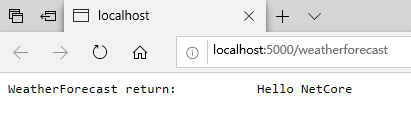
以上示例可以到 https://github.com/zhouandke/ConsulDiscovery.HttpClient 下载, 请记住一定要 启动consul: consul agent -dev
End