
1. 加入依赖包
1<dependency>
2            <groupId>junit</groupId>
3            <artifactId>junit</artifactId>
4            <version>4.9</version>
5            <scope>test</scope>
6        </dependency>
7<dependency>
8            <groupId>org.springframework</groupId>
9            <artifactId>spring-test</artifactId>
10            <version> 3.2.4.RELEASE  </version>
11            <scope>provided</scope>
12        </dependency>
2. 创建测试源目录和包
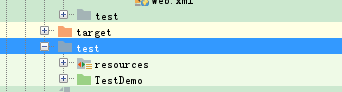
3. 创建测试类
创建一个测试用的类,推荐名称为 “被测试类名称 + Test”。
测试类应该继承与
AbstractJUnit4SpringContextTests 或 AbstractTransactionalJUnit4SpringContextTests
需要用到事务管理(比如要在测试结果出来之后回滚测试内容),就可以使用AbstractTransactionalJUnit4SpringTests类。事务管理的使用方法和正常使用Spring事务管理是一样的。再此需要注意的是,如果想要使用声明式事务管理,即使用AbstractTransactionalJUnitSpringContextTests类,请在applicationContext.xml文件中加入transactionManager bean:
<bean id="transactionManager" class="org.springframework.jdbc.datasource.DataSourceTransactionManager"> <property name="dataSource" ref="dataSource" /> </bean>
如果没有添加上述bean,将会抛出NoSuchBeanDefinitionException,指明 No bean named 'transactionManager' is definded.
4. 配置测试类
添加如下内容在class前,用于配置applicationContext.xml文件的位置。
@RunWith(SpringJUnit4ClassRunner.class) @ContextConfiguration(locations = "classpath:applicationContext.xml")
需要把applicationContext.xml和其相关的文件拉到resources下
5. 创建测试方法
创建测试用方法,推荐名称为 “被测方法名称+ Test”。
测试方法上方加入 @Test
6. 通过JUnit 4 执行
右键方法名,选择则“Run As”→“JUnit Test”即可
附录:整体测试类文件
1import com.zhaogang.mapper.NoticeMapper;
2import org.junit.Test;
3import org.junit.runner.RunWith;
4import org.slf4j.Logger;
5import org.slf4j.LoggerFactory;
6import org.springframework.test.context.ContextConfiguration;
7import org.springframework.test.context.junit4.AbstractJUnit4SpringContextTests;
8import org.springframework.test.context.junit4.SpringJUnit4ClassRunner;
9
10import javax.annotation.Resource;
11
12/**
13 * Created by weixiang.wu on 2017/8/2.
14 */
15@RunWith(SpringJUnit4ClassRunner.class)
16@ContextConfiguration(locations = "classpath:applicationContext.xml")
17public class NoticeTest extends AbstractJUnit4SpringContextTests {
18
19    private static final Logger logger = LoggerFactory.getLogger(NoticeTest.class);
20
21    @Resource
22    private NoticeMapper noticeMapper;
23
24
25    @Test
26    public void testUser() {
27        logger.info("公共标题测试: "+noticeMapper.selectTitleByPrimaryKey(23L));
28    }
29
30}