
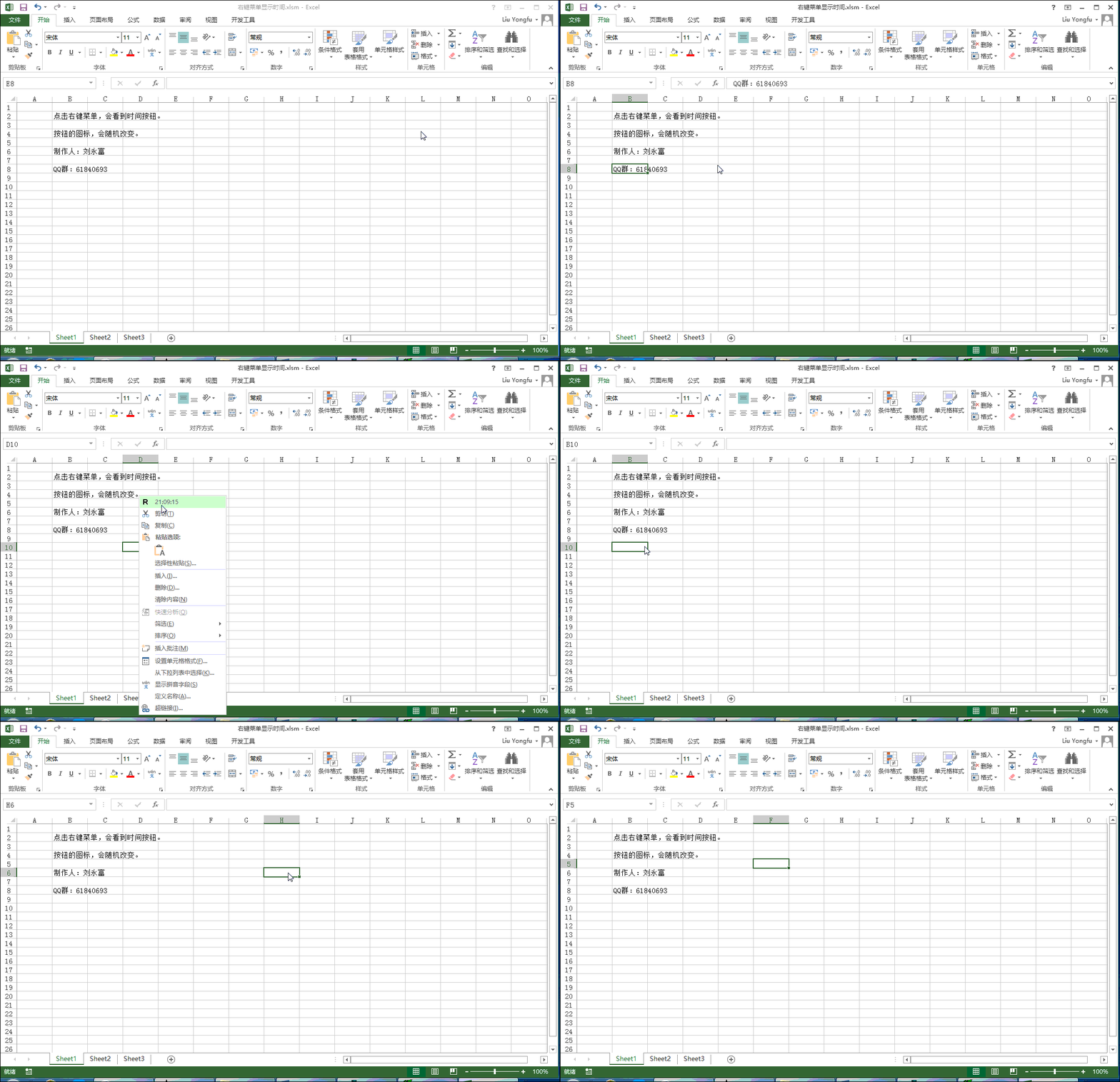
本例,在Excel右键菜单中创建一个按钮,按钮的标题使用getLabel动态获取,图标使用getImage动态获取。
customUI XML代码:
1<customUI xmlns="http://schemas.microsoft.com/office/2009/07/customui" onLoad="OL">
2    <contextMenus>
3        <contextMenu idMso="ContextMenuCell">
4            <button id="Button1" getLabel="GL" getImage="GI" insertBeforeMso="Cut"/>
5        </contextMenu>
6    </contextMenus>
7</customUI>
工作簿中的VBA回调代码:
1Public R As IRibbonUI
2Public Sub OL(ribbon As Office.IRibbonUI)
3Set R = ribbon
4End Sub
5Public Sub GL(control As Office.IRibbonControl, ByRef label)
6label = Time
7End Sub
8Public Sub GI(control As Office.IRibbonControl, ByRef image)
9Dim rnd As Integer
10rnd = Application.WorksheetFunction.RandBetween(65, 90)
11image = Chr(rnd)
12End Sub
效果演示:
源文件下载
想学习更多Office开发技能,赶紧加群联系群主!快满员了!