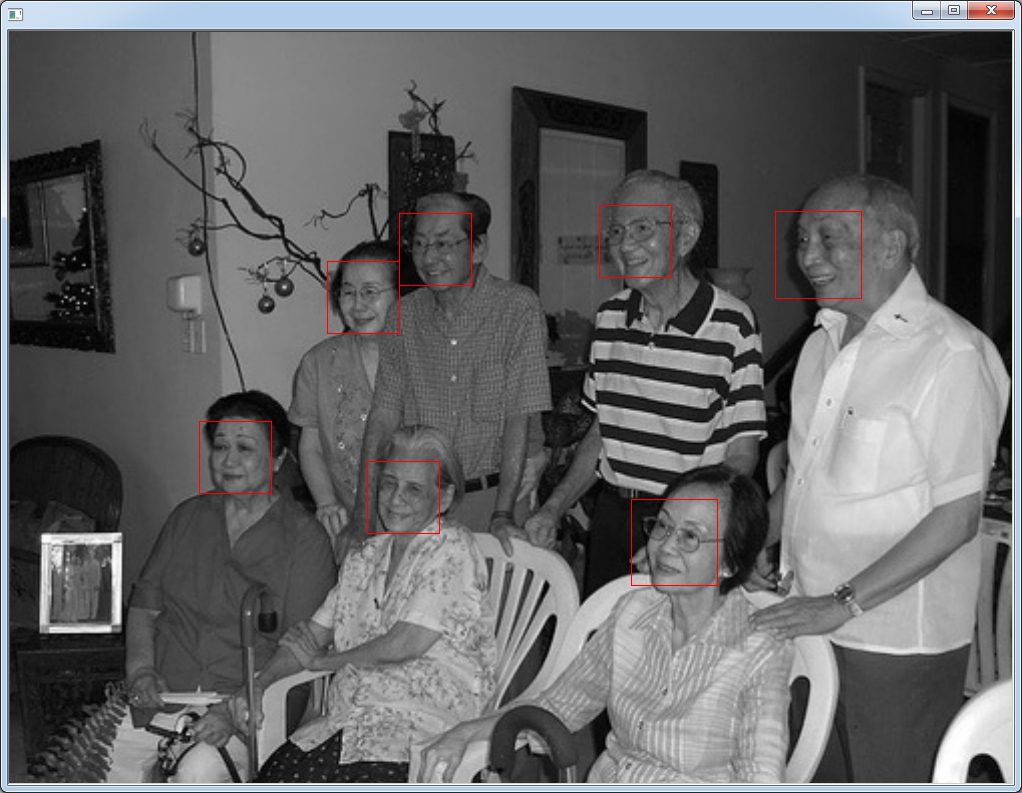
听说Dlib这玩意有人脸识别,觉得好高大上。
然后想拿例子来玩玩,发现运行的时候悲剧了,提示说不支持jpeg。
开始查找原因,发现是没有定义宏DLIB_JPEG_SUPPORT(png一样)
需要在工程项目追加QMAKE_CXXFLAGS += -DDLIB_JPEG_SUPPORT(本质是makefile加宏)
编译的时候悲催了!!!
报各种jpeg*函数 undefined reference to。一开始的想法是追加libjpeg.lib静态库,发现需要VS2010.
但电脑没装,这玩意太大了。后来想下载dll或者编译好的lib。最后各种折腾,都不成功。
其实是我逗逼了,人家Dlib已经提供了jpeg的源码,加上去就可以了。。。
目录在E:\Dlib\dlib-19.4\dlib\external\libjpeg(png一样)。
把这个目录加上去就可以了(原谅我偷懒)
代码的话,用人家的例子
E:\Dlib\dlib-19.4\examples\face_detection_ex.cpp
1#include <dlib/image_processing/frontal_face_detector.h>
2#include <dlib/gui_widgets.h>
3#include <dlib/image_io.h>
4#include <iostream>
5
6using namespace dlib;
7using namespace std;
8
9int main(int argc, char** argv)
10{
11    try
12    {
13        if (argc == 1)
14        {
15            cout << "Give some image files as arguments to this program." << endl;
16            return 0;
17        }
18
19        frontal_face_detector detector = get_frontal_face_detector();
20        image_window win;
21
22        // Loop over all the images provided on the command line.
23        for (int i = 1; i < argc; ++i)
24        {
25            cout << "processing image " << argv[i] << endl;
26            array2d<unsigned char> img;
27            load_image(img, argv[i]);
28            // Make the image bigger by a factor of two.  This is useful since
29            // the face detector looks for faces that are about 80 by 80 pixels
30            // or larger.  Therefore, if you want to find faces that are smaller
31            // than that then you need to upsample the image as we do here by
32            // calling pyramid_up().  So this will allow it to detect faces that
33            // are at least 40 by 40 pixels in size.  We could call pyramid_up()
34            // again to find even smaller faces, but note that every time we
35            // upsample the image we make the detector run slower since it must
36            // process a larger image.
37            pyramid_up(img);
38
39            // Now tell the face detector to give us a list of bounding boxes
40            // around all the faces it can find in the image.
41            std::vector<rectangle> dets = detector(img);
42
43            cout << "Number of faces detected: " << dets.size() << endl;
44            // Now we show the image on the screen and the face detections as
45            // red overlay boxes.
46            win.clear_overlay();
47            win.set_image(img);
48            win.add_overlay(dets, rgb_pixel(255,0,0));
49
50            cout << "Hit enter to process the next image..." << endl;
51            cin.get();
52        }
53    }
54    catch (exception& e)
55    {
56        cout << "\nexception thrown!" << endl;
57        cout << e.what() << endl;
58    }
59}
在生成的二进制目录下运行*.exe *.jpg
我的是
D:\Qt\project\build-face_recognition-Desktop_Qt_5_5_0_MinGW_32bit-Debug\debug>fa
ce_recognition.exe E:\Dlib\dlib-19.4\examples\faces\2007_007763.jpg
运行结果如下: