
别提示:本人博客部分有参考网络其他博客,但均是本人亲手编写过并验证通过。如发现博客有错误,请及时提出以免误导其他人,谢谢!欢迎转载,但记得标明文章出处: http://www.cnblogs.com/mao2080/
1、常用参数
a、配置参数
1 1 package com.mao.swagger.config;
2 2
3 3 import org.springframework.context.annotation.Bean;
4 4 import org.springframework.context.annotation.Configuration;
5 5
6 6 import springfox.documentation.builders.PathSelectors;
7 7 import springfox.documentation.builders.RequestHandlerSelectors;
8 8 import springfox.documentation.spi.DocumentationType;
9 9 import springfox.documentation.spring.web.plugins.Docket;
1010 import springfox.documentation.swagger2.annotations.EnableSwagger2;
1111
1212 @Configuration
1313 @EnableSwagger2
1414 public class SwaggerConfig {
1515
1616     @Bean
1717     public Docket userDocket() {
1818         return new Docket(DocumentationType.SWAGGER_2)
1919                 .groupName("商品接口文档")
2020                 .select()
2121                 .paths(PathSelectors.any())
2222                 .apis(RequestHandlerSelectors.basePackage("com.mao.swagger.goods.controller"))
2323                 .build();
2424     }
2525
2626     @Bean
2727     public Docket deviceDocket() {
2828         return new Docket(DocumentationType.SWAGGER_2)
2929                 .groupName("用户接口文档")
3030                 .select()
3131                 .paths(PathSelectors.any())
3232                 .apis(RequestHandlerSelectors.basePackage("com.mao.swagger.user.controller"))
3333                 .build();
3434     }
3535
3636 }
- .groupName("商品接口文档") 设置栏目名
- .select() 初始化并返回一个API选择构造器
- .paths(PathSelectors.any()) 设置路径筛选
- .apis(RequestHandlerSelectors.basePackage("com.mao.swagger.goods.controller")) 添加路径选择条件
- .build(); 构建
PathSelectors类的方法:
Predicate<String> any():满足条件的路径,该断言总为true
Predicate<String> none():不满足条件的路径,该断言总为false (生产环境可以屏蔽掉swagger:https://blog.csdn.net/goldenfish1919/article/details/78280051)
Predicate<String> regex(final String pathRegex):符合正则的路径
RequestHandlerSelectors类的方法:
Predicate<RequestHandler> any():返回包含所有满足条件的请求处理器的断言,该断言总为true
Predicate<RequestHandler> none():返回不满足条件的请求处理器的断言,该断言总为false
Predicate<RequestHandler> basePackage(final String basePackage):返回一个断言(Predicate),该断言包含所有匹配basePackage下所有类的请求路径的请求处理器
b、接口参数
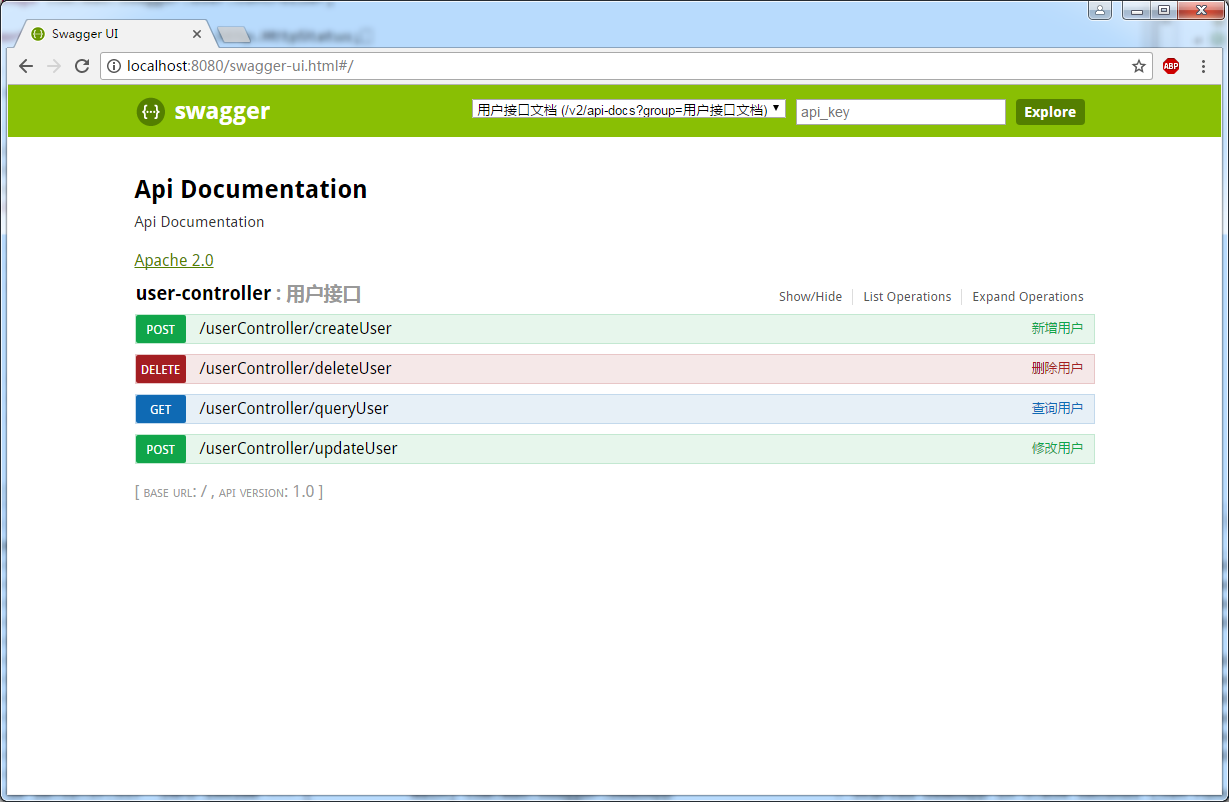
- @Api()用于类; 表示标识这个类是swagger的资源 【参考code1,效果图1】
- @ApiOperation()用于方法; 表示一个http请求的操作 【参考code1,效果图1】
- @ApiParam()用于方法,参数,字段说明; 表示对参数的添加元数据(说明或是否必填等) 【暂时没用,当前使用SpringMVC@RequestParam】
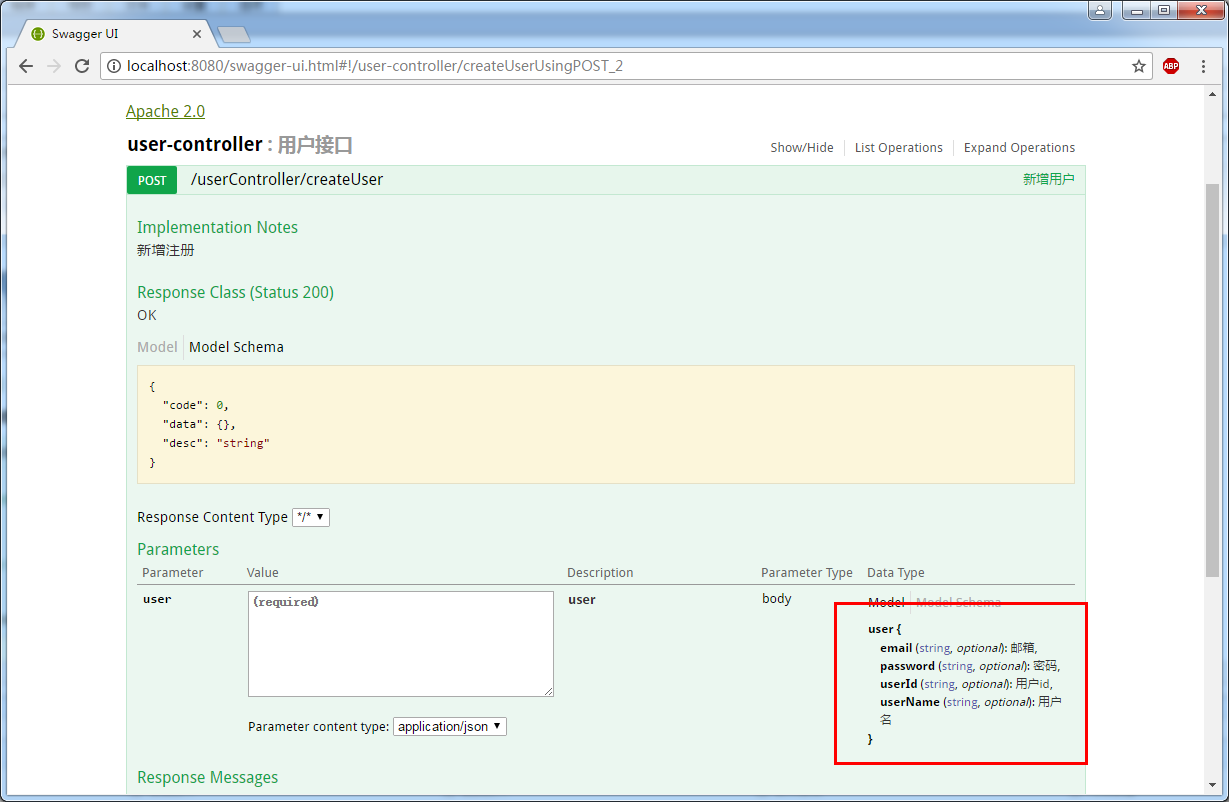
- @ApiModel()用于类 表示对类进行说明,用于参数用实体类接收 【参考code2,效果图2,3】
- @ApiModelProperty()用于方法,字段 表示对model属性的说明或者数据操作更改 【参考code2,效果图2,3】
- @ApiIgnore()用于类,方法,方法参数 表示这个方法或者类被忽略 【参考code1,效果图1】
- @ApiImplicitParam() 用于方法 表示单独的请求参数 【参考code1,效果图1】
- @ApiImplicitParams() 用于方法,包含多个 @ApiImplicitParam 【参考code1,效果图1】
code1
1 1 package com.mao.swagger.user.controller;
2 2
3 3 import org.springframework.http.HttpStatus;
4 4 import org.springframework.http.MediaType;
5 5 import org.springframework.web.bind.annotation.RequestBody;
6 6 import org.springframework.web.bind.annotation.RequestMapping;
7 7 import org.springframework.web.bind.annotation.RequestMethod;
8 8 import org.springframework.web.bind.annotation.RequestParam;
9 9 import org.springframework.web.bind.annotation.RestController;
1010
1111 import com.mao.swagger.beans.ResObject;
1212 import com.mao.swagger.beans.User;
1313
1414 import io.swagger.annotations.Api;
1515 import io.swagger.annotations.ApiImplicitParam;
1616 import io.swagger.annotations.ApiImplicitParams;
1717 import io.swagger.annotations.ApiOperation;
1818 import springfox.documentation.annotations.ApiIgnore;
1919
2020 /**
2121  * Hello world!
2222  *
2323  */
2424 @Api(description = "用户接口")
2525 @RestController
2626 @RequestMapping("/userController")
2727 public class UserController {
2828
2929     @ApiOperation(value = "新增用户" ,  notes="新增注册")
3030     @RequestMapping(value="/createUser",method=RequestMethod.POST,consumes= MediaType.APPLICATION_JSON_VALUE)
3131     public ResObject createUser(@RequestBody User user){
3232         System.out.println("createUser:::"+user.toString());
3333         return new ResObject(HttpStatus.OK.value(), "新增成功.");
3434     }
3535
3636     @ApiOperation(value = "修改用户" ,  notes="修改用户")
3737     @RequestMapping(value="/updateUser",method=RequestMethod.POST,consumes= MediaType.APPLICATION_JSON_VALUE)
3838     public ResObject updateUser(@RequestBody User user){
3939         System.out.println("updateUser:::"+user.toString());
4040         return new ResObject(HttpStatus.OK.value(), "修改成功.");
4141     }
4242
4343     @ApiOperation(value = "删除用户" ,  notes="删除用户")
4444     @ApiImplicitParams({
4545         @ApiImplicitParam(name = "userId", value = "用户标识", required = true, paramType = "query", dataType = "String")
4646     })
4747     @RequestMapping(value="/deleteUser",method=RequestMethod.DELETE)
4848     public ResObject deleteUser(@RequestParam("userId") String userId){
4949         System.out.println("deleteUser:::"+userId);
5050         return new ResObject(HttpStatus.OK.value(), "删除成功.");
5151     }
5252
5353     @ApiOperation(value = "查询用户" ,  notes="查询用户")
5454     @ApiImplicitParam(name = "userId", value = "用户标识", required = true, paramType = "query", dataType = "String")
5555     @RequestMapping(value="/queryUser",method=RequestMethod.GET)
5656     public ResObject queryUser(@RequestParam("userId") String userId){
5757         System.out.println("queryUser:::"+userId);
5858         User user = new User(userId, "张三", "******", "mao2080@sina.com");
5959         return new ResObject(HttpStatus.OK.value(), user);
6060     }
6161
6262     @ApiOperation(value = "被遗忘的方法" ,  notes="这个方法将被不会显示")
6363     @ApiIgnore
6464     @ApiImplicitParam(name = "userId", value = "用户标识", required = true, paramType = "query", dataType = "String")
6565     @RequestMapping(value="/queryUser1",method=RequestMethod.GET)
6666     public ResObject queryUser1(@RequestParam("userId") String userId){
6767         System.out.println("queryUser:::"+userId);
6868         User user = new User(userId, "张三", "******", "mao2080@sina.com");
6969         return new ResObject(HttpStatus.OK.value(), user);
7070     }
7171
7272 }
效果图1
code2
1 1 package com.mao.swagger.beans;
2 2
3 3 import io.swagger.annotations.ApiModel;
4 4 import io.swagger.annotations.ApiModelProperty;
5 5
6 6 @ApiModel(value="user", description="用户对象")
7 7 public class User {
8 8
9 9     @ApiModelProperty(value="用户id",name="userId",example="001")
1010     private String userId;
1111
1212     @ApiModelProperty(value="用户名",name="userName",example="mao2080")
1313     private String userName;
1414
1515     @ApiModelProperty(value="密码",name="password",example="123456")
1616     private String password;
1717
1818     @ApiModelProperty(value="邮箱",name="email",example="mao2080@sina.com")
1919     private String email;
2020
2121     public User() {
2222         super();
2323     }
2424
2525     public User(String userId, String userName, String password, String email) {
2626         super();
2727         this.userId = userId;
2828         this.userName = userName;
2929         this.password = password;
3030         this.email = email;
3131     }
3232
3333     public String getUserId() {
3434         return userId;
3535     }
3636
3737     public void setUserId(String userId) {
3838         this.userId = userId;
3939     }
4040
4141     public String getUserName() {
4242         return userName;
4343     }
4444
4545     public void setUserName(String userName) {
4646         this.userName = userName;
4747     }
4848
4949     public String getPassword() {
5050         return password;
5151     }
5252
5353     public void setPassword(String password) {
5454         this.password = password;
5555     }
5656
5757     public String getEmail() {
5858         return email;
5959     }
6060
6161     public void setEmail(String email) {
6262         this.email = email;
6363     }
6464
6565     @Override
6666     public String toString() {
6767         return "User [userId=" + userId + ", userName=" + userName + ", password=" + password + ", email=" + email+"]";
6868     }
6969
7070 }
效果图2

效果图3
2、参考网站
https://blog.csdn.net/z28126308/article/details/71126677
https://blog.csdn.net/u014231523/article/details/76522486
https://www.cnblogs.com/softidea/p/6251249.html