
eclipse+tomcat+MySQL+SQLyog
1、在SQLyog中新建sqltestdb数据库,其中新建all数据表。包含四个字段:id、course、teacher、area,将id设为自动递增,否则后面递增会出错。
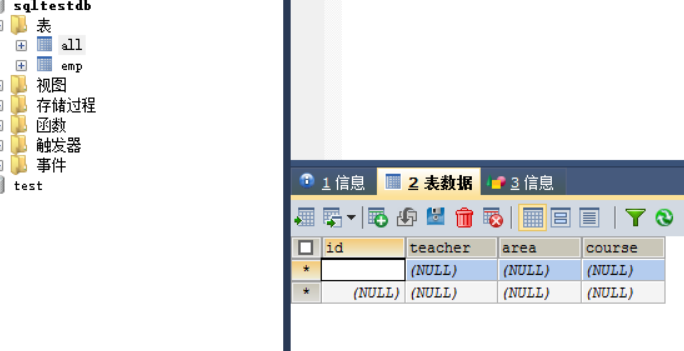
2、
新建web项目,点击两次next,勾选自动生成web.xml。
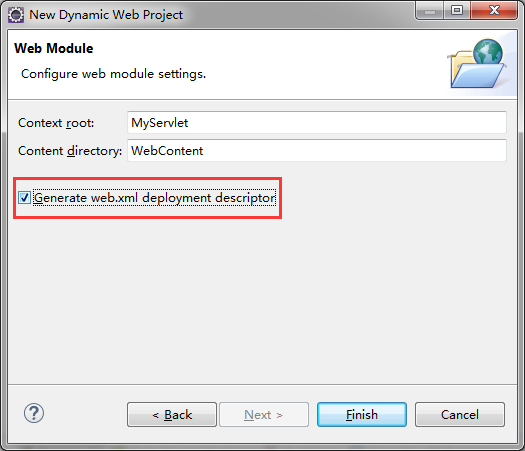
3、
将连接mysql的驱动jar包(mysql-connector-java-8.0.13-bin.jar)复制到WEB-INF下的lib目录下,直接拖拽即可。
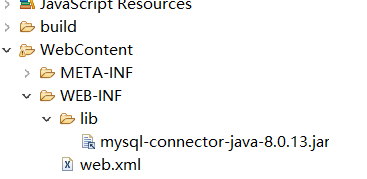
4.新建3个文档包,在每个包下建对应的Java类。
Stu.java

1package example.bean.stu;
2public class Stu {
3
4  private int id;
5
6  private String name;
7
8  private String teacher;
9
10  private String workplace;
11public int getId() {
12    return id;
13}
14public void setId(int id) {
15    this.id = id;
16}
17public String getName() {
18    return name;
19}
20public void setName(String name) {
21    this.name = name;
22}
23public String getTeacher() {
24    return teacher;
25}
26public void setTeacher(String teacher) {
27    this.teacher = teacher;
28}
29public String getWorkplace() {
30    return workplace;
31}
32public void setWorkplace(String workplace) {
33    this.workplace = workplace;
34}
35
36}

BookJdbcDao.java

1package example.dao.stu;
2
3import java.sql.Connection;
4import java.sql.PreparedStatement;
5import java.sql.ResultSet;
6import java.sql.SQLException;
7
8import example.bean.stu.Stu;
9
10public class StuJdbcDao {
11
12  private PreparedStatement ptmt = null;
13  private ResultSet rs = null;
14
15  public StuJdbcDao() {
16  }
17
18  public void findAll(Connection conn) throws SQLException
19  {
20    //to do
21  }
22
23  public void delete(Connection conn, int id) throws SQLException
24  {
25    String sql = "delete from tb_books where id=?";
26    try{
27      ptmt = conn.prepareStatement(sql);
28      // 对SQL语句中的第一个占位符赋值
29      ptmt.setInt(1, id);
30      // 执行更新操作
31      ptmt.executeUpdate();
32
33    }finally{
34      if (null!=ptmt) {
35        ptmt.close();
36      }
37
38      if (null!=conn) {
39        conn.close();
40      }
41
42    }
43
44  }
45
46  public void update(Connection conn, int id ) throws SQLException
47  {
48    //to do
49
50  }
51}

ConnectionFactory.java

1package example.dao.stu;
2
3import java.sql.Connection;
4import java.sql.DriverManager;
5import java.sql.SQLException;
6
7public class ConnectionFactory {
8
9  private String driverClassName = "com.mysql.cj.jdbc.Driver";
10  private String url = "jdbc:mysql://localhost:3306/db_book?&useSSL=false&serverTimezone=UTC";
11  private String userName = "root";
12  private String password = "password";
13
14  private static ConnectionFactory connectionFactory=null;
15
16  private ConnectionFactory() {
17
18    try {
19      Class.forName(driverClassName);
20    } catch (ClassNotFoundException e) {
21      e.printStackTrace();
22    }
23  }
24
25  public Connection getConnection() throws SQLException
26  {
27    return DriverManager.getConnection(url, userName, password);
28
29  }
30
31  public static ConnectionFactory getInstance()
32  {
33    if (null==connectionFactory) {
34      connectionFactory=new ConnectionFactory();
35    }
36    return connectionFactory;
37
38  }
39}

DeleteServlet.java

1package example.servlet.stu;
2import java.io.IOException;
3import java.sql.Connection;
4import javax.servlet.ServletException;
5import javax.servlet.http.HttpServlet;
6import javax.servlet.http.HttpServletRequest;
7import javax.servlet.http.HttpServletResponse;
8import example.dao.stu.StuJdbcDao;
9import example.dao.stu.ConnectionFactory;
10
11/**
12 * Servlet implementation class DeleteServlet
13 */
14public class DeleteServlet extends HttpServlet {
15  private static final long serialVersionUID = 1L;
16
17  /**
18   * @see HttpServlet#doGet(HttpServletRequest request, HttpServletResponse
19   *   response)
20   */
21  protected void doGet(HttpServletRequest request,
22      HttpServletResponse response) throws ServletException, IOException {
23    int id = Integer.valueOf(request.getParameter("id"));
24    try {
25//
26      StuJdbcDao stuDao=new StuJdbcDao();
27      Connection conn=ConnectionFactory.getInstance().getConnection();
28      stuDao.delete(conn,id);
29
30    } catch (Exception e) {
31      e.printStackTrace();
32    }
33    // 重定向到FindServlet
34    response.sendRedirect("FindServlet");
35  }
36
37  /**
38   * @see HttpServlet#doPost(HttpServletRequest request, HttpServletResponse
39   *   response)
40   */
41  protected void doPost(HttpServletRequest request,
42      HttpServletResponse response) throws ServletException, IOException {
43    doGet(request, response);
44  }
45
46}

FindServlet.java

1package example.servlet.stu;
2import java.io.IOException;
3import java.sql.Connection;
4import java.sql.DriverManager;
5import java.sql.ResultSet;
6import java.sql.Statement;
7import java.util.ArrayList;
8import java.util.List;
9
10import javax.servlet.ServletException;
11import javax.servlet.http.HttpServlet;
12import javax.servlet.http.HttpServletRequest;
13import javax.servlet.http.HttpServletResponse;
14
15import example.bean.stu.Stu;//导入包下的Stu类
16
17/**
18 * Servlet implementation class FindServlet
19 */
20public class FindServlet extends HttpServlet {
21  private static final long serialVersionUID = 1L;
22
23  /**
24   * @see HttpServlet#doGet(HttpServletRequest request, HttpServletResponse
25   *   response)
26   */
27  protected void doGet(HttpServletRequest request,
28      HttpServletResponse response) throws ServletException, IOException {
29    try {
30      // 加载数据库驱动,注册到驱动管理器
31      Class.forName("com.mysql.cj.jdbc.Driver");
32      // 数据库连接字符串
33      String url = "jdbc:mysql://localhost:3306/db_book?&useSSL=false&serverTimezone=UTC";
34      // 数据库用户名
35      String username = "root";
36      // 数据库密码
37      String password = "root";
38      // 创建Connection连接
39      Connection conn = DriverManager.getConnection(url, username,
40          password);
41      // 添加图书信息的SQL语句
42      String sql = "select * from tb_books";
43      // 获取Statement
44      Statement statement = conn.createStatement();
45
46      ResultSet resultSet = statement.executeQuery(sql);
47
48      List<Stu> list = new ArrayList<Stu>();
49      while (resultSet.next()) {
50
51        Stu stu = new Stu();
52        stu.setId(resultSet.getInt("id"));
53        stu.setName(resultSet.getString("name"));
54        stu.setTeacher(resultSet.getString("teacher"));
55        stu.setWorkplace(resultSet.getString("workplace"));
56        list.add(stu);
57      }
58      request.setAttribute("list", list);
59      resultSet.close();
60      statement.close();
61      conn.close();
62
63    } catch (Exception e) {
64      e.printStackTrace();
65    }
66
67    request.getRequestDispatcher("stu_list.jsp")
68        .forward(request, response);
69
70  }
71
72  /**
73   * @see HttpServlet#doPost(HttpServletRequest request, HttpServletResponse
74   *   response)
75   */
76  protected void doPost(HttpServletRequest request,
77      HttpServletResponse response) throws ServletException, IOException {
78    // TODO Auto-generated method stub
79    doGet(request, response);
80  }
81
82}

UpdateServlet.java

1package example.servlet.stu;
2
3import java.io.IOException;
4import java.sql.Connection;
5import java.sql.DriverManager;
6import java.sql.PreparedStatement;
7
8import javax.servlet.ServletException;
9import javax.servlet.http.HttpServlet;
10import javax.servlet.http.HttpServletRequest;
11import javax.servlet.http.HttpServletResponse;
12
13/**
14 * Servlet implementation class UpdateServlet
15 */
16public class UpdateServlet extends HttpServlet {
17  private static final long serialVersionUID = 1L;
18
19  /**
20   * @see HttpServlet#doGet(HttpServletRequest request, HttpServletResponse
21   *   response)
22   */
23  protected void doGet(HttpServletRequest request,
24      HttpServletResponse response) throws ServletException, IOException {
25      request.setCharacterEncoding("UTF-8");
26        response.setContentType("text/html;charset=UTF-8");
27    int id = Integer.valueOf(request.getParameter("id"));
28    String name = request.getParameter("name");
29    String teacher = request.getParameter("teacher");
30    String workplace = request.getParameter("workplace");
31    try {
32      // 加载数据库驱动,注册到驱动管理器
33      Class.forName("com.mysql.cj.jdbc.Driver");
34      // 数据库连接字符串
35      String url = "jdbc:mysql://localhost:3306/db_book?&useSSL=false&serverTimezone=UTC";
36      // 数据库用户名
37      String username = "root";
38      // 数据库密码
39      String password = "root";
40      // 创建Connection连接
41      Connection conn = DriverManager.getConnection(url, username,
42          password);
43      // 更新SQL语句
44      String sql = "UPDATE tb_books SET name=?,teacher=?,workplace=? WHERE id=?";
45      // 获取PreparedStatement
46      PreparedStatement ps = conn.prepareStatement(sql);
47      // 对SQL语句中的第一个参数赋值
48      ps.setString(1, name);
49      ps.setString(2, teacher);
50      ps.setString(3, workplace);
51      ps.setInt(4, id);
52      // 对SQL语句中的第二个参数赋值
53
54      // 执行更新操作
55      ps.executeUpdate();
56      // 关闭PreparedStatement
57      ps.close();
58      // 关闭Connection
59      conn.close();
60    } catch (Exception e) {
61      e.printStackTrace();
62    }
63    // 重定向到FindServlet
64    response.sendRedirect("FindServlet");
65
66  }
67
68  /**
69   * @see HttpServlet#doPost(HttpServletRequest request, HttpServletResponse
70   *   response)
71   */
72  protected void doPost(HttpServletRequest request,
73      HttpServletResponse response) throws ServletException, IOException {
74    // TODO Auto-generated method stub
75    doGet(request, response);
76  }
77
78}

5.右击Webcontent新建5个jsp页面。
addbook.jsp

1<%@ page language="java" contentType="text/html; charset=utf-8"
2  pageEncoding="utf-8"%>
3<!DOCTYPE html PUBLIC "-//W3C//DTD HTML 4.01 Transitional//EN" "http://www.w3.org/TR/html4/loose.dtd">
4
5<%@page import="java.sql.Connection"%>
6<%@page import="java.sql.DriverManager"%>
7<%@page import="java.sql.PreparedStatement"%>
8<html>
9<head>
10<meta http-equiv="Content-Type" content="text/html; charset=utf-8">
11<title>添加结果</title>
12</head>
13<body>
14  <%
15    request.setCharacterEncoding("utf-8");
16  %>
17  <jsp:useBean id="stu" class="example.bean.stu.Stu"></jsp:useBean>
18  <jsp:setProperty property="*" name="stu" />
19  <%
20    try {
21      // 加载数据库驱动,注册到驱动管理器
22      Class.forName("com.mysql.cj.jdbc.Driver");
23      // 数据库连接字符串
24      String url = "jdbc:mysql://localhost:3306/db_book?&useSSL=false&serverTimezone=UTC";
25      // 数据库用户名
26      String username = "root";
27      // 数据库密码
28      String password = "root";
29      // 创建Connection连接
30      Connection conn = DriverManager.getConnection(url, username,
31          password);
32      // 添加图书信息的SQL语句
33      String sql = "insert into tb_books(name,teacher,workplace) values(?,?,?)";
34      // 获取PreparedStatement
35      PreparedStatement ps = conn.prepareStatement(sql);
36      // 对SQL语句中的第1个参数赋值
37      ps.setString(1, stu.getName());
38      // 对SQL语句中的第2个参数赋值
39      ps.setString(2, stu.getTeacher());
40      ps.setString(3, stu.getWorkplace());
41      // 对SQL语句中的第3个参数赋值
42      // 对SQL语句中的第4个参数赋值
43      // 执行更新操作,返回所影响的行数
44      int row = ps.executeUpdate();
45      // 判断是否更新成功
46      if (row > 0) {
47        // 更新成输出信息
48        out.print("成功添加了 " + row + "条数据!");
49      }
50      // 关闭PreparedStatement,释放资源
51      ps.close();
52      // 关闭Connection,释放资源
53      conn.close();
54    } catch (Exception e) {
55      out.print("课程信息添加失败!");
56      e.printStackTrace();
57    }
58  %>
59  <br>
60  <a href="main.jsp">返回</a>
61</body>
62</html>

book_list.jsp

1<!--<%@page import="sun.awt.SunHints.Value"%>-->
2<%@ page language="java" contentType="text/html; charset=utf-8"
3    pageEncoding="utf-8"%>
4<!DOCTYPE html PUBLIC "-//W3C//DTD HTML 4.01 Transitional//EN" "http://www.w3.org/TR/html4/loose.dtd">
5
6<%@page import="java.util.List"%>
7<%@page import="example.bean.stu.Stu"%>
8<html>
9<head>
10<meta http-equiv="Content-Type" content="text/html; charset=utf-8">
11<title>所有课程信息</title>
12<style type="text/css">
13td {
14    font-size: 12px;
15}
16
17h2 {
18    margin: 0px
19}
20</style>
21</head>
22<body>
23    <table align="center" width="450" border="1" height="180"
24        bordercolor="white" bgcolor="black" cellpadding="1" cellspacing="1">
25        <tr bgcolor="white">
26            <td align="center" colspan="7">
27                <h2>所有课程信息</h2>
28            </td>
29        </tr>
30        <tr align="center" bgcolor="#e1ffc1">
31            <td><b>ID</b></td>
32            <td><b>课程名称</b></td>
33            <td><b>老师</b></td>
34            <td><b>上课地点</b></td>
35            <td><b>删除</b></td>
36        </tr>
37        <%
38            // 获取图书信息集合
39            List<Book> list = (List<Book>) request.getAttribute("list");
40            // 判断集合是否有效
41            if (list == null || list.size() < 1) {
42                out.print("没有数据!");
43            } else {
44                // 遍历图书集合中的数据
45                for (Book book : list) {
46        %>
47        <tr align="center" bgcolor="white">
48            <td><%=book.getId()%></td>
49            <td><%=book.getName()%></td>
50            <td><%=book.getTeacher()%></td>
51            <td><%=book.getWorkplace()%></td>
52            <td><a href="DeleteServlet?id=<%=book.getId()%>">删除</a></td>
53
54
55        </tr>
56        <%
57            }
58            }
59        %>
60    </table>
61    <h2 align="center">
62        <a href="main.jsp">返回主菜单</a>
63    </h2>
64
65</body>
66</html>

Update.jsp

1<%@ page language="java" contentType="text/html; charset=UTF-8"
2    pageEncoding="UTF-8"%>
3<!DOCTYPE html>
4<html>
5<head>
6<meta charset="UTF-8">
7<title>课程信息修改</title>
8</head>
9<script type="text/javascript">
10function check(form) {
11        with (form) {
12            if (name.value == "") {
13                alert("课程名称不能为空");
14                return false;
15              }
16              if (teacher.value == "") {
17                alert("老师名字不能为空");
18                return false;
19              }
20              if (workplace.value == "") {
21                alert("上课地点不能为空");
22                return false;
23              }
24        }
25    }
26</script>
27<body>
28<td>
29                <form style="align: center;  line-height: 1.5 !important;">
30                    action="UpdateServlet" method="post" onsubmit=" return check(this);">
31                    <input type="text" name="id" size=3>
32                    <input type="text" name="name" size="3">
33                    <input type="text" name="teacher" size="3">
34                    <input type="text" name="workplace" size="3">
35                     <input type="submit" value="修改">
36                </form>
37            </td>
38            <h2 align="center">
39        <a href="main.jsp">返回主菜单</a>
40    </h2>
41</body>
42</html>

index.jsp

1<%@page import="java.sql.SQLException"%>
2<%@page import="java.sql.DriverManager"%>
3<%@page import="java.sql.Connection"%>
4<%@ page language="java" contentType="text/html; charset=utf-8"
5  pageEncoding="utf-8"%>
6<!DOCTYPE html PUBLIC "-//W3C//DTD HTML 4.01 Transitional//EN" "http://www.w3.org/TR/html4/loose.dtd">
7<html>
8<head>
9<meta http-equiv="Content-Type" content="text/html; charset=utf-8">
10<title>添加课程信息</title>
11
12<script type="text/javascript">
13  function check(form) {
14    with (form) {
15      if (name.value == "") {
16        alert("课程名称不能为空");
17        return false;
18      }
19
20      if (teacher.value == "") {
21        alert("老师名字不能为空");
22        return false;
23      }
24
25      if (workplace.value == "") {
26        alert("上课地点不能为空");
27        return false;
28      }
29
30    }
31  }
32</script>
33
34</head>
35
36
37<body>
38
39<form action="addbook.jsp" method="post" onsubmit="check(this)">
40  <table align="center" width="450">
41    <tr>
42      <td align="center" colspan="2">
43        <h2>添加课程信息</h2>
44        <hr>
45      </td>
46    </tr>
47
48    <tr>
49      <td align="right">课程名称:</td>
50      <td><input type="text" name="name"></td>
51    </tr>
52
53    <tr>
54      <td align="right">老师:</td>
55      <td><input type="text" name="teacher"></td>
56    </tr>
57
58    <tr>
59      <td align="right">上课地点:</td>
60      <td><input type="text" name="workplace" /></td>
61    </tr>
62    <tr>
63      <td align="center" colspan="2"><input type="submit" value="添 加">
64      </td>
65    </tr>
66  </table>
67</form>
68
69<h2 align="center">
70        <a href="main.jsp">返回主菜单</a>
71    </h2>
72
73</body>
74</html>

main.jsp

1<%@ page language="java" contentType="text/html; charset=UTF-8"
2    pageEncoding="UTF-8"%>
3<!DOCTYPE html>
4<html>
5<head>
6<meta charset="UTF-8">
7<title>课程信息管理系统</title>
8</head>
9<body>
10<center><h1>主菜单</h1><center>
11<table><center>
12<td><A href="index.jsp"><font size=2>课程信息录入</font></A></td>
13<td><A href="Update.jsp"><font size=2>课程信息修改</font></A></td>
14<h2 align="center">
15  <a href="FindServlet">查询课程信息</a>
16</h2>
17<h2 align="center">
18  <a href="FindServlet">删除课程信息</a>
19</h2>
20</table></center>
21</body>
22</html>

接下来配置web.xml

1<?xml version="1.0" encoding="UTF-8"?>
2<web-app xmlns:xsi="http://www.w3.org/2001/XMLSchema-instance" xmlns="http://java.sun.com/xml/ns/javaee" xmlns:web="http://java.sun.com/xml/ns/javaee/web-app_2_5.xsd" xsi:schemaLocation="http://java.sun.com/xml/ns/javaee http://java.sun.com/xml/ns/javaee/web-app_2_5.xsd" id="WebApp_ID" version="2.5">
3 <display-name>JdbcConnection</display-name>
4 <welcome-file-list>
5  <welcome-file>index.html</welcome-file>
6  <welcome-file>index.htm</welcome-file>
7  <welcome-file>index.jsp</welcome-file>
8  <welcome-file>default.html</welcome-file>
9  <welcome-file>default.htm</welcome-file>
10  <welcome-file>default.jsp</welcome-file>
11 </welcome-file-list>
12 <servlet>
13  <description></description>
14  <display-name>FindServlet</display-name>
15  <servlet-name>FindServlet</servlet-name>
16  <servlet-class>example.servlet.stu.FindServlet</servlet-class>
17 </servlet>
18 <servlet-mapping>
19  <servlet-name>FindServlet</servlet-name>
20  <url-pattern>/FindServlet</url-pattern>
21 </servlet-mapping>
22 <servlet>
23  <description></description>
24  <display-name>UpdateServlet</display-name>
25  <servlet-name>UpdateServlet</servlet-name>
26  <servlet-class>example.servlet.stu.UpdateServlet</servlet-class>
27 </servlet>
28 <servlet-mapping>
29  <servlet-name>UpdateServlet</servlet-name>
30  <url-pattern>/UpdateServlet</url-pattern>
31 </servlet-mapping>
32 <servlet>
33  <description></description>
34  <display-name>DeleteServlet</display-name>
35  <servlet-name>DeleteServlet</servlet-name>
36  <servlet-class>example.servlet.stu.DeleteServlet</servlet-class>
37 </servlet>
38 <servlet-mapping>
39  <servlet-name>DeleteServlet</servlet-name>
40  <url-pattern>/DeleteServlet</url-pattern>
41 </servlet-mapping>
42</web-app>