
最近在做一个项目, 架构上使用了 Nginx +tomcat 集群, 且nginx下配置了SSL,tomcat no SSL,项目使用https协议
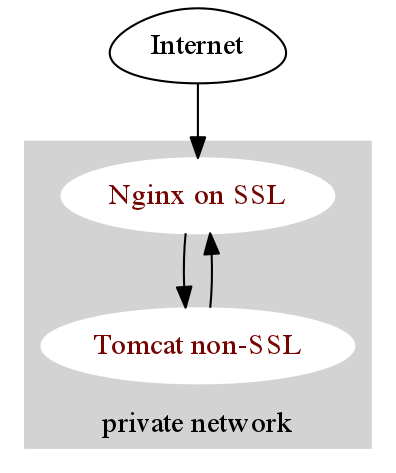
但是,明明是https url请求,发现 log里面,
10428 15:55:55 INFO  (PaymentInterceptor.java:44) preHandle() - requestStringForLog:    {
2        "request.getRequestURL():": "http://trade.feilong.com/payment/paymentChannel?id=212&s=a84485e0985afe97fffd7fd7741c93851d83a4f6",
3        "request.getMethod:": "GET",
4        "_parameterMap":         {
5            "id": ["212"],
6            "s": ["a84485e0985afe97fffd7fd7741c93851d83a4f6"]
7        }
8    }
request.getRequestURL() 输出出来的 一直是 http://trade.feilong.com/payment/paymentChannel?id=212&s=a84485e0985afe97fffd7fd7741c93851d83a4f6 但是浏览器中的URL却是 https://trade.feilong.com/payment/paymentChannel?id=212&s=a84485e0985afe97fffd7fd7741c93851d83a4f6
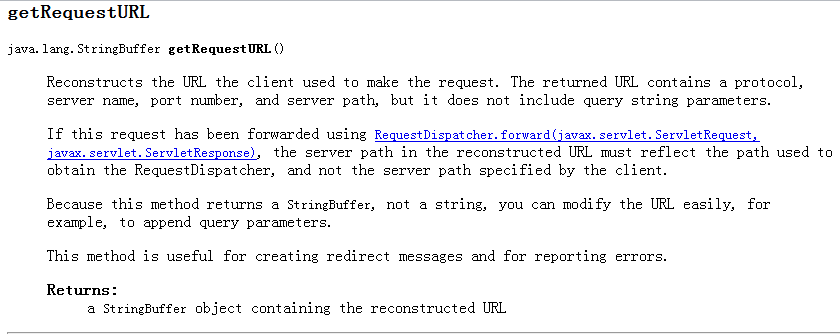
瞬间要颠覆我的Java观尴尬,API上写得很清楚:
-
getRequestURL():
Reconstructs the URL the client used to make the request. The returned URL contains a protocol, server name, port number, and server path, but it does not include query string parameters.
也就是说, getRequestURL() 输出的是不带query string的路经(含协议 端口 server path等信息).
并且,还发现
1request.getScheme()  //总是 http,而不是实际的http或https
2request.isSecure()  //总是false(因为总是http)
3request.getRemoteAddr()  //总是 nginx 请求的 IP,而不是用户的IP
4request.getRequestURL()  //总是 nginx 请求的URL 而不是用户实际请求的 URL
5response.sendRedirect( 相对url )  //总是重定向到 http 上 (因为认为当前是 http 请求)
查阅了一些资料,找到了解决方案:
解决方法很简单,只需要分别配置一下 Nginx 和 Tomcat 就好了,而不用改程序。
配置 Nginx 的转发选项:
1proxy_set_header       Host $host;
2proxy_set_header  X-Real-IP  $remote_addr;
3proxy_set_header  X-Forwarded-For $proxy_add_x_forwarded_for;
4proxy_set_header X-Forwarded-Proto  $scheme;
5# 添加proxy_set_header X-Forwarded-Proto $scheme;
配置Tomcat server.xml 的 Engine 模块下配置一个 Valve:
1<Valve className="org.apache.catalina.valves.RemoteIpValve"
2remoteIpHeader="X-Forwarded-For"
3protocolHeader="X-Forwarded-Proto"
4protocolHeaderHttpsValue="https"/>
配置双方的 X-Forwarded-Proto 就是为了正确地识别实际用户发出的协议是 http 还是 https。
这样以上5项测试就都变为正确的结果了,就像用户在直接访问 Tomcat 一样。
关于 RemoteIpValve,有兴趣的同学可以阅读下 doc
http://tomcat.apache.org/tomcat-6.0-doc/api/org/apache/catalina/valves/RemoteIpValve.html
1Tomcat port of mod_remoteip, this valve replaces the apparent client remote IP address and hostname for the request with the IP address list presented by a proxy or a load balancer via a request headers (e.g. "X-Forwarded-For").
2
3Another feature of this valve is to replace the apparent scheme (http/https) and server port with the scheme presented by a proxy or a load balancer via a request header (e.g. "X-Forwarded-Proto").
看了下他们的源码,比较简单,在各种框架,各种算法面前,这个类对性能影响很小
-
如果没有配置protocolHeader 属性, 什么都不做.
-
如果配置了protocolHeader,但是request.getHeader(protocolHeader)取出来的值是null,什么都不做
-
如果配置了protocolHeader,但是request.getHeader(protocolHeader)取出来的值(忽略大小写)是 配置的protocolHeaderHttpsValue(默认https),scheme设置为https,端口设置 为 httpsServerPort
-
其他设置为 http
if (protocolHeader != null) {
String protocolHeaderValue = request.getHeader(protocolHeader);
if (protocolHeaderValue == null) {
// don't modify the secure,scheme and serverPort attributes
// of the request
} else if (protocolHeaderHttpsValue.equalsIgnoreCase(protocolHeaderValue)) {
request.setSecure(true);
// use request.coyoteRequest.scheme instead of request.setScheme() because request.setScheme() is no-op in Tomcat 6.0
request.getCoyoteRequest().scheme().setString("https");1 request.setServerPort(httpsServerPort); 2} else { 3 request.setSecure(false); 4 // use request.coyoteRequest.scheme instead of request.setScheme() because request.setScheme() is no-op in Tomcat 6.0 5 request.getCoyoteRequest().scheme().setString("http"); 6 7 request.setServerPort(httpServerPort); 8}}