
1.首先创建一个maven项目
这个maven项目会包含springcloud相关的项目,目录结构如下图:
本项目所有的springcloud版本为Finchley.SR2,对应的springboot的版本为2.0.7.RELEASE。

2.创建一个服务,也称为注册中心:eureka-service
2.1 在该maven项目下新建一个module,eureka-service。
即创建一个springboot项目,并添加相关依赖。步骤如下图:
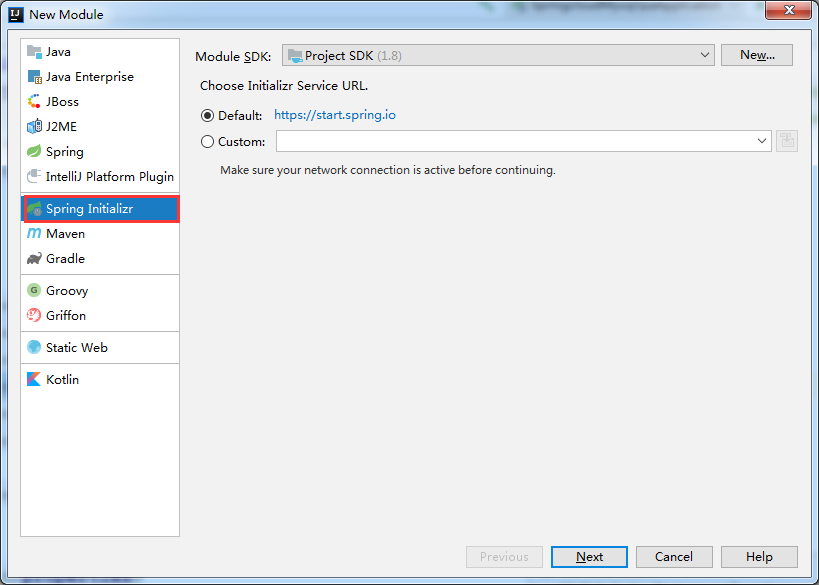
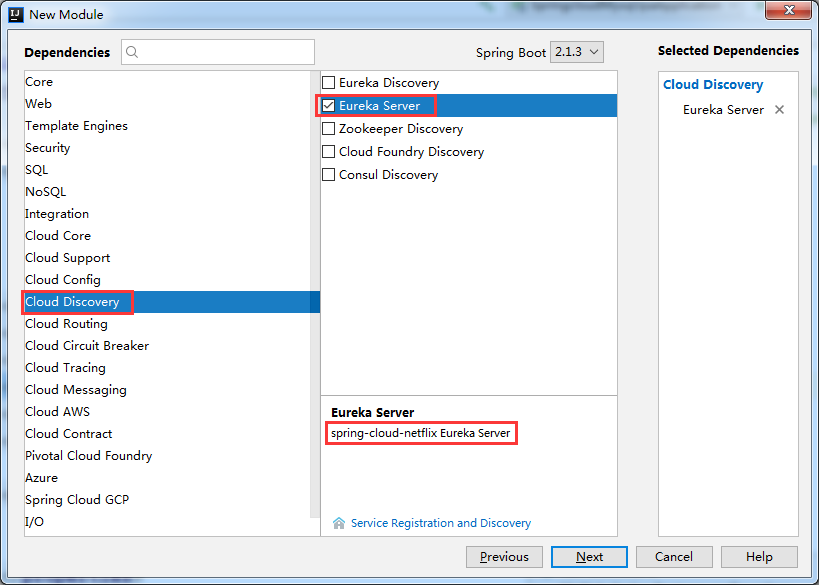
2.2 application.yml配置文件
server: port: 8761spring: application: name: eureka-server security: user: name: admin password: 123eureka: instance: hostname: localhost #服务注册中心实例的主机名 server: enableSelfPreservation: false #关闭自我保护 eviction-interval-timer-in-ms: 1000 # 续期时间,即扫描失效服务的间隔时间(缺省为60*1000ms) client: register-with-eureka: false #是否向服务注册中心注册自己 fetch-registry: false #是否检索服务 service-url: defaultZone: http://${spring.security.user.name}:${spring.security.user.password}@${eureka.instance.hostname}:${server.port}/eureka/
2.3.pom.xml
<dependencies> <dependency> <groupId>org.springframework.cloud</groupId> <artifactId>spring-cloud-starter-netflix-eureka-server</artifactId> </dependency> <dependency> <groupId>org.springframework.boot</groupId> <artifactId>spring-boot-starter-test</artifactId> <scope>test</scope> </dependency> <dependency> <groupId>org.springframework.boot</groupId> <artifactId>spring-boot-starter-security</artifactId> </dependency></dependencies>
2.4 在springboot启动类加上注解@EnableEurekaServer
package com.forezp;import org.springframework.boot.SpringApplication;import org.springframework.boot.autoconfigure.SpringBootApplication;import org.springframework.cloud.netflix.eureka.server.EnableEurekaServer;import org.springframework.security.config.annotation.web.builders.HttpSecurity;import org.springframework.security.config.http.SessionCreationPolicy;@EnableEurekaServer@SpringBootApplicationpublic class EurekaServerApplication { public static void main(String[] args) { SpringApplication.run(EurekaServerApplication.class, args); }}
2.5 启动项目。访问localhost:8761
可以看到没有消费者注册。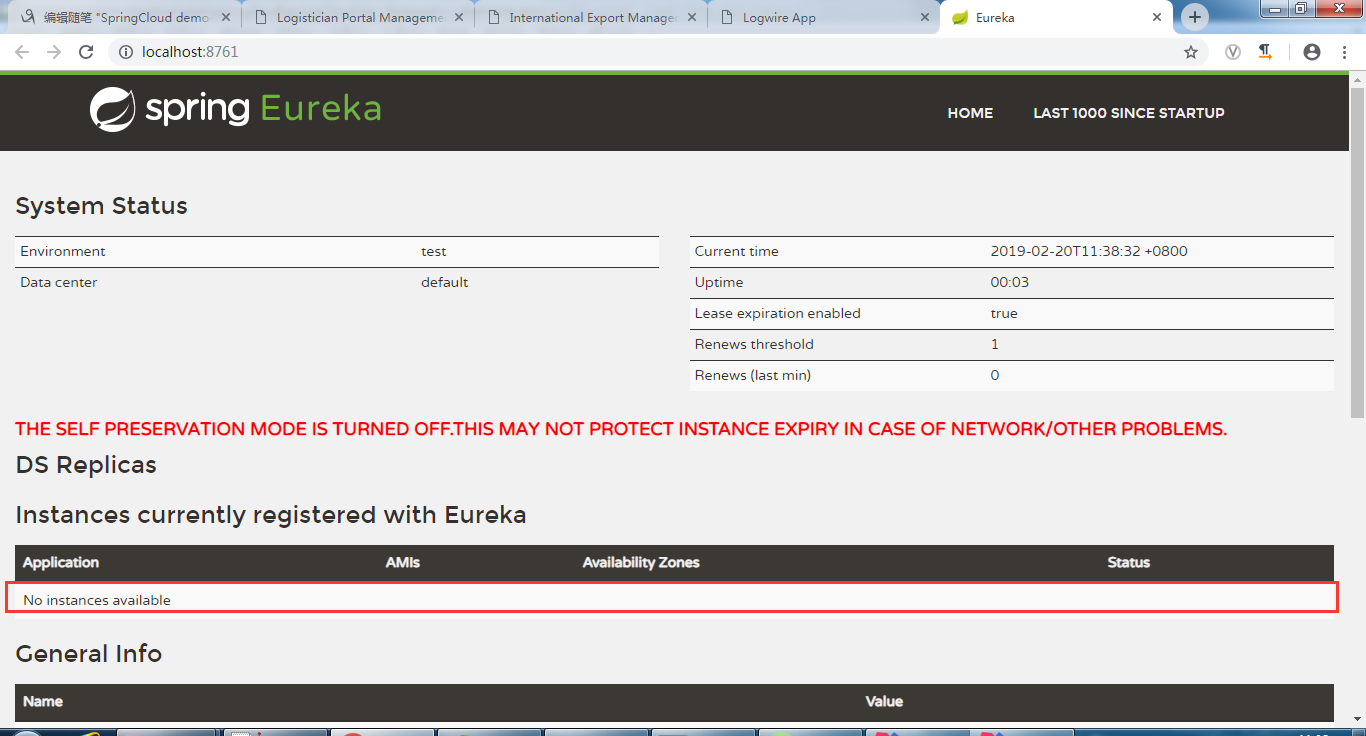
3.创建客户端,并在服务端注册了,也称为生产者:eureke-client
3.1 application.yml配置文件
1server:
2  port: 8762
3spring:
4  application:
5    name: provider
6eureka:
7  instance:
8    lease-renewal-interval-in-seconds: 5     #心跳时间,即服务续约间隔时间(缺省为30s)
9    lease-expiration-duration-in-seconds: 15  #发呆时间,即服务续约到期时间(缺省为90s)
10  client:
11    healthcheck:
12      enabled: true  #健康检查,配合pring-boot-starter-actuator依赖使用
13    service-url:
14      defaultZone: http://admin:123@localhost:8761/eureka/  #服务注册中心的配置内容,指定服务注册中心的位置
3.2 pom.xml
1<dependencies>
2        <dependency>
3            <groupId>org.springframework.cloud</groupId>
4            <artifactId>spring-cloud-starter-netflix-eureka-client</artifactId>
5            <version>2.0.0.RELEASE</version>
6        </dependency>
7        <dependency>
8            <groupId>org.springframework.boot</groupId>
9            <artifactId>spring-boot-starter-web</artifactId>
10        </dependency>
11
12
13        <dependency>
14            <groupId>org.springframework.boot</groupId>
15            <artifactId>spring-boot-starter-test</artifactId>
16            <scope>test</scope>
17        </dependency>
18
19        <dependency>
20            <groupId>org.springframework.boot</groupId>
21            <artifactId>spring-boot-starter-actuator</artifactId>
22        </dependency>
23    </dependencies>
3.3 在springboot启动类加上注解@EnableEurekaClient
1package com.transsion;
2
3import org.springframework.boot.SpringApplication;
4import org.springframework.boot.autoconfigure.SpringBootApplication;
5import org.springframework.cloud.netflix.eureka.EnableEurekaClient;
6
7
8@EnableEurekaClient
9@SpringBootApplication
10public class ProvideApplication {
11
12    public static void main(String[] args) {
13        SpringApplication.run(ProvideApplication.class, args);
14    }
15
16}
3.4 增加测试的controller类
1package com.transsion;
2
3import org.springframework.web.bind.annotation.RequestMapping;
4import org.springframework.web.bind.annotation.RestController;
5
6@RestController
7public class TestController {
8
9    @RequestMapping("/test")
10    public String test(){
11        return System.currentTimeMillis() + ":provider一号";
12    }
13
14}
3.5 继续访问localhost:8761
可以看到已经注册了一个客户端了。
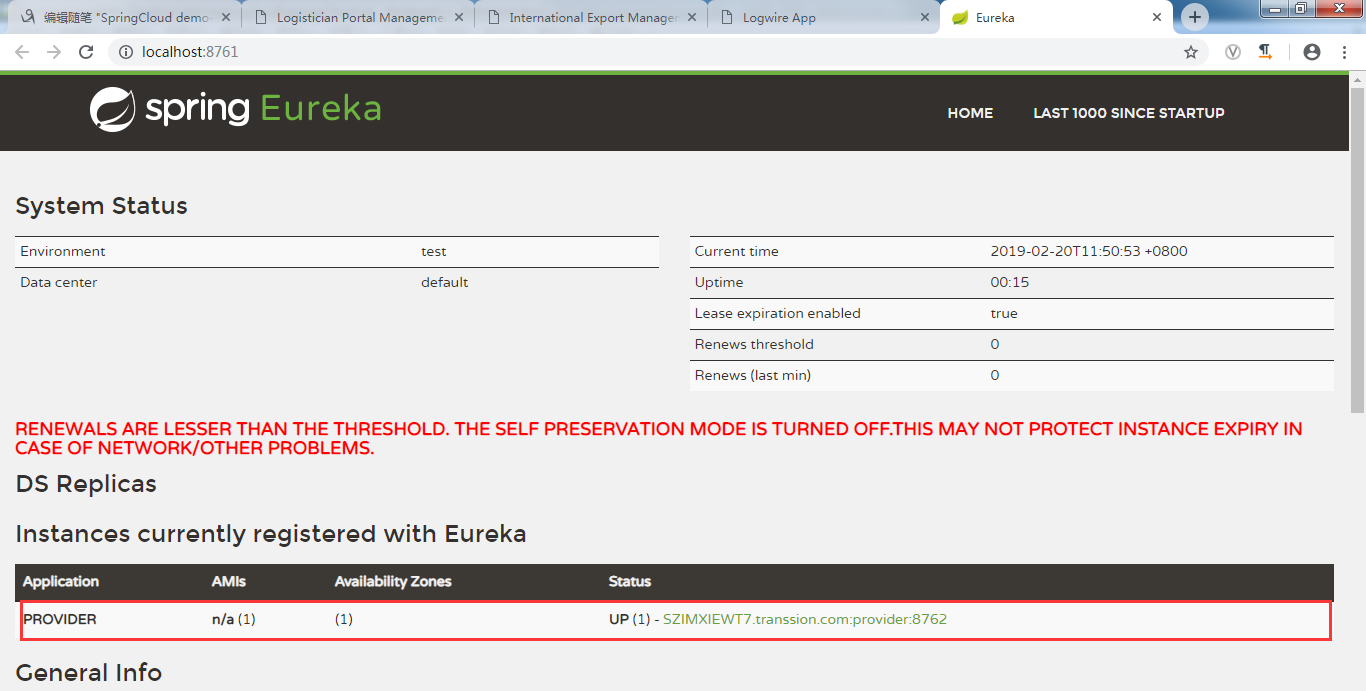
3.6 注解方式:@EnableEurekaClient、@EnableDiscoveryClient
@EnableEurekaClient和@EnableDiscoveryClient的区别:
spring cloud中discovery service有许多种实现(eureka、consul、zookeeper等等),@EnableDiscoveryClient基于spring-cloud-commons,
@EnableEurekaClient基于spring-cloud-netflix。就是如果选用的注册中心是eureka,那么就推荐@EnableEurekaClient,如果是其他的注册中心,
那么推荐使用@EnableDiscoveryClient
3.7 自我保护机制
自我保护模式打开时,已关停节点是会一直显示在 Eureka 首页的关闭自我保护模式后,由于其默认的心跳周期比较长等原因,
要过一会儿才会发现已关停节点被自动踢出了,若想尽快的及时踢出,那就只有修改默认的心跳周期参数了。在注册中
心和client添加如下配置后,关闭eureka-client,注册中心就会很快删除节点。