
简介
众所周知,EventBus 是一款用在 Android 开发中的发布/订阅事件总线框架,基于观察者模式,将事件的接收者和发送者分开,简化了组件之间的通信操作,使用简单、效率高、体积小!
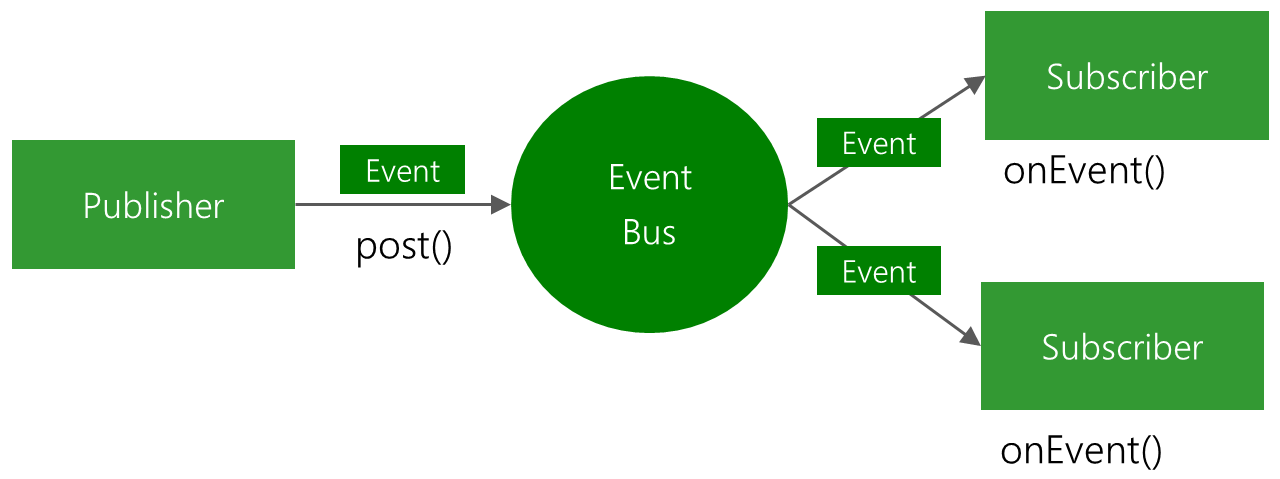
EventBus使用了典型的发布/订阅事件模式,下面是 EventBus官方给出的原理示意图。
安装依赖
使用EventBus之前,需要先添加EventBus依赖,EventBus支持gradle和maven两种方式依赖,gradle依赖的脚本如下:
implementation 'org.greenrobot:eventbus:3.1.1'
maven依赖的配置如下:
1<dependency>
2    <groupId>org.greenrobot</groupId>
3    <artifactId>eventbus</artifactId>
4    <version>3.1.1</version>
5</dependency>
基本使用
EventBus的使用步骤分为定义事件、订阅事件、发送事件、处理事件、取消订阅五步。
1,首先,定义一个事件类,里面添加需要发送的数据内容,如下:
1public static class MessageEvent {
2 /* Additional fields if needed */
3 }
2,然后,在需要接收事件的地方订阅事件,可以选择注册事件订阅方法。
1@Subscribe(threadMode = ThreadMode.MAIN)
2public void onMessageEvent(MessageEvent event) {
3/* Do something */
4};
为了不造成资源的浪费或其他问题,需要在onStart函数中注册订阅事件,然后再onStop函数中取消订阅事件。
1 @Override
2 public void onStart() {
3     super.onStart();
4     EventBus.getDefault().register(this);
5 }
6
7 @Override
8 public void onStop() {
9     super.onStop();
10     EventBus.getDefault().unregister(this);
11 }
3,最后,将处理完成的数据发送出去。
EventBus.getDefault().post(new MessageEvent());
EventBus原理剖析
要理解EventBus背后的原理,可以从以下几个方面着手:
- Subscribe注解
- 注册事件订阅方法
- 取消注册
- 发送事件
- 事件处理
- 粘性事件
- Subscriber Index
- 流程梳理
Subscribe注解
EventBus从3.0开始使用Subscribe注解配置事件订阅方法,不再使用方法名,例如:
1@Subscribe
2public void handleEvent(String event) {
3    // do something
4}
其中,事件类型可以是 Java 中已有的类型或者自定义的类型。下面是Subscribe注解的具体实现:
1@Documented
2@Retention(RetentionPolicy.RUNTIME)
3@Target({ElementType.METHOD})
4public @interface Subscribe {
5    // 指定事件订阅方法的线程模式,即在那个线程执行事件订阅方法处理事件,默认为POSTING
6    ThreadMode threadMode() default ThreadMode.POSTING;
7    // 是否支持粘性事件,默认为false
8    boolean sticky() default false;
9    // 指定事件订阅方法的优先级,默认为0,如果多个事件订阅方法可以接收相同事件的,则优先级高的先接收到事件
10    int priority() default 0;
11}
可以发现,在使用Subscribe注解时可以根据需求指定threadMode、sticky、priority三个属性。其中,threadMode属性有如下几个可选值:
- ThreadMode.POSTING,默认的线程模式,在那个线程发送事件就在对应线程处理事件,避免了线程切换,效率高。
- ThreadMode.MAIN,如在主线程(UI线程)发送事件,则直接在主线程处理事件;如果在子线程发送事件,则先将事件入队列,然后通过 Handler 切换到主线程,依次处理事件。
- ThreadMode.MAIN_ORDERED,无论在那个线程发送事件,都先将事件入队列,然后通过 Handler 切换到主线程,依次处理事件。
- ThreadMode.BACKGROUND,如果在主线程发送事件,则先将事件入队列,然后通过线程池依次处理事件;如果在子线程发送事件,则直接在发送事件的线程处理事件。
- ThreadMode.ASYNC,无论在那个线程发送事件,都将事件入队列,然后通过线程池处理。
注册事件订阅方法
使用EventBus时,需要在在需要接收事件的地方订阅事件,注册事件的方式如下:
EventBus.getDefault().register(this);
点击打开getDefault()会发现,getDefault()是一个单例方法,保证当前只有一个EventBus实例。
1public static EventBus getDefault() {
2        if (defaultInstance == null) {
3            synchronized (EventBus.class) {
4                if (defaultInstance == null) {
5                    defaultInstance = new EventBus();
6                }
7            }
8        }
9        return defaultInstance;
10    }
getDefault()最终调用了new EventBus(),如下:
1public EventBus() {
2        this(DEFAULT_BUILDER);
3    }
然后,EventBus调用它的另一个构造函数来完成它相关属性的初始化:
1EventBus(EventBusBuilder builder) {
2        logger = builder.getLogger();
3        subscriptionsByEventType = new HashMap<>();
4        typesBySubscriber = new HashMap<>();
5        stickyEvents = new ConcurrentHashMap<>();
6        mainThreadSupport = builder.getMainThreadSupport();
7        mainThreadPoster = mainThreadSupport != null ? mainThreadSupport.createPoster(this) : null;
8        backgroundPoster = new BackgroundPoster(this);
9        asyncPoster = new AsyncPoster(this);
10        indexCount = builder.subscriberInfoIndexes != null ? builder.subscriberInfoIndexes.size() : 0;
11        subscriberMethodFinder = new SubscriberMethodFinder(builder.subscriberInfoIndexes,
12                builder.strictMethodVerification, builder.ignoreGeneratedIndex);
13        logSubscriberExceptions = builder.logSubscriberExceptions;
14        logNoSubscriberMessages = builder.logNoSubscriberMessages;
15        sendSubscriberExceptionEvent = builder.sendSubscriberExceptionEvent;
16        sendNoSubscriberEvent = builder.sendNoSubscriberEvent;
17        throwSubscriberException = builder.throwSubscriberException;
18        eventInheritance = builder.eventInheritance;
19        executorService = builder.executorService;
20    }
其中,DEFAULT_BUILDER就是一个默认的EventBusBuilder,如下:
private static final EventBusBuilder DEFAULT_BUILDER = new EventBusBuilder();
如果有需要的话,我们也可以通过配置EventBusBuilder来更改EventBus的属性,例如:
1EventBus.builder()
2        .eventInheritance(false)
3        .logSubscriberExceptions(false)
4        .build()
5        .register(this);
有了EventBus的实例,接下来就可以进行注册了。
1public void register(Object subscriber) {
2        // 得到当前要注册类的Class对象
3        Class<?> subscriberClass = subscriber.getClass();
4        // 根据Class查找当前类中订阅了事件的方法集合,即使用了Subscribe注解、有public修饰符、一个参数的方法
5        // SubscriberMethod类主要封装了符合条件方法的相关信息:
6        // Method对象、线程模式、事件类型、优先级、是否是粘性事等
7        List<SubscriberMethod> subscriberMethods = subscriberMethodFinder.findSubscriberMethods(subscriberClass);
8        synchronized (this) {
9            // 循环遍历订阅了事件的方法集合,以完成注册
10            for (SubscriberMethod subscriberMethod : subscriberMethods) {
11                subscribe(subscriber, subscriberMethod);
12            }
13        }
14    }
可以看到,register()方法主要分为查找和注册两部分,首先来看查找的过程,主要是findSubscriberMethods()方法:
1List<SubscriberMethod> findSubscriberMethods(Class<?> subscriberClass) {
2        // METHOD_CACHE是一个ConcurrentHashMap,直接保存了subscriberClass和对应SubscriberMethod的集合,以提高注册效率,赋值重复查找。
3        List<SubscriberMethod> subscriberMethods = METHOD_CACHE.get(subscriberClass);
4        if (subscriberMethods != null) {
5            return subscriberMethods;
6        }
7        // 由于使用了默认的EventBusBuilder,则ignoreGeneratedIndex属性默认为false,即是否忽略注解生成器
8        if (ignoreGeneratedIndex) {
9            subscriberMethods = findUsingReflection(subscriberClass);
10        } else {
11            subscriberMethods = findUsingInfo(subscriberClass);
12        }
13        // 如果对应类中没有符合条件的方法,则抛出异常
14        if (subscriberMethods.isEmpty()) {
15            throw new EventBusException("Subscriber " + subscriberClass
16                    + " and its super classes have no public methods with the @Subscribe annotation");
17        } else {
18            // 保存查找到的订阅事件的方法
19            METHOD_CACHE.put(subscriberClass, subscriberMethods);
20            return subscriberMethods;
21        }
22    }
findSubscriberMethods()流程很清晰,即先从缓存中查找,如果找到则直接返回,否则去做下一步的查找过程,然后缓存查找到的集合,根据上边的注释可知findUsingInfo()方法会被调用。
1private List<SubscriberMethod> findUsingInfo(Class<?> subscriberClass) {
2        FindState findState = prepareFindState();
3        findState.initForSubscriber(subscriberClass);
4        // 初始状态下findState.clazz就是subscriberClass
5        while (findState.clazz != null) {
6            findState.subscriberInfo = getSubscriberInfo(findState);
7            // 条件不成立
8            if (findState.subscriberInfo != null) {
9                SubscriberMethod[] array = findState.subscriberInfo.getSubscriberMethods();
10                for (SubscriberMethod subscriberMethod : array) {
11                    if (findState.checkAdd(subscriberMethod.method, subscriberMethod.eventType)) {
12                        findState.subscriberMethods.add(subscriberMethod);
13                    }
14                }
15            } else {
16                // 通过反射查找订阅事件的方法
17                findUsingReflectionInSingleClass(findState);
18            }
19            // 修改findState.clazz为subscriberClass的父类Class,即需要遍历父类
20            findState.moveToSuperclass();
21        }
22        // 查找到的方法保存在了FindState实例的subscriberMethods集合中。
23        // 使用subscriberMethods构建一个新的List<SubscriberMethod>
24        // 释放掉findState
25        return getMethodsAndRelease(findState);
26    }
findUsingInfo()方法会在当前要注册的类以及其父类中查找订阅事件的方法,这里出现了一个FindState类,它是SubscriberMethodFinder的内部类,用来辅助查找订阅事件的方法,具体的查找过程在findUsingReflectionInSingleClass()方法里,它主要通过反射来查找订阅事件的方法。
1private void findUsingReflectionInSingleClass(FindState findState) {
2        Method[] methods;
3        try {
4            // This is faster than getMethods, especially when subscribers are fat classes like Activities
5            methods = findState.clazz.getDeclaredMethods();
6        } catch (Throwable th) {
7            // Workaround for java.lang.NoClassDefFoundError, see https://github.com/greenrobot/EventBus/issues/149
8            methods = findState.clazz.getMethods();
9            findState.skipSuperClasses = true;
10        }
11        // 循环遍历当前类的方法,筛选出符合条件的
12        for (Method method : methods) {
13            // 获得方法的修饰符
14            int modifiers = method.getModifiers();
15            // 如果是public类型,但非abstract、static等
16            if ((modifiers & Modifier.PUBLIC) != 0 && (modifiers & MODIFIERS_IGNORE) == 0) {
17                // 获得当前方法所有参数的类型
18                Class<?>[] parameterTypes = method.getParameterTypes();
19                // 如果当前方法只有一个参数
20                if (parameterTypes.length == 1) {
21                    Subscribe subscribeAnnotation = method.getAnnotation(Subscribe.class);
22                    // 如果当前方法使用了Subscribe注解
23                    if (subscribeAnnotation != null) {
24                        // 得到该参数的类型
25                        Class<?> eventType = parameterTypes[0];
26                        // checkAdd()方法用来判断FindState的anyMethodByEventType map是否已经添加过以当前eventType为key的键值对,没添加过则返回true
27                        if (findState.checkAdd(method, eventType)) {
28                             // 得到Subscribe注解的threadMode属性值,即线程模式
29                            ThreadMode threadMode = subscribeAnnotation.threadMode();
30                            // 创建一个SubscriberMethod对象,并添加到subscriberMethods集合
31                            findState.subscriberMethods.add(new SubscriberMethod(method, eventType, threadMode,
32                                    subscribeAnnotation.priority(), subscribeAnnotation.sticky()));
33                        }
34                    }
35                } else if (strictMethodVerification && method.isAnnotationPresent(Subscribe.class)) {
36                    String methodName = method.getDeclaringClass().getName() + "." + method.getName();
37                    throw new EventBusException("@Subscribe method " + methodName +
38                            "must have exactly 1 parameter but has " + parameterTypes.length);
39                }
40            } else if (strictMethodVerification && method.isAnnotationPresent(Subscribe.class)) {
41                String methodName = method.getDeclaringClass().getName() + "." + method.getName();
42                throw new EventBusException(methodName +
43                        " is a illegal @Subscribe method: must be public, non-static, and non-abstract");
44            }
45        }
46    }
到此register()方法中findSubscriberMethods()流程就分析完了,我们已经找到了当前注册类及其父类中订阅事件的方法的集合。
接下来,我们分析下具体的注册流程,即register()中的subscribe()方法。首先,我们看一下subscribe()方法的源码:
1private void subscribe(Object subscriber, SubscriberMethod subscriberMethod) {
2        // 得到当前订阅了事件的方法的参数类型
3        Class<?> eventType = subscriberMethod.eventType;
4        // Subscription类保存了要注册的类对象以及当前的subscriberMethod
5        Subscription newSubscription = new Subscription(subscriber, subscriberMethod);
6        // subscriptionsByEventType是一个HashMap,保存了以eventType为key,Subscription对象集合为value的键值对
7        // 先查找subscriptionsByEventType是否存在以当前eventType为key的值
8        CopyOnWriteArrayList<Subscription> subscriptions = subscriptionsByEventType.get(eventType);
9        // 如果不存在,则创建一个subscriptions,并保存到subscriptionsByEventType
10        if (subscriptions == null) {
11            subscriptions = new CopyOnWriteArrayList<>();
12            subscriptionsByEventType.put(eventType, subscriptions);
13        } else {
14            if (subscriptions.contains(newSubscription)) {
15                throw new EventBusException("Subscriber " + subscriber.getClass() + " already registered to event "
16                        + eventType);
17            }
18        }
19        // 添加上边创建的newSubscription对象到subscriptions中
20        int size = subscriptions.size();
21        for (int i = 0; i <= size; i++) {
22            if (i == size || subscriberMethod.priority > subscriptions.get(i).subscriberMethod.priority) {
23                subscriptions.add(i, newSubscription);
24                break;
25            }
26        }
27        // typesBySubscribere也是一个HashMap,保存了以当前要注册类的对象为key,注册类中订阅事件的方法的参数类型的集合为value的键值对
28        // 查找是否存在对应的参数类型集合
29        List<Class<?>> subscribedEvents = typesBySubscriber.get(subscriber);
30        // 不存在则创建一个subscribedEvents,并保存到typesBySubscriber
31        if (subscribedEvents == null) {
32            subscribedEvents = new ArrayList<>();
33            typesBySubscriber.put(subscriber, subscribedEvents);
34        }
35        // 保存当前订阅了事件的方法的参数类型
36        subscribedEvents.add(eventType);
37        // 粘性事件相关的,后边具体分析
38        if (subscriberMethod.sticky) {
39            if (eventInheritance) {
40                // Existing sticky events of all subclasses of eventType have to be considered.
41                // Note: Iterating over all events may be inefficient with lots of sticky events,
42                // thus data structure should be changed to allow a more efficient lookup
43                // (e.g. an additional map storing sub classes of super classes: Class -> List<Class>).
44                Set<Map.Entry<Class<?>, Object>> entries = stickyEvents.entrySet();
45                for (Map.Entry<Class<?>, Object> entry : entries) {
46                    Class<?> candidateEventType = entry.getKey();
47                    if (eventType.isAssignableFrom(candidateEventType)) {
48                        Object stickyEvent = entry.getValue();
49                        checkPostStickyEventToSubscription(newSubscription, stickyEvent);
50                    }
51                }
52            } else {
53                Object stickyEvent = stickyEvents.get(eventType);
54                checkPostStickyEventToSubscription(newSubscription, stickyEvent);
55            }
56        }
57    }
可以发现,subscribe()方法主要是得到了subscriptionsByEventType、typesBySubscriber两个 HashMap。其中,发送事件的时候要用到subscriptionsByEventType,完成事件的处理。当取消 EventBus 注册的时候要用到typesBySubscriber、subscriptionsByEventType,完成相关资源的释放。
取消注册
接下来,我们看一下EventBus 取消事件注册的流程。
EventBus.getDefault().unregister(this);
其中,unregister()的源码如下:
1public synchronized void unregister(Object subscriber) {
2        // 得到当前注册类对象 对应的 订阅事件方法的参数类型 的集合
3        List<Class<?>> subscribedTypes = typesBySubscriber.get(subscriber);
4        if (subscribedTypes != null) {
5            // 遍历参数类型集合,释放之前缓存的当前类中的Subscription
6            for (Class<?> eventType : subscribedTypes) {
7                unsubscribeByEventType(subscriber, eventType);
8            }
9            // 删除以subscriber为key的键值对
10            typesBySubscriber.remove(subscriber);
11        } else {
12            logger.log(Level.WARNING, "Subscriber to unregister was not registered before: " + subscriber.getClass());
13        }
14    }
unregister()方法调用了unsubscribeByEventType()方法:
1private void unsubscribeByEventType(Object subscriber, Class<?> eventType) {
2        // 得到当前参数类型对应的Subscription集合
3        List<Subscription> subscriptions = subscriptionsByEventType.get(eventType);
4        if (subscriptions != null) {
5            int size = subscriptions.size();
6            // 遍历Subscription集合
7            for (int i = 0; i < size; i++) {
8                Subscription subscription = subscriptions.get(i);
9                // 如果当前subscription对象对应的注册类对象 和 要取消注册的注册类对象相同,则删除当前subscription对象
10                if (subscription.subscriber == subscriber) {
11                    subscription.active = false;
12                    subscriptions.remove(i);
13                    i--;
14                    size--;
15                }
16            }
17        }
18    }
所以,在unregister()方法中,最主要的就是释放typesBySubscriber、subscriptionsByEventType中缓存的资源。
发送事件
在EventBus中,我们发送一个事件使用的是如下的方式:
EventBus.getDefault().post("Hello World!")
可以看到,发送事件就是通过post()方法完成的,post()方法的源码如下:
1public void post(Object event) {
2        // currentPostingThreadState是一个PostingThreadState类型的ThreadLocal
3        // PostingThreadState类保存了事件队列和线程模式等信息
4        PostingThreadState postingState = currentPostingThreadState.get();
5        List<Object> eventQueue = postingState.eventQueue;
6        // 将要发送的事件添加到事件队列
7        eventQueue.add(event);
8        // isPosting默认为false
9        if (!postingState.isPosting) {
10            // 是否为主线程
11            postingState.isMainThread = isMainThread();
12            postingState.isPosting = true;
13            if (postingState.canceled) {
14                throw new EventBusException("Internal error. Abort state was not reset");
15            }
16            try {
17                // 遍历事件队列
18                while (!eventQueue.isEmpty()) {
19                    // 发送单个事件
20                    // eventQueue.remove(0),从事件队列移除事件
21                    postSingleEvent(eventQueue.remove(0), postingState);
22                }
23            } finally {
24                postingState.isPosting = false;
25                postingState.isMainThread = false;
26            }
27        }
28    }
可以发现,post()方法先将发送的事件保存到List的事件队列,然后通过循环出队列,将事件交给postSingleEvent()方法处理。
1private void postSingleEvent(Object event, PostingThreadState postingState) throws Error {
2        Class<?> eventClass = event.getClass();
3        boolean subscriptionFound = false;
4        // eventInheritance默认为true,表示是否向上查找事件的父类
5        if (eventInheritance) {
6            // 查找当前事件类型的Class,连同当前事件类型的Class保存到集合
7            List<Class<?>> eventTypes = lookupAllEventTypes(eventClass);
8            int countTypes = eventTypes.size();
9            // 遍历Class集合,继续处理事件
10            for (int h = 0; h < countTypes; h++) {
11                Class<?> clazz = eventTypes.get(h);
12                subscriptionFound |= postSingleEventForEventType(event, postingState, clazz);
13            }
14        } else {
15            subscriptionFound = postSingleEventForEventType(event, postingState, eventClass);
16        }
17        if (!subscriptionFound) {
18            if (logNoSubscriberMessages) {
19                logger.log(Level.FINE, "No subscribers registered for event " + eventClass);
20            }
21            if (sendNoSubscriberEvent && eventClass != NoSubscriberEvent.class &&
22                    eventClass != SubscriberExceptionEvent.class) {
23                post(new NoSubscriberEvent(this, event));
24            }
25        }
26    }
postSingleEvent()方法中,根据eventInheritance属性,决定是否向上遍历事件的父类型,然后用postSingleEventForEventType()方法进一步处理事件。
1private boolean postSingleEventForEventType(Object event, PostingThreadState postingState, Class<?> eventClass) {
2        CopyOnWriteArrayList<Subscription> subscriptions;
3        synchronized (this) {
4            // 获取事件类型对应的Subscription集合
5            subscriptions = subscriptionsByEventType.get(eventClass);
6        }
7        // 如果已订阅了对应类型的事件
8        if (subscriptions != null && !subscriptions.isEmpty()) {
9            for (Subscription subscription : subscriptions) {
10                // 记录事件
11                postingState.event = event;
12                // 记录对应的subscription
13                postingState.subscription = subscription;
14                boolean aborted = false;
15                try {
16                    // 最终的事件处理
17                    postToSubscription(subscription, event, postingState.isMainThread);
18                    aborted = postingState.canceled;
19                } finally {
20                    postingState.event = null;
21                    postingState.subscription = null;
22                    postingState.canceled = false;
23                }
24                if (aborted) {
25                    break;
26                }
27            }
28            return true;
29        }
30        return false;
31    }
可以发现,postSingleEventForEventType()方法核心就是遍历发送的事件类型对应的Subscription集合,然后调用postToSubscription()方法处理事件。
处理事件
接着上面的postToSubscription()方法,postToSubscription()内部会根据订阅事件方法的线程模式,间接或直接的以发送的事件为参数,通过反射执行订阅事件的方法。
1private void postToSubscription(Subscription subscription, Object event, boolean isMainThread) {
2        // 判断订阅事件方法的线程模式
3        switch (subscription.subscriberMethod.threadMode) {
4            // 默认的线程模式,在那个线程发送事件就在那个线程处理事件
5            case POSTING:
6                invokeSubscriber(subscription, event);
7                break;
8            // 在主线程处理事件
9            case MAIN:
10                // 如果在主线程发送事件,则直接在主线程通过反射处理事件
11                if (isMainThread) {
12                    invokeSubscriber(subscription, event);
13                } else {
14                     // 如果是在子线程发送事件,则将事件入队列,通过Handler切换到主线程执行处理事件
15                    // mainThreadPoster 不为空
16                    mainThreadPoster.enqueue(subscription, event);
17                }
18                break;
19            // 无论在那个线程发送事件,都先将事件入队列,然后通过 Handler 切换到主线程,依次处理事件。
20            // mainThreadPoster 不为空
21            case MAIN_ORDERED:
22                if (mainThreadPoster != null) {
23                    mainThreadPoster.enqueue(subscription, event);
24                } else {
25                    invokeSubscriber(subscription, event);
26                }
27                break;
28            case BACKGROUND:
29                // 如果在主线程发送事件,则先将事件入队列,然后通过线程池依次处理事件
30                if (isMainThread) {
31                    backgroundPoster.enqueue(subscription, event);
32                } else {
33                    // 如果在子线程发送事件,则直接在发送事件的线程通过反射处理事件
34                    invokeSubscriber(subscription, event);
35                }
36                break;
37            // 无论在那个线程发送事件,都将事件入队列,然后通过线程池处理。
38            case ASYNC:
39                asyncPoster.enqueue(subscription, event);
40                break;
41            default:
42                throw new IllegalStateException("Unknown thread mode: " + subscription.subscriberMethod.threadMode);
43        }
44    }
可以看到,postToSubscription()方法就是根据订阅事件方法的线程模式、以及发送事件的线程来判断如何处理事件,至于处理方式主要有两种:一种是在相应线程直接通过invokeSubscriber()方法,用反射来执行订阅事件的方法,这样发送出去的事件就被订阅者接收并做相应处理了。
首先,我们来看一下invokeSubscriber()方法:
1void invokeSubscriber(Subscription subscription, Object event) {
2        try {
3            subscription.subscriberMethod.method.invoke(subscription.subscriber, event);
4        } catch (InvocationTargetException e) {
5            handleSubscriberException(subscription, event, e.getCause());
6        } catch (IllegalAccessException e) {
7            throw new IllegalStateException("Unexpected exception", e);
8        }
9    }
如果在子线程发送事件,则直接在发送事件的线程通过反射处理事件。
另外一种是先将事件入队列(其实底层是一个List),然后做进一步处理,我们以mainThreadPoster.enqueue(subscription, event)为例简单的分析下,其中mainThreadPoster是HandlerPoster类的一个实例。
1public class HandlerPoster extends Handler implements Poster {
2    private final PendingPostQueue queue;
3    private boolean handlerActive;
4    ......
5    public void enqueue(Subscription subscription, Object event) {
6        // 用subscription和event封装一个PendingPost对象
7        PendingPost pendingPost = PendingPost.obtainPendingPost(subscription, event);
8        synchronized (this) {
9            // 入队列
10            queue.enqueue(pendingPost);
11            if (!handlerActive) {
12                handlerActive = true;
13                // 发送开始处理事件的消息,handleMessage()方法将被执行,完成从子线程到主线程的切换
14                if (!sendMessage(obtainMessage())) {
15                    throw new EventBusException("Could not send handler message");
16                }
17            }
18        }
19    }
20
21    @Override
22    public void handleMessage(Message msg) {
23        boolean rescheduled = false;
24        try {
25            long started = SystemClock.uptimeMillis();
26            // 死循环遍历队列
27            while (true) {
28                // 出队列
29                PendingPost pendingPost = queue.poll();
30                ......
31                // 进一步处理pendingPost
32                eventBus.invokeSubscriber(pendingPost);
33                ......
34            }
35        } finally {
36            handlerActive = rescheduled;
37        }
38    }
39}
可以发现,HandlerPoster的enqueue()方法主要就是将subscription、event对象封装成一个PendingPost对象,然后保存到队列里,之后通过Handler切换到主线程,在handleMessage()方法将中将PendingPost对象循环出队列,交给invokeSubscriber()方法做进一步处理。
1void invokeSubscriber(PendingPost pendingPost) {
2        Object event = pendingPost.event;
3        Subscription subscription = pendingPost.subscription;
4        // 释放pendingPost引用的资源
5        PendingPost.releasePendingPost(pendingPost);
6        if (subscription.active) {
7            // 用反射来执行订阅事件的方法
8            invokeSubscriber(subscription, event);
9        }
10    }
invokeSubscriber方法比较简单,主要就是从pendingPost中取出之前保存的event、subscription,然后用反射来执行订阅事件的方法,又回到了第一种处理方式。所以mainThreadPoster.enqueue(subscription, event)的核心就是先将将事件入队列,然后通过Handler从子线程切换到主线程中去处理事件。
backgroundPoster.enqueue()和asyncPoster.enqueue也类似,内部都是先将事件入队列,然后再出队列,但是会通过线程池去进一步处理事件。
粘性事件
一般情况,我们使用 EventBus 都是准备好订阅事件的方法,然后注册事件,最后在发送事件,即要先有事件的接收者。但粘性事件却恰恰相反,我们可以先发送事件,后续再准备订阅事件的方法、注册事件。
首先,我们看一下EventBus的粘性事件是如何使用的:
EventBus.getDefault().postSticky("Hello World!");
粘性事件使用了postSticky()方法,postSticky()方法的源码如下:
1public void postSticky(Object event) {
2        synchronized (stickyEvents) {
3            stickyEvents.put(event.getClass(), event);
4        }
5        post(event);
6    }
postSticky()方法主要做了两件事:先将事件类型和对应事件保存到stickyEvents中,方便后续使用;然后执行post(event)继续发送事件,这个post()方法就是之前发送的post()方法。所以,如果在发送粘性事件前,已经有了对应类型事件的订阅者,及时它是非粘性的,依然可以接收到发送出的粘性事件。
发送完粘性事件后,再准备订阅粘性事件的方法,并完成注册。核心的注册事件流程还是我们之前的register()方法中的subscribe()方法,前边分析subscribe()方法时,有一段没有分析的代码,就是用来处理粘性事件的。
1private void subscribe(Object subscriber, SubscriberMethod subscriberMethod) {
2        ......
3        ......
4        ......
5        // 如果当前订阅事件的方法的Subscribe注解的sticky属性为true,即该方法可接受粘性事件
6        if (subscriberMethod.sticky) {
7            // 默认为true,表示是否向上查找事件的父类
8            if (eventInheritance) {
9                // stickyEvents就是发送粘性事件时,保存了事件类型和对应事件
10                Set<Map.Entry<Class<?>, Object>> entries = stickyEvents.entrySet();
11                for (Map.Entry<Class<?>, Object> entry : entries) {
12                    Class<?> candidateEventType = entry.getKey();
13                    // 如果candidateEventType是eventType的子类或
14                    if (eventType.isAssignableFrom(candidateEventType)) {
15                        // 获得对应的事件
16                        Object stickyEvent = entry.getValue();
17                        // 处理粘性事件
18                        checkPostStickyEventToSubscription(newSubscription, stickyEvent);
19                    }
20                }
21            } else {
22                Object stickyEvent = stickyEvents.get(eventType);
23                checkPostStickyEventToSubscription(newSubscription, stickyEvent);
24            }
25        }
26    }
可以看到,处理粘性事件就是在 EventBus 注册时,遍历stickyEvents,如果当前要注册的事件订阅方法是粘性的,并且该方法接收的事件类型和stickyEvents中某个事件类型相同或者是其父类,则取出stickyEvents中对应事件类型的具体事件,做进一步处理。
subscribe()方法最核心的就是checkPostStickyEventToSubscription()方法。
1private void checkPostStickyEventToSubscription(Subscription newSubscription, Object stickyEvent) {
2        if (stickyEvent != null) {
3            postToSubscription(newSubscription, stickyEvent, isMainThread());
4        }
5    }
Subscriber 索引
回顾上面对 EventBus 注册事件流程的分析,EventBus主要是在项目运行时通过反射来查找订事件的方法信息,如果项目中有大量的订阅事件的方法,必然会对项目运行时的性能产生影响。其实除了在项目运行时通过反射查找订阅事件的方法信息,EventBus 还提供了在项目编译时通过注解处理器查找订阅事件方法信息的方式,生成一个辅助的索引类来保存这些信息,这个索引类就是Subscriber Index,和 ButterKnife 的原理是类似的。
所以,我们在添加EventBus依赖的时候通常是下面这样的:
1dependencies {
2    compile 'org.greenrobot:eventbus:3.1.1'
3    // 引入注解处理器
4    annotationProcessor 'org.greenrobot:eventbus-annotation-processor:3.1.1'
5}
然后在项目的 Application 中添加如下配置,可以生成一个默认的 EventBus 单例。
EventBus.builder().addIndex(new MyEventBusIndex()).installDefaultEventBus();
其中,MyEventBusIndex()方法的源码如下:
1public class MyEventBusIndex implements SubscriberInfoIndex {
2    private static final Map<Class<?>, SubscriberInfo> SUBSCRIBER_INDEX;
3
4    static {
5        SUBSCRIBER_INDEX = new HashMap<Class<?>, SubscriberInfo>();
6
7        putIndex(new SimpleSubscriberInfo(MainActivity.class, true, new SubscriberMethodInfo[] {
8            new SubscriberMethodInfo("changeText", String.class),
9        }));
10
11    }
12
13    private static void putIndex(SubscriberInfo info) {
14        SUBSCRIBER_INDEX.put(info.getSubscriberClass(), info);
15    }
16
17    @Override
18    public SubscriberInfo getSubscriberInfo(Class<?> subscriberClass) {
19        SubscriberInfo info = SUBSCRIBER_INDEX.get(subscriberClass);
20        if (info != null) {
21            return info;
22        } else {
23            return null;
24        }
25    }
26}
其中SUBSCRIBER_INDEX是一个HashMap,保存了当前注册类的 Class 类型和其中事件订阅方法的信息。
接下来,我们再来分析下使用 Subscriber 索引时 EventBus 的注册流程。首先,创建一个EventBusBuilder,然后通过addIndex()方法添加索引类的实例。
1public EventBusBuilder addIndex(SubscriberInfoIndex index) {
2        if (subscriberInfoIndexes == null) {
3            subscriberInfoIndexes = new ArrayList<>();
4        }
5        subscriberInfoIndexes.add(index);
6        return this;
7    }
即把生成的索引类的实例保存在subscriberInfoIndexes集合中,然后用installDefaultEventBus()创建默认的 EventBus实例。
1public EventBus installDefaultEventBus() {
2        synchronized (EventBus.class) {
3            if (EventBus.defaultInstance != null) {
4                throw new EventBusException("Default instance already exists." +
5                        " It may be only set once before it's used the first time to ensure consistent behavior.");
6            }
7            EventBus.defaultInstance = build();
8            return EventBus.defaultInstance;
9        }
10    }
即用当前EventBusBuilder对象创建一个 EventBus 实例,这样我们通过EventBusBuilder配置的 Subscriber Index 也就传递到了EventBus实例中,然后赋值给EventBus的 defaultInstance成员变量。
所以在 Application 中生成了 EventBus 的默认单例,这样就保证了在项目其它地方执行EventBus.getDefault()就能得到唯一的 EventBus 实例!
由于我们现在使用了 Subscriber Index 所以不会通过findUsingReflectionInSingleClass()来反射解析订阅事件的方法。我们重点来看getSubscriberInfo()方法。
1private SubscriberInfo getSubscriberInfo(FindState findState) {
2        // 该条件不成立
3        if (findState.subscriberInfo != null && findState.subscriberInfo.getSuperSubscriberInfo() != null) {
4            SubscriberInfo superclassInfo = findState.subscriberInfo.getSuperSubscriberInfo();
5            if (findState.clazz == superclassInfo.getSubscriberClass()) {
6                return superclassInfo;
7            }
8        }
9        // 该条件成立
10        if (subscriberInfoIndexes != null) {
11            // 遍历索引类实例集合
12            for (SubscriberInfoIndex index : subscriberInfoIndexes) {
13                // 根据注册类的 Class 类查找SubscriberInfo
14                SubscriberInfo info = index.getSubscriberInfo(findState.clazz);
15                if (info != null) {
16                    return info;
17                }
18            }
19        }
20        return null;
21    }
subscriberInfoIndexes就是在前边addIndex()方法中创建的,保存了项目中的索引类实例,即MyEventBusIndex的实例,继续看索引类的getSubscriberInfo()方法,来到了MyEventBusIndex类中。
1@Override
2    public SubscriberInfo getSubscriberInfo(Class<?> subscriberClass) {
3        SubscriberInfo info = SUBSCRIBER_INDEX.get(subscriberClass);
4        if (info != null) {
5            return info;
6        } else {
7            return null;
8        }
9    }
即根据注册类的 Class 类型从 SUBSCRIBER_INDEX 查找对应的SubscriberInfo,如果我们在注册类中定义了订阅事件的方法,则 info不为空,进而上边findUsingInfo()方法中findState.subscriberInfo != null成立,到这里主要的内容就分析完了,其它的和之前的注册流程一样。
所以 Subscriber Index 的核心就是项目编译时使用注解处理器生成保存事件订阅方法信息的索引类,然后项目运行时将索引类实例设置到 EventBus 中,这样当注册 EventBus 时,从索引类取出当前注册类对应的事件订阅方法信息,以完成最终的注册,避免了运行时反射处理的过程,所以在性能上会有质的提高。项目中可以根据实际的需求决定是否使用 Subscriber Index。
完整流程
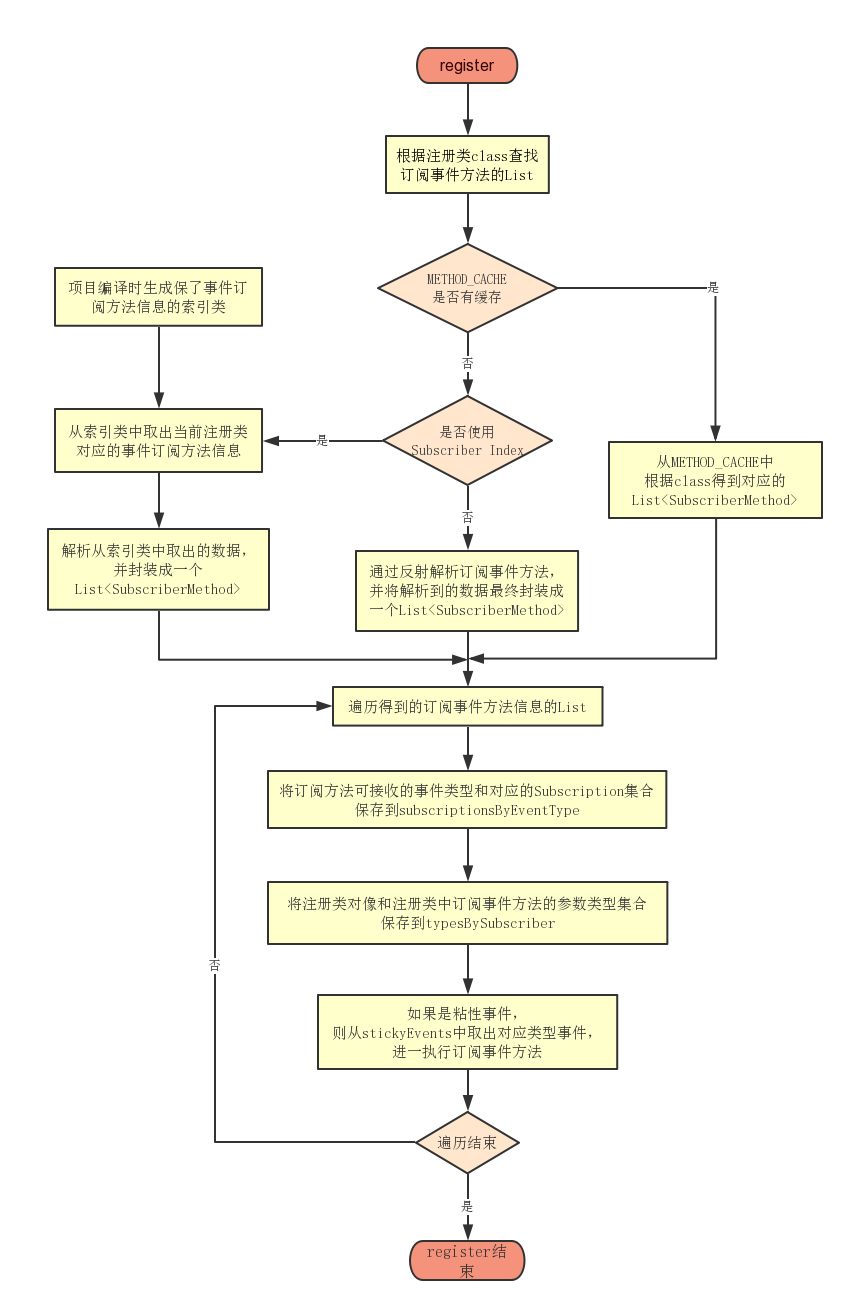
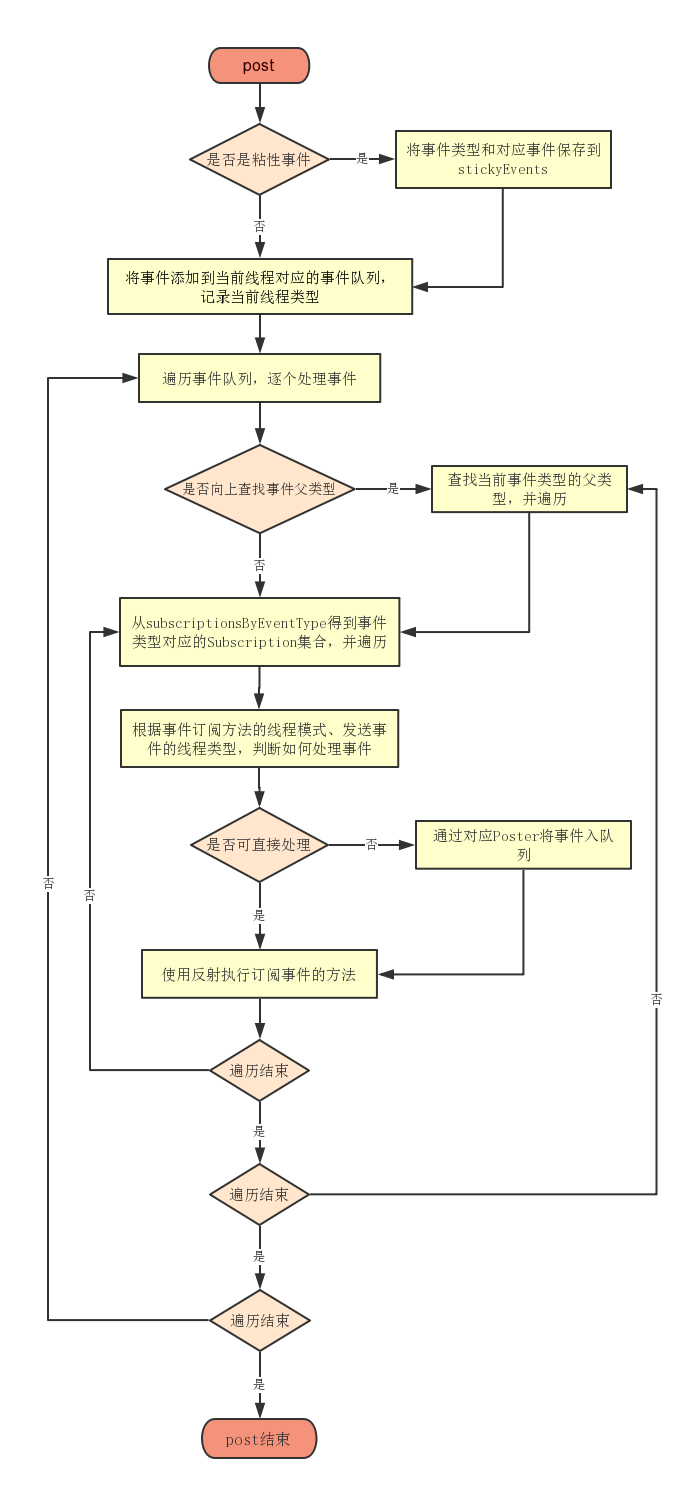
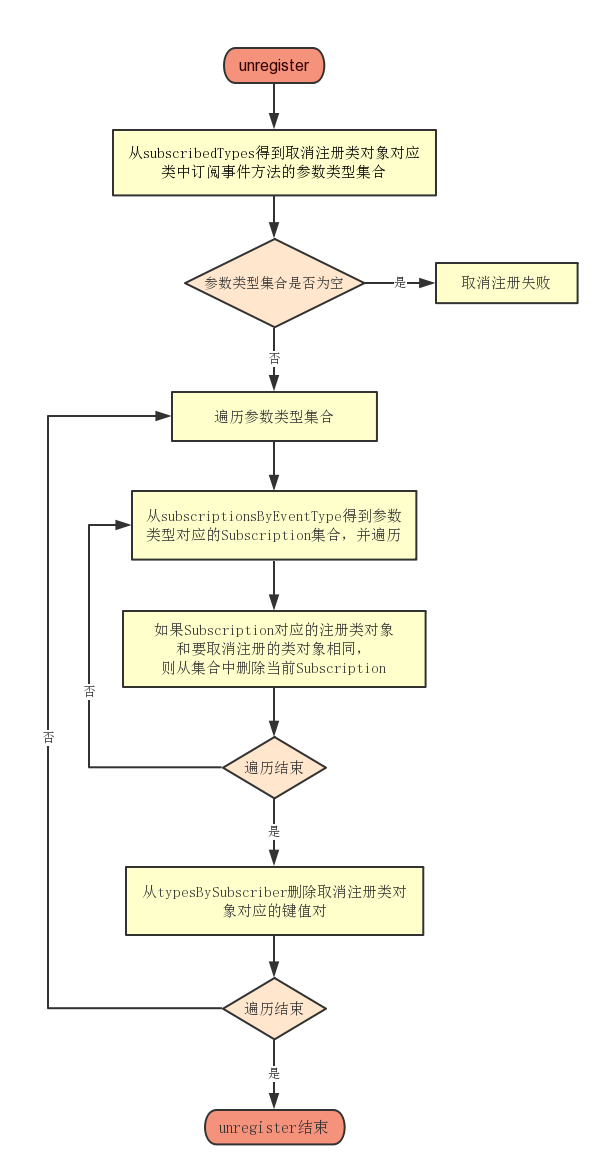
下面我们再来看一下EventBus的完成流程,可以用以下的几张图:
本文同步分享在 博客“xiangzhihong8”(CSDN)。
如有侵权,请联系 support@oschina.cn 删除。
本文参与“OSC源创计划”,欢迎正在阅读的你也加入,一起分享。