一:推文
软件定义网络基础---REST API概述
软件定义网络基础---REST API的设计规范
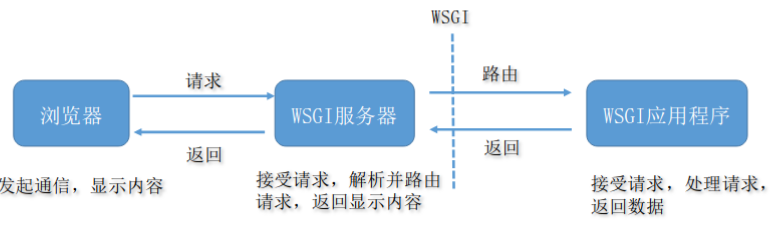
二:掌握Ryu基本RESTAPI使用方法
(一)Ryu的RESTAPI

(二) REST应用样例:app/ofctl_rest.py
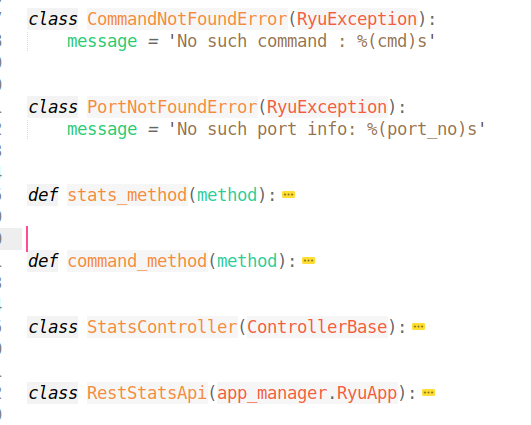
1.所提供的样例API接口
1# REST API
2#
3
4# Retrieve the switch stats
5#
6# get the list of all switches
7# GET /stats/switches
8#
9# get the desc stats of the switch
10# GET /stats/desc/<dpid>
11#
12# get flows desc stats of the switch
13# GET /stats/flowdesc/<dpid>
14#
15# get flows desc stats of the switch filtered by the fields
16# POST /stats/flowdesc/<dpid>
17#
18# get flows stats of the switch
19# GET /stats/flow/<dpid>
20#
21# get flows stats of the switch filtered by the fields
22# POST /stats/flow/<dpid>
23#
24# get aggregate flows stats of the switch
25# GET /stats/aggregateflow/<dpid>
26#
27# get aggregate flows stats of the switch filtered by the fields
28# POST /stats/aggregateflow/<dpid>
29#
30# get table stats of the switch
31# GET /stats/table/<dpid>
32#
33# get table features stats of the switch
34# GET /stats/tablefeatures/<dpid>
35#
36# get ports stats of the switch
37# GET /stats/port/<dpid>[/<port>]
38# Note: Specification of port number is optional
39#
40# get queues stats of the switch
41# GET /stats/queue/<dpid>[/<port>[/<queue_id>]]
42# Note: Specification of port number and queue id are optional
43#       If you want to omitting the port number and setting the queue id,
44#       please specify the keyword "ALL" to the port number
45#       e.g. GET /stats/queue/1/ALL/1
46#
47# get queues config stats of the switch
48# GET /stats/queueconfig/<dpid>[/<port>]
49# Note: Specification of port number is optional
50#
51# get queues desc stats of the switch
52# GET /stats/queuedesc/<dpid>[/<port>[/<queue_id>]]
53# Note: Specification of port number and queue id are optional
54#       If you want to omitting the port number and setting the queue id,
55#       please specify the keyword "ALL" to the port number
56#       e.g. GET /stats/queuedesc/1/ALL/1
57#
58# get meter features stats of the switch
59# GET /stats/meterfeatures/<dpid>
60#
61# get meter config stats of the switch
62# GET /stats/meterconfig/<dpid>[/<meter_id>]
63# Note: Specification of meter id is optional
64#
65# get meter desc stats of the switch
66# GET /stats/meterdesc/<dpid>[/<meter_id>]
67# Note: Specification of meter id is optional
68#
69# get meters stats of the switch
70# GET /stats/meter/<dpid>[/<meter_id>]
71# Note: Specification of meter id is optional
72#
73# get group features stats of the switch
74# GET /stats/groupfeatures/<dpid>
75#
76# get groups desc stats of the switch
77# GET /stats/groupdesc/<dpid>[/<group_id>]
78# Note: Specification of group id is optional (OpenFlow 1.5 or later)
79#
80# get groups stats of the switch
81# GET /stats/group/<dpid>[/<group_id>]
82# Note: Specification of group id is optional
83#
84# get ports description of the switch
85# GET /stats/portdesc/<dpid>[/<port_no>]
86# Note: Specification of port number is optional (OpenFlow 1.5 or later)
87
88# Update the switch stats
89#
90# add a flow entry
91# POST /stats/flowentry/add
92#
93# modify all matching flow entries
94# POST /stats/flowentry/modify
95#
96# modify flow entry strictly matching wildcards and priority
97# POST /stats/flowentry/modify_strict
98#
99# delete all matching flow entries
100# POST /stats/flowentry/delete
101#
102# delete flow entry strictly matching wildcards and priority
103# POST /stats/flowentry/delete_strict
104#
105# delete all flow entries of the switch
106# DELETE /stats/flowentry/clear/<dpid>
107#
108# add a meter entry
109# POST /stats/meterentry/add
110#
111# modify a meter entry
112# POST /stats/meterentry/modify
113#
114# delete a meter entry
115# POST /stats/meterentry/delete
116#
117# add a group entry
118# POST /stats/groupentry/add
119#
120# modify a group entry
121# POST /stats/groupentry/modify
122#
123# delete a group entry
124# POST /stats/groupentry/delete
125#
126# modify behavior of the physical port
127# POST /stats/portdesc/modify
128#
129# modify role of controller
130# POST /stats/role
131#
132#
133# send a experimeter message
134# POST /stats/experimenter/<dpid>
(三)Ryu官方文档:https://ryu.readthedocs.io/en/latest/app/ofctl_rest.html
三:实验开始
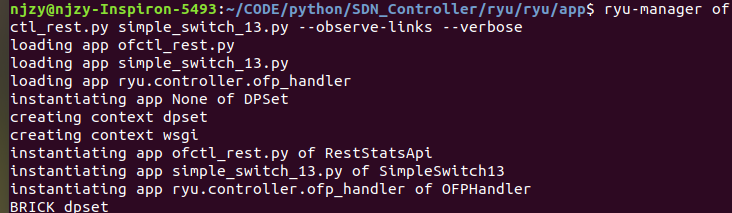
(一)开启Ryu控制器
ryu-manager ofctl_rest.py simple_switch_13.py --observe-links --verbose #除了使用RESTAPI之外,我们还要保证ryu控制器正常处理交换机逻辑
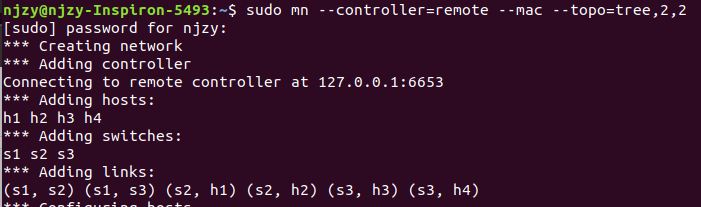
(二)开启Mininet
sudo mn --controller=remote --mac --topo=tree,2,2
(三)使用Curl发送URL请求
1.获取到所有交换机Get the list of all switches which connected to the controller.
$ curl -X GET http://localhost:8080/stats/switches

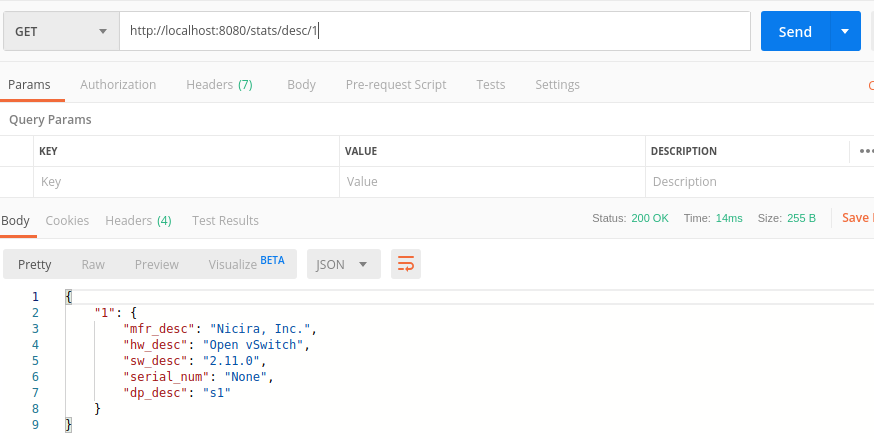
2.获取交换机的描述信息Get the desc stats of the switch which specified with Datapath ID in URI.
$ curl -X GET http://localhost:8080/stats/desc/1

3.其他类似
(四)Postman实验(更美观)
1.安装postman
2.获取交换机信息