
一、准备jar包
https://sourceforge.net/projects/jbcode/?source=typ_redirect
二、编写工具类
1  1 package com.example.demo.utils;
2  2
3  3 import org.jbarcode.JBarcode;
4  4 import org.jbarcode.JBarcodeFactory;
5  5 import org.jbarcode.encode.Code128Encoder;
6  6 import org.jbarcode.encode.InvalidAtributeException;
7  7 import org.jbarcode.paint.TextPainter;
8  8 import org.jbarcode.util.ImageUtil;
9  9
10 10 import java.awt.*;
11 11 import java.awt.image.BufferedImage;
12 12 import java.io.*;
13 13 import java.util.ArrayList;
14 14 import java.util.List;
15 15
16 16 /**
17 17  * @author zsh
18 18  * @company wlgzs
19 19  * @create 2019-03-10 10:37
20 20  * @Describe Jbarcode 条形码生成工具
21 21  * 备注:
22 22  * 1.静态代码块的作用:当类被载入时,静态代码块被执行,且只被执行一次,静态块常用来执行类属性的初始化。
23 23  * 2.常量条形码的高度和字体大小设置很重要,若是设置小了会看不到设置的文件
24 24  */
25 25 public class JbarcodeUtil {
26 26
27 27     //设置条形码高度
28 28     private static final int BARCODE_HEIGHT = 40;
29 29     //设置条形码默认分辨率
30 30     private static final int BARCODE_DPI = ImageUtil.DEFAULT_DPI;
31 31     //设置条形码字体样式
32 32     private static final String FONT_FAMILY = "console";
33 33     //设置条形码字体大小
34 34     private static final int FONT_SIZE = 15;
35 35     //设置条形码文本
36 36     public static String TEXT = "";
37 37     //创建jbarcode
38 38     private static JBarcode jbc = null;
39 39
40 40     static JBarcode getJBarcode() throws InvalidAtributeException {
41 41         /**
42 42          * 参考设置样式:
43 43          *barcode.setEncoder(Code128Encoder.getInstance()); //设置编码
44 44          *barcode.setPainter(WidthCodedPainter.getInstance());// 设置Painter
45 45          *barcode.setTextPainter(BaseLineTextPainter.getInstance()); //设置TextPainter
46 46          *barcode.setBarHeight(17); //设置高度
47 47          *barcode.setWideRatio(Double.valueOf(30).doubleValue());// 设置宽度比率
48 48          *barcode.setXDimension(Double.valueOf(2).doubleValue()); // 设置尺寸,大小 密集程度
49 49          *barcode.setShowText(true); //是否显示文本
50 50          *barcode.setCheckDigit(true); //是否检查数字
51 51          *barcode.setShowCheckDigit(false); //是否显示检查数字
52 52          */
53 53         if (jbc == null) {
54 54             //生成code128
55 55             jbc = JBarcodeFactory.getInstance().createCode128();
56 56             jbc.setEncoder(Code128Encoder.getInstance());
57 57             jbc.setTextPainter(CustomTextPainter.getInstance());
58 58             jbc.setBarHeight(BARCODE_HEIGHT);
59 59             jbc.setXDimension(Double.valueOf(0.8).doubleValue());
60 60             jbc.setShowText(true);
61 61         }
62 62         return jbc;
63 63     }
64 64
65 65     /**
66 66      * @descript:生成条形码文件
67 67      * @param message  条形码内容
68 68      * @param file   生成文件
69 69      */
70 70     public static void createBarcode(String message, File file, String text) {
71 71         try {
72 72             FileOutputStream fos = new FileOutputStream(file);
73 73             createBarcode(message, fos,text);
74 74             fos.close();
75 75         } catch (IOException e) {
76 76             throw new RuntimeException(e);
77 77         }
78 78     }
79 79
80 80     /**
81 81      * @descript:生成条形码并写入指定输出流
82 82      * @param message   条形码内容
83 83      * @param os   输出流
84 84      */
85 85     public static void createBarcode(String message, OutputStream os, String text) {
86 86         try {
87 87             //设置条形码文本
88 88             TEXT=text;
89 89             //创建条形码的BufferedImage图像
90 90             BufferedImage image = getJBarcode().createBarcode(message);
91 91             ImageUtil.encodeAndWrite(image, ImageUtil.PNG, os, BARCODE_DPI, BARCODE_DPI);
92 92             os.flush();
93 93         } catch (Exception e) {
94 94             throw new RuntimeException(e);
95 95         }
96 96     }
97 97
98 98     /**
99 99      * 静态内部类
100100      * 自定义的 TextPainter, 允许定义字体,大小,文本等
101101      * 参考底层实现:BaseLineTextPainter.getInstance()
102102      */
103103     protected static class CustomTextPainter implements TextPainter {
104104         private static CustomTextPainter instance =new CustomTextPainter();
105105         public static CustomTextPainter getInstance() {
106106             return instance;
107107         }
108108         public void paintText(BufferedImage barCodeImage, String text, int width) {
109109             //绘图
110110             Graphics g2d = barCodeImage.getGraphics();
111111             //创建字体
112112             Font font = new Font(FONT_FAMILY, Font.PLAIN, FONT_SIZE * width);
113113             g2d.setFont(font);
114114             FontMetrics fm = g2d.getFontMetrics();
115115             int height = fm.getHeight();
116116             int center = (barCodeImage.getWidth() - fm.stringWidth(text)) / 2;
117117             g2d.setColor(Color.WHITE);
118118             g2d.fillRect(0, 0, barCodeImage.getWidth(), barCodeImage.getHeight() * 1 / 20);
119119             g2d.fillRect(0, barCodeImage.getHeight() - (height * 9 / 10), barCodeImage.getWidth(), (height * 9 / 10));
120120             g2d.setColor(Color.BLACK);
121121             //绘制文本
122122             g2d.drawString(TEXT, 0, 145);
123123             //绘制条形码
124124             g2d.drawString(text, center, barCodeImage.getHeight() - (height / 10) - 2);
125125         }
126126     }
127127
128128     //测试
129129     public static void main(String[] args) throws FileNotFoundException, IOException {
130130         List<String> list=new ArrayList<String>();
131131         list.add("KJ4.1-0127-0001");
132132         list.add("KJ4.1-0128-0001");
133133         list.add("KJ4.1-0129-0001");
134134         list.add("KJ4.1-0130-0001");
135135         if(list!=null && list.size()>0){
136136             for(String message:list){
137137                 JbarcodeUtil.createBarcode(message, new File("D:\\"+message+".png"),"测试");
138138             }
139139         }
140140
141141     }
142142 }

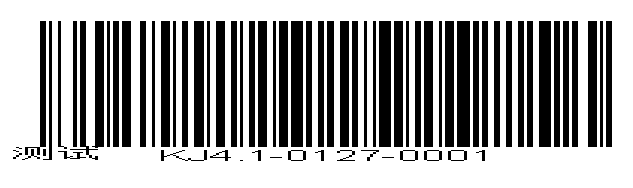
注意事项:
1.//设置条形码高度
private static final int BARCODE_HEIGHT = 20;
//设置条形码字体大小
private static final int FONT_SIZE = 15;
这2个设置大小很重要,若是设置值小了则看不到文件如“苏薇”,自己可以把值修改为12运行下会发现文本"苏微"看不到,这是由于高度太小,字体无法显示
2.生成的条形码用扫码枪可以扫描,但是有时候扫描不了,原因是生成的条形码密度太厚,故"jbc.setXDimension(Double.valueOf(0.8).doubleValue());"设置很重要,值越小密度越细,条形码宽度越宽。
3.案例中message="KJ4.1-0130-0001",若message="KJ4.1-0130-0001(001)"则扫描不了,原因识别不了括号
4.该案例生成的条形码扫描反应慢