
Spring RestTemplate 调用天气预报接口可能遇到中文乱码的问题,解决思路如下。
问题出现
我们在网上找了一个免费的天气预报接口 http://wthrcdn.etouch.cn/weather_mini?citykey=101280601。我们希望调用该接口,并将返回的数据解析为 JSON 格式。
核心业务逻辑如下:
1private WeatherResponse doGetWeatherData(String uri) {
2
3    ResponseEntity<String> response = restTemplate.getForEntity(uri, String.class);
4
5    String strBody = null;
6
7    if (response.getStatusCodeValue() == 200) {
8        strBody = response.getBody();
9    }
10
11    ObjectMapper mapper = new ObjectMapper();
12    WeatherResponse weather = null;
13
14    try {
15        weather = mapper.readValue(strBody, WeatherResponse.class);
16    } catch (IOException e) {
17        e.printStackTrace();
18    }
19
20    return weather;
21}
在浏览器里面访问该接口都挺正常。如下图所示:
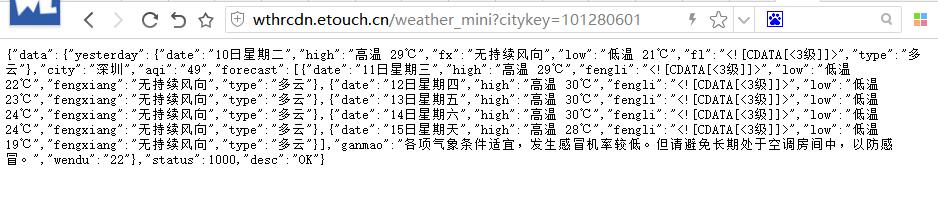
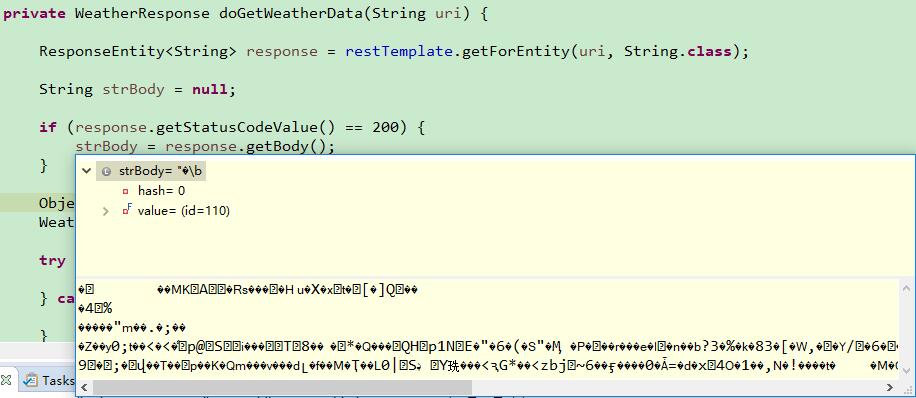
但在纯 Spring 应用里面,尝试使用 RestTemplate 来调用,结果解析数据为 JSON 失败,因为数据有乱码。如下图所示:
尝试进行编码转换
一开始,我们认为这可能是对方转过来的数据不是 UTF-8 导致的,所以,尝试加入了消息转换器。
1@Configuration
2public class RestConfiguration {
3
4    @Bean
5    public RestTemplate restTemplate() {
6    	RestTemplate restTemplate = new RestTemplate();
7    	restTemplate.getMessageConverters().set(1,
8    			new StringHttpMessageConverter(StandardCharsets.UTF_8)); // 支持中文编码
9        return restTemplate;
10    }
11
12}
StringHttpMessageConverter 默认是 ISO_8859_1,所以我们设置为了 UTF_8。
再次执行,发现仍然是乱码。
找到问题的根源
这一次我没有再瞎猜了,而是仔细观察了 HTTP 的请求协议。发现消息头里面的蛛丝马迹:
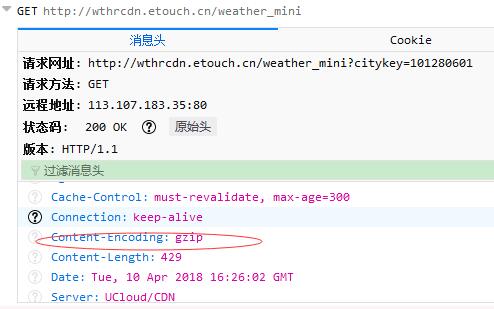
原来,数据是经过 GZIP 压缩过的。默认情况下, RestTemplate 使用的是 JDK 的 HTTP 调用器,并不支持 GZIP 解压,难怪解析不了。
解决方案
既然找到了问题所在,解决起来就简单了。主要考虑了以下几种方案。
1. 编写 GIZP 工具类
处理 Gizp 压缩的数据的工具类如下:
1/**
2 * Welcome to https://waylau.com
3 */
4package com.waylau.spring.mvc.util;
5
6import java.io.ByteArrayInputStream;
7import java.io.ByteArrayOutputStream;
8import java.io.IOException;
9import java.util.zip.GZIPInputStream;
10
11/**
12 * String Util.
13 *
14 * @since 1.0.0 2018年3月27日
15 * @author <a href="https://waylau.com">Way Lau</a>
16 */
17public class StringUtil {
18
19	/**
20	 * 处理 Gizp 压缩的数据.
21	 *
22	 * @param str
23	 * @return
24	 * @throws IOException
25	 */
26	public static String conventFromGzip(String str) throws IOException {
27		ByteArrayOutputStream out = new ByteArrayOutputStream();
28		ByteArrayInputStream in;
29		GZIPInputStream gunzip = null;
30
31		in = new ByteArrayInputStream(str.getBytes("ISO-8859-1"));
32		gunzip = new GZIPInputStream(in);
33		byte[] buffer = new byte[256];
34		int n;
35		while ((n = gunzip.read(buffer)) >= 0) {
36			out.write(buffer, 0, n);
37		}
38
39		return out.toString();
40	}
41}
核心业务逻辑如下:
1private WeatherResponse doGetWeatherData(String uri) {
2
3    ResponseEntity<String> response = restTemplate.getForEntity(uri, String.class);
4    String strBody = null;
5
6    if (response.getStatusCodeValue() == 200) {
7        try {
8            strBody = StringUtil.conventFromGzip(response.getBody());
9        } catch (IOException e) {
10            e.printStackTrace();
11        }
12    }
13
14    ObjectMapper mapper = new ObjectMapper();
15    WeatherResponse weather = null;
16
17    try {
18        weather = mapper.readValue(strBody, WeatherResponse.class);
19    } catch (IOException e) {
20        e.printStackTrace();
21    }
22
23    return weather;
24}
2. 使用 Apache HttpClient
使用 Apache HttpClient 作为 REST 客户端。Apache HttpClient 内置了对于 GZIP 的支持
1@Configuration
2public class RestConfiguration {
3
4    @Bean
5    public RestTemplate restTemplate() {
6    	RestTemplate restTemplate = new RestTemplate(
7    			new HttpComponentsClientHttpRequestFactory()); // 使用HttpClient,支持GZIP
8    	restTemplate.getMessageConverters().set(1,
9    			new StringHttpMessageConverter(StandardCharsets.UTF_8)); // 支持中文编码
10        return restTemplate;
11    }
12
13}
核心业务逻辑如下:
1private WeatherResponse doGetWeatherData(String uri) {
2
3    ResponseEntity<String> response = restTemplate.getForEntity(uri, String.class);
4
5    String strBody = null;
6
7    if (response.getStatusCodeValue() == 200) {
8        strBody = response.getBody();
9    }
10
11    ObjectMapper mapper = new ObjectMapper();
12    WeatherResponse weather = null;
13
14    try {
15        weather = mapper.readValue(strBody, WeatherResponse.class);
16    } catch (IOException e) {
17        e.printStackTrace();
18    }
19
20    return weather;
21}
当然,使用该方案,需要引入 Apache HttpClient 的依赖。
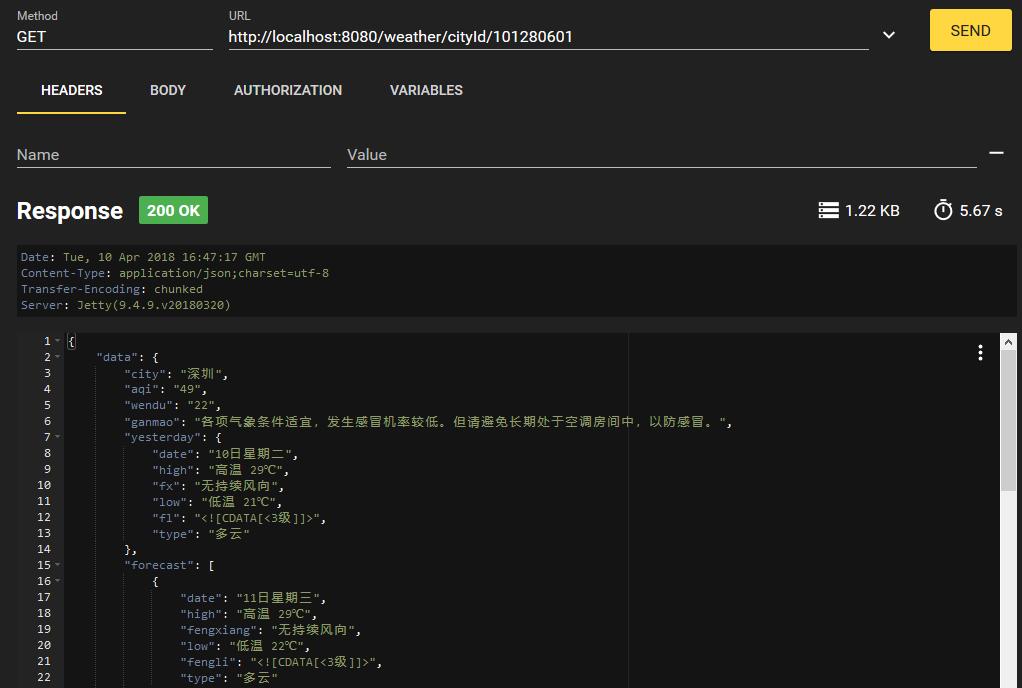
最终效果,完美!
在 Spring Boot 中所使用的差异
也有学员问到,为啥我在“基于Spring Cloud的微服务实战”课程中,没有同样也是使用 RestTemplate, 调用同样的接口,为啥没有出现乱码的问题?
其实,细心的学员应该发现,在课程中,我们同样也是使用了 Apache HttpClient,由于 Spring Cloud 本身也是基于 Spring Boot 来构建的,所以屏蔽了很多消息转换的细节而言。
以下是 Spring Boot 中通过 RestTemplateBuilder 来构建 RestTemplate 的方式:
1@Configuration
2public class RestConfiguration {
3
4	@Autowired
5	private RestTemplateBuilder builder;
6
7	@Bean
8	public RestTemplate restTemplate() {
9		return builder.build();
10	}
11
12}
所以学习编码,知其然要知其所以然!
源码
- 本文示例源码,见 “Spring 5 案例大全”(https://github.com/waylau/spring-5-book) 的 “基于 RestTemplate 的天气预报服务”例子
参考引用:
- 《Spring Boot 教程》:https://github.com/waylau/spring-boot-tutorial
- 《基于Spring Boot的博客系统实战》:http://coding.imooc.com/class/125.html
- 原文同步至https://waylau.com/spring-resttemplate-gzip/