
本文收录在 GitHub 地址 https://github.com/chengxy-nds/Springboot-Notebook
时间格式化在项目中使用频率是非常高的,当我们的 API 接口返回结果,需要对其中某一个 date 字段属性进行特殊的格式化处理,通常会用到 SimpleDateFormat 工具处理。
1SimpleDateFormat dateFormat = new SimpleDateFormat("yyyy-MM-dd");
2Date stationTime = dateFormat.parse(dateFormat.format(PayEndTime()));
可一旦处理的地方较多,不仅 CV 操作频繁,还产生很多重复臃肿的代码,而此时如果能将时间格式统一配置,就可以省下更多时间专注于业务开发了。
可能很多人觉得统一格式化时间很简单啊,像下边这样配置一下就行了,但事实上这种方式只对 date 类型生效。
1spring.jackson.date-format=yyyy-MM-dd HH:mm:ss
2spring.jackson.time-zone=GMT+8
而很多项目中用到的时间和日期API 比较混乱, java.util.Date 、 java.util.Calendar 和 java.time LocalDateTime 都存在,所以全局时间格式化必须要同时兼容性新旧 API。
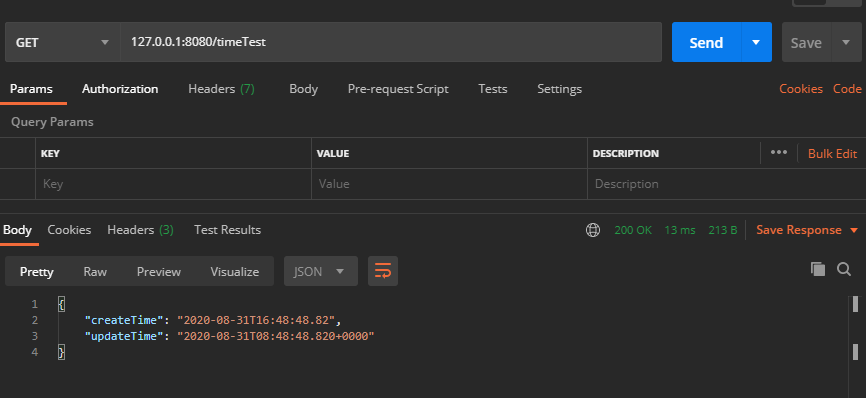
看看配置全局时间格式化前,接口返回时间字段的格式。
1@Data
2public class OrderDTO {
3
4    private LocalDateTime createTime;
5
6    private Date updateTime;
7}
8
很明显不符合页面上的显示要求(有人抬杠为啥不让前端解析时间,我只能说睡服代码比说服人容易得多~)
一、@JsonFormat 注解
@JsonFormat 注解方式严格意义上不能叫全局时间格式化,应该叫部分格式化,因为@JsonFormat 注解需要用在实体类的时间字段上,而只有使用相应的实体类,对应的字段才能进行格式化。
1@Data
2public class OrderDTO {
3
4    @JsonFormat(locale = "zh", timezone = "GMT+8", pattern = "yyyy-MM-dd")
5    private LocalDateTime createTime;
6
7    @JsonFormat(locale = "zh", timezone = "GMT+8", pattern = "yyyy-MM-dd HH:mm:ss")
8    private Date updateTime;
9}
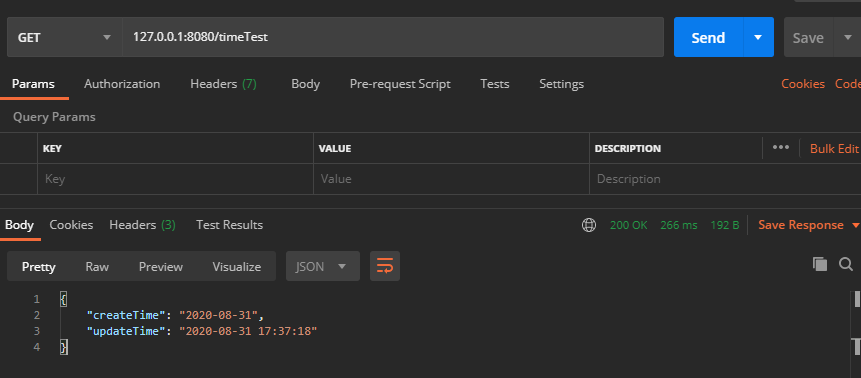
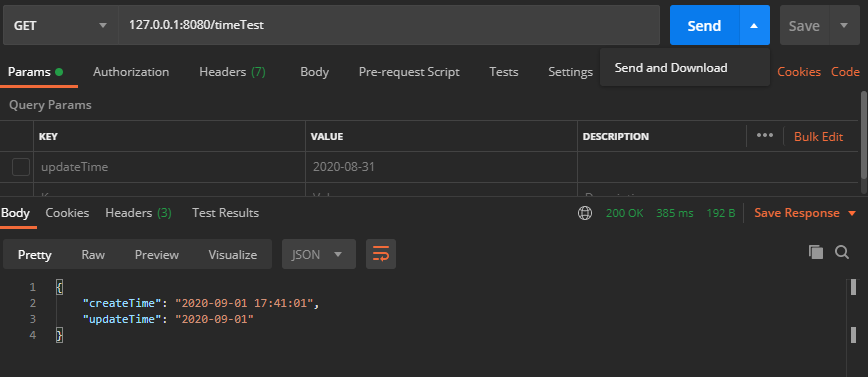
字段加上 @JsonFormat 注解后,LocalDateTime 和 Date 时间格式化成功。
二、@JsonComponent 注解(推荐)
这是我个人比较推荐的一种方式,前边看到使用 @JsonFormat 注解并不能完全做到全局时间格式化,所以接下来我们使用 @JsonComponent 注解自定义一个全局格式化类,分别对 Date 和 LocalDate 类型做格式化处理。
1@JsonComponent
2public class DateFormatConfig {
3
4    @Value("${spring.jackson.date-format:yyyy-MM-dd HH:mm:ss}")
5    private String pattern;
6
7    /**
8     * @author xiaofu
9     * @description date 类型全局时间格式化
10     * @date 2020/8/31 18:22
11     */
12    @Bean
13    public Jackson2ObjectMapperBuilderCustomizer jackson2ObjectMapperBuilder() {
14
15        return builder -> {
16            TimeZone tz = TimeZone.getTimeZone("UTC");
17            DateFormat df = new SimpleDateFormat(pattern);
18            df.setTimeZone(tz);
19            builder.failOnEmptyBeans(false)
20                    .failOnUnknownProperties(false)
21                    .featuresToDisable(SerializationFeature.WRITE_DATES_AS_TIMESTAMPS)
22                    .dateFormat(df);
23        };
24    }
25
26    /**
27     * @author xiaofu
28     * @description LocalDate 类型全局时间格式化
29     * @date 2020/8/31 18:22
30     */
31    @Bean
32    public LocalDateTimeSerializer localDateTimeDeserializer() {
33        return new LocalDateTimeSerializer(DateTimeFormatter.ofPattern(pattern));
34    }
35
36    @Bean
37    public Jackson2ObjectMapperBuilderCustomizer jackson2ObjectMapperBuilderCustomizer() {
38        return builder -> builder.serializerByType(LocalDateTime.class, localDateTimeDeserializer());
39    }
40}
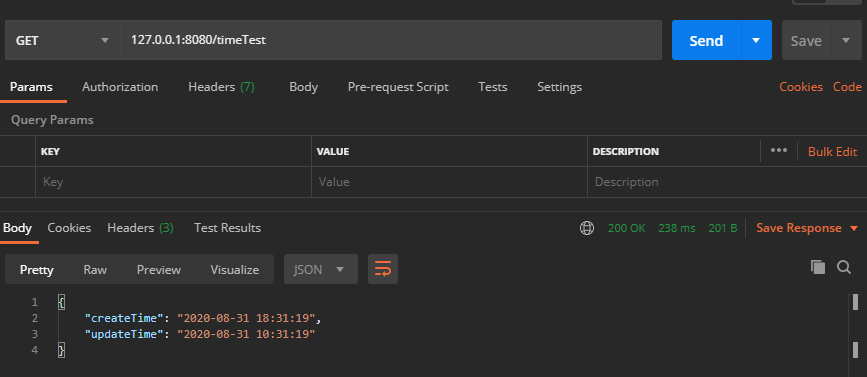
看到 Date 和 LocalDate 两种时间类型格式化成功,此种方式有效。
但还有个问题,实际开发中如果我有个字段不想用全局格式化设置的时间样式,想自定义格式怎么办?
那就需要和 @JsonFormat 注解配合使用了。
1@Data
2public class OrderDTO {
3
4    @JsonFormat(locale = "zh", timezone = "GMT+8", pattern = "yyyy-MM-dd")
5    private LocalDateTime createTime;
6
7    @JsonFormat(locale = "zh", timezone = "GMT+8", pattern = "yyyy-MM-dd")
8    private Date updateTime;
9}
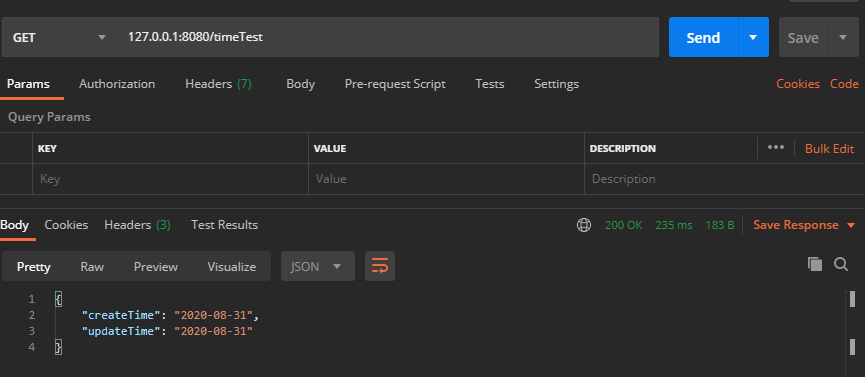
从结果上我们看到 @JsonFormat 注解的优先级比较高,会以 @JsonFormat 注解的时间格式为主。
三、@Configuration 注解
这种全局配置的实现方式与上边的效果是一样的。
注意:在使用此种配置后,字段手动配置
@JsonFormat注解将不再生效。
1@Configuration
2public class DateFormatConfig2 {
3
4    @Value("${spring.jackson.date-format:yyyy-MM-dd HH:mm:ss}")
5    private String pattern;
6
7    public static DateFormat dateFormat = new SimpleDateFormat("yyyy-MM-dd HH:mm:ss");
8
9    @Bean
10    @Primary
11    public ObjectMapper serializingObjectMapper() {
12        ObjectMapper objectMapper = new ObjectMapper();
13        JavaTimeModule javaTimeModule = new JavaTimeModule();
14        javaTimeModule.addSerializer(LocalDateTime.class, new LocalDateTimeSerializer());
15        javaTimeModule.addDeserializer(LocalDateTime.class, new LocalDateTimeDeserializer());
16        objectMapper.registerModule(javaTimeModule);
17        return objectMapper;
18    }
19
20    /**
21     * @author xiaofu
22     * @description Date 时间类型装换
23     * @date 2020/9/1 17:25
24     */
25    @Component
26    public class DateSerializer extends JsonSerializer<Date> {
27        @Override
28        public void serialize(Date date, JsonGenerator gen, SerializerProvider provider) throws IOException {
29            String formattedDate = dateFormat.format(date);
30            gen.writeString(formattedDate);
31        }
32    }
33
34    /**
35     * @author xiaofu
36     * @description Date 时间类型装换
37     * @date 2020/9/1 17:25
38     */
39    @Component
40    public class DateDeserializer extends JsonDeserializer<Date> {
41
42        @Override
43        public Date deserialize(JsonParser jsonParser, DeserializationContext deserializationContext) throws IOException {
44            try {
45                return dateFormat.parse(jsonParser.getValueAsString());
46            } catch (ParseException e) {
47                throw new RuntimeException("Could not parse date", e);
48            }
49        }
50    }
51
52    /**
53     * @author xiaofu
54     * @description LocalDate 时间类型装换
55     * @date 2020/9/1 17:25
56     */
57    public class LocalDateTimeSerializer extends JsonSerializer<LocalDateTime> {
58        @Override
59        public void serialize(LocalDateTime value, JsonGenerator gen, SerializerProvider serializers) throws IOException {
60            gen.writeString(value.format(DateTimeFormatter.ofPattern(pattern)));
61        }
62    }
63
64    /**
65     * @author xiaofu
66     * @description LocalDate 时间类型装换
67     * @date 2020/9/1 17:25
68     */
69    public class LocalDateTimeDeserializer extends JsonDeserializer<LocalDateTime> {
70        @Override
71        public LocalDateTime deserialize(JsonParser p, DeserializationContext deserializationContext) throws IOException {
72            return LocalDateTime.parse(p.getValueAsString(), DateTimeFormatter.ofPattern(pattern));
73        }
74    }
75}
总结
分享了一个简单却又很实用的 Springboot 开发技巧,其实所谓的开发效率,不过是一个又一个开发技巧堆砌而来,聪明的程序员总是能用最少的代码完成任务。
整理了几百本各类技术电子书,送给小伙伴们。关注公号回复【666】自行领取。和一些小伙伴们建了一个技术交流群,一起探讨技术、分享技术资料,旨在共同学习进步,如果感兴趣就加入我们吧!

无论你是刚入行、还是已经有几年经验的程序员,相信这份面试提纲都会给你不少助力,长按二维码关注 『 程序员内点事 』 ,回复 『 offer 』 自行领取,祝大家 offer 拿到手软
