
每隔半年不看官方文档,你就会不认识React了😁
- React组件生命周期
- 受控组件与非受控组件
- 多个输入的解决方法
- Props.children可以传递任何数据包括函数
- 布尔值、Null 和 Undefined 被忽略
- 使用 PropTypes 进行类型检查(直接参考官方文档)
- react-redux中
mapDispatchToProps方法无法访问Store中state,怎么办???
React组件生命周期
1.React 15.x
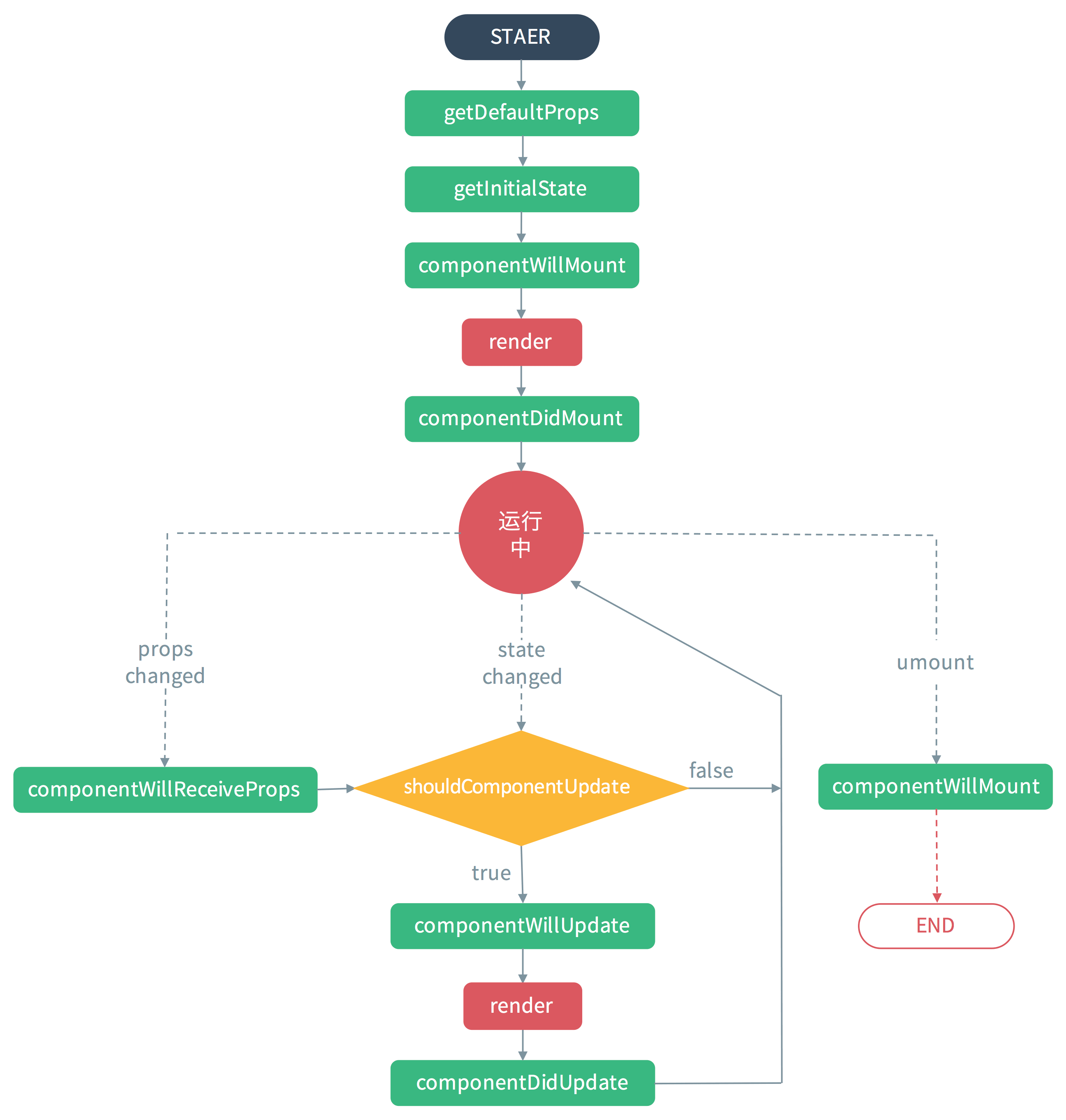 

1componentWillReceiveProps(nextProps)
2shouldComponentUpdate(nextProps, nextState)
3componentWillUpdate(nextProps, nextState)
4componentDidUpdate(prevProps, prevState)
2.React 16.3
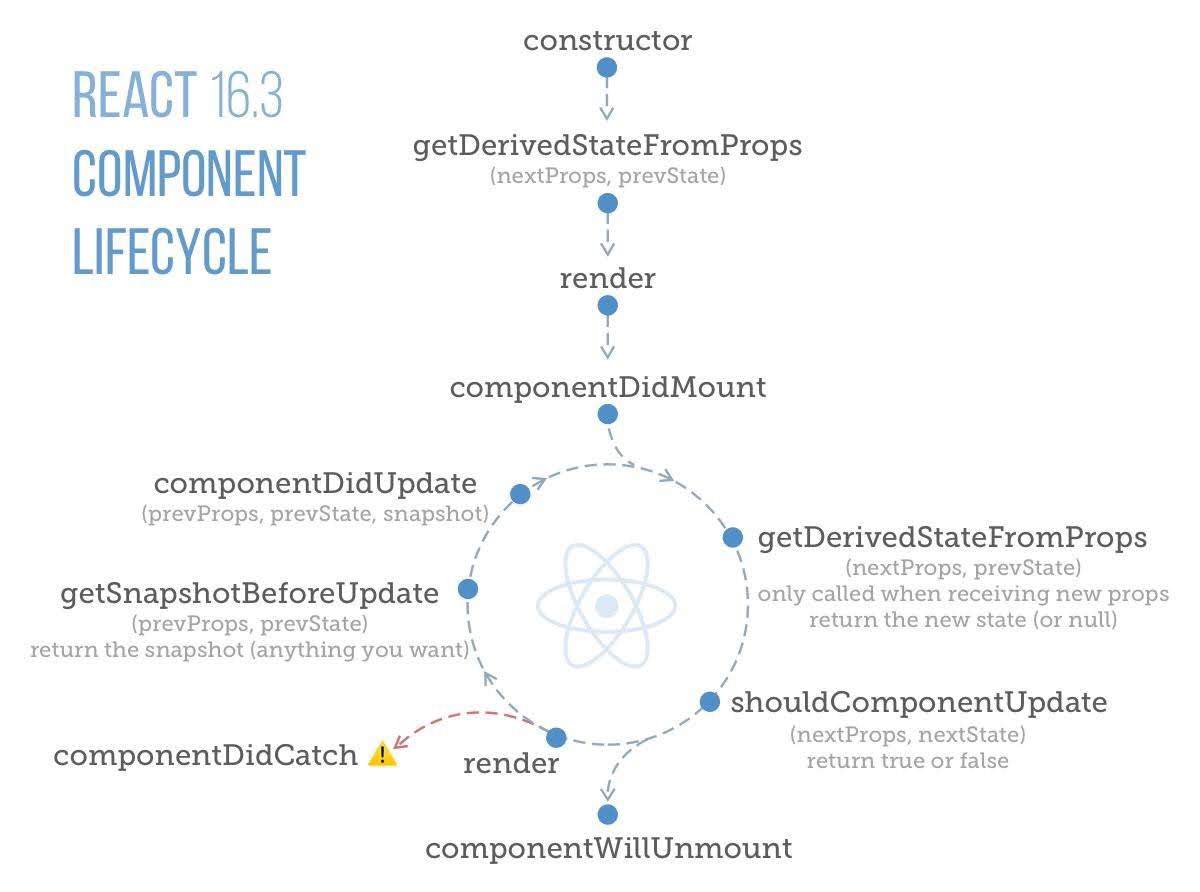 

static getDerivedStateFromProps是在render方法之前调用的, 组件初次加载和后续更新的时候都会调用,返回一个对象来更新state,如果返回null则不做任何更新.需要注意的是这个方法是静态方法,在方法内this不是指向组件实例的,this.props/this.state是取不到组件数据的getSnapshotBeforeUpdate是在最近一次渲染更新到真实DOM节点之前被调用的,这个方法的返回值会作为第三个参数传入componentDidUpdate方法
受控组件与非受控组件
受控组件:表单数据由React组件控制(通过props或者state控制)
1class Form extends Component {
2  constructor() {
3    super();
4    this.state = {
5      name: '',
6    };
7  }
8
9  handleNameChange = (event) => {
10    this.setState({ name: event.target.value });
11  };
12
13  render() {
14    return (
15      <div>
16        <input
17          type="text"
18          value={this.state.name}
19          onChange={this.handleNameChange}
20        />
21      </div>
22    );
23  }
24}
非受控组件:数据由真实的DOM控制(使用ref获取真实的DOM)
1class Form extends Component {
2  handleSubmitClick = () => {
3    const name = this._name.value;
4    // do something with `name`
5  }
6
7  render() {
8    return (
9      <div>
10        <input type="text" defaultValue="Bob" ref={input => this._name = input} />
11        <button onClick={this.handleSubmitClick}>Sign up</button>
12      </div>
13    );
14  }
15}
16
两种组件该如何选择
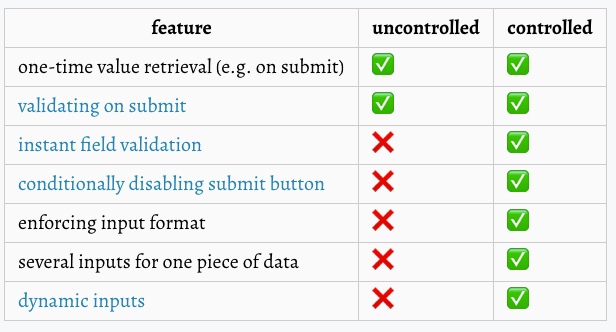 

参考:Controlled and uncontrolled form inputs in React don't have to be complicated
多个输入的解决方法
当你有处理多个受控的input元素时,你可以通过给每个元素添加一个name属性,来让处理函数根据 event.target.name的值来选择做什么。
1class Reservation extends React.Component {
2  constructor(props) {
3    super(props);
4    this.state = {
5      isGoing: true,
6      numberOfGuests: 2
7    };
8
9    this.handleInputChange = this.handleInputChange.bind(this);
10  }
11
12  handleInputChange(event) {
13    const target = event.target;
14    const value = target.type === 'checkbox' ? target.checked : target.value;
15    const name = target.name;
16
17    this.setState({
18      [name]: value
19    });
20  }
21
22  render() {
23    return (
24      <form>
25        <label>
26          Is going:
27          <input
28            name="isGoing"
29            type="checkbox"
30            checked={this.state.isGoing}
31            onChange={this.handleInputChange} />
32        </label>
33        <br />
34        <label>
35          Number of guests:
36          <input
37            name="numberOfGuests"
38            type="number"
39            value={this.state.numberOfGuests}
40            onChange={this.handleInputChange} />
41        </label>
42      </form>
43    );
44  }
45}
Props.children可以传递任何数据包括函数
1// Calls the children callback numTimes to produce a repeated component
2function Repeat(props) {
3  let items = [];
4  for (let i = 0; i < props.numTimes; i++) {
5    items.push(props.children(i));
6  }
7  return <div>{items}</div>;
8}
9
10function ListOfTenThings() {
11  return (
12    <Repeat numTimes={10}>
13      {(index) => <div key={index}>This is item {index} in the list</div>}
14    </Repeat>
15  );
16}
布尔值、Null 和 Undefined 被忽略
false、null、undefined 和 true 都是有效的子代,但它们不会直接被渲染。下面的表达式是等价的:
1<div />
2<div></div>
3<div>{false}</div>
4<div>{null}</div>
5<div>{undefined}</div>
6<div>{true}</div>
值得注意的是,JavaScript 中的一些 “falsy” 值(比如数字0),它们依然会被渲染。例如,下面的代码不会像你预期的那样运行,因为当 props.message 为空数组时,它会打印0:
1<div>
2  {props.messages.length &&
3    <MessageList messages={props.messages} />
4  }
5</div>
要解决这个问题,请确保 && 前面的表达式始终为布尔值:
1<div>
2  {props.messages.length > 0 &&
3    <MessageList messages={props.messages} />
4  }
5</div>
相反,如果你想让类似 false、true、null 或 undefined 出现在输出中,你必须先把它转换成字符串 :
1<div>
2  My JavaScript variable is {String(myVariable)}.
3</div>
使用 PropTypes 进行类型检查(直接参考官方文档)
react-redux中mapDispatchToProps方法无法访问Store中state,怎么办???
最近在开发过程中遇到这样一种场景:在mapDispatchToProps需要根据state中某个状态决定引入何种dispatchProps,但是mapDispatchToProps没有提供直接访问state的方式,
mapDispatchToProps可以是对象或者函数,当为函数时,其函数签名如下:mapDispatchToProps(dispatch, [ownProps]): dispatchProps,因此在mapDispatchToProps中并不能实现这种需求。但是借助connect方法的第三个参数mergeProps可以实现我们的需求
connect([mapStateToProps], [mapDispatchToProps], [mergeProps], [options])
[mergeProps(stateProps, dispatchProps, ownProps): props] (Function): 如果指定了这个参数,mapStateToProps() 与 mapDispatchToProps() 的执行结果和组件自身的 props 将传入到这个回调函数中。该回调函数返回的对象将作为 props 传递到被包装的组件中。你也许可以用这个回调函数,根据组件的 props 来筛选部分的 state 数据,或者把 props 中的某个特定变量与 action creator 绑定在一起。如果你省略这个参数,默认情况下返回 Object.assign({}, ownProps, stateProps, dispatchProps) 的结果。如果我们需要根据state中的状态决定dispatchProps,可以先在mapStateToProps()将其映射到stateProps中,然后在mergeProps中重新构造dispatchProps。
Add state as the third parameter to mapDispatchToProps
Access state props in mapDispatchToProps