
那么,到底什么是Luci呢?先直观的感受一下,打开web浏览器的网关地址,然后出现了一个web登录界面,这个就是Openwrt Luci的应用。
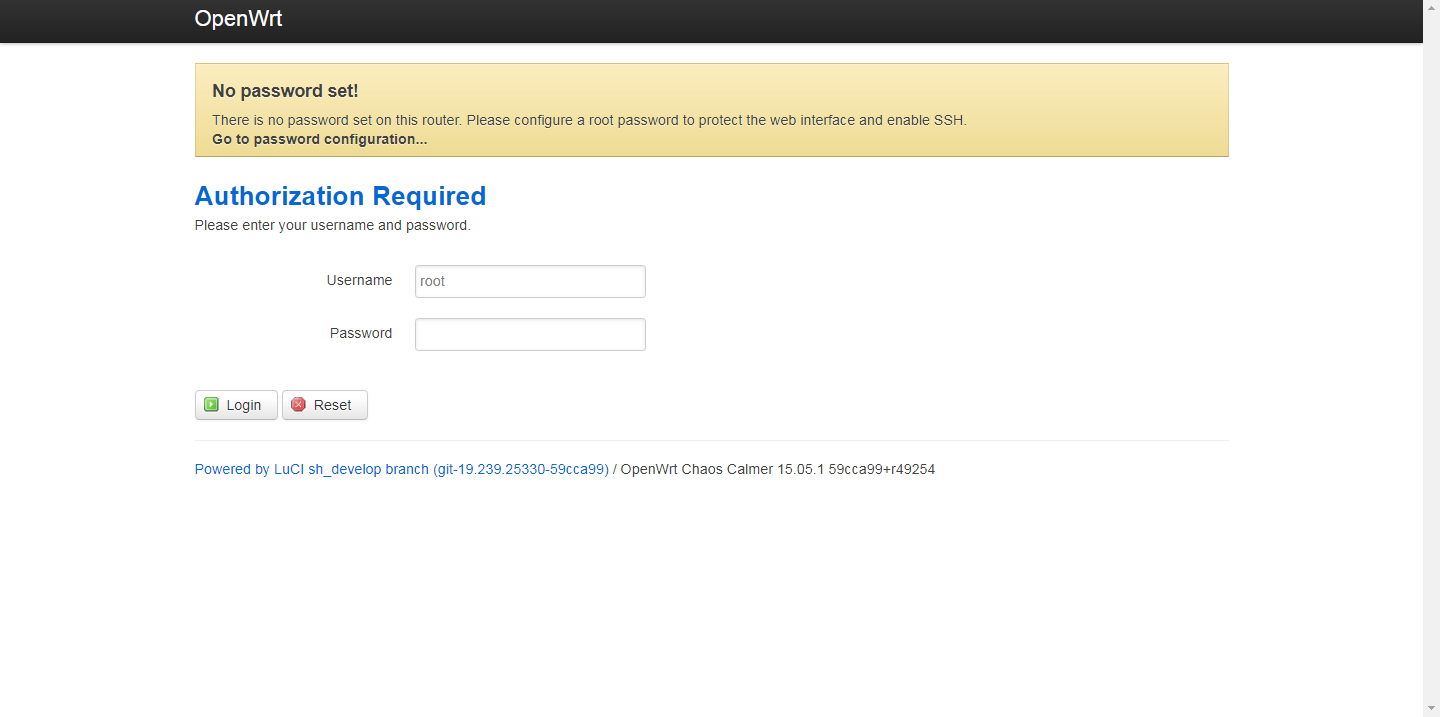
概述:
OpenWRT的web采取的是luci框架, 在luci的官方网站说明了luci是一个MVC架构的框架,是一个单用户框架,
公用的模块放置在*/luci/controller/下面,
各个用户的模块放置在*/luci/controller/下面对应的文件夹里面,
比如admin登录,最终的页面只显示/luci/controller/admin下面的菜单。这样既有效的管理了不同管理员的权限。
基础知识:
Luci = lua + uci
lua : 脚本语言
uci :(Unified Configuration Interface)是Openwrt的配置框架
Openwrt 的 web 服务器: uhttpd
uhttpd:是一个轻量级的web服务器,由于其可以和Openwrt的配置框架UCI结合到一起,因此默认被用于OpenWrt的Web管理接口LuCI。我们都知道,网站都是被部署在一台台服务器,PC等设备上的,我们的设备访问网站时,先是通过网络访问到部署这个网站的服务器,然后服务器的web服务再返回页面给我们;也就是说如果服务器没有web服务,我们是访问不了网页的哦。
说明:
- lua单行注释使用“--”,类似于C语言的“//”,多行注释时,“--[[”类似C语言中的“/*”,“]]--”类似C语言中的“*/”
一:luci的目录
contoller:逻辑控制文件(主要是注册页面)
model :业务上的处理
view : 存放 html 文件
controller在luci框架中的作用是逻辑上的组织,编码时主要分为2块
1 模块的注册 :
module("luci.controller.admin.system", package.seeall) //在luci/controller/admin/下注册一个system模块
2 节点的注册 :表示添加一个新的模块入口
1local fs = require "nixio.fs"
2entry({"admin", "system"}, alias("admin", "system", "system"), _("System"), 30).index = true
3entry({"admin", "system", "system"}, cbi("admin_system/system"), _("System"), 1)
4entry({"admin", "system", "clock_status"}, call("action_clock_status"))
5entry({"admin", "system", "admin"}, cbi("admin_system/admin"), _("Administration"), 2)
6entry({"admin", "system", "reboot"}, call("action_reboot"), _("Reboot"), 90)
7
8函数原型 : entry(path, target, title=nil, order=nil)
9
10path :是访问的路径,路径是按字符串数组给定的,
11	比如路径按如下方式写"{"admin", "loogson", "control"}",那么就可以在浏览器里访问"http://192.168.1.1/cgi-bin/luci/admin/loogson/control"来访问这个脚本。
12	其中的“admin”表示为管理员添加脚本,"loogson"即为一级菜单名,"control"为菜单项名。系统会自动在对应的菜单中生成菜单项。比如想在"System"菜单下创建一个菜单项,那么一级菜单名可以写为"system"。
13
14target : 为调用目标,调用目标分为三种,分别是执行指定方法(Action)、访问指定页面(Views)以及调用CBI Module。
15
16  call:第一种可以直接调用指定的函数,比如点击菜单项就直接重启路由器等等,比如写为"call("function_name")",然后在该lua文件下编写名为function_name的函数就可以调用了。
17
18  template:第二种可以访问指定的页面,比如写为"template("myapp/mymodule")"就可以调用/usr/lib/lua/luci/view/myapp/mymodule.htm文件了。
19
20  cbi: 第三种主要应用在配置界面,比如写为"cbi("myapp/mymodule")"就可以调用/usr/lib/lua/luci/model/cbi/myapp/mymodule.lua文件了。
21
22  title和order: 是针对管理员菜单的,其中的title即是显示在网页上的内容。这里我们创建"/usr/lib/lua/luci/controller/loogson.lua"文件,定义我们的入口为"loogson"。
23  alias :表示连接到其他某个节点
用户管理:
/luci/controller/admin下面的菜单,一共7个文件
1root@OpenWrt:/usr/lib/lua/luci/controller/admin# ls -l
2-rw-rw-r--    1 root     root           319 Mar 31 07:19 filebrowser.lua
3-rw-rw-r--    1 root     root          1140 Mar 31 07:19 index.lua
4-rw-rw-r--    1 root     root         11355 Mar 31 07:19 network.lua
5-rw-rw-r--    1 root     root          4403 Mar 31 07:19 status.lua
6-rw-rw-r--    1 root     root         10235 Mar 31 07:19 system.lua
7-rw-rw-r--    1 root     root          1769 Mar 31 07:19 uci.lua
8
9-rw-rw-r--    1 root     root          1167 Mar 31 07:19 servicectl.lua
前面6个来至Feeds/luci/modules/luci-mod-admin-full/luasrc/controller/admin目录,最后一个来自luci-base目录
二:脚本函数
2.1 Map 函数
m = Map("配置文件存储的文件名,不包含路径", "配置页面标题", "配置页面说明")
2.2
local m, s, o //定义全局变量
2.3
1Section : 创建与配置文件中对应的Section , Section分为两种,NamedSection 和 TypedSection
2NamedSection :根据配置文件中的Section名
3TypedSection:根据配置文件中的Section类型
4
5s = m:section(TypedSection, "_dummy", "")
6s.addremove = false	//不允许增加或删除Section
7s.anonymous = true	//设定不显示Section的名称
2.4 定义:
1选项:tab
2s:tab("led", translate("Control LED"))
3
4文本框:value
5o:value(0, translate("LED0"))
6o:value(1, translate("LED1"))
7o:value(2, translate("LED2"))
8
9下拉框:ListValue
10o = s:taboption("led", ListValue, "lednum", translate("LED NUM:"))
11
12选择框:Flag
三:web 访问流程
3.1 首先只有当web 服务器起来后,才可能访问到页面,所以首先看一下web 服务器的配置,前文说过,openwrt 的web 服务器使用的是uhttpd
1root@OpenWrt:/etc/config# cat uhttpd 	#也可以通过uci 命令查看 :uci show uhttpd
2
3config uhttpd 'main'
4        list listen_http '0.0.0.0:8080'	#http协议IPV4的监听端口80
5        list listen_http '[::]:8080' 	#http协议IPV6的监听端口80
6        list listen_https '0.0.0.0:443'		#https协议的监听端口为443
7        list listen_https '[::]:443'
8        option redirect_https '1'
9        option home '/www'				#指定根路径
10        option rfc1918_filter '1'
11        option max_requests '3'			#最大请求数
12        option max_connections '100'	#最大TCP连接数
13        option cert '/etc/uhttpd.crt'	#HTTPS连接的证书路径
14        option key '/etc/uhttpd.key'	#HTTPS连接的私钥路径
15        option cgi_prefix '/cgi-bin'	#cgi脚本的路径,这个路径又是home的相对路径,即/www/cgi-bin
16        option script_timeout '60'
17        option network_timeout '30'
18        option http_keepalive '20'
19        option tcp_keepalive '1'
20        option ubus_prefix '/ubus'
21
22config cert 'px5g'
23        option days '730'
24        option bits '1024'
25        option country 'ZZ'
26        option state 'Somewhere'
27        option location ''
28        option commonname 'OpenWrt'
3.2 由上面uhttpd的配置来看,当我们通过web的方式访问时,uhttpd会导向"/www"的路径,那么我们来看看"/www"里面有什么。
1root@OpenWrt:/www# ls
2cgi-bin      index.html   luci-static
3
4root@OpenWrt:/www# cat index.html
5<?xml version="1.0" encoding="utf-8"?>
6<!DOCTYPE html PUBLIC "-//W3C//DTD XHTML 1.1//EN" "http://www.w3.org/TR/xhtml11/DTD/xhtml11.dtd">
7<html xmlns="http://www.w3.org/1999/xhtml">
8<head>
9<meta http-equiv="Cache-Control" content="no-cache" />
10<meta http-equiv="refresh" content="0; URL=/cgi-bin/luci" />
11</head>
12<body style="background-color: white">
13<a style="color: black; font-family: arial, helvetica, sans-serif;" href="https://my.oschina.net/cgi-bin/luci">LuCI - Lua Configuration Interface</a>
14</body>
15</html>
16root@OpenWrt:/www#
从 index.html 可以看到这个内容“href="https://my.oschina.net/cgi-bin/luci”,原来是这里把网关导向了“/cgi-bin/luci”;那么我们再来看看这个路径里面又有什么?
1root@OpenWrt:/www/cgi-bin# ls         #这里有个luci的脚本
2luci
3
4root@OpenWrt:/www/cgi-bin# cat luci
5#!/usr/bin/lua
6require "luci.cacheloader"
7require "luci.sgi.cgi"
8luci.dispatcher.indexcache = "/tmp/luci-indexcache"
9luci.sgi.cgi.run()
10
11root@OpenWrt:/www/cgi-bin#
这个路径下面放着一个lua的脚本,脚本里面调用了这个接口“luci.sgi.cgi.run()”,那么这个接口执行的函数在哪里呢,在这里:
1root@OpenWrt:/usr/lib/lua/luci/sgi# ls
2cgi.lua     uhttpd.lua
3
4root@OpenWrt:/usr/lib/lua/luci/sgi# cat cgi.lua
5-- Copyright 2008 Steven Barth <steven@midlink.org>
6-- Licensed to the public under the Apache License 2.0.
7
8exectime = os.clock()
9module("luci.sgi.cgi", package.seeall)
10local ltn12 = require("luci.ltn12")
11require("nixio.util")
12require("luci.http")
13require("luci.sys")
14require("luci.dispatcher")
15
16-- Limited source to avoid endless blocking
17local function limitsource(handle, limit)
18        limit = limit or 0
19        local BLOCKSIZE = ltn12.BLOCKSIZE
20
21        return function()
22                if limit < 1 then
23                        handle:close()
24                        return nil
25                else
26                        local read = (limit > BLOCKSIZE) and BLOCKSIZE or limit
27                        limit = limit - read
28
29                        local chunk = handle:read(read)
30                        if not chunk then handle:close() end
31                        return chunk
32                end
33        end
34end
35
36function run()
37        local r = luci.http.Request(
38                luci.sys.getenv(),
39                limitsource(io.stdin, tonumber(luci.sys.getenv("CONTENT_LENGTH"))),
40                ltn12.sink.file(io.stderr)
41        )
42
43        local x = coroutine.create(luci.dispatcher.httpdispatch)
44        local hcache = ""
45        local active = true
46
47        while coroutine.status(x) ~= "dead" do
48                local res, id, data1, data2 = coroutine.resume(x, r)
49
50                if not res then
51                        print("Status: 500 Internal Server Error")
52                        print("Content-Type: text/plain\n")
53                        print(id)
54                        break;
55                end
56
57                if active then
58                        if id == 1 then
59                                io.write("Status: " .. tostring(data1) .. " " .. data2 .. "\r\n")
60                        elseif id == 2 then
61                                hcache = hcache .. data1 .. ": " .. data2 .. "\r\n"
62                        elseif id == 3 then
63                                io.write(hcache)
64                                io.write("\r\n")
65                        elseif id == 4 then
66                                io.write(tostring(data1 or ""))
67                        elseif id == 5 then
68                                io.flush()
69                                io.close()
70                                active = false
71                        elseif id == 6 then
72                                data1:copyz(nixio.stdout, data2)
73                                data1:close()
74                        end
75                end
76        end
77end
78root@OpenWrt:/usr/lib/lua/luci/sgi#
现在我们可以初步了解到,lua语言就是这样被Luci使用的。
那么我们再整体看一下整个访问流程:
web(输入网关地址)==> uhttpd调用"/www/index.html" ==> index.html重定向到"/cgi-bin/luci" ==> luci被启动。