
大家好,我是IT共享者,人称皮皮。这篇文章我们来讲讲CSS的文本样式。
一、文本颜色Color
颜色属性被用来设置文字的颜色。
颜色是通过CSS最经常的指定:
-
十六进制值 - 如"#FF0000"。
-
一个RGB值 - "RGB(255,0,0)"。
-
颜色的名称 - 如"红"。
一个网页的文本颜色是指在主体内的选择:
1<html>
2    <head>
3        <meta charset="utf-8">
4        <meta name="viewport" content="width=640, user-scalable=no">
5        <title>项目</title>
6        <style>
7            body {
8                color: blue;
9            }
10
11            h1 {
12                color: #00ff00;
13            }
14
15            h2 {
16                color: rgb(255, 0, 0);
17            }
18</style>
19    </head>
20
21    <body>
22        <h2>hello world</h2>
23        <h1>welcome to CaoZhou</h1>
24    </body>
25
26</html>

注:对于W3C标准的CSS:如果你定义了颜色属性,你还必须定义背景色属性。
二、属性
1. text-align 文本的对齐方式
文本排列属性是用来设置文本的水平对齐方式。
文本可居中或对齐到左或右,两端对齐。
当text-align设置为"justify",每一行被展开为宽度相等,左,右外边距是对齐(如杂志和报纸)。
1<!doctype html>
2<html lang="en">
3
4    <head>
5        <meta charset="UTF-8">
6        <title>Document</title>
7        <style>
8            h1 {
9                text-align: center;
10            }
11
12            p.date {
13                text-align: right;
14            }
15
16            p.main {
17                text-align: justify;
18            }
19</style>
20    </head>
21
22    <body>
23
24        <p class="date">2015 年 3 月 14 号</p>
25        <p class="main"> 从前有个书生,和未婚妻约好在某年某月某日结婚。到那一天,未婚妻却嫁给了别人。书生受此打击, 一病不起。  这时,路过一游方僧人,从怀里摸出一面镜子叫书生看。书生看到茫茫大海,一名遇害的女子一丝不挂地躺在海滩上。路过一人, 看一眼,摇摇头,走了。又路过一人,将衣服脱下,给女尸盖上,走了。再路过一人,过去,挖个坑,小心翼翼把尸体掩埋了。  僧人解释道, 那具海滩上的女尸,就是你未婚妻的前世。你是第二个路过的人,曾给过他一件衣服。她今生和你相恋,只为还你一个情。但是她最终要报答一生一世的人,是最后那个把她掩埋的人,那人就是他现在的丈夫。书生大悟,病愈。
26
27        </p>
28        <p><b>注意:</b> 重置浏览器窗口大小查看 "justify" 是如何工作的。</p>
29    </body>
30
31</html>

2. text-decoration文本修饰
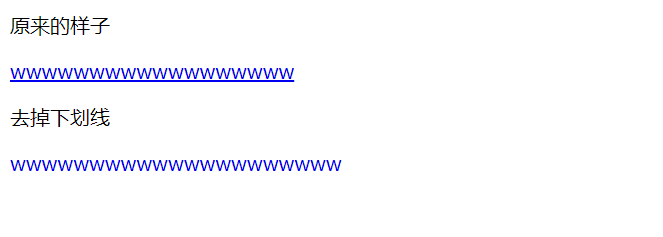
text-decoration 属性用来设置或删除文本的装饰。
从设计的角度看 text-decoration属性主要是用来删除链接的下划线:
1<!doctype html>
2<html lang="en">
3
4    <head>
5        <meta charset="UTF-8">
6        <title>Document</title>
7        <style>
8            .none {}
9
10            .del {
11                text-decoration: none;
12            }
13</style>
14    </head>
15
16    <body>
17        <p>原来的样子</p>
18        <a href="#" class="none">wwwwwwwwwwwwwwwwww</a>
19        <p>去掉下划线</p>
20        <a href="#" class="del">wwwwwwwwwwwwwwwwwwwww</a>
21    </body>
22
23</html>
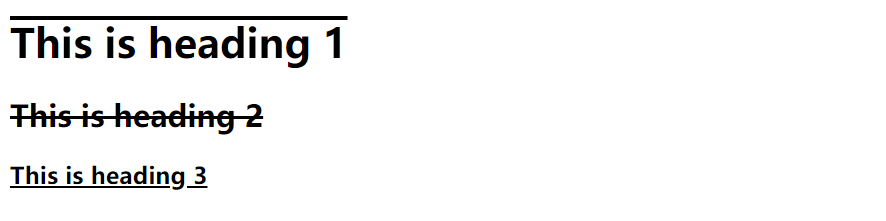
也可以这样装饰文字:
1<html>
2    <head>
3        <meta charset="utf-8">
4        <meta name="viewport" content="width=640, user-scalable=no">
5        <title>项目</title>
6        <style>
7            h1 {
8                text-decoration: overline;
9            }
10
11            h2 {
12                text-decoration: line-through;
13            }
14
15            h3 {
16                text-decoration: underline;
17            }
18</style>
19    </head>
20
21    <body>
22        <h1>This is heading 1</h1>
23        <h2>This is heading 2</h2>
24        <h3>This is heading 3</h3>
25    </body>
26
27</html>
注:不建议强调指出不是链接的文本,因为这常常混淆用户。
3. text-transform文本转换
text-transform文本转换属性是用来指定在一个文本中的大写和小写字母。
-
uppercase:转换为全部大写。
-
lowercase:转换为全部小写。
-
capitalize :每个单词的首字母大写。
1<!DOCTYPE html>
2<html>
3
4    <head>
5        <meta charset="utf-8">
6        <meta name="viewport" content="width=640, user-scalable=no">
7        <title>项目</title>
8        <style>
9            p.uppercase {
10                text-transform: uppercase;
11            }
12
13            p.lowercase {
14                text-transform: lowercase;
15            }
16
17            p.capitalize {
18                text-transform: capitalize;
19            }
20</style>
21    </head>
22
23    <body>
24        <p class="uppercase">This is some text.</p>
25        <p class="lowercase">This is some text.</p>
26        <p class="capitalize">This is some text.</p>
27    </body>
28
29</html>

4. text-indent文本缩进
text-indent文本缩进属性是用来指定文本的第一行的缩进。
p {text-indent:50px;}
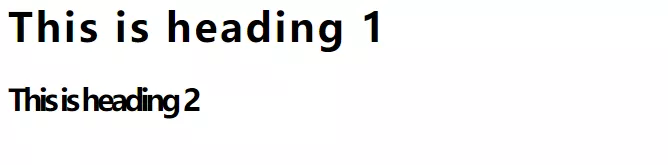
5. letter-spacing 设置字符间距
增加或减少字符之间的空间。
1<style>
2     h1 {
3       letter-spacing:2px;
4}
5      h2 {
6        letter-spacing:-3px;
7}
8</style>
6. line-height设置行高
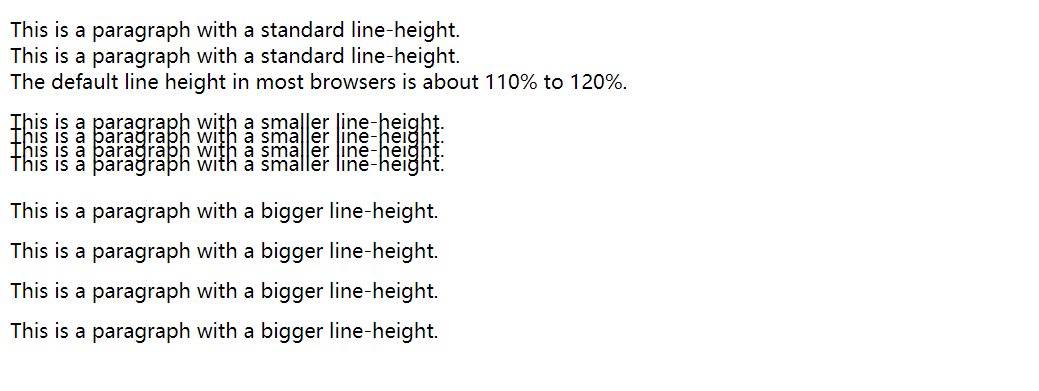
指定在一个段落中行之间的空间。
1<html>
2    <head>
3        <meta charset="utf-8">
4        <meta name="viewport" content="width=640, user-scalable=no">
5        <title>项目</title>
6        <style>
7            p.small {
8                line-height: 70%;
9            }
10
11            p.big {
12                line-height: 200%;
13            }
14</style>
15    </head>
16
17    <body>
18        <p>
19            This is a paragraph with a standard line-height.<br> This is a paragraph with a standard line-height.<br> The default line height in most browsers is about 110% to 120%.<br>
20        </p>
21
22        <p class="small">
23            This is a paragraph with a smaller line-height.<br> This is a paragraph with a smaller line-height.<br> This is a paragraph with a smaller line-height.<br> This is a paragraph with a smaller line-height.<br>
24        </p>
25
26        <p class="big">
27            This is a paragraph with a bigger line-height.<br> This is a paragraph with a bigger line-height.<br> This is a paragraph with a bigger line-height.<br> This is a paragraph with a bigger line-height.<br>
28        </p>
29
30    </body>
31
32</html>
7. word-spacing 设置字间距
增加一个段落中的单词之间的空白空间。
1<html>
2    <head>
3        <meta charset="utf-8">
4        <meta name="viewport" content="width=640, user-scalable=no">
5        <title>项目</title>
6        <style type="text/css">
7            p {
8                word-spacing: 30px;
9            }
10</style>
11    </head>
12
13    <body>
14
15        <p>
16            This is some text. This is some text.
17        </p>
18
19    </body>
20
21</html>

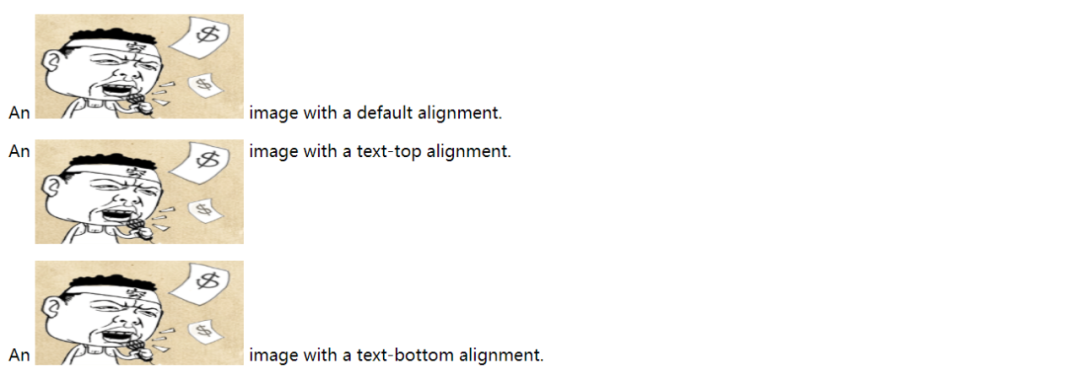
8. vertical-align 设置元垂直居中
设置文本的垂直对齐图像。
1<html>
2    <head>
3        <meta charset="utf-8">
4        <meta name="viewport" content="width=640, user-scalable=no">
5        <title>项目</title>
6        <style>
7            img{
8                width: 200px;
9                height: 100px;
10            }
11            img.top {
12                vertical-align: text-top;
13
14            }
15
16            img.bottom {
17                vertical-align: text-bottom;
18
19            }
20</style>
21    </head>
22
23    <body>
24        <p>An <img src="img/logo.png"  /> image with a default alignment.</p>
25        <p>An <img class="top" src="img/logo.png" /> image with a text-top alignment.</p>
26        <p>An <img class="bottom" src="img/logo.png" /> image with a text-bottom alignment.</p>
27    </body>
28
29</html>
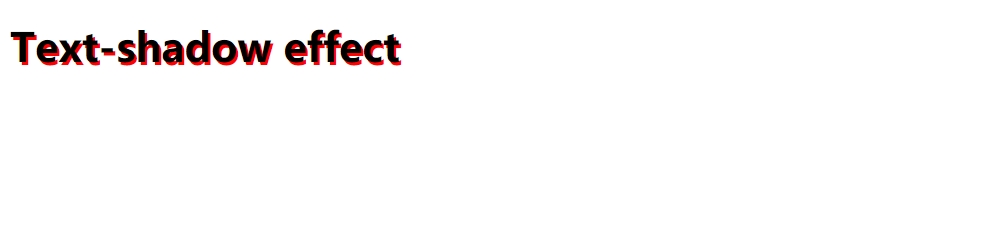
9. text-shadow 设置文本阴影
设置文本阴影。
1<html>
2    <head>
3        <meta charset="utf-8">
4        <meta name="viewport" content="width=640, user-scalable=no">
5        <title>项目</title>
6        <style>
7         h1{
8            text-shadow: 2px 2px #FF0000;
9     }
10</style>
11    </head>
12
13    <body>
14    <h1>Text-shadow effect</h1>
15    </body>
16
17</html>
三、总结
本文主要介绍了CSS文本样式实际应用中应该如何去操作,通过讲解文本中对应的属性去改变文本的表现形式。使用丰富的效果图的展示,能够更直观的看到运行的效果,能够更好的理解。使用Html语言,代码结构更佳的清晰,能够帮助你更好的学习。