
本篇文章代码实现不多,主要是教你如何用JestClient去实现ElasticSearch上的操作。
授人以鱼不如授人以渔。
一、说明
1、elasticsearch版本:6.2.4 。
jdk版本:1.8(该升级赶紧升级吧,现在很多技术都是最低要求1.8)。
jest版本:5.3.3。
2、一些不错的文章
一些基本概念的讲解:http://www.gaowm.com/categories/Elasticsearch/
es配置文件参数介绍:https://www.jianshu.com/p/149a8da90bbc
中文ik插件安装:https://blog.csdn.net/zjcjava/article/details/78653753
linux启动需要更改的一些参数:https://www.cnblogs.com/woxpp/p/6061073.html
二、前提:
1、最好已经大概看过es的官方文档,附上文档地址:
中文:https://www.elastic.co/guide/cn/elasticsearch/guide/cn/index.html 虽然已经有点老了,不过还是可以看看的。(我英文不好看的这个)
英文:https://www.elastic.co/guide/en/elasticsearch/reference/current/index.html 英文好的直接看英文版的,毕竟是最新的。
2、知道自己需要的es命令:
比如想用jest进行索引模版的相关操作,需要知道操作模版的命令是“template” 等等。然后能在官方文档里查到相关命令的详细操作。
简单说就是现在已经知道怎么在 es里进行相关操作了。现在想要用jest进行实现。
三、开始:
1、pom依赖:


1<project xmlns="http://maven.apache.org/POM/4.0.0"
2    xmlns:xsi="http://www.w3.org/2001/XMLSchema-instance"
3    xsi:schemaLocation="http://maven.apache.org/POM/4.0.0 http://maven.apache.org/xsd/maven-4.0.0.xsd">
4    <modelVersion>4.0.0</modelVersion>
5    <groupId>ceshi</groupId>
6    <artifactId>ceshi</artifactId>
7    <version>0.0.1-SNAPSHOT</version>
8
9    <dependencies>
10        <dependency>
11            <groupId>io.searchbox</groupId>
12            <artifactId>jest</artifactId>
13            <version>5.3.3</version>
14        </dependency>
15        <dependency>
16            <groupId>org.elasticsearch</groupId>
17            <artifactId>elasticsearch</artifactId>
18            <version>6.2.4</version>
19        </dependency>
20    </dependencies>
21    <build>
22        <plugins>
23            <!-- java编译插件 -->
24            <plugin>
25                <groupId>org.apache.maven.plugins</groupId>
26                <artifactId>maven-compiler-plugin</artifactId>
27                <configuration>
28                    <source>1.8</source>
29                    <target>1.8</target>
30                    <encoding>UTF-8</encoding>
31                </configuration>
32            </plugin>
33        </plugins>
34    </build>
35</project>
pom.xml
2、jest初始化,这里就不说了。直接开始操作了,简单说几个命令抛砖引玉:
索引模版:es命令地址:https://www.elastic.co/guide/cn/elasticsearch/guide/cn/index-templates.html
文档中可以看到命令是“_template”。 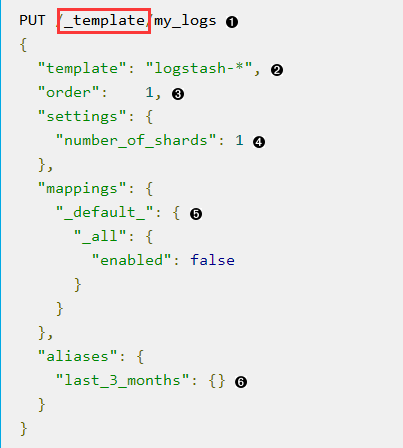
现在在jest的jar包里找 “template”相关的类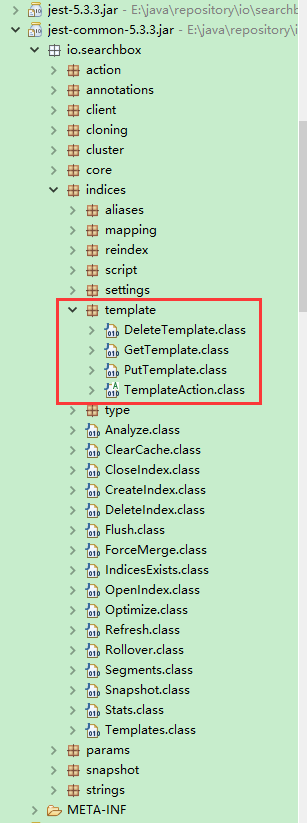
其实写到这 大概应该知道啥意思了。补张图:
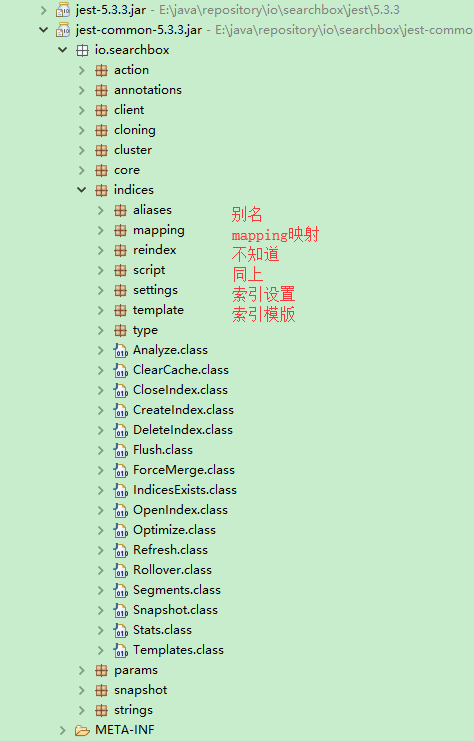
写的有点乱,以后整理吧。
-------------------------2018-07-17------------------------------------
附上自己的代码实现(index的一些操作)。数据操作之后整理完,再发。
1创建index
2public void createIndex(String index) {
3    try {
4        JestResult jestResult = jestClient.execute(new CreateIndex.Builder(index).build());
5        System.out.println("createIndex:{}" + jestResult.isSucceeded());
6    } catch (IOException e) {
7        e.printStackTrace();
8    }
9}
10删除index
11public void deleteIndex(String index) {
12    try {
13        JestResult jestResult = jestClient.execute(new DeleteIndex.Builder(index).build());
14        System.out.println("deleteIndex result:{}" + jestResult.isSucceeded());
15    } catch (IOException e) {
16        e.printStackTrace();
17    }
18
19}
20
21设置index的mapping(设置数据类型和分词方式)
22public void createIndexMapping(String index, String type, String mappingString) {
23    //mappingString为拼接好的json格式的mapping串
24    PutMapping.Builder builder = new PutMapping.Builder(index, type, mappingString);
25    try {
26        JestResult jestResult = jestClient.execute(builder.build());
27        System.out.println("createIndexMapping result:{}" + jestResult.isSucceeded());
28        if (!jestResult.isSucceeded()) {
29            System.err.println("settingIndexMapping error:{}" + jestResult.getErrorMessage());
30        }
31    } catch (IOException e) {
32        e.printStackTrace();
33    }
34}
35获取index的mapping
36public String getMapping(String indexName, String typeName) {
37        GetMapping.Builder builder = new GetMapping.Builder();
38        builder.addIndex(indexName).addType(typeName);
39        try {
40            JestResult result = jestClient.execute(builder.build());
41            if (result != null && result.isSucceeded()) {
42                return result.getSourceAsObject(JsonObject.class).toString();
43            }
44        } catch (Exception e) {
45            e.printStackTrace();
46        }
47        return null;
48    }
49
50获取索引index设置setting
51public boolean getIndexSettings(String index) {
52        try {
53            JestResult jestResult = jestClient.execute(new GetSettings.Builder().addIndex(index).build());
54            System.out.println(jestResult.getJsonString());
55            if (jestResult != null) {
56                return jestResult.isSucceeded();
57            }
58        } catch (IOException e) {
59            e.printStackTrace();
60        }
61        return false;
62    }
63
64更改索引index设置setting
65public boolean updateIndexSettings(String index) {
66        String source;
67        XContentBuilder mapBuilder = null;
68        try {
69            mapBuilder = XContentFactory.jsonBuilder();
70            mapBuilder.startObject().startObject("index").field("max_result_window", "1000000").endObject().endObject();
71            source = mapBuilder.string();
72            JestResult jestResult = jestClient.execute(new UpdateSettings.Builder(source).build());
73            System.out.println(jestResult.getJsonString());
74            if (jestResult != null) {
75                return jestResult.isSucceeded();
76            }
77        } catch (IOException e) {
78            e.printStackTrace();
79        }
80        return false;
81    }
82获取索引 别名
83public boolean getIndexAliases(String index) {
84        try {
85            JestResult jestResult = jestClient.execute(new GetAliases.Builder().addIndex(index).build());
86            System.out.println(jestResult.getJsonString());
87            if (jestResult != null) {
88                return jestResult.isSucceeded();
89            }
90        } catch (IOException e) {
91            e.printStackTrace();
92        }
93        return false;
94    }
95添加索引别名
96public void addAlias(List<String> index, String alias) {
97    try {
98        AddAliasMapping build = new AddAliasMapping.Builder(index, alias).build();
99        JestResult jestResult = jestClient.execute(new ModifyAliases.Builder(build).build());
100        System.out.println("result:" + jestResult.getJsonString());
101    } catch (IOException e) {
102        e.printStackTrace();
103    }
104}
105获取索引模版
106public void getTemplate(String template) {
107    try {
108        JestResult jestResult = jestClient.execute(new GetTemplate.Builder(template).build());
109        System.out.println("result:" + jestResult.getJsonString());
110    } catch (IOException e) {
111        e.printStackTrace();
112    }
113
114}
115添加索引模版
116public void putreturnreportTemplate() {
117    String source;
118    XContentBuilder mapBuilder = null;
119    try {
120        mapBuilder = XContentFactory.jsonBuilder();
121        mapBuilder.startObject().field("template", "df_returnreport*").field("order", 1)//
122                .startObject("settings").field("number_of_shards", 5)//五个分片
123                .startObject("index").field("max_result_window", "1000000")//一次查询最大一百万
124                .endObject()//
125                .endObject()//
126                .startObject("mappings")//
127
128                .startObject("df_returnreport")//type名
129                .startObject("properties")//
130                .startObject("id").field("type", "long").endObject()//
131                .startObject("username").field("type", "keyword").endObject()//
132                .startObject("content").field("type", "text").field("analyzer", "ik_max_word").endObject()//
133                .startObject("returntime").field("type", "date").field("format", "yyyy-MM-dd HH:mm:ss").endObject()//
134                .startObject("gateway").field("type", "integer").endObject()//
135                .endObject()//
136                .endObject()//
137
138                .endObject()//
139                .startObject("aliases").startObject("df_returnreport").endObject().endObject()//别名
140                .endObject();//
141        source = mapBuilder.string();
142        JestResult jestResult = jestClient.execute(new PutTemplate.Builder("my_returnreport", source).build());
143        System.out.println("result:" + jestResult.getJsonString());
144    } catch (IOException e) {
145        e.printStackTrace();
146    }
147}
148索引优化
149public void optimizeIndex() {
150    Optimize optimize = new Optimize.Builder().build();
151    jestClient.executeAsync(optimize, new JestResultHandler<JestResult>() {
152        public void completed(JestResult jestResult) {
153            System.out.println("optimizeIndex result:{}" + jestResult.isSucceeded());
154        }
155        public void failed(Exception e) {
156            e.printStackTrace();
157        }
158    });
159}
160清理缓存
161public void clearCache() {
162    try {
163        ClearCache clearCache = new ClearCache.Builder().build();
164        jestClient.execute(clearCache);
165    } catch (IOException e) {
166        e.printStackTrace();
167    }
168}