最近梳理springboot相关知识。看到分布式锁,其中有一种是使用zookeeper实现的,就学习一下zookeeper。本来是使用springboot和zookeeper集成的,但是试了半天,好像不行。pom文件一直冲突。无奈,参考 https://start.spring.io/ ,生成了一个小的demo,发现该demo是使用springcloud,遂弃之springboot,使用springcloud,其中的原因我猜测可能是zookeeper是一个组件,属于springcloud体系。
下面是zookeeper官网对zookeeper的介绍
ZooKeeper is a centralized service for maintaining configuration information, naming, providing distributed synchronization, and providing group services. All of these kinds of services are used in some form or another by distributed applications. Each time they are implemented there is a lot of work that goes into fixing the bugs and race conditions that are inevitable. Because of the difficulty of implementing these kinds of services, applications initially usually skimp on them ,which make them brittle in the presence of change and difficult to manage. Even when done correctly, different implementations of these services lead to management complexity when the applications are deployed.
zookeeper是被适用于分手不是应用中的。springboot是一个单体的微服务,多个单体的微服务构成分布式服务。而springcloud是一个服务治理的集成者。
——————————分割线———————————————
springCloud集成zookeeper
1,创建一个maven工程;
2:,引入依赖
1<?xml version="1.0" encoding="UTF-8"?>
2<project xmlns="http://maven.apache.org/POM/4.0.0" xmlns:xsi="http://www.w3.org/2001/XMLSchema-instance"
3    xsi:schemaLocation="http://maven.apache.org/POM/4.0.0 http://maven.apache.org/xsd/maven-4.0.0.xsd">
4    <modelVersion>4.0.0</modelVersion>
5
6    <groupId>com.example</groupId>
7    <artifactId>demo</artifactId>
8    <version>0.0.1-SNAPSHOT</version>
9    <packaging>jar</packaging>
10
11    <name>demo</name>
12    <description>Demo project for Spring Boot</description>
13
14    <parent>
15        <groupId>org.springframework.boot</groupId>
16        <artifactId>spring-boot-starter-parent</artifactId>
17        <version>1.4.2.RELEASE</version>
18        <relativePath /> <!-- lookup parent from repository -->
19    </parent>
20
21    <properties>
22        <project.build.sourceEncoding>UTF-8</project.build.sourceEncoding>
23        <project.reporting.outputEncoding>UTF-8</project.reporting.outputEncoding>
24        <java.version>1.8</java.version>
25        <spring-cloud.version>Finchley.RELEASE</spring-cloud.version>
26    </properties>
27
28    <dependencies>
29        <!-- 提供zookeeper整合的包 -->
30        <dependency>
31            <groupId>org.springframework.cloud</groupId>
32            <artifactId>spring-cloud-starter-zookeeper-config</artifactId>
33        </dependency>
34        <dependency>
35            <groupId>org.springframework.cloud</groupId>
36            <artifactId>spring-cloud-starter-zookeeper-discovery</artifactId>
37        </dependency>
38
39        <dependency>
40            <groupId>org.springframework.boot</groupId>
41            <artifactId>spring-boot-starter-test</artifactId>
42            <scope>test</scope>
43        </dependency>
44        <!-- 热部署工具 -->
45        <dependency>
46            <groupId>org.springframework.boot</groupId>
47            <artifactId>spring-boot-devtools</artifactId>
48        </dependency>
49    </dependencies>
50
51    <dependencyManagement>
52        <dependencies>
53            <dependency>
54                <groupId>org.springframework.cloud</groupId>
55                <artifactId>spring-cloud-dependencies</artifactId>
56                <version>Camden.SR2</version>
57                <type>pom</type>
58                <scope>import</scope>
59            </dependency>
60        </dependencies>
61    </dependencyManagement>
62
63    <build>
64        <plugins>
65            <plugin>
66                <groupId>org.springframework.boot</groupId>
67                <artifactId>spring-boot-maven-plugin</artifactId>
68            </plugin>
69        </plugins>
70    </build>
71
72
73</project>
说明:注意引入的依赖之间是否冲突。
2,配置文件 application.properties
1#系统中用到的参数配置  编码格式
2com.interview.question=springboot有哪些配置的注解
3logging.level.root=INFO
4logging.file=D:/logs/hello.log
5server.port=8081
6spring.application.name=info     ——————————————必须有该属性配置,否则启动时报空指针异常
配置文件
1#spring.cloud.zookeeper.connectString=127.0.0.1:2181
23spring.cloud.zookeeper.discovery.instanceHost=127.0.0.1
3#spring.cloud.zookeeper.discovery.instancePort=${server.port}
4
5## 启用zookeeper作为配置中心
6spring.cloud.zookeeper.config.enabled = true
7
8## 配置根路径
9spring.cloud.zookeeper.config.root = config
10
11## 配置默认上下文
12spring.cloud.zookeeper.config.defaultContext = zook
13
14## 配置profile分隔符
15spring.cloud.zookeeper.config.profileSeparator = -
3:,启动类
1package zookeper;
2
3import org.springframework.boot.SpringApplication;
4import org.springframework.boot.autoconfigure.SpringBootApplication;
5import org.springframework.cloud.client.discovery.EnableDiscoveryClient;
6
7/**
8*
9* 项目名称:zookeper
10* 类名称:App
11* 类描述:
12* 创建人:john
13* 创建时间:2018年7月31日 下午3:36:01
14* 修改人:john
15* 修改时间:2018年7月31日 下午3:36:01
16* 修改备注:
17* @version
18*
19*/
20@SpringBootApplication
21@EnableDiscoveryClient
22public class ZookApp {
23   public static void main(String[] args){
24       SpringApplication.run(ZookApp.class, args);
25       System.out.println("hello springcloud");
26   }
27}
4,controller
1package zookeper.controller;
2
3import java.util.List;
4import org.springframework.core.env.Environment;
5import org.springframework.beans.factory.annotation.Autowired;
6import org.springframework.cloud.client.discovery.DiscoveryClient;
7import org.springframework.web.bind.annotation.GetMapping;
8import org.springframework.web.bind.annotation.RequestMapping;
9import org.springframework.web.bind.annotation.RestController;
10
11/**
12 *
13 * 项目名称:zookeper 类名称:ZookController 类描述: 创建人:john 创建时间:2018年7月31日 下午3:51:56
14 * 修改人:john 修改时间:2018年7月31日 下午3:51:56 修改备注:
15 *
16 * @version
17 *
18 */
19@RestController
20@RequestMapping("/zook")
21public class ZookController {
22    @Autowired
23    private DiscoveryClient client;
24    @Autowired
25    private Environment environment;
26
27    public String getZook() {
28        return "";
29    }
30
31    @RequestMapping("/getServices")
32    public String discoveryClent() {
33        List<String> serviceList = client.getServices();
34        System.out.println("注册服务的数量>>>>>>>>>>>>>>>>>" + serviceList.size());
35        for (String service : serviceList) {
36            System.out.println("注册的服务>>>>>>" + service);
37        }
38        return "info";
39    }
40
41    @GetMapping("/env")
42    public String test() {
43        String[] profiles = environment.getActiveProfiles();
44        System.out.println("profiles>>>>>>>" + profiles.length);
45        for (String item : profiles) {
46            System.out.println("item>>>>>>>>>>>>>>>" + item);
47        }
48
49        String name = environment.getProperty("url");
50        System.out.println(name);
51
52        return "Hello," + name;
53    }
54}
5,验证
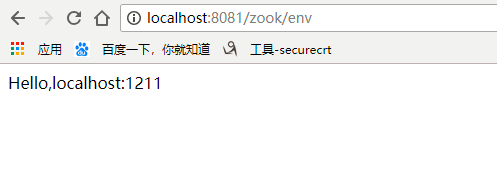
浏览器验证
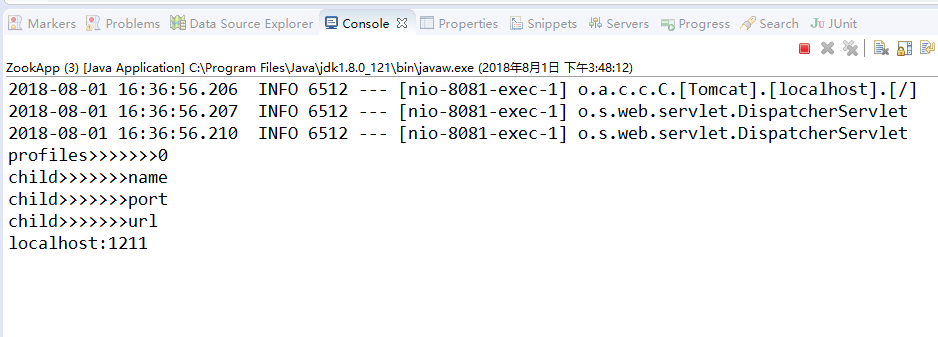
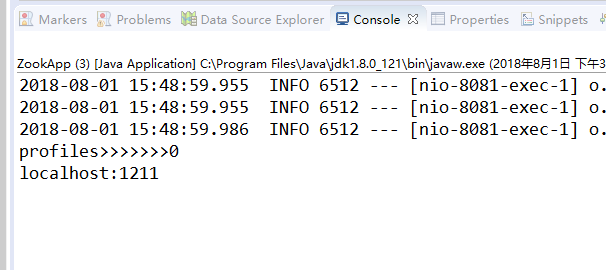
elipse打印
6,添加操作zookeeper的客户端 CuratorFramework(直接注入即可)
1package zookeper.controller;
2
3import java.util.List;
4import org.springframework.core.env.Environment;
5import org.apache.curator.framework.CuratorFramework;
6import org.springframework.beans.factory.annotation.Autowired;
7import org.springframework.cloud.client.ServiceInstance;
8import org.springframework.cloud.client.discovery.DiscoveryClient;
9import org.springframework.web.bind.annotation.GetMapping;
10import org.springframework.web.bind.annotation.RequestMapping;
11import org.springframework.web.bind.annotation.RestController;
12
13/**
14 *
15 * 项目名称:zookeper 类名称:ZookController 类描述: 创建人:john 创建时间:2018年7月31日 下午3:51:56
16 * 修改人:john 修改时间:2018年7月31日 下午3:51:56 修改备注:
17 *
18 * @version
19 *
20 */
21@RestController
22@RequestMapping("/zook")
23public class ZookController {
24    @Autowired
25    private DiscoveryClient client;
26    @Autowired
27    private Environment environment;
28    @Autowired
29    private CuratorFramework curatorFramework;
30
31    public String getZook() {
32        return "";
33    }
34
35    @RequestMapping("/getServices")
36    public String discoveryClent() {
37        List<String> serviceList = client.getServices();
38        List<ServiceInstance> list=client.getInstances("info");
39         //获取实例化的服务
40        StringBuffer sb = new StringBuffer();
41        if (list != null && list.size() > 0 ) {
42            sb.append(list.get(0).getUri()+",");
43            System.out.println(">>>>>>>>>>>>>>>>"+list.get(0).isSecure());
44        }
45        System.out.println("sb>>>>>"+sb);
46        System.out.println("注册服务的数量>>>>>>>>>>>>>>>>>" + serviceList.size());
47        for (String service : serviceList) {
48            System.out.println("注册的服务>>>>>>" + service);
49        }
50        return "info";
51    }
52
53    @GetMapping("/env")
54    public String test() {
55        String[] profiles = environment.getActiveProfiles();
56        System.out.println("profiles>>>>>>>" + profiles.length);
57        for (String item : profiles) {
58            System.out.println("item>>>>>>>>>>>>>>>" + item);
59        }
60
61        String name = environment.getProperty("url");
62
63        try {
64            List <String> listChildren=curatorFramework.getChildren().forPath("/config/zook");
65            for(String child:listChildren ){
66                System.out.println("child>>>>>>>"+child);
67            }
68        } catch (Exception e) {
69            // TODO Auto-generated catch block
70            e.printStackTrace();
71        }
72
73        System.out.println(name);
74
75        return "Hello," + name;
76    }
77}