
云水
MyGitee - https://gitee.com/lsgx/
MyGithub - https://github.com/lsgxeva/
随笔 - 975 文章 - 0 评论 - 34
Linux查看PCIe版本及速率
Linux查看PCIe版本及速率
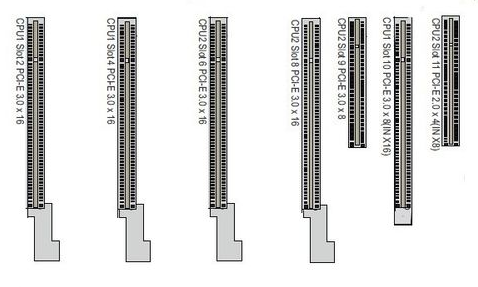
PCIE有四种不同的规格,通过下图来了解下PCIE的其中2种规格
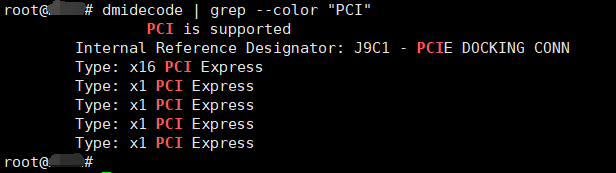
查看主板上的PCI插槽
# dmidecode | grep --color "PCI"
不同PCIe版本对应的传输速率如下:
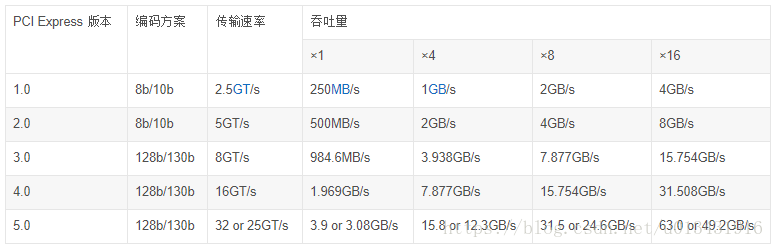
传输速率为每秒传输量GT/s,而不是每秒位数Gbps,因为传输量包括不提供额外吞吐量的开销位;
比如PCIe 1.x和PCIe 2.x使用8b/10b编码方案,导致占用了20% (= 2/10)的原始信道带宽。
GT/s —— Giga transation per second (千兆传输/秒),即每一秒内传输的次数。重点在于描述物理层通信协议的速率属性,可以不和链路宽度等关联。
Gbps —— Giga Bits Per Second (千兆位/秒)。GT/s 与Gbps 之间不存在成比例的换算关系。
PCIe 吞吐量(可用带宽)计算方法:
吞吐量 = 传输速率 * 编码方案
例如:PCI-e2.0 协议支持 5.0 GT/s,即每一条Lane上支持每秒钟内传输5G个Bit;但这并不意味着 PCIe 2.0协议的每一条Lane支持 5Gbps 的速率。
为什么这么说呢?因为PCIe 2.0 的物理层协议中使用的是8b/10b的编码方案。 即每传输8个Bit,需要发送10个Bit;这多出的2个Bit并不是对上层有意义的信息。
那么,PCIe 2.0协议的每一条Lane支持 5 * 8 / 10 = 4 Gbps = 500 MB/s 的速率。
以一个PCIe 2.0 x8的通道为例,x8的可用带宽为 4 * 8 = 32 Gbps = 4 GB/s。
PCI-e3.0 协议支持 8.0 GT/s, 即每一条Lane 上支持每秒钟内传输 8G个Bit。
而PCIe 3.0 的物理层协议中使用的是 128b/130b 的编码方案。 即每传输128个Bit,需要发送130个Bit。
那么, PCIe 3.0协议的每一条Lane支持 8 * 128 / 130 = 7.877 Gbps = 984.6 MB/s 的速率。
一个PCIe 3.0 x16的通道,x16 的可用带宽为 7.877 * 16 = 126.031 Gbps = 15.754 GB/s。
在 Linux 下要如何得知 PCI-E Bus 使用的是 Gen(Generation) 1 還是 Gen2 還是新一代的 Gen 3 雖然使用
#lspci 只要可以看到目前系統所有的裝置.但是好像看不到 PCI-E Bus 所採用的是哪一代的 PCI-E.

1root@XXX# lspci
200:00.0 Host bridge: Intel Corporation Haswell DRAM Controller (rev 06)
300:01.0 PCI bridge: Intel Corporation Haswell PCI Express x16 Controller (rev 06)
400:01.1 PCI bridge: Intel Corporation Haswell PCI Express x8 Controller (rev 06)
500:02.0 VGA compatible controller: Intel Corporation Haswell Integrated Graphics Controller (rev 06)
600:03.0 Audio device: Intel Corporation Haswell HD Audio Controller (rev 06)
700:14.0 USB controller: Intel Corporation Lynx Point USB xHCI Host Controller (rev 05)
800:16.0 Communication controller: Intel Corporation Lynx Point MEI Controller #1 (rev 04)
900:1a.0 USB controller: Intel Corporation Lynx Point USB Enhanced Host Controller #2 (rev 05)
1000:1c.0 PCI bridge: Intel Corporation Lynx Point PCI Express Root Port #1 (rev d5)
1100:1c.4 PCI bridge: Intel Corporation Lynx Point PCI Express Root Port #5 (rev d5)
1200:1c.5 PCI bridge: Intel Corporation Lynx Point PCI Express Root Port #6 (rev d5)
1300:1d.0 USB controller: Intel Corporation Lynx Point USB Enhanced Host Controller #1 (rev 05)
1400:1f.0 ISA bridge: Intel Corporation Lynx Point LPC Controller (rev 05)
1500:1f.2 IDE interface: Intel Corporation Lynx Point 4-port SATA Controller 1 [IDE mode] (rev 05)
1600:1f.3 SMBus: Intel Corporation Lynx Point SMBus Controller (rev 05)
1700:1f.6 Signal processing controller: Intel Corporation Lynx Point Thermal Management Controller (rev 05)
1801:00.0 PCI bridge: PLX Technology, Inc. Unknown device 8724 (rev ca)
1902:01.0 PCI bridge: PLX Technology, Inc. Unknown device 8724 (rev ca)
2002:02.0 PCI bridge: PLX Technology, Inc. Unknown device 8724 (rev ca)
2102:08.0 PCI bridge: PLX Technology, Inc. Unknown device 8724 (rev ca)
2202:09.0 PCI bridge: PLX Technology, Inc. Unknown device 8724 (rev ca)
2303:00.0 Ethernet controller: Intel Corporation I350 Gigabit Network Connection (rev 01)
2403:00.1 Ethernet controller: Intel Corporation I350 Gigabit Network Connection (rev 01)
2503:00.2 Ethernet controller: Intel Corporation I350 Gigabit Network Connection (rev 01)
2603:00.3 Ethernet controller: Intel Corporation I350 Gigabit Network Connection (rev 01)
2704:00.0 Ethernet controller: Intel Corporation I350 Gigabit Network Connection (rev 01)
2804:00.1 Ethernet controller: Intel Corporation I350 Gigabit Network Connection (rev 01)
2904:00.2 Ethernet controller: Intel Corporation I350 Gigabit Network Connection (rev 01)
3004:00.3 Ethernet controller: Intel Corporation I350 Gigabit Network Connection (rev 01)
3106:00.0 Ethernet controller: Intel Corporation 82599EB 10-Gigabit SFI/SFP+ Network Connection (rev 01)
3206:00.1 Ethernet controller: Intel Corporation 82599EB 10-Gigabit SFI/SFP+ Network Connection (rev 01)
3307:00.0 PCI bridge: PLX Technology, Inc. PEX 8732 32-lane, 8-Port PCI Express Gen 3 (8.0 GT/s) Switch (rev ca)
3408:01.0 PCI bridge: PLX Technology, Inc. PEX 8732 32-lane, 8-Port PCI Express Gen 3 (8.0 GT/s) Switch (rev ca)
3508:08.0 PCI bridge: PLX Technology, Inc. PEX 8732 32-lane, 8-Port PCI Express Gen 3 (8.0 GT/s) Switch (rev ca)
3608:09.0 PCI bridge: PLX Technology, Inc. PEX 8732 32-lane, 8-Port PCI Express Gen 3 (8.0 GT/s) Switch (rev ca)
3708:0a.0 PCI bridge: PLX Technology, Inc. PEX 8732 32-lane, 8-Port PCI Express Gen 3 (8.0 GT/s) Switch (rev ca)
3809:00.0 Ethernet controller: Intel Corporation 82599EB 10-Gigabit SFI/SFP+ Network Connection (rev 01)
3909:00.1 Ethernet controller: Intel Corporation 82599EB 10-Gigabit SFI/SFP+ Network Connection (rev 01)
400e:00.0 Ethernet controller: Intel Corporation I210 Gigabit Network Connection (rev 03)
410f:00.0 Ethernet controller: Intel Corporation I210 Gigabit Network Connection (rev 03)
42root@XXX#


1root@XXX# lspci -tv
2-[0000:00]-+-00.0  Intel Corporation Haswell DRAM Controller
3           +-01.0-[0000:01-06]----00.0-[0000:02-06]--+-01.0-[0000:03]--+-00.0  Intel Corporation I350 Gigabit Network Connection
4           |                                         |                 +-00.1  Intel Corporation I350 Gigabit Network Connection
5           |                                         |                 +-00.2  Intel Corporation I350 Gigabit Network Connection
6           |                                         |                 \-00.3  Intel Corporation I350 Gigabit Network Connection
7           |                                         +-02.0-[0000:04]--+-00.0  Intel Corporation I350 Gigabit Network Connection
8           |                                         |                 +-00.1  Intel Corporation I350 Gigabit Network Connection
9           |                                         |                 +-00.2  Intel Corporation I350 Gigabit Network Connection
10           |                                         |                 \-00.3  Intel Corporation I350 Gigabit Network Connection
11           |                                         +-08.0-[0000:05]--
12           |                                         \-09.0-[0000:06]--+-00.0  Intel Corporation 82599EB 10-Gigabit SFI/SFP+ Network Connection
13           |                                                           \-00.1  Intel Corporation 82599EB 10-Gigabit SFI/SFP+ Network Connection
14           +-01.1-[0000:07-0c]----00.0-[0000:08-0c]--+-01.0-[0000:09]--+-00.0  Intel Corporation 82599EB 10-Gigabit SFI/SFP+ Network Connection
15           |                                         |                 \-00.1  Intel Corporation 82599EB 10-Gigabit SFI/SFP+ Network Connection
16           |                                         +-08.0-[0000:0a]--
17           |                                         +-09.0-[0000:0b]--
18           |                                         \-0a.0-[0000:0c]--
19           +-02.0  Intel Corporation Haswell Integrated Graphics Controller
20           +-03.0  Intel Corporation Haswell HD Audio Controller
21           +-14.0  Intel Corporation Lynx Point USB xHCI Host Controller
22           +-16.0  Intel Corporation Lynx Point MEI Controller #1
23           +-1a.0  Intel Corporation Lynx Point USB Enhanced Host Controller #2
24           +-1c.0-[0000:0d]--
25           +-1c.4-[0000:0e]----00.0  Intel Corporation I210 Gigabit Network Connection
26           +-1c.5-[0000:0f]----00.0  Intel Corporation I210 Gigabit Network Connection
27           +-1d.0  Intel Corporation Lynx Point USB Enhanced Host Controller #1
28           +-1f.0  Intel Corporation Lynx Point LPC Controller
29           +-1f.2  Intel Corporation Lynx Point 4-port SATA Controller 1 [IDE mode]
30           +-1f.3  Intel Corporation Lynx Point SMBus Controller
31           \-1f.6  Intel Corporation Lynx Point Thermal Management Controller
32root@XXX#

如果有裝置是 unknown 的,需要更新 /usr/local/share/pci.ids.gz 請參考更新方式 http://benjr.tw/node/88
先查询 Inetl 82599EB 网卡的识别号(bus:device.function)

1root@XXX# lspci | grep --color 82599
206:00.0 Ethernet controller: Intel Corporation 82599EB 10-Gigabit SFI/SFP+ Network Connection (rev 01)
306:00.1 Ethernet controller: Intel Corporation 82599EB 10-Gigabit SFI/SFP+ Network Connection (rev 01)
409:00.0 Ethernet controller: Intel Corporation 82599EB 10-Gigabit SFI/SFP+ Network Connection (rev 01)
509:00.1 Ethernet controller: Intel Corporation 82599EB 10-Gigabit SFI/SFP+ Network Connection (rev 01)
6root@XXX#

在 PCI 的裝置使用三個編號用來當作識別值,個別為 1. "匯流排(bus number)", 2. "裝置(device number) 以及 3. "功能(function number)".
所以剛剛的 06:00.0 就是 bus number = 06 ,device number = 00 function = 0 .
這3個編號會組合成一個 16-bits 的識別碼,
匯流排(bus number) 8bits 2^8 至多可連接 256 個匯流排(0 to ff),
裝置(device number) 5bits 2^5 至多可接 32 種裝置(0 to 1f) 以及
功能(function number) 3bits 2^3 至多每種裝置可有 8 項功能(0 to 7).
關於更多 #lspci 的資訊請參考 http://benjr.tw/node/543
然后查看vendor id和device id
1root@XXX# lspci -n | grep -i 06:00.0
206:00.0 0200: 8086:10fb (rev 01)
3root@XXX#
Linux 使用 Class ID + Vendor ID + Device ID 來代表裝置,如剛剛的 0200: 8086:10fb 所代表裝置名稱為 (Class ID = 0200 , Vendor ID = 8086, Device ID = 10fb)
最后查看指定PCI设备的带宽

1root@XXX# lspci -n -d 8086:10fb -vvv | grep --color  Width
2        LnkCap:    Port #9, Speed 5GT/s, Width x8, ASPM L0s, Latency L0 <1us, L1 <8us
3        LnkSta:    Speed 5GT/s, Width x8, TrErr- Train- SlotClk+ DLActive- BWMgmt- ABWMgmt-
4        LnkCap:    Port #9, Speed 5GT/s, Width x8, ASPM L0s, Latency L0 <1us, L1 <8us
5        LnkSta:    Speed 5GT/s, Width x8, TrErr- Train- SlotClk+ DLActive- BWMgmt- ABWMgmt-
6        LnkCap:    Port #1, Speed 5GT/s, Width x8, ASPM L0s, Latency L0 <1us, L1 <8us
7        LnkSta:    Speed 5GT/s, Width x8, TrErr- Train- SlotClk+ DLActive- BWMgmt- ABWMgmt-
8        LnkCap:    Port #1, Speed 5GT/s, Width x8, ASPM L0s, Latency L0 <1us, L1 <8us
9        LnkSta:    Speed 5GT/s, Width x8, TrErr- Train- SlotClk+ DLActive- BWMgmt- ABWMgmt-
10root@XXX#

LnkSta : 目前系統所提供的速度 PCI-Express 2.0 ( 5GT/s )
LnkCap : 裝置目前所採用的速度.
LnkSta 和 LnkCap 這兩個速度有可能不一樣 , 典型情况下: 系統所提供的是 PCI Express 是 3.0 但裝置還是使用 2.0 的.
======================== End