https://blog.csdn.net/phenomenonstell/article/details/79033144
从mybatis3.4.0开始加入了@Mapper注解,目的就是为了不再写mapper映射文件(那个xml写的是真的蛋疼。。。)。很恶心的一个事实是源码中并没有对于这个注解的详细解释
现在我们通过一个简易的maven项目去了解@Mapper注解的使用方式
完整项目请访问我的github项目地址下载
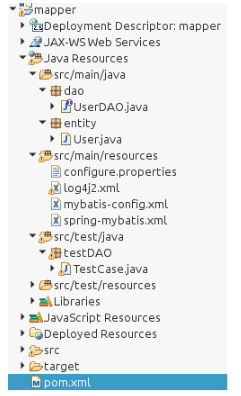
1、构建一个maven的web项目,目录结构如下:
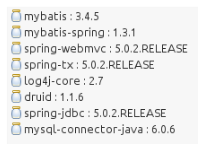
2、导入相应的依赖
1<dependency>
2        <groupId>org.mybatis</groupId>
3        <artifactId>mybatis</artifactId>
4        <version>3.4.5</version>
5    </dependency>
6    <dependency>
7        <groupId>org.mybatis</groupId>
8        <artifactId>mybatis-spring</artifactId>
9        <version>1.3.1</version>
10    </dependency>
11    <dependency>
12        <groupId>org.springframework</groupId>
13        <artifactId>spring-webmvc</artifactId>
14        <version>5.0.2.RELEASE</version>
15    </dependency>
16    <dependency>
17        <groupId>org.springframework</groupId>
18        <artifactId>spring-tx</artifactId>
19        <version>5.0.2.RELEASE</version>
20    </dependency>
21    <dependency>
22        <groupId>org.apache.logging.log4j</groupId>
23        <artifactId>log4j-core</artifactId>
24        <version>2.7</version>
25    </dependency>
26    <dependency>
27        <groupId>com.alibaba</groupId>
28        <artifactId>druid</artifactId>
29        <version>1.1.6</version>
30    </dependency>
31    <dependency>
32        <groupId>org.springframework</groupId>
33        <artifactId>spring-jdbc</artifactId>
34        <version>5.0.2.RELEASE</version>
35    </dependency>
36    <dependency>
37        <groupId>mysql</groupId>
38        <artifactId>mysql-connector-java</artifactId>
39        <version>6.0.6</version>
40    </dependency>
3、代码
1//UserDAO
2import org.apache.ibatis.annotations.Mapper;
3import org.apache.ibatis.annotations.Param;
4import org.apache.ibatis.annotations.Select;
5
6import entity.User;
7
8/**
9 * 添加了@Mapper注解之后这个接口在编译时会生成相应的实现类
10 *
11 * 需要注意的是:这个接口中不可以定义同名的方法,因为会生成相同的id
12 * 也就是说这个接口是不支持重载的
13 */
14@Mapper
15public interface UserDAO {
16
17    @Select("select * from user where name = #{name}")
18    public User find(String name);
19
20    @Select("select * from user where name = #{name} and pwd = #{pwd}")
21    /**
22      * 对于多个参数来说,每个参数之前都要加上@Param注解,
23      * 要不然会找不到对应的参数进而报错
24      */
25    public User login(@Param("name")String name, @Param("pwd")String pwd);
26}
测试类代码:
1import org.junit.Test;
2import org.springframework.context.ApplicationContext;
3import org.springframework.context.support.ClassPathXmlApplicationContext;
4
5import dao.UserDAO;
6import entity.User;
7
8public class TestCase {
9
10    @Test
11    public void testMapper() {
12        ApplicationContext ac = new ClassPathXmlApplicationContext("spring-mybatis.xml");
13        UserDAO dao = ac.getBean(UserDAO.class);
14        User u1 = dao.find("hehe");
15        User u2 = dao.login("hehe", "123");
16        System.out.println(u1.getName().equals(u2.getName()));
17    }
18}
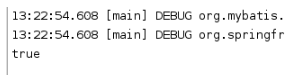
测试结果: