
OAuth2 统一认证
原理
OAuth在"客户端"与"服务提供商"之间,设置了一个授权层(authorization layer)。"客户端"不能直接登录"服务提供商",只能登录授权层,以此将用户与客户端区分开来。"客户端"登录授权层所用的令牌(token),与用户的密码不同。用户可以在登录的时候,指定授权层令牌的权限范围和有效期。
"客户端"登录授权层以后,"服务提供商"根据令牌的权限范围和有效期,向"客户端"开放用户储存的资料。
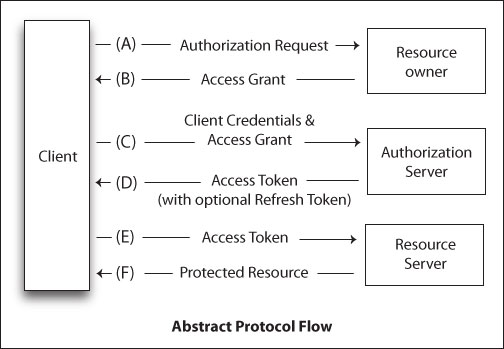
A、用户打开客户端以后,客户端要求用户给予授权。
B、用户同意给予客户端授权。
C、客户端使用上一步获得的授权,向认证服务器申请令牌。
D、认证服务器对客户端进行认证以后,确认无误,同意发放令牌。
E、客户端使用令牌,向资源服务器申请获取资源。
F、资源服务器确认令牌无误,同意向客户端开放资源。
客户端授权模式
上面 B、流程中是用户给予客户端授权。oauth2 定义了下面四种授权方式:
- 授权码模式(authorization code)
- 简化模式(implicit)
- 密码模式(resource owner password credentials)
- 客户端模式(client credentials)
授权码模式
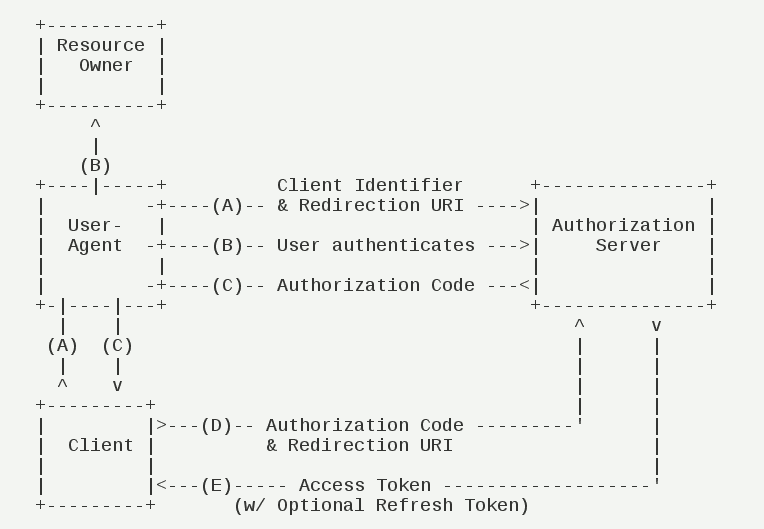
A、用户访问客户端,后者将前者导向认证服务器。
B、用户选择是否给予客户端授权。
C、假设用户给予授权,认证服务器将用户导向客户端事先指定的"重定向URI"(redirection URI),同时附上一个授权码。
D、客户端收到授权码,附上早先的"重定向URI",向认证服务器申请令牌。这一步是在客户端的后台的服务器上完成的,对用户不可见。
E、认证服务器核对了授权码和重定向URI,确认无误后,向客户端发送访问令牌(access token)和更新令牌(refresh token)。
步骤说明:
① A步骤中,客户端申请认证的URI,包含以下参数:
* response_type:表示授权类型,必选项,此处的值固定为"code"
* client_id:表示客户端的ID,必选项
* redirect_uri:表示重定向URI,可选项
* scope:表示申请的权限范围,可选项
* state:表示客户端的当前状态,可以指定任意值,认证服务器会原封不动地返回这个值。
1GET /authorize?response_type=code&client_id=s6BhdRkqt3&state=xyz
2        &redirect_uri=https%3A%2F%2Fclient%2Eexample%2Ecom%2Fcb HTTP/1.1Host: server.example.com
② C步骤中,服务器回应客户端的URI,包含以下参数:
* code:表示授权码,必选项。该码的有效期应该很短,通常设为10分钟,客户端只能使用该码一次,否则会被授权服务器拒绝。该码与客户端ID和重定向URI,是一一对应关系。
* state:如果客户端的请求中包含这个参数,认证服务器的回应也必须一模一样包含这个参数。
1HTTP/1.1 302 FoundLocation: https://client.example.com/cb?code=SplxlOBeZQQYbYS6WxSbIA
2          &state=xyz
③ D步骤中,客户端向认证服务器申请令牌的HTTP请求,包含以下参数:
* grant_type:表示使用的授权模式,必选项,此处的值固定为"authorization_code"。
* code:表示上一步获得的授权码,必选项。
* redirect_uri:表示重定向URI,必选项,且必须与A步骤中的该参数值保持一致。
* client_id:表示客户端ID,必选项。
1POST /token HTTP/1.1Host: server.example.comAuthorization: Basic czZCaGRSa3F0MzpnWDFmQmF0M2JWContent-Type: application/x-www-form-urlencoded
2
3grant_type=authorization_code&code=SplxlOBeZQQYbYS6WxSbIA
4&redirect_uri=https%3A%2F%2Fclient%2Eexample%2Ecom%2Fcb
④ E步骤中,认证服务器发送的HTTP回复,包含以下参数:
* access_token:表示访问令牌,必选项。
* token_type:表示令牌类型,该值大小写不敏感,必选项,可以是bearer类型或mac类型。
* expires_in:表示过期时间,单位为秒。如果省略该参数,必须其他方式设置过期时间。
* refresh_token:表示更新令牌,用来获取下一次的访问令牌,可选项。
* scope:表示权限范围,如果与客户端申请的范围一致,此项可省略。
1HTTP/1.1 200 OK
2     Content-Type: application/json;charset=UTF-8
3     Cache-Control: no-store
4     Pragma: no-cache
5
6     {
7       "access_token":"2YotnFZFEjr1zCsicMWpAA",
8       "token_type":"example",
9       "expires_in":3600,
10       "refresh_token":"tGzv3JOkF0XG5Qx2TlKWIA",
11       "example_parameter":"example_value"
12     }
密码模式
密码模式是将授权码模式中的授权码固定为用户名和密码。
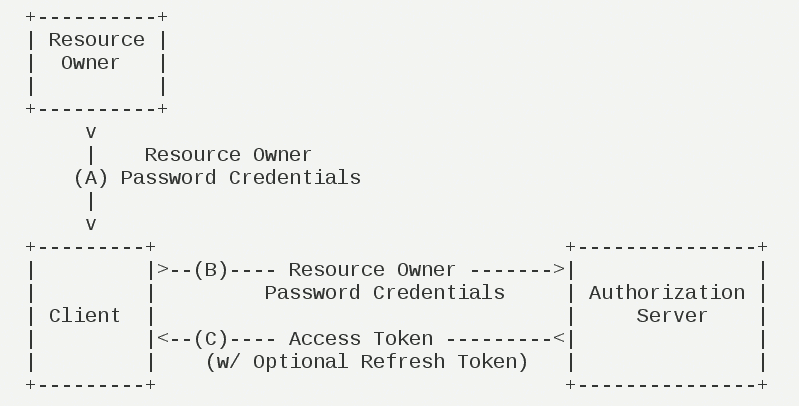
A、用户向客户端提供用户名和密码。
B、客户端将用户名和密码发给认证服务器,向后者请求令牌。
C、认证服务器确认无误后,向客户端提供访问令牌。
步骤说明:
① B步骤中,客户端发出的HTTP请求,包含以下参数:
* grant_type:表示授权类型,此处的值固定为"password",必选项。
* username:表示用户名,必选项。
* password:表示用户的密码,必选项。
* scope:表示权限范围,可选项。
1POST /token HTTP/1.1
2     Host: server.example.com
3     Authorization: Basic czZCaGRSa3F0MzpnWDFmQmF0M2JW
4     Content-Type: application/x-www-form-urlencoded
5
6     grant_type=password&username=johndoe&password=A3ddj3w
② C步骤中,认证服务器向客户端发送访问令牌,下面是一个例子。
1HTTP/1.1 200 OK
2     Content-Type: application/json;charset=UTF-8
3     Cache-Control: no-store
4     Pragma: no-cache
5
6     {
7       "access_token":"2YotnFZFEjr1zCsicMWpAA",
8       "token_type":"example",
9       "expires_in":3600,
10       "refresh_token":"tGzv3JOkF0XG5Qx2TlKWIA",
11       "example_parameter":"example_value"
12     }
注意,整个过程中,客户端不得保存用户的密码。
项目实践
1 .pom.xml
1<dependency>
2    <groupId>org.springframework.boot</groupId>
3    <artifactId>spring-boot-starter-security</artifactId>
4</dependency>
5<dependency>
6    <groupId>org.springframework.security.oauth</groupId>
7    <artifactId>spring-security-oauth2</artifactId>
8</dependency>
2 .SecurityConfig.java(主要配置文件)
1package club.lemos.sso.config;
2
3import club.lemos.sso.config.security.ClientResources;
4import org.springframework.beans.factory.annotation.Autowired;
5import org.springframework.boot.autoconfigure.security.SecurityProperties;
6import org.springframework.boot.autoconfigure.security.oauth2.resource.UserInfoTokenServices;
7import org.springframework.boot.context.properties.ConfigurationProperties;
8import org.springframework.boot.web.servlet.FilterRegistrationBean;
9import org.springframework.context.annotation.Bean;
10import org.springframework.context.annotation.Configuration;
11import org.springframework.core.annotation.Order;
12import org.springframework.security.authentication.dao.DaoAuthenticationProvider;
13import org.springframework.security.config.annotation.authentication.builders.AuthenticationManagerBuilder;
14import org.springframework.security.config.annotation.web.builders.HttpSecurity;
15import org.springframework.security.config.annotation.web.configuration.WebSecurityConfigurerAdapter;
16import org.springframework.security.core.userdetails.UserDetailsService;
17import org.springframework.security.crypto.bcrypt.BCryptPasswordEncoder;
18import org.springframework.security.crypto.password.PasswordEncoder;
19import org.springframework.security.oauth2.client.OAuth2ClientContext;
20import org.springframework.security.oauth2.client.OAuth2RestTemplate;
21import org.springframework.security.oauth2.client.filter.OAuth2ClientAuthenticationProcessingFilter;
22import org.springframework.security.oauth2.client.filter.OAuth2ClientContextFilter;
23import org.springframework.security.oauth2.config.annotation.web.configuration.EnableOAuth2Client;
24import org.springframework.security.web.authentication.LoginUrlAuthenticationEntryPoint;
25import org.springframework.security.web.authentication.www.BasicAuthenticationFilter;
26import org.springframework.security.web.csrf.CookieCsrfTokenRepository;
27import org.springframework.web.filter.CompositeFilter;
28
29import javax.annotation.Resource;
30import javax.servlet.Filter;
31import java.util.ArrayList;
32import java.util.List;
33
34@Configuration
35@EnableOAuth2Client
36@Order(SecurityProperties.ACCESS_OVERRIDE_ORDER)
37public class SecurityConfig extends WebSecurityConfigurerAdapter {
38
39    @Resource
40    private OAuth2ClientContext oauth2ClientContext;
41
42    private final UserDetailsService userDetailService;
43
44    @Autowired
45    public SecurityConfig(UserDetailsService userDetailService) {
46        this.userDetailService = userDetailService;
47    }
48
49    /**
50     * 详细的路由配置参数
51     *
52     * @param http 配置
53     * @throws Exception 相关异常
54     */
55    @Override
56    protected void configure(HttpSecurity http) throws Exception {
57        http
58                .cors() // 跨域支持
59                .and()
60                .antMatcher("/**") // 捕捉所有路由
61                .authorizeRequests()
62                .antMatchers("/", "/login**", "/webjars/**", "/github").permitAll()
63                .anyRequest().authenticated()
64                .and()
65                .exceptionHandling()
66                .authenticationEntryPoint(new LoginUrlAuthenticationEntryPoint("/login")) // 认证入口(跳转)
67                .and()
68                .formLogin().loginProcessingUrl("/doLogin") // 表单请求的路由为 "POST /login"
69                .defaultSuccessUrl("/").failureUrl("/login?err=1")
70                .permitAll()
71                .and()
72                .logout().logoutUrl("/logout") // 注销请求的路由为 "GET /logout"
73                .logoutSuccessUrl("/")
74                .permitAll()
75                .invalidateHttpSession(true)
76                .clearAuthentication(true)
77                .and()
78                .csrf().csrfTokenRepository(CookieCsrfTokenRepository.withHttpOnlyFalse()) // csrf 安全处理
79                .and()
80                .addFilterBefore(ssoFilter(), BasicAuthenticationFilter.class); // 第三方授权层
81
82    }
83
84    @Bean
85    public FilterRegistrationBean oauth2ClientFilterRegistration(
86            OAuth2ClientContextFilter filter) {
87        FilterRegistrationBean registration = new FilterRegistrationBean();
88        registration.setFilter(filter);
89        registration.setOrder(-100);
90        return registration;
91    }
92
93    private Filter ssoFilter() {
94        CompositeFilter filter = new CompositeFilter();
95        List<Filter> filters = new ArrayList<>();
96        filters.add(ssoFilter(github(), "/login/github"));
97        filter.setFilters(filters);
98        return filter;
99    }
100
101    private Filter ssoFilter(ClientResources client, String path) {
102        OAuth2ClientAuthenticationProcessingFilter filter = new OAuth2ClientAuthenticationProcessingFilter(path);
103        OAuth2RestTemplate template = new OAuth2RestTemplate(client.getClient(), oauth2ClientContext);
104        filter.setRestTemplate(template);
105        UserInfoTokenServices tokenServices = new UserInfoTokenServices(
106                client.getResource().getUserInfoUri(), client.getClient().getClientId());
107        tokenServices.setRestTemplate(template);
108        filter.setTokenServices(tokenServices);
109        return filter;
110    }
111
112    /**
113     * github 授权连接
114     *
115     * @return 第三方授权连接对象
116     */
117    @Bean
118    @ConfigurationProperties("github")
119    public ClientResources github() {
120        return new ClientResources();
121    }
122
123    /**
124     * BCrypt 密码加密
125     *
126     * @return BCrypt 编码器
127     */
128    @Bean
129    public PasswordEncoder passwordEncoder() {
130        return new BCryptPasswordEncoder();
131    }
132
133    @Bean
134    public DaoAuthenticationProvider authProvider() {
135        DaoAuthenticationProvider authProvider = new DaoAuthenticationProvider();
136        authProvider.setUserDetailsService(userDetailService);
137//        authProvider.setPasswordEncoder(passwordEncoder());
138        return authProvider;
139    }
140
141    /**
142     * 用户认证服务(用户名+密码)
143     *
144     * @param auth 认证
145     * @throws Exception 相关异常
146     */
147    @Override
148    protected void configure(AuthenticationManagerBuilder auth) throws Exception {
149        auth.authenticationProvider(authProvider());
150    }
151
152//    TODO 提供一个访问用户信息(昵称,角色信息等等)的 api
153//    TODO 提供 cookie持久化时间
154//    TODO 注销功能实现
155}
ClientResources.java
1package club.lemos.sso.config.security;
2
3import org.springframework.boot.autoconfigure.security.oauth2.resource.ResourceServerProperties;
4import org.springframework.boot.context.properties.NestedConfigurationProperty;
5import org.springframework.security.oauth2.client.token.grant.code.AuthorizationCodeResourceDetails;
6
7public class ClientResources {
8
9    @NestedConfigurationProperty
10    private AuthorizationCodeResourceDetails client = new AuthorizationCodeResourceDetails();
11
12    @NestedConfigurationProperty
13    private ResourceServerProperties resource = new ResourceServerProperties();
14
15    public AuthorizationCodeResourceDetails getClient() {
16        return client;
17    }
18
19    public ResourceServerProperties getResource() {
20        return resource;
21    }
22}
3 .application.yml(配置文件)
1logging:
2    level:
3        org:
4            springframework:
5                security: DEBUG
6        root: INFO
7server:
8    port: 8080
9spring:
10    datasource:
11        dbcp2:
12            initial-size: 10
13            max-idle: 8
14            min-idle: 8
15        driverClassName: com.mysql.jdbc.Driver
16        password: root
17        url: jdbc:mysql://localhost:3306/sso?useSSL=false
18        username: root
19    freemarker:
20        charset: UTF-8
21        check-template-location: true
22        content-type: text/html
23        expose-request-attributes: true
24        expose-session-attributes: true
25        request-context-attribute: request
26    thymeleaf:
27        cache: false
28        prefix: classpath:/templates/
29        suffix: .html
30github:
31  client:
32    clientId: dd2bf79a9e6be256f0e8
33    clientSecret: 0e555a2ee5d627e3abdee3f5096de6d8278d3413
34    accessTokenUri: https://github.com/login/oauth/access_token
35    userAuthorizationUri: https://github.com/login/oauth/authorize
36    clientAuthenticationScheme: form
37  resource:
38    userInfoUri: https://api.github.com/user
4 .UserDetailsServiceImpl.java(用户接口实现)
1package club.lemos.sso.config.security;
2
3import org.springframework.security.core.authority.SimpleGrantedAuthority;
4import org.springframework.security.core.userdetails.UserDetails;
5import org.springframework.security.core.userdetails.UserDetailsService;
6import org.springframework.security.core.userdetails.UsernameNotFoundException;
7import org.springframework.stereotype.Service;
8
9import java.util.Arrays;
10import java.util.Date;
11
12@Service
13public class UserDetailsServiceImpl implements UserDetailsService {
14
15    @Override
16    public UserDetails loadUserByUsername(String username) throws UsernameNotFoundException {
17        // TODO 从数据库中查找用户
18        return new UserDetailsImpl(1L, "lisi", "password",
19                Arrays.asList(new SimpleGrantedAuthority("USER"), new SimpleGrantedAuthority("ADMIN")), true, new Date());
20    }
21
22}
UserDetailsImpl.java
1package club.lemos.sso.config.security;
2
3import com.fasterxml.jackson.annotation.JsonIgnore;
4import org.springframework.security.core.GrantedAuthority;
5import org.springframework.security.core.userdetails.UserDetails;
6
7import java.util.Collection;
8import java.util.Date;
9
10public class UserDetailsImpl implements UserDetails {
11    private final Long id;
12    private final String username;
13    private final String password;
14    private final Collection<? extends GrantedAuthority> authorities;
15    private final boolean enabled;
16    private final Date lastPasswordResetDate;
17
18    public UserDetailsImpl(Long id, String username, String password, Collection<? extends GrantedAuthority> authorities, boolean enabled, Date lastPasswordResetDate) {
19        this.id = id;
20        this.username = username;
21        this.password = password;
22        this.authorities = authorities;
23        this.enabled = enabled;
24        this.lastPasswordResetDate = lastPasswordResetDate;
25    }
26
27    @JsonIgnore
28    public Long getId() {
29        return id;
30    }
31
32    @Override
33    public String getUsername() {
34        return username;
35    }
36
37    @JsonIgnore
38    @Override
39    public boolean isAccountNonExpired() {
40        return true;
41    }
42
43    @JsonIgnore
44    @Override
45    public boolean isAccountNonLocked() {
46        return true;
47    }
48
49    @JsonIgnore
50    @Override
51    public boolean isCredentialsNonExpired() {
52        return true;
53    }
54
55    @JsonIgnore
56    @Override
57    public String getPassword() {
58        return password;
59    }
60
61    @Override
62    public Collection<? extends GrantedAuthority> getAuthorities() {
63        return authorities;
64    }
65
66    @Override
67    public boolean isEnabled() {
68        return enabled;
69    }
70
71    @JsonIgnore
72    public Date getLastPasswordResetDate() {
73        return lastPasswordResetDate;
74    }
75}
相关问题
问题一、提供oAuth2 接口 及 token 的获取
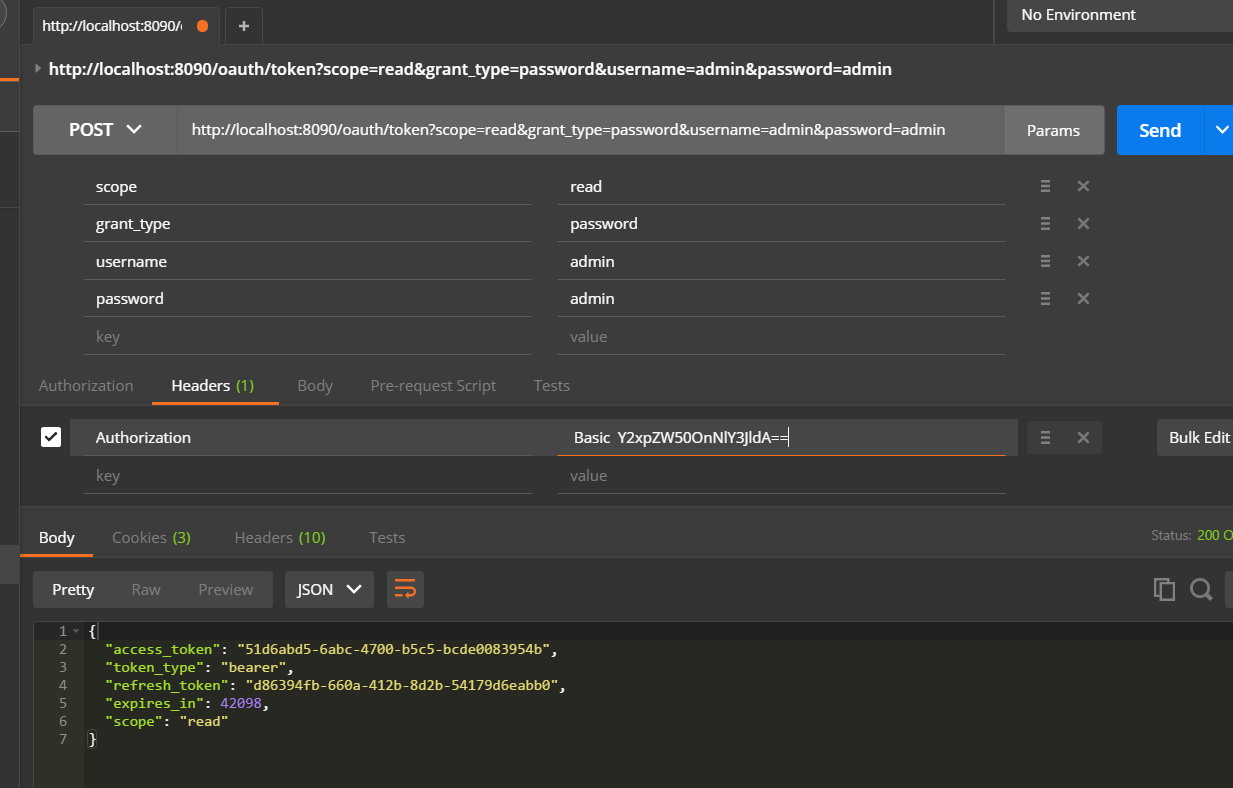
之前的Web端(B\S结构),可以正常通信。登录跳转什么的。对于受限资源,需要通过 oauth2授权( C\S 结构)。可以通过Web端发送一个请求进行认证。认证成功,获得 token,可以使用 token访问f服务器受限资源。formLogin 即表单登录,比较好理解。oauth2 登录,需要先获得 token,再用它访问 api 资源服务器,获取信息。
1. 证书 token
curl client:secret@localhost:8090/oauth/token -d grant_type=client_credentials

2. 密码 token
当应用启动时,springboot 会创建一个默认的用户,用户id为‘user‘。密码是随机的,但可以从打印的日志中看到。
curl client:secret@localhost:8090/oauth/token -d grant_type=password -d username=user -d password=...
或者使用定义好的用户名及密码进行认证
curl client:secret@localhost:8090/oauth/token -d grant_type=password -d username=admin -d password=admin

认证后,访问资源服务
curl http://localhost:8090/api/users -H "Authorization: bearer 7e7b7ced-3747-43a2-8134-c7e6b87c6451"
3. 页面中,可以通过发送带 auth 认证头的请求,访问oauth服务器
ajax 请求认证:
1$.ajax({
2  type: "GET",
3  url: "index1.php",
4  dataType: 'json',
5  async: false,
6  headers: {
7    "Authorization": "Basic " + btoa(USERNAME + ":" + PASSWORD)
8  },
9  data: '{ "comment" }',
10  success: function (){
11    alert('Thanks for your comment!');
12  }});
问题二、github 第三方授权接入(原文:https://developer.github.com/v3/oauth/)
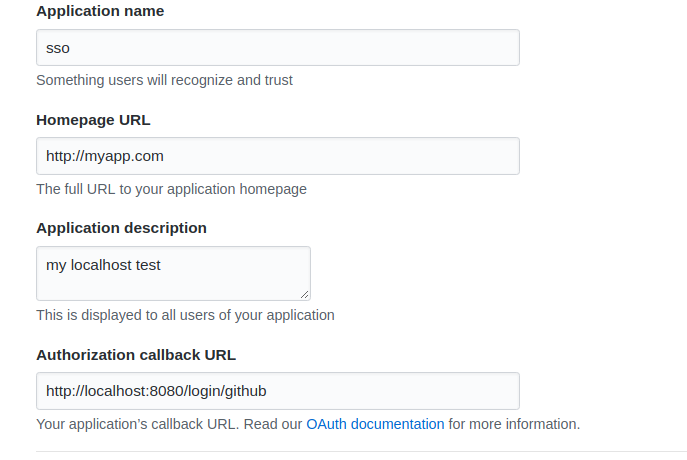
从 github上申请 开发权限:
执行流程
1> 点击页面的 callback超链接(比如 <a href="http://localhost:8090/login/github">go to github</a>)。
callbackURL = http://localhost:8090/login/github GET
2> 重定向到授权页面,用户点击授权
user-authorization-uri = https://github.com/login/oauth/authorize?client_id=141c0a61de83cf2d9841&redirect_uri=http://localhost:8090/login/github&response_type=code&scope=user&state=4jgVT2
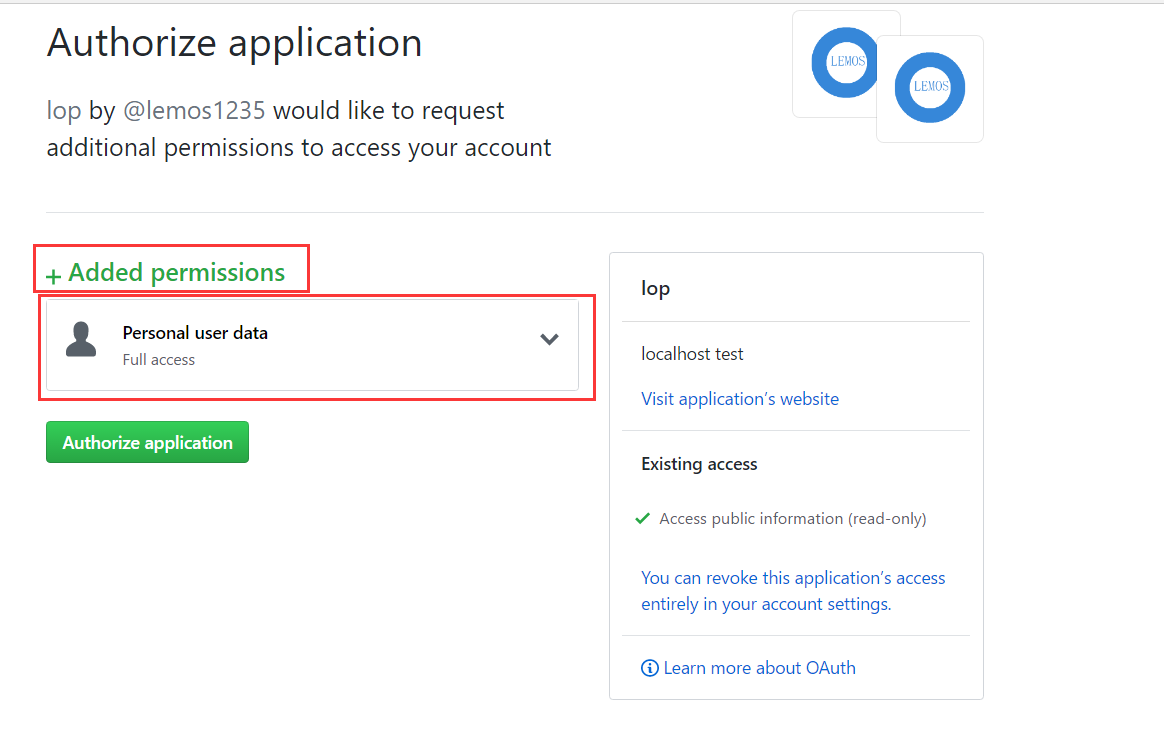
3> 重定向回自己的页面,并携带一个 code (授权码) 和 前一步中的 state参数,如果 states 匹配,则可以发送一个 POST https://github.com/login/oauth/access_token
http://localhost:8090/login/github?code=2c6dcdce82ef1473e148&state=4jgVT2
4> 请求 token(授权成功,会自动发送这个请求)
https://github.com/login/oauth/access_token POST
响应 token(包含着授权信息,存储在 JSESSION 中)
access_token=e72e16c7e42f292c6912e7710c838347ae178b4a&scope=user%2Cgist&token_type=bearer
或者
Accept: application/json {"access_token":"e72e16c7e42f292c6912e7710c838347ae178b4a", "scope":"repo,gist", "token_type":"bearer"}
5> 访问 Github API(使用 js访问)
GET https://api.github.com/user?access_token=...
或者设置头信息
Authorization: token OAUTH-TOKEN
问题三、 github 的token的获取
使用 RestTemplate访问。
1OAuth2RestTemplate template = oAuth2RestTemplate(new AuthorizationCodeResourceDetails());
2template.setRetryBadAccessTokens(false);
3token = template.getAccessToken();
或者在配置文件中从上下文中直接获取。
OAuth2AccessToken accessToken = oauth2ClientContext.getAccessToken();
完整项目下载
完整项目下载—— 点我
其他
参阅文档
1springboot 官方文档
2
3Spring-Boot-Reference-Guide
4https://qbgbook.gitbooks.io/spring-boot-reference-guide-zh/content/
5
6Spring Boot and OAuth2 *****接入github 的详细配置******
7https://spring.io/guides/tutorials/spring-boot-oauth2/
8
9---------------------------------------------------------------------------
10
11有用的文章
12
13spring security & oauth2
14http://www.jianshu.com/p/6b211e845b16/
15
16spring-security-oauth2 server
17http://www.jianshu.com/p/028043425b09
18
19详解Spring Security进阶身份认证之UserDetailsService(附源码)
20http://favccxx.blog.51cto.com/2890523/1609692
21
22---------------------------------------------------------------------------
23
24github 相关文档
25
26https://developer.github.com/v3/
27
28https://developer.github.com/v3/oauth/
29
30https://developer.github.com/v3/oauth_authorizations/#list-your-authorizations
31
32https://help.github.com/articles/connecting-with-third-party-applications/