
前台通过json 取出后台数据
步骤1:后台数据通过 JSON 序列化成字符串
注意:1、json是1个字符串
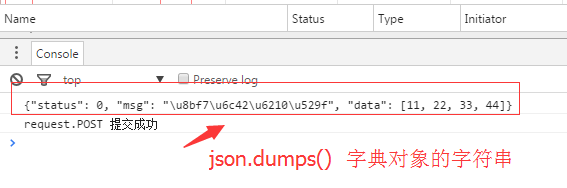
2、通过json.dumps('xxx') 序列化成 1个字符串的 '字典对象'
views.py
1def ajax(request):
2    if request.method=='POST':
3        print(request.POST)
4        data={'status':0,'msg':'请求成功','data':[11,22,33,44]}
5        return HttpResponse(json.dumps(data))
6    else:
7        return render(request,'ajax.html')
此时tempates 中ajax.html 代码 详细查看:https://my.oschina.net/esdn/blog/814094
此时浏览器返回的数据
步骤2:前台取出后台序列化的字符串
方法1:正则表达式 (不推荐)
**方法2:**jQuery.parseJSON() ,需要import json
转换成1个JQuery可识别的字典(对象) 通过 对象. xxx 取值 (推荐)
views.py序列化:return HttpResponse(json.dumps(data))
ajax.html 取值:var obj=jQuery.parseJSON(arg)
console.log(obj.status)
修改后的tempates 中ajax.html 代码
1<script type='text/javascript'>
2	function DoAjax(){
3			var temp=$('#na').val()
4			$.ajax({
5				url:'/ajax/',           //url相当于 form 中的 action
6				type:'POST',            //type相当于form 中的 method
7				data:{dat:temp},       // data:传人的数据 dat为任意设置的内容,相当于模版中的{author:lee}
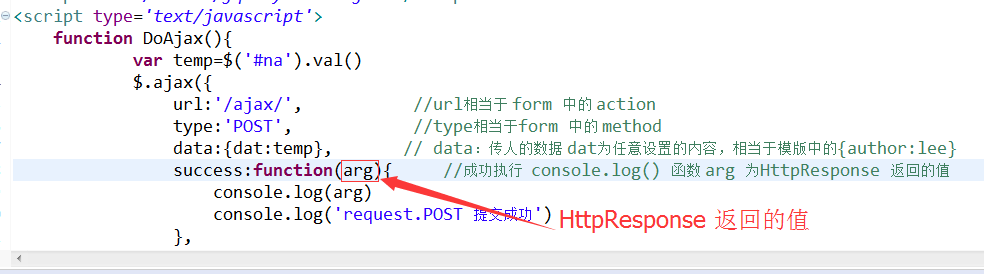
8				success:function(arg){     //成功执行  console.log() 函数 arg 为HttpResponse 返回的值
9					var obj=jQuery.parseJSON(arg)    //转化成JS识别的对象
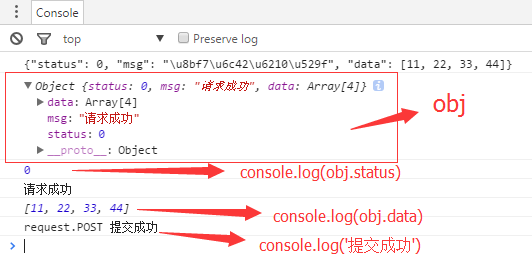
10                    console.log(obj)          //打印obj
11					console.log(arg)              //json.dumps(data) 序列化后的数据
12					console.log(obj.status)       //取json.dumps(data)字典的值status
13					console.log(obj.msg)
14					console.log(obj.data)
15					console.log('request.POST 提交成功')
16				},
17				error:function(){            //失败
18					console.log('失败')
19				}
20			});
21		}
22</script>
此时前台浏览器 显示数据
方法3:content_type='application/json'
views.py 序列化:return HttpResponse(json.dumps(data),content_type='application/json')
浏览器F12有变色提示
或:HttpResponse(json.dumps(data),content_type='type/json') 浏览器F12无变色提示
ajax.html 取值 arg.xxx
方法4:使用JsonRespon 包 (最简单) 前台通过 arg.xxx 取值
views.py 序列化: return JsonResponse(data)
ajax.html 取值:arg.xxx
区别:HttpResponse 需要dumps
JsonResponse 不需要dumps
views.py
1from django.shortcuts import render
2from django.http import JsonResponse
3def ajax(request):
4    if request.method=='POST':
5        print(request.POST)
6        data={'status':0,'msg':'请求成功','data':[11,22,33,44]} #假如传人的数据为一字典
7        #return HttpResponse(json.dumps(data))      #原来写法,需要dumps
8        return JsonResponse(data)                  #后来写法
9    else:
10        return render(request,'ajax.html')
templates 中的 ajax.html
1<script type='text/javascript'>
2	function DoAjax(){
3			var temp=$('#na').val()
4			$.ajax({
5				url:'/ajax/',           //url相当于 form 中的 action
6				type:'POST',            //type相当于form 中的 method
7				data:{dat:temp},       // data:传人的数据 dat为任意设置的内容,相当于模版中的{author:lee}
8				success:function(arg){     //成功执行  console.log() 函数 arg 为HttpResponse 返回的值
9					//var obj=jQuery.parseJSON(arg)
10					//console.log(arg)              //json.dumps(data) 序列化后的数据
11					console.log(arg.msg)
12					/*
13					console.log(obj)
14					console.log(obj.status)       //取json.dumps(data)字典的值status
15					console.log(obj.msg)
16					console.log(obj.data)*/
17					console.log('request.POST 提交成功')
18				},
19				error:function(){            //失败
20					console.log('失败')
21				}
22			});
23		}
24</script>