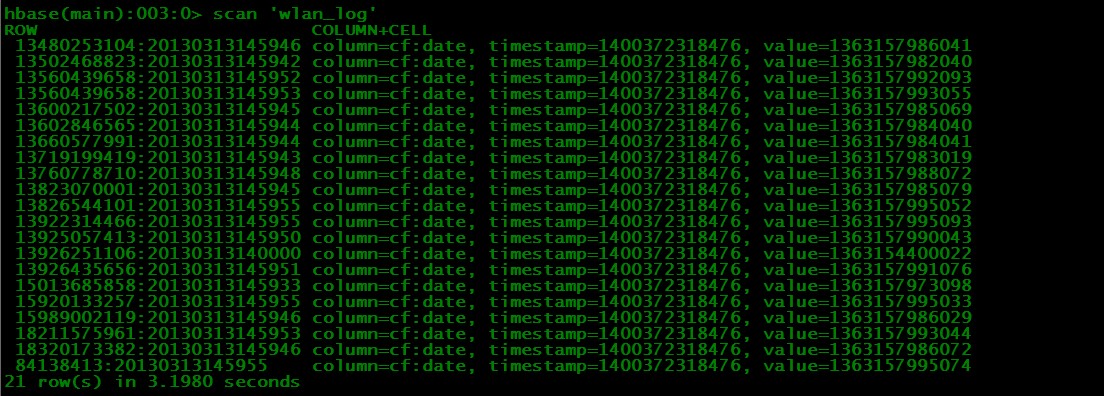
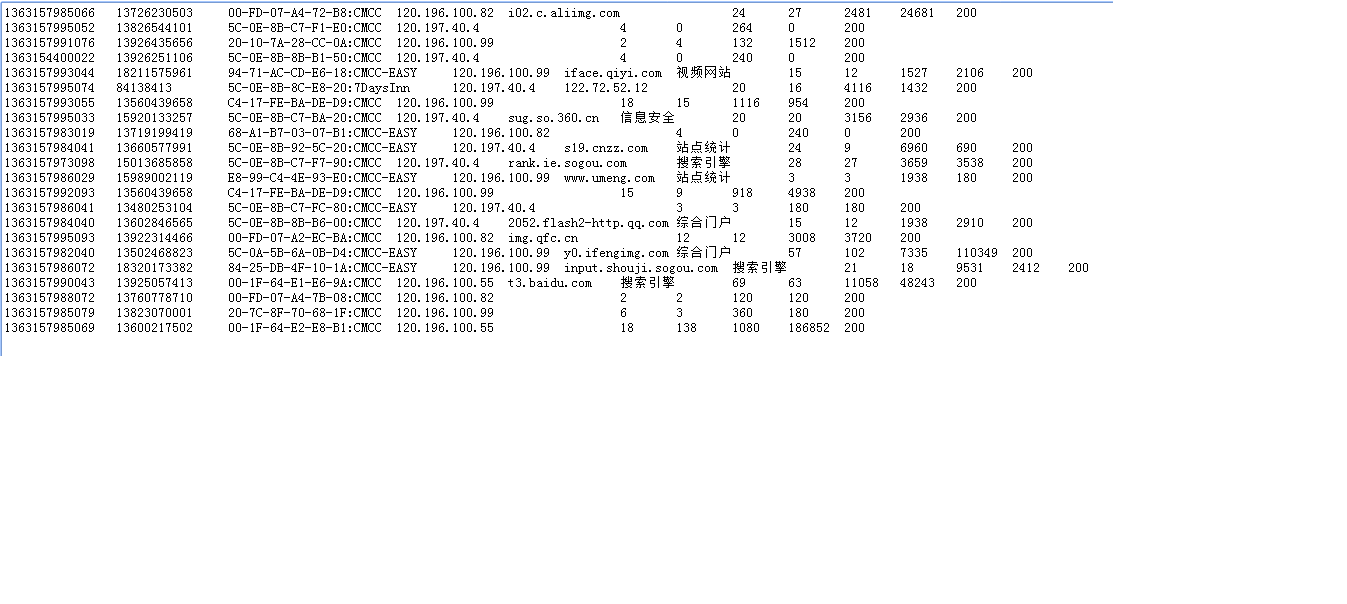
将手机上网日志文件批量导入到Hbase中。操作步骤:
1、将日志文件(请下载附件)上传到HDFS中,利用hadoop的操作命令上传:hadoop fs -put input /
2、创建Hbase表,通过Java操作
Java代码 
-
package com.jiewen.hbase;
-
import java.io.IOException;
-
import org.apache.hadoop.conf.Configuration;
-
import org.apache.hadoop.hbase.HBaseConfiguration;
-
import org.apache.hadoop.hbase.HColumnDescriptor;
-
import org.apache.hadoop.hbase.HTableDescriptor;
-
import org.apache.hadoop.hbase.client.Get;
-
import org.apache.hadoop.hbase.client.HBaseAdmin;
-
import org.apache.hadoop.hbase.client.HTable;
-
import org.apache.hadoop.hbase.client.Put;
-
import org.apache.hadoop.hbase.client.Result;
-
import org.apache.hadoop.hbase.client.ResultScanner;
-
import org.apache.hadoop.hbase.client.Scan;
-
import org.apache.hadoop.hbase.util.Bytes;
-
public class HbaseDemo {
-
public static void main(String[] args) throws IOException {
-
String tableName = "wlan_log";
-
String columnFamily = "cf";
-
HbaseDemo.create(tableName, columnFamily);
-
// HbaseDemo.put(tableName, "row1", columnFamily, "cl1", "data");
-
// HbaseDemo.get(tableName, "row1");
-
// HbaseDemo.scan(tableName);
-
// HbaseDemo.delete(tableName);
-
}
-
// hbase操作必备
-
private static Configuration getConfiguration() {
-
Configuration conf = HBaseConfiguration.create();
-
conf.set("hbase.rootdir", "hdfs://hadoop1:9000/hbase");
-
// 使用eclipse时必须加入这个,否则无法定位
-
conf.set("hbase.zookeeper.quorum", "hadoop1");
-
return conf;
-
}
-
// 创建一张表
-
public static void create(String tableName, String columnFamily)
-
throws IOException {
-
HBaseAdmin admin = new HBaseAdmin(getConfiguration());
-
if (admin.tableExists(tableName)) {
-
System.out.println("table exists!");
-
} else {
-
HTableDescriptor tableDesc = new HTableDescriptor(tableName);
-
tableDesc.addFamily(new HColumnDescriptor(columnFamily));
-
admin.createTable(tableDesc);
-
System.out.println("create table success!");
-
}
-
}
-
// 加入一条记录
-
public static void put(String tableName, String row, String columnFamily,
-
String column, String data) throws IOException {
-
HTable table = new HTable(getConfiguration(), tableName);
-
Put p1 = new Put(Bytes.toBytes(row));
-
p1.add(Bytes.toBytes(columnFamily), Bytes.toBytes(column), Bytes
-
.toBytes(data));
-
table.put(p1);
-
System.out.println("put'" + row + "'," + columnFamily + ":" + column
-
+ "','" + data + "'");
-
}
-
// 读取一条记录
-
public static void get(String tableName, String row) throws IOException {
-
HTable table = new HTable(getConfiguration(), tableName);
-
Get get = new Get(Bytes.toBytes(row));
-
Result result = table.get(get);
-
System.out.println("Get: " + result);
-
}
-
// 显示全部数据
-
public static void scan(String tableName) throws IOException {
-
HTable table = new HTable(getConfiguration(), tableName);
-
Scan scan = new Scan();
-
ResultScanner scanner = table.getScanner(scan);
-
for (Result result : scanner) {
-
System.out.println("Scan: " + result);
-
}
-
}
-
// 删除表
-
public static void delete(String tableName) throws IOException {
-
HBaseAdmin admin = new HBaseAdmin(getConfiguration());
-
if (admin.tableExists(tableName)) {
-
try {
-
admin.disableTable(tableName);
-
admin.deleteTable(tableName);
-
} catch (IOException e) {
-
e.printStackTrace();
-
System.out.println("Delete " + tableName + " 失败");
-
}
-
}
-
System.out.println("Delete " + tableName + " 成功");
-
}
-
}
3、将日志文件导入Hbase表wlan_log中:
Java代码 
-
import java.text.SimpleDateFormat;
-
import java.util.Date;
-
import org.apache.hadoop.conf.Configuration;
-
import org.apache.hadoop.hbase.client.Put;
-
import org.apache.hadoop.hbase.mapreduce.TableOutputFormat;
-
import org.apache.hadoop.hbase.mapreduce.TableReducer;
-
import org.apache.hadoop.hbase.util.Bytes;
-
import org.apache.hadoop.io.LongWritable;
-
import org.apache.hadoop.io.NullWritable;
-
import org.apache.hadoop.io.Text;
-
import org.apache.hadoop.mapreduce.Counter;
-
import org.apache.hadoop.mapreduce.Job;
-
import org.apache.hadoop.mapreduce.Mapper;
-
import org.apache.hadoop.mapreduce.lib.input.FileInputFormat;
-
import org.apache.hadoop.mapreduce.lib.input.TextInputFormat;
-
public class HbaseBatchImport {
-
public static void main(String[] args) throws Exception {
-
final Configuration configuration = new Configuration();
-
// 设置zookeeper
-
configuration.set("hbase.zookeeper.quorum", "hadoop1");
-
// 设置hbase表名称
-
configuration.set(TableOutputFormat.OUTPUT_TABLE, "wlan_log");
-
// 将该值改大,防止hbase超时退出
-
configuration.set("dfs.socket.timeout", "180000");
-
final Job job = new Job(configuration, "HBaseBatchImport");
-
job.setMapperClass(BatchImportMapper.class);
-
job.setReducerClass(BatchImportReducer.class);
-
// 设置map的输出,不设置reduce的输出类型
-
job.setMapOutputKeyClass(LongWritable.class);
-
job.setMapOutputValueClass(Text.class);
-
job.setInputFormatClass(TextInputFormat.class);
-
// 不再设置输出路径。而是设置输出格式类型
-
job.setOutputFormatClass(TableOutputFormat.class);
-
FileInputFormat.setInputPaths(job, "hdfs://hadoop1:9000/input");
-
job.waitForCompletion(true);
-
}
-
static class BatchImportMapper extends
-
Mapper<LongWritable, Text, LongWritable, Text> {
-
SimpleDateFormat dateformat1 = new SimpleDateFormat("yyyyMMddHHmmss");
-
Text v2 = new Text();
-
protected void map(LongWritable key, Text value, Context context)
-
throws java.io.IOException, InterruptedException {
-
final String[] splited = value.toString().split("\t");
-
try {
-
final Date date = new Date(Long.parseLong(splited[0].trim()));
-
final String dateFormat = dateformat1.format(date);
-
String rowKey = splited[1] + ":" + dateFormat;
-
v2.set(rowKey + "\t" + value.toString());
-
context.write(key, v2);
-
} catch (NumberFormatException e) {
-
final Counter counter = context.getCounter("BatchImport",
-
"ErrorFormat");
-
counter.increment(1L);
-
System.out.println("出错了" + splited[0] + " " + e.getMessage());
-
}
-
};
-
}
-
static class BatchImportReducer extends
-
TableReducer<LongWritable, Text, NullWritable> {
-
protected void reduce(LongWritable key,
-
java.lang.Iterable<Text> values, Context context)
-
throws java.io.IOException, InterruptedException {
-
for (Text text : values) {
-
final String[] splited = text.toString().split("\t");
-
final Put put = new Put(Bytes.toBytes(splited[0]));
-
put.add(Bytes.toBytes("cf"), Bytes.toBytes("date"), Bytes
-
.toBytes(splited[1]));
-
// 省略其它字段,调用put.add(....)就可以
-
context.write(NullWritable.get(), put);
-
}
-
};
-
}
-
}
4、查看导入结果: