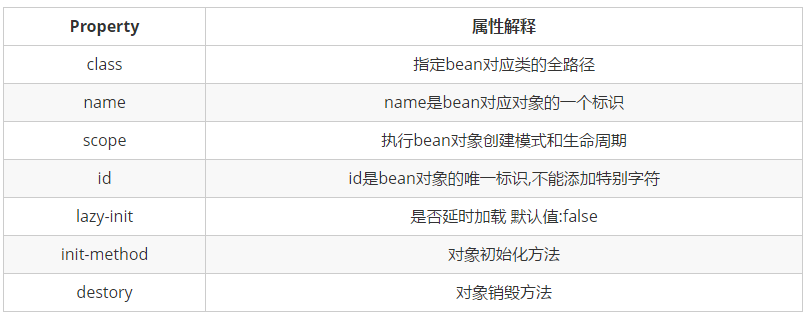
1.概要:
在spring中,都是使用反射机制创建对象,将创建对象的权利交给spring容器,就是控制反转(ioc)
对象创建方式
- 有参构造
- 无参构造
- 工厂模式(静态,非静态)
2.创建IDEA控制台测试项目
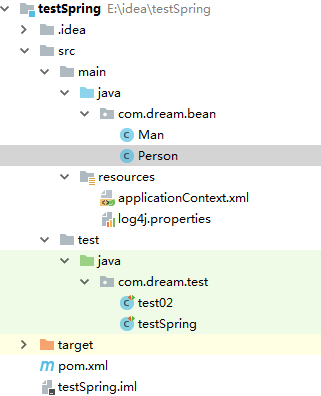
3.导入依赖
日志依赖:log4j
测试依赖:junit
spring依赖:spring-context-support、core、context、expression、beans、test
4.创建resources
log4j.properties配置如下:
1# log4J日志框架的配置文件 文件名字不能改
2# DEBUG 表示日志的级别  调试
3# Console 日志打印在控制台
4log4j.rootLogger=DEBUG, Console
5log4j.appender.Console=org.apache.log4j.ConsoleAppender
6log4j.appender.Console.layout=org.apache.log4j.PatternLayout
7log4j.appender.Console.layout.ConversionPattern=%d [%t] %-5p [%c] - %m%n
8# 哪些日志需要打印
9log4j.logger.java.sql.ResultSet=INFO
10log4j.logger.org.apache=INFO
11log4j.logger.java.sql.Connection=DEBUG
12log4j.logger.java.sql.Statement=DEBUG
13log4j.logger.java.sql.PreparedStatement=DEBUG
5.创建bean层
1public class Person {
2    private Integer id;
3    private String name;
4
5//无参,有参,getset,tostring
6
7    public Person() {
8        System.out.println("调用了无参构造");//方便观察如何调用的
9    }
10
11    public Person(Integer id, String name) {    System.out.println("调用了有参构造。。")
12        this.id = id;
13        this.name = name;
14    }
15
16    public Integer getId() {
17        return id;
18    }
19
20    public void setId(Integer id) {
21        System.out.println("调用了setId");
22        this.id = id;
23    }
24
25    public String getName() {
26        return name;
27    }
28
29    public void setName(String name) {
30        System.out.println("调用了setName");
31        this.name = name;
32    }
33
34    @Override
35    public String toString() {
36        return "Person{" +
37                "id=" + id +
38                ", name='" + name + '\'' +
39                '}';
40    }//静态工厂模式创建对象要单独在同一个bean中,新建一个类
41
42  package com.dream.bean;  public class PersonFactory {      public static Person createPerson(){          return new Person(3,"使用静态工厂创建p3.....");      }  }
43
44//非静态工厂模式创建对象要单独新建一个类
45
46  package com.dream.bean;  public class PFactory {      public Person createPerson(){          return new Person(4,"使用非静态工厂创建p4.....");      }  }
6.创建spring容器创建对象的配置文件(建议使用applicationContext.xml命名)
1<?xml version="1.0" encoding="UTF-8"?>
2<beans xmlns="http://www.springframework.org/schema/beans"
3       xmlns:xsi="http://www.w3.org/2001/XMLSchema-instance"
4       xsi:schemaLocation="http://www.springframework.org/schema/beans
5       http://www.springframework.org/schema/beans/spring-beans.xsd">
6    <!--使用Spring的反射机制 创建对象-->
7    <!--1:默认调用无参数的构造方法-->
8    <!--2.调用有参数的构方法创建对象-->
9    <!--3.使用静态工厂创建对象-->
10    <!--4.使用非静态工厂创建对象-->
11
12<!--1:默认调用无参数的构造方法-->
13
14<bean id="p1" class="com.dream.bean.Person">    <property name="id" value="1"/>    <property name="name" value="这是spring创建的第一个对象"/></bean>
15
16  <!--2.调用有参数的构造方法创建对象--><bean id="p2" class="com.dream.bean.Person">    <constructor-arg name="name" value="用index调整传入参数的顺序" index="1" />    <constructor-arg name="id" value="2" index="0" /></bean>
17
18  <!--3.使用静态工厂创建对象--><bean id="p3" class="com.dream.bean.PersonFactory" factory-method="createPerson"/>
19
20  <!--4.使用非静态工厂创建对象--><bean id="factory" class="com.dream.bean.PFactory"/><bean id="p4" factory-bean="factory" factory-method="createPerson"/>
21
22</beans>
7.创建测试类
1package com.dream.test;
2import com.dream.bean.Person;
3import org.junit.Test;
4import org.springframework.context.support.ClassPathXmlApplicationContext;
5
6public class testSpring {
7@Test
8public void testSpring01(){
9//启动加载配置文件,并启动Spring框架
10 ClassPathXmlApplicationContext context = new ClassPathXmlApplicationContext("applicationContext.xml");
11// 从Spring容器中获取对象(装的是对象!Spring就是对象的容器!)
12 Person p = context.getBean("p1", Person.class);
13 System.out.println(p);
14    }打印结果:调用了无参构造调用了setId调用了setName调用了无参构造调用了setId调用了setNamePerson{id=1, name='这是spring创建的第一个对象'}
15
16@Testpublic void testSpring02(){
17
18    ClassPathXmlApplicationContext context = new ClassPathXmlApplicationContext("applicationContext.xml");    Person p = context.getBean("p2", Person.class);    System.out.println(p);}打印结果:
调用了有参构造。。
调用了有参构造。。
调用了有参构造。。
调用了无参构造
调用了setId
调用了setName
Person{id=2, name='用index调整传入参数的顺序'}
1@Testpublic void testSpring03(){    ClassPathXmlApplicationContext context = new ClassPathXmlApplicationContext("applicationContext.xml");    Person p = context.getBean("p3", Person.class);    System.out.println(p);}打印结果:Person{id=3, name='使用静态工厂创建p3.....'}
2
3@Testpublic void testSpring04(){    ClassPathXmlApplicationContext context = new ClassPathXmlApplicationContext("applicationContext.xml");    Person p = context.getBean("p4", Person.class);    System.out.println(p);}
4
5打印结果: Person{id=4, name='使用非静态工厂创建p4.....'}}
8.另附xml中属性解释