
一.在eclipse中使用Graphviz:建立一个 class Graphviz
GraphViz库的代码如下(复制到class GraphViz中)
1//GraphViz.java - a simple API to call dot from Java programs
2/*$Id$*/
3/*
4******************************************************************************
5*                                                                            *
6*              (c) Copyright 2003 Laszlo Szathmary                           *
7*                                                                            *
8* This program is free software; you can redistribute it and/or modify it    *
9* under the terms of the GNU Lesser General Public License as published by   *
10* the Free Software Foundation; either version 2.1 of the License, or        *
11* (at your option) any later version.                                        *
12*                                                                            *
13* This program is distributed in the hope that it will be useful, but        *
14* WITHOUT ANY WARRANTY; without even the implied warranty of MERCHANTABILITY *
15* or FITNESS FOR A PARTICULAR PURPOSE.  See the GNU Lesser General Public    *
16* License for more details.                                                  *
17*                                                                            *
18* You should have received a copy of the GNU Lesser General Public License   *
19* along with this program; if not, write to the Free Software Foundation,    *
20* Inc., 675 Mass Ave, Cambridge, MA 02139, USA.                              *
21*                                                                            *
22******************************************************************************
23*/
24
25import java.io.BufferedReader;
26import java.io.DataInputStream;
27import java.io.File;
28import java.io.FileInputStream;
29import java.io.FileOutputStream;
30import java.io.FileWriter;
31import java.io.InputStreamReader;
32
33/**
34* <dl>
35* <dt>Purpose: GraphViz Java API
36* <dd>
37*
38* <dt>Description:
39* <dd> With this Java class you can simply call dot
40*      from your Java programs
41* <dt>Example usage:
42* <dd>
43* <pre>
44*    GraphViz gv = new GraphViz();
45*    gv.addln(gv.start_graph());
46*    gv.addln("A -> B;");
47*    gv.addln("A -> C;");
48*    gv.addln(gv.end_graph());
49*    System.out.println(gv.getDotSource());
50*
51*    String type = "gif";
52*    File out = new File("out." + type);   // out.gif in this example
53*    gv.writeGraphToFile( gv.getGraph( gv.getDotSource(), type ), out );
54* </pre>
55* </dd>
56*
57* </dl>
58*
59* @version v0.4, 2011/02/05 (February) -- Patch of Keheliya Gallaba is added. Now you
60* can specify the type of the output file: gif, dot, fig, pdf, ps, svg, png, etc.
61* @version v0.3, 2010/11/29 (November) -- Windows support + ability
62* to read the graph from a text file
63* @version v0.2, 2010/07/22 (July) -- bug fix
64* @version v0.1, 2003/12/04 (December) -- first release
65* @author  Laszlo Szathmary (<a href="jabba.laci@gmail.com">jabba.laci@gmail.com</a>)
66*/
67public class Graphviz
68{
69/**
70 * The dir. where temporary files will be created.
71 */
72//private static String TEMP_DIR = "/tmp"; // Linux
73private static String TEMP_DIR = "c:/temp"; // Windows
74
75/**
76 * Where is your dot program located? It will be called externally.
77 */
78// private static String DOT = "/usr/bin/dot"; // Linux
79private static String DOT = "C:\\Program Files (x86)\\Graphviz2.38\\bin\\dot.exe"; // Windows
80
81/**
82 * The source of the graph written in dot language.
83 */
84private StringBuilder graph = new StringBuilder();
85
86/**
87 * Constructor: creates a new GraphViz object that will contain
88 * a graph.
89 */
90public Graphviz() {
91}
92
93/**
94 * Returns the graph's source description in dot language.
95 * @return Source of the graph in dot language.
96 */
97public String getDotSource() {
98   return graph.toString();
99}
100
101/**
102 * Adds a string to the graph's source (without newline).
103 */
104public void add(String line) {
105   graph.append(line);
106}
107
108/**
109 * Adds a string to the graph's source (with newline).
110 */
111public void addln(String line) {
112   graph.append(line + "\n");
113}
114
115/**
116 * Adds a newline to the graph's source.
117 */
118public void addln() {
119   graph.append('\n');
120}
121
122/**
123 * Returns the graph as an image in binary format.
124 * @param dot_source Source of the graph to be drawn.
125 * @param type Type of the output image to be produced, e.g.: gif, dot, fig, pdf, ps, svg, png.
126 * @return A byte array containing the image of the graph.
127 */
128public byte[] getGraph(String dot_source, String type)
129{
130   File dot;
131   byte[] img_stream = null;
132
133   try {
134      dot = writeDotSourceToFile(dot_source);
135      if (dot != null)
136      {
137         img_stream = get_img_stream(dot, type);
138         if (dot.delete() == false)
139            System.err.println("Warning: " + dot.getAbsolutePath() + " could not be deleted!");
140         return img_stream;
141      }
142      return null;
143   } catch (java.io.IOException ioe) { return null; }
144}
145
146/**
147 * Writes the graph's image in a file.
148 * @param img   A byte array containing the image of the graph.
149 * @param file  Name of the file to where we want to write.
150 * @return Success: 1, Failure: -1
151 */
152public int writeGraphToFile(byte[] img, String file)
153{
154   File to = new File(file);
155   return writeGraphToFile(img, to);
156}
157
158/**
159 * Writes the graph's image in a file.
160 * @param img   A byte array containing the image of the graph.
161 * @param to    A File object to where we want to write.
162 * @return Success: 1, Failure: -1
163 */
164public int writeGraphToFile(byte[] img, File to)
165{
166   try {
167      FileOutputStream fos = new FileOutputStream(to);
168      fos.write(img);
169      fos.close();
170   } catch (java.io.IOException ioe) { ioe.printStackTrace();return -1; }
171   return 1;
172}
173
174/**
175 * It will call the external dot program, and return the image in
176 * binary format.
177 * @param dot Source of the graph (in dot language).
178 * @param type Type of the output image to be produced, e.g.: gif, dot, fig, pdf, ps, svg, png.
179 * @return The image of the graph in .gif format.
180 */
181private byte[] get_img_stream(File dot, String type)
182{
183   File img;
184   byte[] img_stream = null;
185
186try {
187      img = File.createTempFile("graph_", "."+type, new File(Graphviz.TEMP_DIR));
188      Runtime rt = Runtime.getRuntime();
189
190      // patch by Mike Chenault
191      String[] args = {DOT, "-T"+type, dot.getAbsolutePath(), "-o", img.getAbsolutePath()};
192      Process p = rt.exec(args);
193
194      p.waitFor();
195
196FileInputStream in = new FileInputStream(img.getAbsolutePath());
197      img_stream = new byte[in.available()];
198      in.read(img_stream);
199      // Close it if we need to
200      if( in != null ) in.close();
201
202if (img.delete() == false)
203         System.err.println("Warning: " + img.getAbsolutePath() + " could not be deleted!");
204   }
205   catch (java.io.IOException ioe) {
206      System.err.println("Error:    in I/O processing of tempfile in dir " + Graphviz.TEMP_DIR+"\n");
207      System.err.println("       or in calling external command");
208      ioe.printStackTrace();
209   }
210   catch (java.lang.InterruptedException ie) {
211      System.err.println("Error: the execution of the external program was interrupted");
212      ie.printStackTrace();
213   }
214
215return img_stream;   }
216/**
217 * Writes the source of the graph in a file, and returns the written file
218 * as a File object.
219 * @param str Source of the graph (in dot language).
220 * @return The file (as a File object) that contains the source of the graph.
221 */
222public File writeDotSourceToFile(String str) throws java.io.IOException
223{
224   File temp;
225   try {
226      temp = File.createTempFile("graph_", ".dot.tmp", new File(Graphviz.TEMP_DIR));
227      FileWriter fout = new FileWriter(temp);
228      fout.write(str);
229      fout.close();
230   }
231   catch (Exception e) {
232      System.err.println("Error: I/O error while writing the dot source to temp file!");
233      return null;
234   }
235   return temp;
236}
237
238/**
239 * Returns a string that is used to start a graph.
240 * @return A string to open a graph.
241 */
242public String start_graph() {
243   return "digraph G {" ;
244}
245
246/**
247 * Returns a string that is used to end a graph.
248 * @return A string to close a graph.
249 */
250public String end_graph() {
251   return "}";
252}
253
254/**
255 * Read a DOT graph from a text file.
256 *
257 * @param input Input text file containing the DOT graph
258 * source.
259 */
260public void readSource(String input)
261{
262 StringBuilder sb = new StringBuilder();
263
264 try
265 {
266  FileInputStream fis = new FileInputStream(input);
267  DataInputStream dis = new DataInputStream(fis);
268  BufferedReader br = new BufferedReader(new InputStreamReader(dis));
269  String line;
270  while ((line = br.readLine()) != null) {
271   sb.append(line);
272  }
273  dis.close();
274 }
275 catch (Exception e) {
276  System.err.println("Error: " + e.getMessage());
277 }
278
279 this.graph = sb;
280}
281
282} // end of class GraphViz
二.使用GraphViz库画图,GraphViz画图代码示例见https://www.2cto.com/kf/201212/173431.html
测试代码如下:
1import java.io.File;
2
3public class GTest {
4    public static void main(String[] args){
5        GTest gtest = new GTest();
6        String[] nodes = {"A","B","C","D","E","F","G"};
7        String[] preline = {"B -> A","D -> B","E -> D","C -> E","G -> C","F -> G"};
8        gtest.start(nodes, preline);
9    }
10    private void start(String[] nodes,String[] preline){
11
12           Graphviz gv = new Graphviz();
13           //定义每个节点的style
14           String nodesty = "[shape = polygon, sides = 6, peripheries = 2, color = lightblue, style = filled]";
15           //String linesty = "[dir=\"none\"]";
16
17           gv.addln(gv.start_graph());//SATRT
18           gv.addln("edge[fontname=\"DFKai-SB\" fontsize=15 fontcolor=\"black\" color=\"brown\" style=\"filled\"]");
19           gv.addln("size =\"8,8\";");
20           //设置节点的style
21           for(int i=0;i<nodes.length;i++){
22               gv.addln(nodes[i]+" "+nodesty);
23           }
24           for(int i=0;i<preline.length;i++){
25               gv.addln(preline[i]+" "+" [dir=\"none\"]");
26           }
27           gv.addln(gv.end_graph());//END
28           //节点之间的连接关系输出到控制台
29           System.out.println(gv.getDotSource());
30           //输出什么格式的图片(gif,dot,fig,pdf,ps,svg,png,plain)
31           String type = "png";
32           //输出到文件夹以及命名
33           File out = new File("C:/Users/fanghui/Desktop/GraphTest/test." + type);   // Linux
34           //File out = new File("c:/eclipse.ws/graphviz-java-api/out." + type);    // Windows
35           gv.writeGraphToFile( gv.getGraph( gv.getDotSource(), type ), out );
36       }
37}
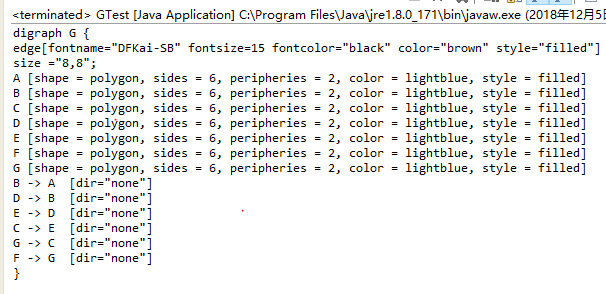
三.结果:
控制台输出
输出生成的图片
