
1、计量单位,大小写不敏感,配置redis内存。
1# Note on units: when memory size is needed, it is possible to specify
2# it in the usual form of 1k 5GB 4M and so forth:
3#
4# 1k => 1000 bytes
5# 1kb => 1024 bytes
6# 1m => 1000000 bytes
7# 1mb => 1024*1024 bytes
8# 1g => 1000000000 bytes
9# 1gb => 1024*1024*1024 bytes
10#
11# units are case insensitive so 1GB 1Gb 1gB are all the same.
2、include,类似jsp中的include,多实例的情况可以把公用的配置文件提取出来
1# Include one or more other config files here.  This is useful if you
2# have a standard template that goes to all Redis servers but also need
3# to customize a few per-server settings.  Include files can include
4# other files, so use this wisely.
5#
6# Notice option "include" won't be rewritten by command "CONFIG REWRITE"
7# from admin or Redis Sentinel. Since Redis always uses the last processed
8# line as value of a configuration directive, you'd better put includes
9# at the beginning of this file to avoid overwriting config change at runtime.
10#
11# If instead you are interested in using includes to override configuration
12# options, it is better to use include as the last line.
13#
14# include /path/to/local.conf
15# include /path/to/other.conf
3、ip地址的绑定(bind)
1# Examples:
2#
3# bind 192.168.1.100 10.0.0.1
4# bind 127.0.0.1 ::1
默认情况bind=127.0.0.1只能接受本机的访问请求
不写的情况下,无限制接受任何ip地址的访问
生产环境肯定要写你应用服务器的地址
如果开启了protected-mode,那么在没有设定bind ip且没有设密码的情况下,Redis只允许接受本机的请求
4、tcp-backlog
可以理解是一个请求到达后至到接受进程处理前的队列
backlog队列总和=未完成三次握手队列 + 已经完成三次握手队列
高并发环境tcp-backlog 设置值跟超时时限内的Redis吞吐量决定、
1# In high requests-per-second environments you need an high backlog in order
2# to avoid slow clients connections issues. Note that the Linux kernel
3# will silently truncate it to the value of /proc/sys/net/core/somaxconn so
4# make sure to raise both the value of somaxconn and tcp_max_syn_backlog
5# in order to get the desired effect.
6tcp-backlog 511
这个首先会读取/proc/sys/net/core/somaxconn文件中设置的值。
5、timeout
一个空闲的客户端维持多少秒会关闭,0为永不关闭。
6、TCP keepalive
对访问客户端的一种心跳检测,每个n秒检测一次。
官方推荐设为60秒。
7、daemonize
是否为后台进程
8、pidfile
存放pid文件的位置,每个实例会产生一个不同的pid文件
9、log level
四个级别根据使用阶段来选择,生产环境选择notice 或者warning
10、logfile
日志文件名称
11、syslog
是否将Redis日志输送到linux系统日志服务中
12、syslog-ident
日志的标志
13、syslog-facility
输出日志的设备
14、database
设定库的数量 默认16
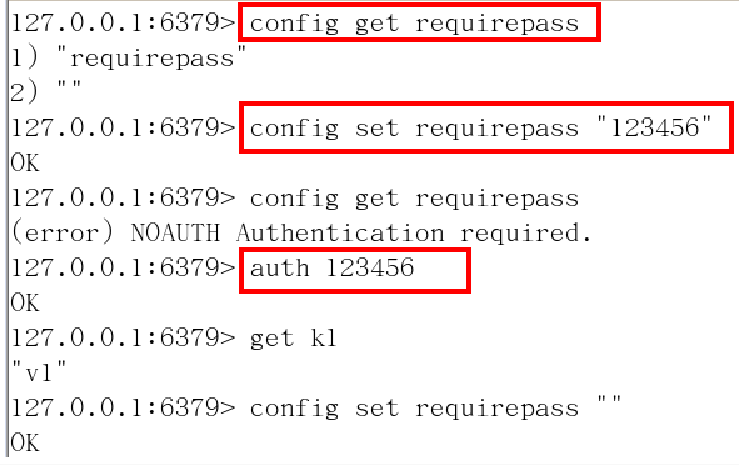
15、security
在命令行中设置密码
16、maxclient
最大客户端连接数
17、maxmemory
设置Redis可以使用的内存量。一旦到达内存使用上限,Redis将会试图移除内部数据,移除规则可以通过maxmemory-policy来指定。如果Redis无法根据移除规则来移除内存中的数据,或者设置了“不允许移除”, 那么Redis则会针对那些需要申请内存的指令返回错误信息,比如SET、LPUSH等。
18、Maxmemory-policy
(1)volatile-lru:使用LRU算法移除key,只对设置了过期时间的键 (2)allkeys-lru:使用LRU算法移除key (3)volatile-random:在过期集合中移除随机的key,只对设置了过期时间的键 (4)allkeys-random:移除随机的key (5)volatile-ttl:移除那些TTL值最小的key,即那些最近要过期的key (6)noeviction:不进行移除。针对写操作,只是返回错误信息
19、Maxmemory-samples
设置样本数量,LRU算法和最小TTL算法都并非是精确的算法,而是估算值,所以你可以设置样本的大小。 一般设置3到7的数字,数值越小样本越不准确,但是性能消耗也越小。