
在NuGet中添加Swashbuckle 引用 ; 主要Swashbuckle 中已经包含了Swagger UI 与Swagger.net 不要重复引用。
引用完之后会在App_Start下生成 SwaggerConfig文件,如果还有一个SwaggerNet需要将这个删除掉。
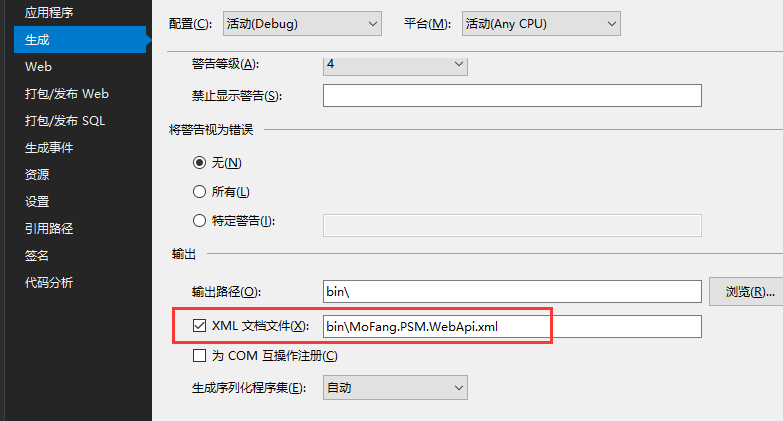
1  c.RootUrl(ResolveBasePath); 这个为了解决域名访问问题
2
3 c.IncludeXmlComments(GetXmlCommentsPath()); 指定当前api的xml文件地址
4
5public class SwaggerConfig
6    {
7        public static void Register()
8        {
9            var thisAssembly = typeof(SwaggerConfig).Assembly;
10
11            GlobalConfiguration.Configuration
12                .EnableSwagger(c =>
13                {
14                    c.RootUrl(ResolveBasePath);
15                    // By default, the service root url is inferred from the request used to access the docs.
16                    // However, there may be situations (e.g. proxy and load-balanced environments) where this does not
17                    // resolve correctly. You can workaround this by providing your own code to determine the root URL.
18                    //
19                    //c.RootUrl(req => GetRootUrlFromAppConfig());
20
21                    // If schemes are not explicitly provided in a Swagger 2.0 document, then the scheme used to access
22                    // the docs is taken as the default. If your API supports multiple schemes and you want to be explicit
23                    // about them, you can use the "Schemes" option as shown below.
24                    //
25                    //c.Schemes(new[] { "http", "https" });
26
27                    // Use "SingleApiVersion" to describe a single version API. Swagger 2.0 includes an "Info" object to
28                    // hold additional metadata for an API. Version and title are required but you can also provide
29                    // additional fields by chaining methods off SingleApiVersion.
30                    //
31                    c.SingleApiVersion("v1", "MoFang.API");
32
33                    // If you want the output Swagger docs to be indented properly, enable the "PrettyPrint" option.
34                    //
35                    //c.PrettyPrint();
36
37                    // If your API has multiple versions, use "MultipleApiVersions" instead of "SingleApiVersion".
38                    // In this case, you must provide a lambda that tells Swashbuckle which actions should be
39                    // included in the docs for a given API version. Like "SingleApiVersion", each call to "Version"
40                    // returns an "Info" builder so you can provide additional metadata per API version.
41                    //
42                    //c.MultipleApiVersions(
43                    //    (apiDesc, targetApiVersion) => ResolveVersionSupportByRouteConstraint(apiDesc, targetApiVersion),
44                    //    (vc) =>
45                    //    {
46                    //        vc.Version("v2", "Swashbuckle Dummy API V2");
47                    //        vc.Version("v1", "Swashbuckle Dummy API V1");
48                    //    });
49
50                    // You can use "BasicAuth", "ApiKey" or "OAuth2" options to describe security schemes for the API.
51                    // See https://github.com/swagger-api/swagger-spec/blob/master/versions/2.0.md for more details.
52                    // NOTE: These only define the schemes and need to be coupled with a corresponding "security" property
53                    // at the document or operation level to indicate which schemes are required for an operation. To do this,
54                    // you'll need to implement a custom IDocumentFilter and/or IOperationFilter to set these properties
55                    // according to your specific authorization implementation
56                    //
57                    //c.BasicAuth("basic")
58                    //    .Description("Basic HTTP Authentication");
59                    //
60                    // NOTE: You must also configure 'EnableApiKeySupport' below in the SwaggerUI section
61                    //c.ApiKey("apiKey")
62                    //    .Description("API Key Authentication")
63                    //    .Name("apiKey")
64                    //    .In("header");
65                    //
66                    //c.OAuth2("oauth2")
67                    //    .Description("OAuth2 Implicit Grant")
68                    //    .Flow("implicit")
69                    //    .AuthorizationUrl("http://petstore.swagger.wordnik.com/api/oauth/dialog")
70                    //    //.TokenUrl("https://tempuri.org/token")
71                    //    .Scopes(scopes =>
72                    //    {
73                    //        scopes.Add("read", "Read access to protected resources");
74                    //        scopes.Add("write", "Write access to protected resources");
75                    //    });
76
77                    // Set this flag to omit descriptions for any actions decorated with the Obsolete attribute
78                    //c.IgnoreObsoleteActions();
79
80                    // Each operation be assigned one or more tags which are then used by consumers for various reasons.
81                    // For example, the swagger-ui groups operations according to the first tag of each operation.
82                    // By default, this will be controller name but you can use the "GroupActionsBy" option to
83                    // override with any value.
84                    //
85                    //c.GroupActionsBy(apiDesc => apiDesc.HttpMethod.ToString());
86
87                    // You can also specify a custom sort order for groups (as defined by "GroupActionsBy") to dictate
88                    // the order in which operations are listed. For example, if the default grouping is in place
89                    // (controller name) and you specify a descending alphabetic sort order, then actions from a
90                    // ProductsController will be listed before those from a CustomersController. This is typically
91                    // used to customize the order of groupings in the swagger-ui.
92                    //
93                    //c.OrderActionGroupsBy(new DescendingAlphabeticComparer());
94
95                    // If you annotate Controllers and API Types with
96                    // Xml comments (http://msdn.microsoft.com/en-us/library/b2s063f7(v=vs.110).aspx), you can incorporate
97                    // those comments into the generated docs and UI. You can enable this by providing the path to one or
98                    // more Xml comment files.
99                    //
100                    c.IncludeXmlComments(GetXmlCommentsPath());
101
102                    // Swashbuckle makes a best attempt at generating Swagger compliant JSON schemas for the various types
103                    // exposed in your API. However, there may be occasions when more control of the output is needed.
104                    // This is supported through the "MapType" and "SchemaFilter" options:
105                    //
106                    // Use the "MapType" option to override the Schema generation for a specific type.
107                    // It should be noted that the resulting Schema will be placed "inline" for any applicable Operations.
108                    // While Swagger 2.0 supports inline definitions for "all" Schema types, the swagger-ui tool does not.
109                    // It expects "complex" Schemas to be defined separately and referenced. For this reason, you should only
110                    // use the "MapType" option when the resulting Schema is a primitive or array type. If you need to alter a
111                    // complex Schema, use a Schema filter.
112                    //
113                    //c.MapType<ProductType>(() => new Schema { type = "integer", format = "int32" });
114
115                    // If you want to post-modify "complex" Schemas once they've been generated, across the board or for a
116                    // specific type, you can wire up one or more Schema filters.
117                    //
118                    //c.SchemaFilter<ApplySchemaVendorExtensions>();
119
120                    // In a Swagger 2.0 document, complex types are typically declared globally and referenced by unique
121                    // Schema Id. By default, Swashbuckle does NOT use the full type name in Schema Ids. In most cases, this
122                    // works well because it prevents the "implementation detail" of type namespaces from leaking into your
123                    // Swagger docs and UI. However, if you have multiple types in your API with the same class name, you'll
124                    // need to opt out of this behavior to avoid Schema Id conflicts.
125                    //
126                    //c.UseFullTypeNameInSchemaIds();
127
128                    // Alternatively, you can provide your own custom strategy for inferring SchemaId's for
129                    // describing "complex" types in your API.
130                    //
131                    //c.SchemaId(t => t.FullName.Contains('`') ? t.FullName.Substring(0, t.FullName.IndexOf('`')) : t.FullName);
132
133                    // Set this flag to omit schema property descriptions for any type properties decorated with the
134                    // Obsolete attribute
135                    //c.IgnoreObsoleteProperties();
136
137                    // In accordance with the built in JsonSerializer, Swashbuckle will, by default, describe enums as integers.
138                    // You can change the serializer behavior by configuring the StringToEnumConverter globally or for a given
139                    // enum type. Swashbuckle will honor this change out-of-the-box. However, if you use a different
140                    // approach to serialize enums as strings, you can also force Swashbuckle to describe them as strings.
141                    //
142                    //c.DescribeAllEnumsAsStrings();
143
144                    // Similar to Schema filters, Swashbuckle also supports Operation and Document filters:
145                    //
146                    // Post-modify Operation descriptions once they've been generated by wiring up one or more
147                    // Operation filters.
148                    //
149                    //c.OperationFilter<AddDefaultResponse>();
150                    //
151                    // If you've defined an OAuth2 flow as described above, you could use a custom filter
152                    // to inspect some attribute on each action and infer which (if any) OAuth2 scopes are required
153                    // to execute the operation
154                    //
155                    //c.OperationFilter<AssignOAuth2SecurityRequirements>();
156
157                    // Post-modify the entire Swagger document by wiring up one or more Document filters.
158                    // This gives full control to modify the final SwaggerDocument. You should have a good understanding of
159                    // the Swagger 2.0 spec. - https://github.com/swagger-api/swagger-spec/blob/master/versions/2.0.md
160                    // before using this option.
161                    //
162                    //c.DocumentFilter<ApplyDocumentVendorExtensions>();
163
164                    // In contrast to WebApi, Swagger 2.0 does not include the query string component when mapping a URL
165                    // to an action. As a result, Swashbuckle will raise an exception if it encounters multiple actions
166                    // with the same path (sans query string) and HTTP method. You can workaround this by providing a
167                    // custom strategy to pick a winner or merge the descriptions for the purposes of the Swagger docs
168                    //
169                    //c.ResolveConflictingActions(apiDescriptions => apiDescriptions.First());
170
171                    // Wrap the default SwaggerGenerator with additional behavior (e.g. caching) or provide an
172                    // alternative implementation for ISwaggerProvider with the CustomProvider option.
173                    //
174                    //c.CustomProvider((defaultProvider) => new CachingSwaggerProvider(defaultProvider));
175
176                })
177                .EnableSwaggerUi(c =>
178                {
179                    // Use the "DocumentTitle" option to change the Document title.
180                    // Very helpful when you have multiple Swagger pages open, to tell them apart.
181                    //
182                    //c.DocumentTitle("My Swagger UI");
183
184                    // Use the "InjectStylesheet" option to enrich the UI with one or more additional CSS stylesheets.
185                    // The file must be included in your project as an "Embedded Resource", and then the resource's
186                    // "Logical Name" is passed to the method as shown below.
187                    //
188                    //c.InjectStylesheet(containingAssembly, "Swashbuckle.Dummy.SwaggerExtensions.testStyles1.css");
189
190                    // Use the "InjectJavaScript" option to invoke one or more custom JavaScripts after the swagger-ui
191                    // has loaded. The file must be included in your project as an "Embedded Resource", and then the resource's
192                    // "Logical Name" is passed to the method as shown above.
193                    //
194                    //c.InjectJavaScript(thisAssembly, "Swashbuckle.Dummy.SwaggerExtensions.testScript1.js");
195
196                    // The swagger-ui renders boolean data types as a dropdown. By default, it provides "true" and "false"
197                    // strings as the possible choices. You can use this option to change these to something else,
198                    // for example 0 and 1.
199                    //
200                    //c.BooleanValues(new[] { "0", "1" });
201
202                    // By default, swagger-ui will validate specs against swagger.io's online validator and display the result
203                    // in a badge at the bottom of the page. Use these options to set a different validator URL or to disable the
204                    // feature entirely.
205                    //c.SetValidatorUrl("http://localhost/validator");
206                    //c.DisableValidator();
207
208                    // Use this option to control how the Operation listing is displayed.
209                    // It can be set to "None" (default), "List" (shows operations for each resource),
210                    // or "Full" (fully expanded: shows operations and their details).
211                    //
212                    //c.DocExpansion(DocExpansion.List);
213
214                    // Specify which HTTP operations will have the 'Try it out!' option. An empty paramter list disables
215                    // it for all operations.
216                    //
217                    //c.SupportedSubmitMethods("GET", "HEAD");
218
219                    // Use the CustomAsset option to provide your own version of assets used in the swagger-ui.
220                    // It's typically used to instruct Swashbuckle to return your version instead of the default
221                    // when a request is made for "index.html". As with all custom content, the file must be included
222                    // in your project as an "Embedded Resource", and then the resource's "Logical Name" is passed to
223                    // the method as shown below.
224                    //
225                    //c.CustomAsset("index", containingAssembly, "YourWebApiProject.SwaggerExtensions.index.html");
226
227                    // If your API has multiple versions and you've applied the MultipleApiVersions setting
228                    // as described above, you can also enable a select box in the swagger-ui, that displays
229                    // a discovery URL for each version. This provides a convenient way for users to browse documentation
230                    // for different API versions.
231                    //
232                    //c.EnableDiscoveryUrlSelector();
233
234                    // If your API supports the OAuth2 Implicit flow, and you've described it correctly, according to
235                    // the Swagger 2.0 specification, you can enable UI support as shown below.
236                    //
237                    //c.EnableOAuth2Support(
238                    //    clientId: "test-client-id",
239                    //    clientSecret: null,
240                    //    realm: "test-realm",
241                    //    appName: "Swagger UI"
242                    //    //additionalQueryStringParams: new Dictionary<string, string>() { { "foo", "bar" } }
243                    //);
244
245                    // If your API supports ApiKey, you can override the default values.
246                    // "apiKeyIn" can either be "query" or "header"
247                    //
248                    //c.EnableApiKeySupport("apiKey", "header");
249                });
250        }
251        private static string GetXmlCommentsPath()
252        {
253            return string.Format("{0}/bin/MoFang.PSM.WebApi.xml", System.AppDomain.CurrentDomain.BaseDirectory);
254        }
255        private static string ResolveBasePath(HttpRequestMessage message)
256        {
257            var virtualPathRoot = message.GetRequestContext().VirtualPathRoot;
258            var schemeAndHost = "http://" + message.RequestUri.Host;
259            if (!message.RequestUri.Host.Contains(".com") && !message.RequestUri.Host.Contains(".cn"))
260                schemeAndHost += ":" + message.RequestUri.Port;
261            return new Uri(new Uri(schemeAndHost, UriKind.Absolute), virtualPathRoot).AbsoluteUri;
262        }
输入:http://localhost:4771/swagger 就可以访问