
一、Feign项目Hystrix自带的监控
在feign项目pom.xml 添加:
1<!--  1,使用 Hystrix的模块 hystrix-metrics-event-stream,就可将这些监控的指标信息以    text/event-stream的格式暴露给外部系统。 spring-cloud-starter-netflix-hystrix包含该    模块,在此基础上,只须为项目添加 spring-boot-starter-actuator依赖,就可使    用/hystrix.stream端点获得Hystrix的监控信息了。      2, Feign项目的Hystrix监控-->
2
3  <dependency>
4      <groupId>org.springframework.cloud</groupId>
5      <artifactId>spring-cloud-starter-netflix-hystrix</artifactId>
6    </dependency>
7
8<!-- 健康度jar--><dependency>  <groupId>org.springframework.boot</groupId>  <artifactId>spring-boot-starter-actuator</artifactId></dependency>
注意之前Feign项目整合Hystrix时pom依赖是这样的:
1<!-- 虽然Feign已经依赖Hystrix-core 但是想要监控还是不够的 要引入整个Hystrix-->   <dependency>
2      <groupId>org.springframework.cloud</groupId>
3      <artifactId>spring-cloud-starter-openfeign</artifactId>
4    </dependency>
Feign项目启动类需要添加注解 @EnableCircuitBreaker
1 1 package com.tuling.cloud.study;
2 2
3 3 import org.springframework.boot.SpringApplication;
4 4 import org.springframework.boot.autoconfigure.SpringBootApplication;
5 5 import org.springframework.cloud.client.circuitbreaker.EnableCircuitBreaker;
6 6 import org.springframework.cloud.client.discovery.EnableDiscoveryClient;
7 7 import org.springframework.cloud.netflix.feign.EnableFeignClients;
8 8
9 9 @EnableDiscoveryClient
1010 @SpringBootApplication
1111 @EnableFeignClients
1212 @EnableCircuitBreaker   //这样就可以使用/hystrix.stream端点监控Hystrix了
1313 public class ConsumerOrderApplication_07_stream {
1414
1515   public static void main(String[] args) {
1616     SpringApplication.run(ConsumerOrderApplication_07_stream.class, args);
1717   }
1818
1919 }
启动之后访问Feign 项目 : http://localhost:9020/hystrix.stream 是这样的:
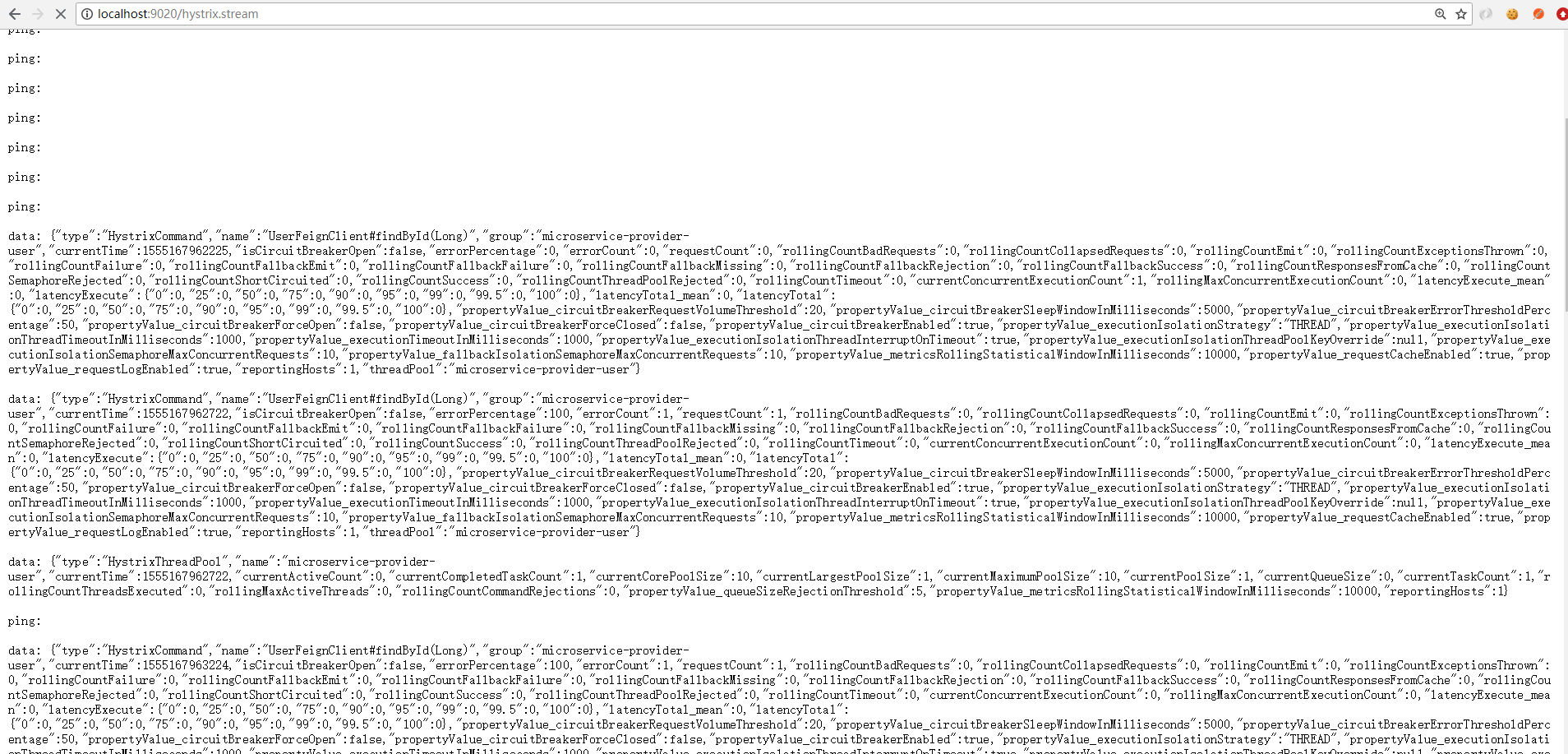
这种监控数据没法看,对吧?
二、使用Hystrix Dashboard可视化监控数据
dashBoard 是一个独立的项目:
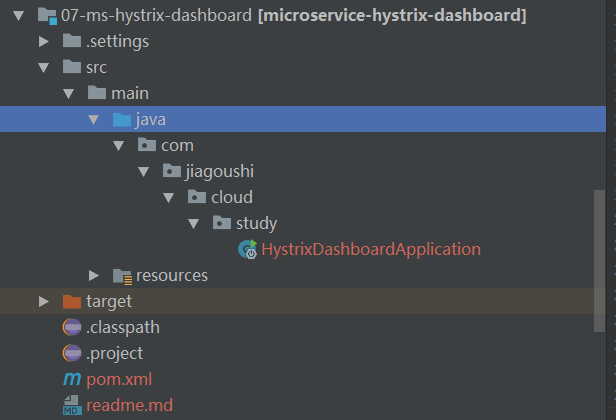
pom.xml:
1 1 <?xml version="1.0" encoding="UTF-8"?>
2 2 <project xmlns="http://maven.apache.org/POM/4.0.0" xmlns:xsi="http://www.w3.org/2001/XMLSchema-instance"
3 3   xsi:schemaLocation="http://maven.apache.org/POM/4.0.0 http://maven.apache.org/xsd/maven-4.0.0.xsd">
4 4   <modelVersion>4.0.0</modelVersion>
5 5   <groupId>com.tuling.cloud</groupId>
6 6   <artifactId>microservice-hystrix-dashboard</artifactId>
7 7   <version>0.0.1-SNAPSHOT</version>
8 8   <packaging>jar</packaging>
9 9   <name>07-ms-hystrix-dashboard</name>
1010
1111   <!-- 引入spring boot的依赖 -->
1212   <parent>
1313     <groupId>org.springframework.boot</groupId>
1414     <artifactId>spring-boot-starter-parent</artifactId>
1515     <version>1.5.9.RELEASE</version>
1616   </parent>
1717
1818   <properties>
1919     <project.build.sourceEncoding>UTF-8</project.build.sourceEncoding>
2020     <java.version>1.8</java.version>
2121   </properties>
2222
2323   <dependencies>    <!-- dashBoard包-->
2424     <dependency>
2525       <groupId>org.springframework.cloud</groupId>
2626       <artifactId>spring-cloud-starter-netflix-hystrix-dashboard</artifactId>
2727     </dependency>
2828   </dependencies>
2929
3030   <!-- 引入spring cloud的依赖 -->
3131   <dependencyManagement>
3232     <dependencies>
3333       <dependency>
3434         <groupId>org.springframework.cloud</groupId>
3535         <artifactId>spring-cloud-dependencies</artifactId>
3636         <version>Edgware.RELEASE</version>
3737         <type>pom</type>
3838         <scope>import</scope>
3939       </dependency>
4040     </dependencies>
4141   </dependencyManagement>
4242
4343   <!-- 添加spring-boot的maven插件 -->
4444   <build>
4545     <plugins>
4646       <plugin>
4747         <groupId>org.springframework.boot</groupId>
4848         <artifactId>spring-boot-maven-plugin</artifactId>
4949       </plugin>
5050     </plugins>
5151   </build>
5252 </project>
启动类:
1 1 package com.jiagoushi.cloud.study;
2 2
3 3 import org.springframework.boot.SpringApplication;
4 4 import org.springframework.boot.autoconfigure.SpringBootApplication;
5 5 import org.springframework.cloud.netflix.hystrix.dashboard.EnableHystrixDashboard;
6 6
7 7 @SpringBootApplication
8 8 @EnableHystrixDashboard //DashBoard 支持
9 9 public class HystrixDashboardApplication {
1010
1111   public static void main(String[] args) {
1212     SpringApplication.run(HystrixDashboardApplication.class, args);
1313   }
1414 }
applciation.yml:
1server:
2  port: 8030
启动之后访问:http://localhost:8030/hystrix
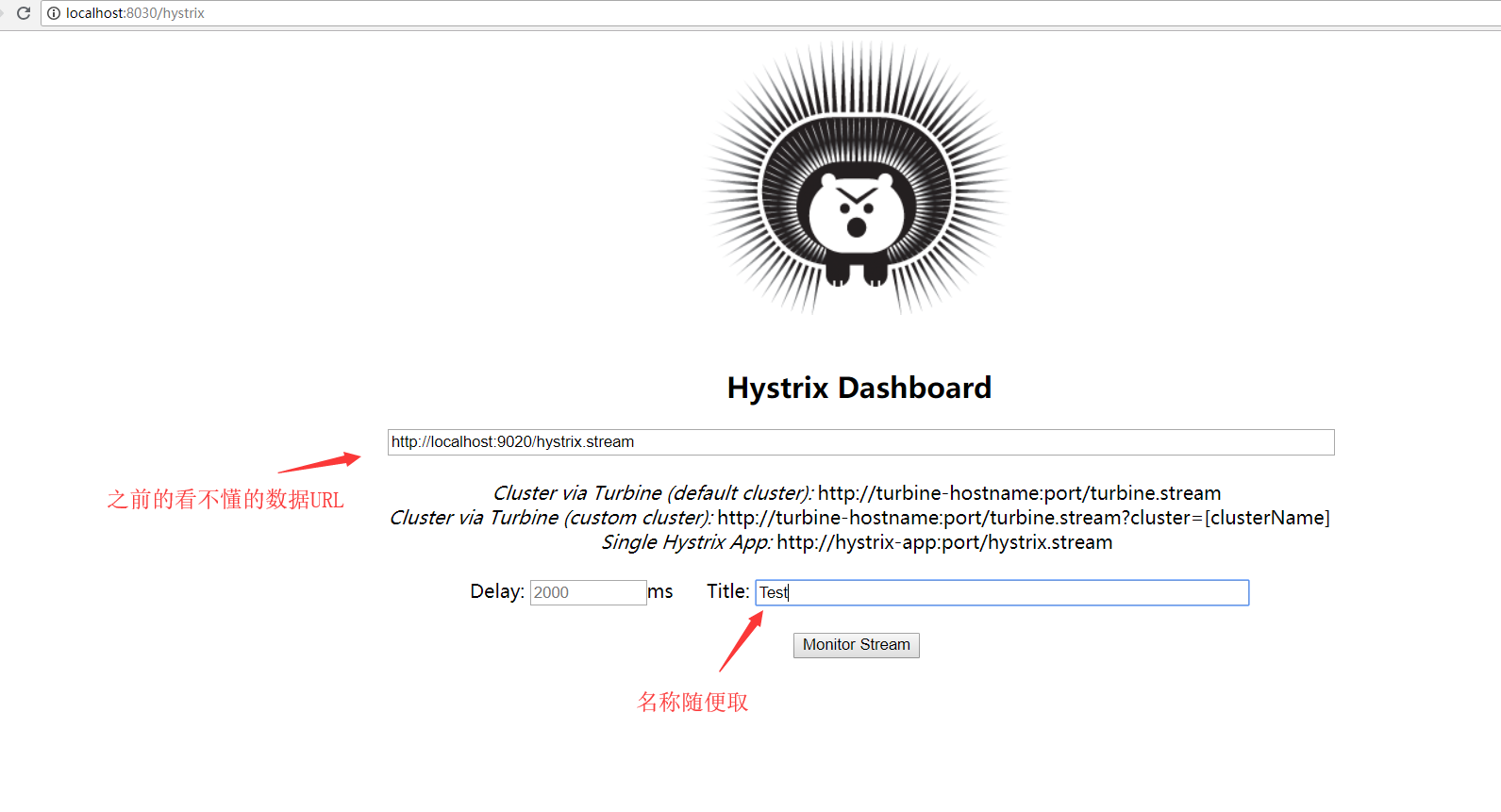
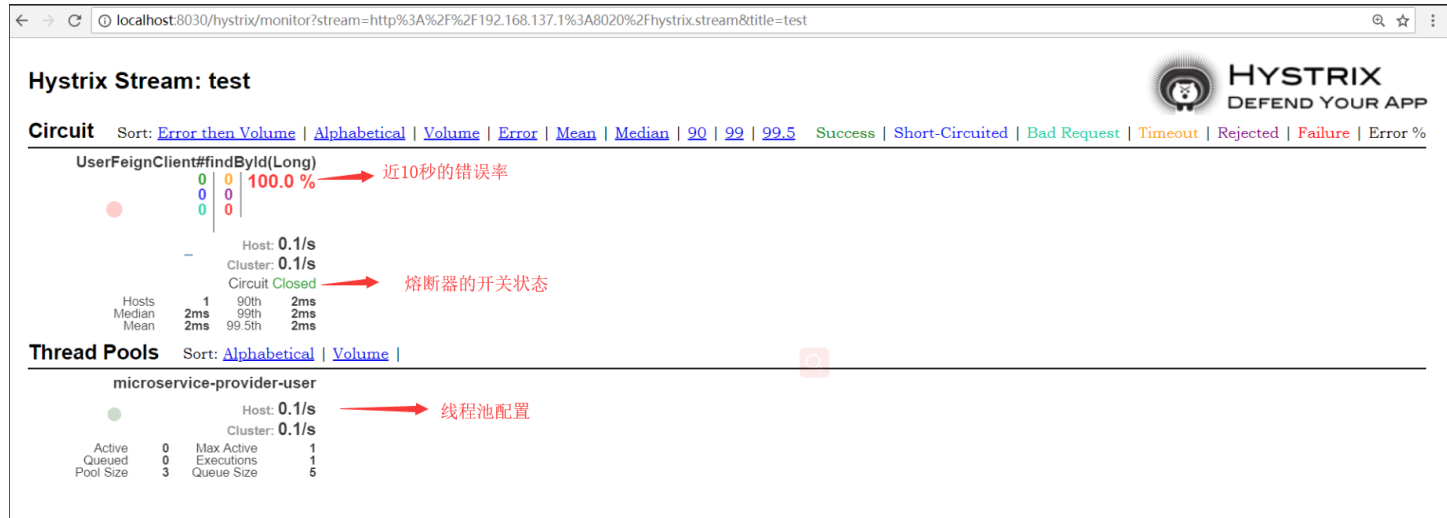
在监控的界面有两个重要的图形信息:一个实心圆和一条曲线。
实心圆:1、通过颜色的变化代表了实例的健康程度,健康程度从绿色、黄色、橙色、
红色递减。
2、通过大小表示请求流量发生变化,流量越大该实心圆就越大。所以可以在大
量的实例中快速发现故障实例和高压实例。
曲线:用来记录2分钟内流浪的相对变化,可以通过它来观察流量的上升和下降趋势
在复杂的分布式系统中,相同服务的节点经常需要部署上百甚至上千个,很多时候,运维人员希望能够把相同服务的节点状态以一个整体集群的形式展现出来,这样可以更好的把握整个系统的状态。 为此,Netflix提供了一个开源项目(Turbine)
来提供把多个hystrix.stream的内容聚合为一个数据源供Dashboard展示。
三、使用Turbine聚合监控数据
Turbine是一个聚合 Hystrix监控数据的工具,它可将所有相关/hystrix.stream端点的数据聚合到一个组合的/turbine.stream中,从而让集群的监控更加方便
Turbine 独立的项目:

pom.xml:
1 1 <?xml version="1.0" encoding="UTF-8"?>
2 2 <project xmlns="http://maven.apache.org/POM/4.0.0" xmlns:xsi="http://www.w3.org/2001/XMLSchema-instance"
3 3   xsi:schemaLocation="http://maven.apache.org/POM/4.0.0 http://maven.apache.org/xsd/maven-4.0.0.xsd">
4 4   <modelVersion>4.0.0</modelVersion>
5 5   <groupId>com.tuling.cloud</groupId>
6 6   <artifactId>microservice-hystrix-turbine</artifactId>
7 7   <version>0.0.1-SNAPSHOT</version>
8 8   <packaging>jar</packaging>
9 9   <name>07-ms-hystrix-turbine</name>
1010
1111   <!-- 引入spring boot的依赖 -->
1212   <parent>
1313     <groupId>org.springframework.boot</groupId>
1414     <artifactId>spring-boot-starter-parent</artifactId>
1515     <version>1.5.9.RELEASE</version>
1616   </parent>
1717
1818   <properties>
1919     <project.build.sourceEncoding>UTF-8</project.build.sourceEncoding>
2020     <java.version>1.8</java.version>
2121   </properties>
2222
2323   <dependencies>
2424     <!-- turbine 依赖-->
2525     <dependency>
2626       <groupId>org.springframework.cloud</groupId>
2727       <artifactId>spring-cloud-starter-netflix-turbine</artifactId>
2828     </dependency>
2929   </dependencies>
3030
3131   <!-- 引入spring cloud的依赖 -->
3232   <dependencyManagement>
3333     <dependencies>
3434       <dependency>
3535         <groupId>org.springframework.cloud</groupId>
3636         <artifactId>spring-cloud-dependencies</artifactId>
3737         <version>Edgware.RELEASE</version>
3838         <type>pom</type>
3939         <scope>import</scope>
4040       </dependency>
4141     </dependencies>
4242   </dependencyManagement>
4343
4444   <!-- 添加spring-boot的maven插件 -->
4545   <build>
4646     <plugins>
4747       <plugin>
4848         <groupId>org.springframework.boot</groupId>
4949         <artifactId>spring-boot-maven-plugin</artifactId>
5050       </plugin>
5151     </plugins>
5252   </build>
5353 </project>
application.yml:
1 1 server:
2 2   port: 8031
3 3 spring:
4 4   application:
5 5     name: microservice-hystrix-turbine
6 6 eureka:
7 7   client:
8 8     service-url:
9 9       defaultZone: http://localhost:8761/eureka/
1010   instance:
1111     prefer-ip-address: true
1212
1313 #turbine 配置
1414 turbine:
1515   appConfig: microservice-consumer-order,microservice-consumer-order-feign-hystrix-fallback-stream  #微服务名称
1616   clusterNameExpression: "'default'"
1717
1818
1919
Turbine 为什么要链接注册中心?
Turbine会在Eureka Server中找到 microservice-consumer-order和 microservice-consumer-order-feign-hystrix-fallback-stream这两个微服务,并聚合两个微服务的监控数据
TurbineApplication 启动类:
1package com.jiagoushi.cloud.study;
2
3import org.springframework.boot.SpringApplication;
4import org.springframework.boot.autoconfigure.SpringBootApplication;
5import org.springframework.cloud.netflix.turbine.EnableTurbine;
6
7@SpringBootApplication
8@EnableTurbine  //开启turbine
9public class TurbineApplication {
10  public static void main(String[] args) {
11    SpringApplication.run(TurbineApplication.class, args);
12  }
13}
启动Tuibine:
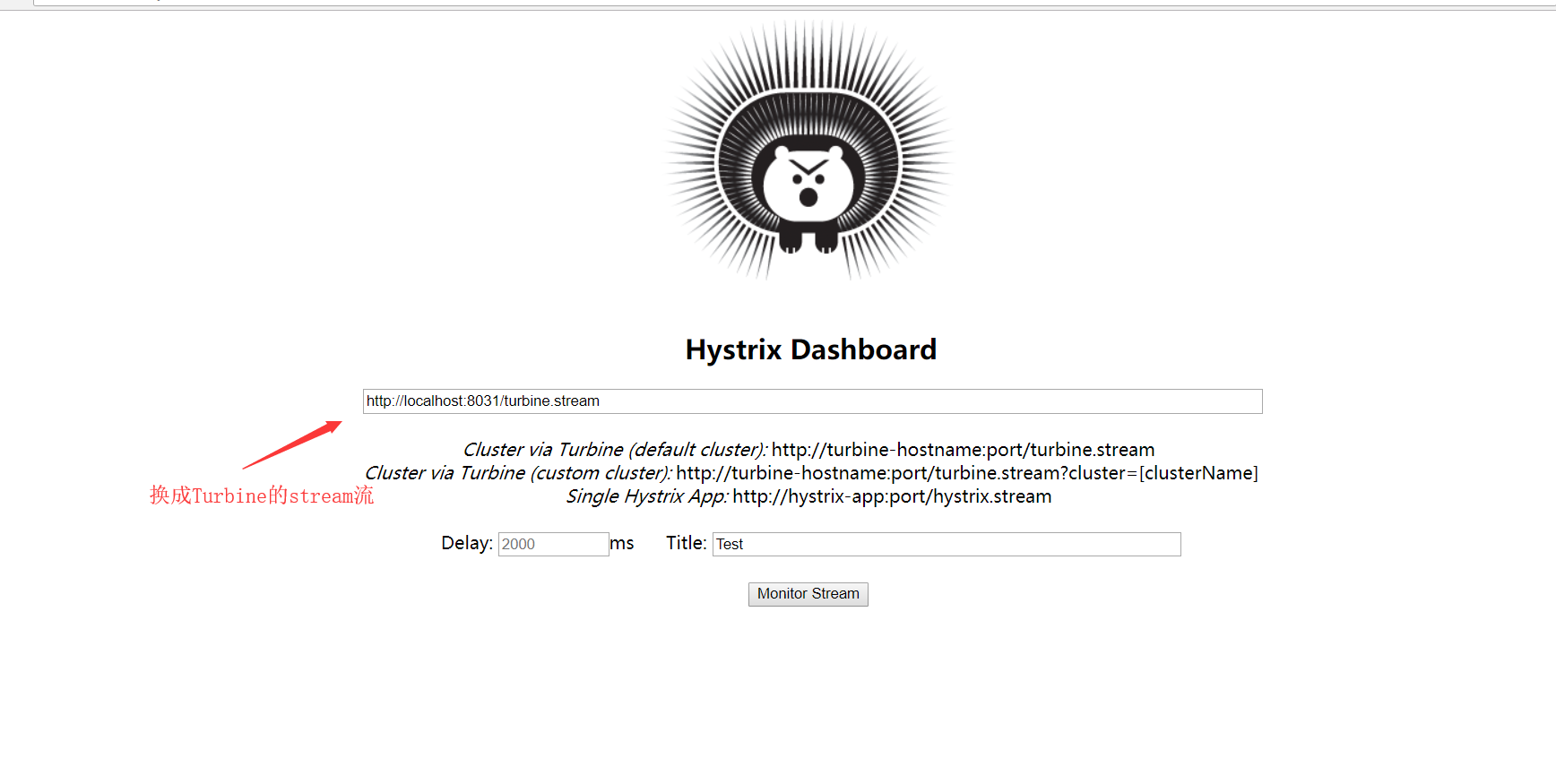
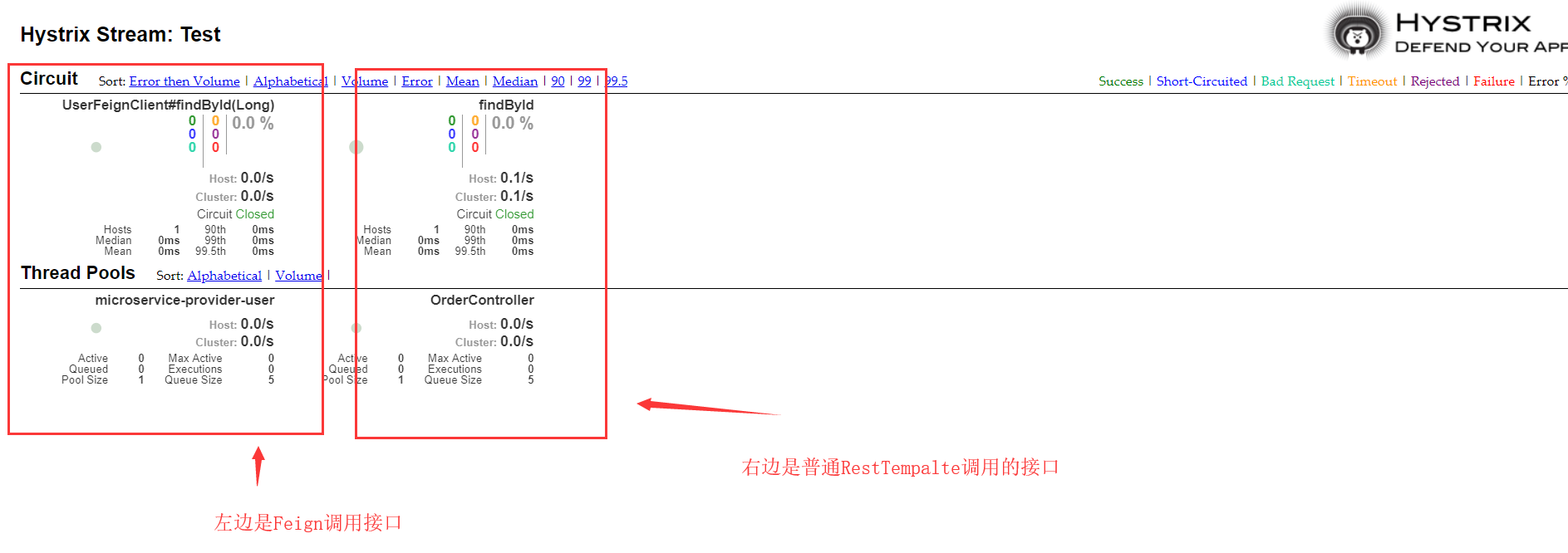
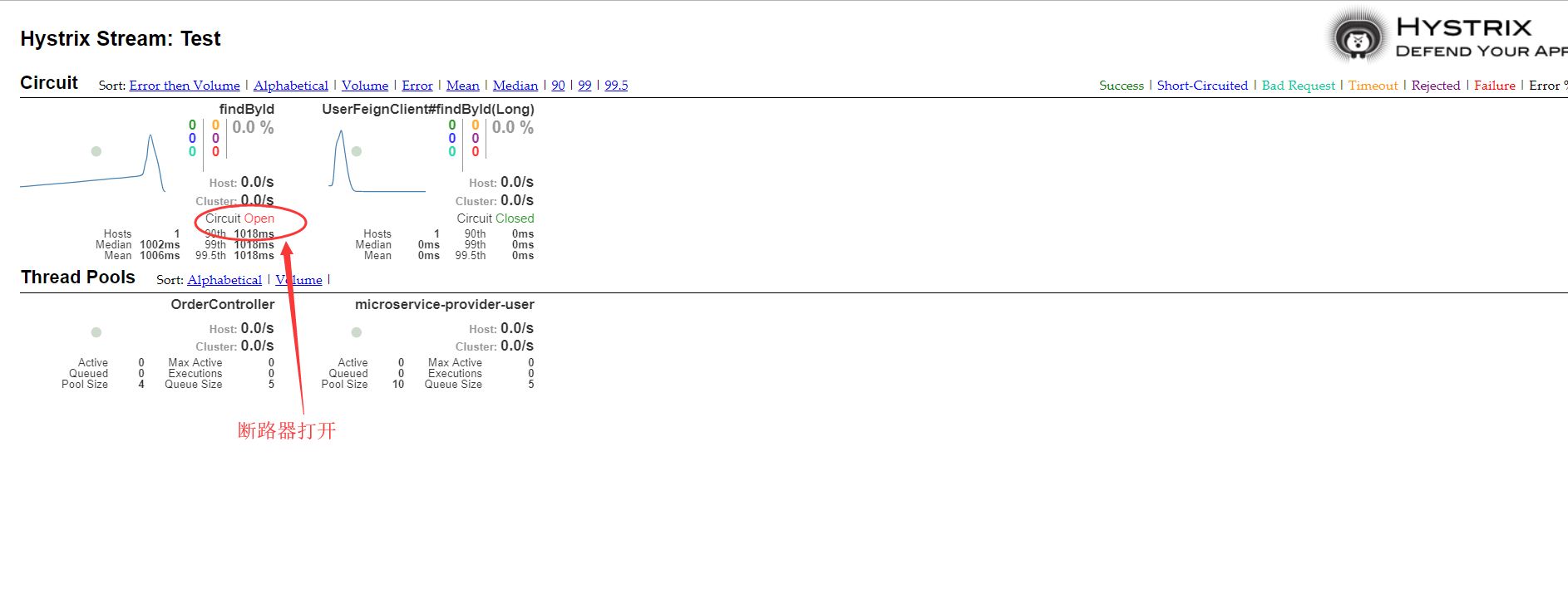
如果我们把user服务关闭了,那么监控就是这样的:
欢迎来群592495675一起学习