
针对swiper.js的全屏动画切换,我们已经简单分析和介绍过一次:
http://my.oschina.net/u/2352644/blog/487902 这个里面非常简单的分析了如何加入我们的动画效果,swiper现在已经出现了3.0版本,我们这里就是使用swiper3.0去开发我们的更贴近真实的项目。
下载swiper3.0 http://www.swiper.com.cn/download/index.html 推荐下载演示包,这样我们可以充分了解swiper都可以实现什么!
一,原理简单分析
1.加入动画
上一个博客只是分析了在active类名下加入我们的动画样式就可完成我们的效果呈现,这里我们二次的分析其中的更多知识,了解别人的原理我们在构建类似效果就可以自己动手了。
首先打开demo文件下,预览这个html页面,和复制此html页面:
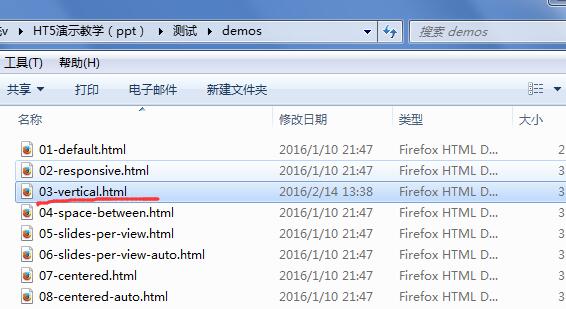
然后打开dist文件夹,把这个html重新命名自己喜欢的名称,我的是demo2

demo2.html就是我们的实战页面,我们打开页面,把css和js的引入路径从全局改为dist下的css和js上:
1<!DOCTYPE html>
2<html>
3<head>
4    <meta charset="utf-8">
5    <title>demo2</title>
6    <meta name="viewport" content="width=device-width, initial-scale=1, minimum-scale=1, maximum-scale=1">
7    <!-- Link Swiper's CSS -->
8    <link rel="stylesheet" href="css/swiper.min.css">
9    <!-- Demo styles -->
10    <style>
11    html, body {
12        position: relative;
13        height: 100%;
14    }
15    body {
16        background: #eee;
17        font-family: Helvetica Neue, Helvetica, Arial, sans-serif;
18        font-size: 14px;
19        color:#000;
20        margin: 0;
21        padding: 0;
22    }
23    .swiper-container {
24        width: 100%;
25        height: 100%;
26    }
27    .swiper-slide {
28        text-align: center;
29        font-size: 18px;
30        background: #fff;
31        /* Center slide text vertically */
32        display: -webkit-box;
33        display: -ms-flexbox;
34        display: -webkit-flex;
35        display: flex;
36        -webkit-box-pack: center;
37        -ms-flex-pack: center;
38        -webkit-justify-content: center;
39        justify-content: center;
40        -webkit-box-align: center;
41        -ms-flex-align: center;
42        -webkit-align-items: center;
43        align-items: center;
44    }
45    </style>
46</head>
47<body>
48    <!-- Swiper -->
49    <div>
50        <div id="aa">
51            <div>Slide 1</div>
52            <div>Slide 2</div>
53            <div>Slide 3</div>
54            <div>Slide 4</div>
55            <div>Slide 5</div>
56            <div>Slide 6</div>
57            <div>Slide 7</div>
58            <div>Slide 8</div>
59            <div>Slide 9</div>
60            <div>Slide 10</div>
61        </div>
62        <!-- Add Pagination -->
63        <div></div>
64    </div>
65    <!-- Swiper JS -->
66    <script src="js/swiper.min.js"></script>
67    <!-- Initialize Swiper -->
68    <script>
69    var swiper = new Swiper('.swiper-container', {
70        pagination: '.swiper-pagination',
71        paginationClickable: true,
72        direction: 'vertical'
73    });
74
75
76    </script>
77</body>
78</html>
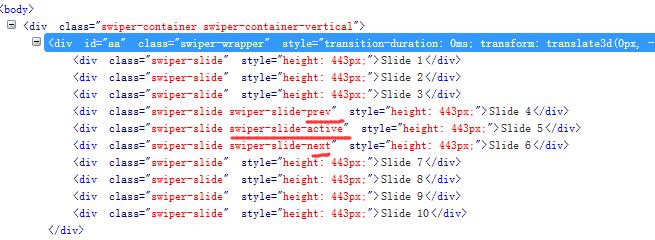
我们预览测试,pc就可以查看,保证没有任何问题,我们firebug查看是不是当前所在位置有active的类名:
2.显示切换
同上次分析结果吻合,3.0同样是这个加入动画原理,我们进一步分析每次滑动是如何显示当前div(这一屏内容)的:
我们利用firebug进一步分析:

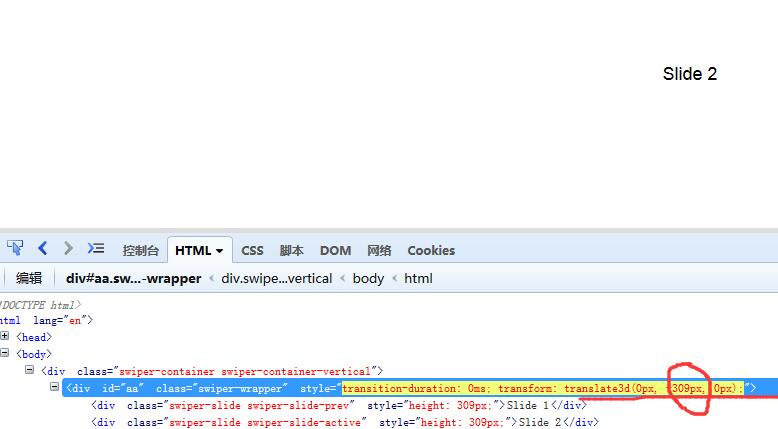
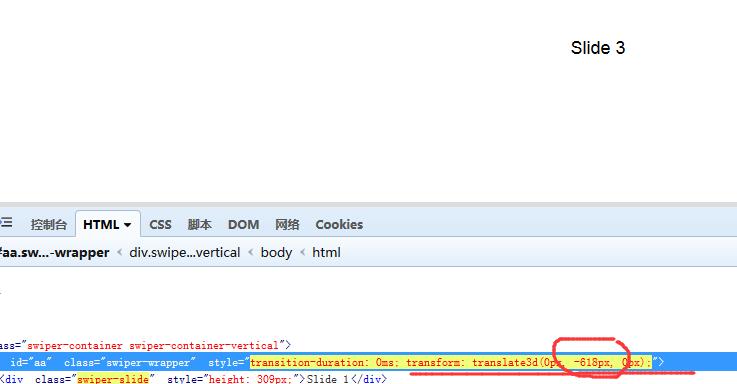
分别切换到1 2 3屏我们发现在父容器.swiper-wrapper 上改变的是transform: translate3d(0px, -618px, 0px);的属性值,
变化3d效果中移动处理y轴在发上变化,从0到-309到-618,我们试想一下这个原理方式:
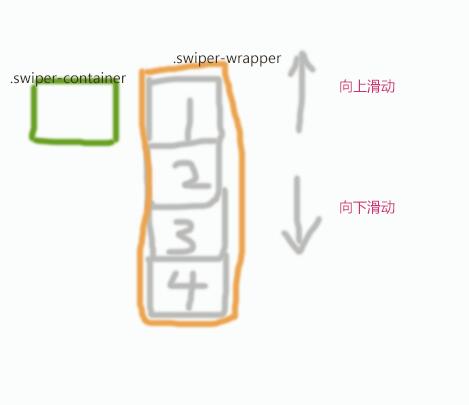
上面是初始状态,默认变化3d的位移y轴值是0。
当我们向下切换时,y轴值就会变成**-1*一屏高度**,这样就利用变化移动显示了第二屏:

其实做过tab切换的就知道这个切换原理,不过以前是利用定位处理去改变left或者top的值实现切换,这里使用的是css3变换位移处理,我们把最外层父容器定好宽高和设置超出隐藏,那么就可以去切换我们的显示内容了,我们firebug这个.swiper-container可以查看是不是有超出隐藏。
3.方向判断
我们预览页面,从按下到抬起,会识别出我们是向上或者向下,然后去切换我们的显示内容,
我们事件触发的过程就是
1.按下
2.移动/没有移动
3.抬起
我们针对这三个事件可以分别获取event的pagex和pagey,我们根据抬起的x和y与按下的x与y去比较就可分析出操作方向:

我们针对抬起和按下的坐标,构造三角形可以去分析出移动的方位:
我们算数x1 x2的差值取整和y1 y2差值取整,如果x的差值/y差值大于1说明方向不是左就是右,当然跟具体的分析我们可以去具体研究。
4.弹性下拉分析
我们在第一屏,向下拖拽:
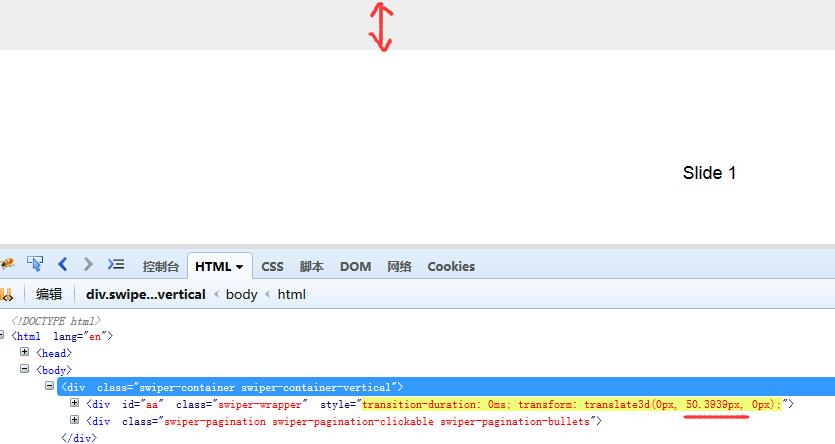
这个效果我们在app里面非常常见,在app就会刷新页面,这里只是单纯的弹动!
这个实现和我们的切换类似,也是改变3d变化位移处理y值,不过这个y值不是在根据屏幕高度就处理,而是带有极限和时时改变的。
1.当前是第一屏(办法很多,比如一个全局变量,根据y值改变而变化)
2.记住mousedown事件event的pagey
3.在mousemove中不断获取event的pagey和down的pagey做差值,然后复制到3d变换位移出的y上
4.设置一个极限值比如100,差值和100比较如果大于100了3d位移y一直赋值为100。
5.全屏css样式
这个说的话太绕了,我们一张图表示:
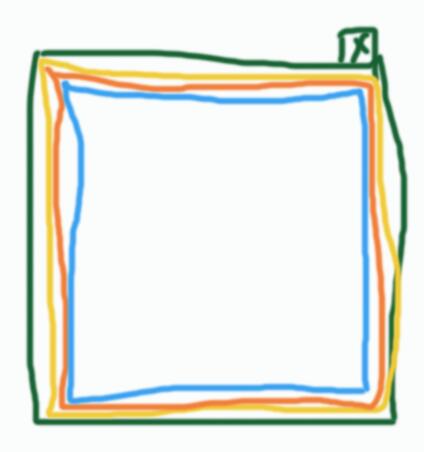
绿色代表浏览器窗口,也就是window
黄色就是html标签,我们宽度设置为100%就等于窗口宽度,高度设置为100%就是窗口高度
橘黄色是body标签,这个同html的设置,都设置为100%,宽高等于了窗口宽高
蓝色就是我们作于切换容器的div,在宽高100%等于窗口基础上,设置超出隐藏,首先保证了滚动条的不出现,然后里面的元素在这个div预览时,这个div就起到了窗户的作用,我们改变窗户里面内容位置就可以看到不同的内容了。
使用百分比设置宽高是全局切换的方法。
6.pc和移动端的事件
我们上面一直说到,切换的触发是在mousedown move up组合事件中产生的,在手机登移动设备上,dom提供了移动设备的一套处理,
touchstat对应mousedown
touchmove对应mousemove
touchend对应mouseup
我们针对苹果和安卓系统这种兼容处理是没有问题的,不过在wp8上,也就是微软手机是不被支持的,要用另一套事件做兼容处理,我们查看swiper.js源码,看这个位置:

pointer和mspointer是对ie浏览器的支持,能力监测来实现不同移动设备支持。
二,搭建全屏切换动画
1.简单使用
为什么要简单分析原理,第一就是学习这种方法,用来我们自己开发;第二就是更好的使用这个框架,第三就是基于swiper更好的扩展开发。
我们修改demo2.html,加入我们一些简单动画配置,先动起来:
1<!DOCTYPE html>
2<html>
3<head>
4    <meta charset="utf-8">
5    <title>demo2</title>
6    <meta name="viewport" content="width=device-width, initial-scale=1, minimum-scale=1, maximum-scale=1">
7    <!-- Link Swiper's CSS -->
8    <link rel="stylesheet" href="css/swiper.min.css">
9    <!-- Demo styles -->
10    <style>
11    html, body {
12        position: relative;
13        height: 100%;
14    }
15    body {
16        background: #eee;
17        font-family: Helvetica Neue, Helvetica, Arial, sans-serif;
18        font-size: 14px;
19        color:#000;
20        margin: 0;
21        padding: 0;
22    }
23    .swiper-container {
24        width: 100%;
25        height: 100%;
26    }
27    .swiper-slide {
28       position:relative;
29    }
30 /*real css*/
31 .swiper-slide:nth-child(1) {
32       background:#FCC;
33    }
34 .swiper-slide:nth-child(2) {
35       background:#6CC;
36    }
37 .swiper-slide:nth-child(3) {
38       background:#0CF;
39    }
40 .swiper-slide:nth-child(4) {
41       background:#996;
42    }
43 .swiper-slide:nth-child(5) {
44       background:#CCF;
45    }
46 .anima1{ position:absolute; width:300px; height:300px; text-align:center; line-height:300px; font-size:30px; color:#0CF; border-radius:150px; top:50%; left:50%; margin-top:-150px; margin-left:-150px; background:#FFF;}
47 .anima2{position:absolute; width:300px; height:300px; text-align:center; line-height:300px; font-size:30px; color:#0CF; border-radius:150px; top:50%; left:50%; margin-top:-150px; margin-left:-150px; background:#FFF;}
48 .anima3{position:absolute; width:300px; height:300px; text-align:center; line-height:300px; font-size:30px; color:#0CF; border-radius:150px; top:50%; left:50%; margin-top:-150px; margin-left:-150px; background:#FFF;}
49 .anima4{position:absolute; width:300px; height:300px; text-align:center; line-height:300px; font-size:30px; color:#0CF; border-radius:150px; top:50%; left:50%; margin-top:-150px; margin-left:-150px; background:#FFF;}
50 .anima5{position:absolute; width:300px; height:300px; text-align:center; line-height:300px; font-size:30px; color:#0CF; border-radius:150px; top:50%; left:50%; margin-top:-150px; margin-left:-150px; background:#FFF;}
51 .swiper-slide-active .anima1{animation:animations1 2s linear 0s infinite forwards;transform-origin:center center;}
52 .swiper-slide-active .anima2{animation:animations2 2s ease-out 0s infinite backwards;transform-origin:center center;}
53 .swiper-slide-active .anima3{animation:animations3 2s ease-out 0.5s 1 forwards;transform-origin:center center;}
54 .swiper-slide-active .anima4{animation:animations4 2s ease-out 0s 1 forwards;transform-origin:center center;transform-style: preserve-3d;}
55 .swiper-slide-active .anima5{animation:animations5 2s linear 0s infinite forwards;transform-origin:center center;}
56 @keyframes animations1{
57  0%{transform:scale(1);}
58  50%{transform:scale(0.8);}
59  100%{transform:scale(1);}
60 }
61 @keyframes animations2{
62  0%{transform:skew(-5deg);}
63  50%{transform:skew(-30deg);}
64  100%{transform:skew(-5deg);}
65 }
66 @keyframes animations3{
67  0%{transform:translate(0px);opacity:0.8;}
68  50%{transform:translate(100px);opacity:1;}
69  100%{transform:translate(0px);opacity:0.8;}
70 }
71 @keyframes animations4{
72  0%{transform:rotatey(0deg);}
73  100%{transform:rotatey(360deg);}
74 }
75 @keyframes animations5{
76  0%{transform:rotate(0deg);}
77  100%{transform:rotate(360deg);}
78 }
79    </style>
80</head>
81<body>
82    <!-- Swiper -->
83    <div>
84        <div id="aa">
85            <div>
86             <div>动画1</div>
87            </div>
88            <div>
89             <div>动画2</div>
90            </div>
91            <div>
92             <div>动画3</div>
93            </div>
94            <div>
95             <div>动画4</div>
96            </div>
97            <div>
98             <div>动画5</div>
99            </div>
100        </div>
101        <!-- Add Pagination -->
102        <div></div>
103    </div>
104    <!-- Swiper JS -->
105    <script src="js/swiper.min.js"></script>
106    <!-- Initialize Swiper -->
107    <script>
108    var swiper = new Swiper('.swiper-container', {
109        pagination: '.swiper-pagination',
110        paginationClickable: true,
111        direction: 'vertical'
112    });
113
114
115    </script>
116</body>
117</html>
我们只留下5屏, 尽可能的使用css3的变化效果来演示处理。
2.实践应用
动画好看与否,与设计稿直接挂钩。
我在pc上找到了一个切换全屏的网站 http://mp.toutiao.com/login/ 这个网站效果相对比较简单,我们可以模拟实现。
我针对第一屏写了盘牌效果的模拟:
1<!DOCTYPE html>
2<html>
3<head>
4    <meta charset="utf-8">
5    <title>demo2</title>
6    <meta name="viewport" content="width=device-width, initial-scale=1, minimum-scale=1, maximum-scale=1">
7    <!-- Link Swiper's CSS -->
8    <link rel="stylesheet" href="css/swiper.min.css">
9    <!-- Demo styles -->
10    <style>
11    html, body {
12        position: relative;
13        height: 100%;
14    }
15    body {
16        background: #eee;
17        font-family: Helvetica Neue, Helvetica, Arial, sans-serif;
18        font-size: 14px;
19        color:#000;
20        margin: 0;
21        padding: 0;
22    }
23    .swiper-container {
24        width: 100%;
25        height: 100%;
26    }
27    .swiper-slide {
28       position:relative;
29    }
30 /*real css*/
31 .swiper-slide:nth-child(1) {
32       background:#fff;
33    }
34 .swiper-slide:nth-child(2) {
35       background:#6CC;
36    }
37 .swiper-slide:nth-child(3) {
38       background:#0CF;
39    }
40 .swiper-slide:nth-child(4) {
41       background:#996;
42    }
43 .swiper-slide:nth-child(5) {
44       background:#CCF;
45    }
46 .pai{ position:absolute; width:200px; height:300px; text-align:center; line-height:300px; font-size:100px; color:#0CF; border-radius:30px; background:#FFF; top:50%; margin-top:-100px; border:2px solid #0CF;}
47 .pai1{left:140px; z-index:10;}
48 .pai2{left:110px;z-index:9;}
49 .pai3{left:80px;z-index:8;}
50 .swiper-slide-active .pai1{animation:pai1 3s linear 0s 1 forwards;transform-origin:center center;transform-style: preserve-3d;}
51 @keyframes pai1{
52  0%{left:140px;transform:rotatex(0deg);color:#0CF;background:#FFF;}
53  40%{left:1000px;transform:rotatex(0deg);color:#0CF;background:#FFF;}
54  60%{left:1000px;transform:rotatex(0deg);color:#0CF;background:#FFF;}
55  80%{color:transparent;}
56  100%{left:1000px;transform:rotatex(180deg);color:transparent;background:#0CF;}
57 }
58 .swiper-slide-active .pai2{animation:pai2 3s linear 0.5s 1 forwards;transform-origin:center center;transform-style: preserve-3d;}
59 @keyframes pai2{
60  0%{left:110pxtransform:rotatex(0deg);color:#0CF;background:#FFF;}
61  40%{left:750px;transform:rotatex(0deg);color:#0CF;background:#FFF;}
62  60%{left:750px;transform:rotatex(0deg);color:#0CF;background:#FFF;}
63  80%{color:transparent;}
64  100%{left:750px;transform:rotatex(180deg);color:transparent;background:#0CF;}
65 }
66 .swiper-slide-active .pai3{animation:pai3 3s linear 1s 1 forwards;transform-origin:center center;transform-style: preserve-3d;}
67 @keyframes pai3{
68  0%{left:80px;transform:rotatex(0deg);color:#0CF;background:#FFF;}
69  40%{left:500px;transform:rotatex(0deg);color:#0CF;background:#FFF;}
70  60%{left:500px;transform:rotatex(0deg);color:#0CF;background:#FFF;}
71  80%{color:transparent;}
72  100%{left:500px;transform:rotatex(180deg);color:transparent;background:#0CF;}
73 }
74
75    </style>
76</head>
77<body>
78    <!-- Swiper -->
79    <div>
80        <div id="aa">
81            <div>
82             <div class="pai pai1">2</div>
83                <div class="pai pai2">3</div>
84                <div class="pai pai3">4</div>
85            </div>
86            <div>
87             <div>动画2</div>
88            </div>
89            <div>
90             <div>动画3</div>
91            </div>
92            <div>
93             <div>动画4</div>
94            </div>
95            <div>
96             <div>动画5</div>
97            </div>
98        </div>
99        <!-- Add Pagination -->
100        <div></div>
101    </div>
102    <!-- Swiper JS -->
103    <script src="js/swiper.min.js"></script>
104    <!-- Initialize Swiper -->
105    <script>
106    var swiper = new Swiper('.swiper-container', {
107        pagination: '.swiper-pagination',
108        paginationClickable: true,
109        direction: 'vertical'
110    });
111
112
113    </script>
114</body>
115</html>
3.全屏切换跳出和跳入的处理
假如我们5屏动画全ok了,用户开始切换预览,当用户切换到最后一屏,在向下切换,就会跳出我们的切换效果,显示出正常的页面部分,这个还是很需要的一中处理接入,
那么既然是跳出切换,我们知道切换都是放在.swiper-container下,我们判断出用户已经在最后一屏切换了,我们把.swiper-container隐藏掉,并且显示出正常部分,我们就可以实现跳出了。
我们加入跳出显示的正常结构,并且在初始情况隐藏掉:
1<!DOCTYPE html>
2<html>
3<head>
4    <meta charset="utf-8">
5    <title>demo2</title>
6    <meta name="viewport" content="width=device-width, initial-scale=1, minimum-scale=1, maximum-scale=1">
7    <!-- Link Swiper's CSS -->
8    <link rel="stylesheet" href="css/swiper.min.css">
9    <!-- Demo styles -->
10    <style>
11    html, body {
12        position: relative;
13        height: 100%;
14    }
15    body {
16        background: #eee;
17        font-family: Helvetica Neue, Helvetica, Arial, sans-serif;
18        font-size: 14px;
19        color:#000;
20        margin: 0;
21        padding: 0;
22    }
23    .swiper-container {
24        width: 100%;
25        height: 100%;
26    }
27    .swiper-slide {
28       position:relative;
29    }
30 /*real css*/
31 .swiper-slide:nth-child(1) {
32       background:#fff;
33    }
34 .swiper-slide:nth-child(2) {
35       background:#fff;
36    }
37 .swiper-slide:nth-child(3) {
38       background:#0CF;
39    }
40 .swiper-slide:nth-child(4) {
41       background:#996;
42    }
43 .swiper-slide:nth-child(5) {
44       background:#CCF;
45    }
46 .pai{ position:absolute; width:200px; height:300px; text-align:center; line-height:300px; font-size:100px; color:#0CF; border-radius:30px; background:#FFF; top:50%; margin-top:-100px; border:2px solid #0CF;}
47 .pai1{left:140px; z-index:10;}
48 .pai2{left:110px;z-index:9;}
49 .pai3{left:80px;z-index:8;}
50 .swiper-slide-active .pai1{animation:pai1 3s linear 0s 1 forwards;transform-origin:center center;transform-style: preserve-3d;}
51 @keyframes pai1{
52  0%{left:140px;transform:rotatex(0deg);color:#0CF;background:#FFF;}
53  40%{left:1000px;transform:rotatex(0deg);color:#0CF;background:#FFF;}
54  60%{left:1000px;transform:rotatex(0deg);color:#0CF;background:#FFF;}
55  80%{color:transparent;}
56  100%{left:1000px;transform:rotatex(180deg);color:transparent;background:#0CF;}
57 }
58 .swiper-slide-active .pai2{animation:pai2 3s linear 0.5s 1 forwards;transform-origin:center center;transform-style: preserve-3d;}
59 @keyframes pai2{
60  0%{left:110pxtransform:rotatex(0deg);color:#0CF;background:#FFF;}
61  40%{left:750px;transform:rotatex(0deg);color:#0CF;background:#FFF;}
62  60%{left:750px;transform:rotatex(0deg);color:#0CF;background:#FFF;}
63  80%{color:transparent;}
64  100%{left:750px;transform:rotatex(180deg);color:transparent;background:#0CF;}
65 }
66 .swiper-slide-active .pai3{animation:pai3 3s linear 1s 1 forwards;transform-origin:center center;transform-style: preserve-3d;}
67 @keyframes pai3{
68  0%{left:80px;transform:rotatex(0deg);color:#0CF;background:#FFF;}
69  40%{left:500px;transform:rotatex(0deg);color:#0CF;background:#FFF;}
70  60%{left:500px;transform:rotatex(0deg);color:#0CF;background:#FFF;}
71  80%{color:transparent;}
72  100%{left:500px;transform:rotatex(180deg);color:transparent;background:#0CF;}
73 }
74
75 .zhuan{position:absolute; width:100px; height:100px; text-align:center; font-size:100px; color:#0CF; border-radius:50px; background:#09F; top:50%; margin-top:-50px; left:100px;}
76 .swiper-slide-active .zhuan1{animation:zhuan1 5s linear 0s infinite forwards;transform-origin:300px center;}
77 @keyframes zhuan1{
78  0%{ transform:rotate(0deg) scale(1);opacity:1;}
79  100%{transform:rotate(360deg) scale(0.5);opacity:0.3;}
80 }
81 .swiper-slide-active .zhuan2{animation:zhuan2 5s linear 0s infinite forwards;transform-origin:300px center;transform:rotate(72deg);}
82 @keyframes zhuan2{
83  0%{transform:rotate(72deg) scale(1);opacity:1;}
84  100%{transform:rotate(432deg) scale(0.5);opacity:0.3;}
85 }
86 .swiper-slide-active .zhuan3{animation:zhuan3 5s linear 0s infinite forwards;transform-origin:300px center;transform:rotate(144deg);}
87 @keyframes zhuan3{
88  0%{transform:rotate(144deg) scale(1);opacity:1;}
89  100%{transform:rotate(504deg) scale(0.5);opacity:0.3;}
90 }
91 .swiper-slide-active .zhuan4{animation:zhuan4 5s linear 0s infinite forwards;transform-origin:300px center;transform:rotate(216deg);}
92 @keyframes zhuan4{
93  0%{transform:rotate(216deg) scale(1);opacity:1;}
94  100%{transform:rotate(576deg) scale(0.5);opacity:0.3;}
95 }
96 .swiper-slide-active .zhuan5{animation:zhuan5 5s linear 0s infinite forwards;transform-origin:300px center;transform:rotate(288deg);}
97 @keyframes zhuan5{
98  0%{transform:rotate(288deg) scale(1);opacity:1;}
99  100%{transform:rotate(648deg) scale(0.5);opacity:0.3;}
100 }
101
102 .normal{ display:none;}
103 .normal .jinru{ height:40px; line-height:40px; text-align:center;}
104    </style>
105</head>
106<body>
107    <!-- Swiper -->
108    <div>
109        <div id="aa">
110            <div>
111             <div class="pai pai1">2</div>
112                <div class="pai pai2">3</div>
113                <div class="pai pai3">4</div>
114            </div>
115            <div>
116             <div class="zhuan zhuan1"></div>
117                <div class="zhuan zhuan2"></div>
118                <div class="zhuan zhuan3"></div>
119                <div class="zhuan zhuan4"></div>
120                <div class="zhuan zhuan5"></div>
121            </div>
122            <div>
123             <div>动画3</div>
124            </div>
125            <div>
126             <div>动画4</div>
127            </div>
128            <div>
129             <div>动画5</div>
130            </div>
131        </div>
132        <!-- Add Pagination -->
133        <div></div>
134    </div>
135 <div>
136
137        <p>我是正常的内容</p>
138
139        <div>点击可进入切换预览</div>
140
141    </div>
142    <!-- Swiper JS -->
143    <script src="js/swiper.min.js"></script>
144    <!-- Initialize Swiper -->
145    <script>
146    var swiper = new Swiper('.swiper-container', {
147        pagination: '.swiper-pagination',
148        paginationClickable: true,
149        direction: 'vertical'
150    });
151
152
153    </script>
154</body>
155</html>
因为正常内容是display:none,不会影响到我们的切换预览,我们要做的就是判断出当前在最后一屏,并且向下又切换了,然后去显示出正常内容:
api地址:http://www.swiper.com.cn/api/index.html
1<!DOCTYPE html>
2<html>
3<head>
4    <meta charset="utf-8">
5    <title>demo2</title>
6    <meta name="viewport" content="width=device-width, initial-scale=1, minimum-scale=1, maximum-scale=1">
7    <!-- Link Swiper's CSS -->
8    <link rel="stylesheet" href="css/swiper.min.css">
9    <!-- Demo styles -->
10    <style>
11    html, body {
12        position: relative;
13        height: 100%;
14    }
15    body {
16        background: #eee;
17        font-family: Helvetica Neue, Helvetica, Arial, sans-serif;
18        font-size: 14px;
19        color:#000;
20        margin: 0;
21        padding: 0;
22    }
23    .swiper-container {
24        width: 100%;
25        height: 100%;
26    }
27    .swiper-slide {
28       position:relative;
29    }
30 /*real css*/
31 .swiper-slide:nth-child(1) {
32       background:#fff;
33    }
34 .swiper-slide:nth-child(2) {
35       background:#fff;
36    }
37 .swiper-slide:nth-child(3) {
38       background:#0CF;
39    }
40 .swiper-slide:nth-child(4) {
41       background:#996;
42    }
43 .swiper-slide:nth-child(5) {
44       background:#CCF;
45    }
46 .pai{ position:absolute; width:200px; height:300px; text-align:center; line-height:300px; font-size:100px; color:#0CF; border-radius:30px; background:#FFF; top:50%; margin-top:-100px; border:2px solid #0CF;}
47 .pai1{left:140px; z-index:10;}
48 .pai2{left:110px;z-index:9;}
49 .pai3{left:80px;z-index:8;}
50 .swiper-slide-active .pai1{animation:pai1 3s linear 0s 1 forwards;transform-origin:center center;transform-style: preserve-3d;}
51 @keyframes pai1{
52  0%{left:140px;transform:rotatex(0deg);color:#0CF;background:#FFF;}
53  40%{left:1000px;transform:rotatex(0deg);color:#0CF;background:#FFF;}
54  60%{left:1000px;transform:rotatex(0deg);color:#0CF;background:#FFF;}
55  80%{color:transparent;}
56  100%{left:1000px;transform:rotatex(180deg);color:transparent;background:#0CF;}
57 }
58 .swiper-slide-active .pai2{animation:pai2 3s linear 0.5s 1 forwards;transform-origin:center center;transform-style: preserve-3d;}
59 @keyframes pai2{
60  0%{left:110pxtransform:rotatex(0deg);color:#0CF;background:#FFF;}
61  40%{left:750px;transform:rotatex(0deg);color:#0CF;background:#FFF;}
62  60%{left:750px;transform:rotatex(0deg);color:#0CF;background:#FFF;}
63  80%{color:transparent;}
64  100%{left:750px;transform:rotatex(180deg);color:transparent;background:#0CF;}
65 }
66 .swiper-slide-active .pai3{animation:pai3 3s linear 1s 1 forwards;transform-origin:center center;transform-style: preserve-3d;}
67 @keyframes pai3{
68  0%{left:80px;transform:rotatex(0deg);color:#0CF;background:#FFF;}
69  40%{left:500px;transform:rotatex(0deg);color:#0CF;background:#FFF;}
70  60%{left:500px;transform:rotatex(0deg);color:#0CF;background:#FFF;}
71  80%{color:transparent;}
72  100%{left:500px;transform:rotatex(180deg);color:transparent;background:#0CF;}
73 }
74
75 .zhuan{position:absolute; width:100px; height:100px; text-align:center; font-size:100px; color:#0CF; border-radius:50px; background:#09F; top:50%; margin-top:-50px; left:100px;}
76 .swiper-slide-active .zhuan1{animation:zhuan1 5s linear 0s infinite forwards;transform-origin:300px center;}
77 @keyframes zhuan1{
78  0%{ transform:rotate(0deg) scale(1);opacity:1;}
79  100%{transform:rotate(360deg) scale(0.5);opacity:0.3;}
80 }
81 .swiper-slide-active .zhuan2{animation:zhuan2 5s linear 0s infinite forwards;transform-origin:300px center;transform:rotate(72deg);}
82 @keyframes zhuan2{
83  0%{transform:rotate(72deg) scale(1);opacity:1;}
84  100%{transform:rotate(432deg) scale(0.5);opacity:0.3;}
85 }
86 .swiper-slide-active .zhuan3{animation:zhuan3 5s linear 0s infinite forwards;transform-origin:300px center;transform:rotate(144deg);}
87 @keyframes zhuan3{
88  0%{transform:rotate(144deg) scale(1);opacity:1;}
89  100%{transform:rotate(504deg) scale(0.5);opacity:0.3;}
90 }
91 .swiper-slide-active .zhuan4{animation:zhuan4 5s linear 0s infinite forwards;transform-origin:300px center;transform:rotate(216deg);}
92 @keyframes zhuan4{
93  0%{transform:rotate(216deg) scale(1);opacity:1;}
94  100%{transform:rotate(576deg) scale(0.5);opacity:0.3;}
95 }
96 .swiper-slide-active .zhuan5{animation:zhuan5 5s linear 0s infinite forwards;transform-origin:300px center;transform:rotate(288deg);}
97 @keyframes zhuan5{
98  0%{transform:rotate(288deg) scale(1);opacity:1;}
99  100%{transform:rotate(648deg) scale(0.5);opacity:0.3;}
100 }
101
102 .normal{ display:none;}
103 .normal .jinru{ height:40px; line-height:40px; text-align:center; background:#09F;}
104    </style>
105</head>
106<body>
107    <!-- Swiper -->
108    <div id="swiper-container">
109        <div>
110            <div>
111             <div class="pai pai1">2</div>
112                <div class="pai pai2">3</div>
113                <div class="pai pai3">4</div>
114            </div>
115            <div>
116             <div class="zhuan zhuan1"></div>
117                <div class="zhuan zhuan2"></div>
118                <div class="zhuan zhuan3"></div>
119                <div class="zhuan zhuan4"></div>
120                <div class="zhuan zhuan5"></div>
121            </div>
122            <div>
123             <div>动画3</div>
124            </div>
125            <div>
126             <div>动画4</div>
127            </div>
128            <div>
129             <div>动画5</div>
130            </div>
131        </div>
132        <!-- Add Pagination -->
133        <div></div>
134    </div>
135 <div id="normal">
136
137        <p>我是正常的内容</p>
138
139        <div id="jinru">点击可进入切换预览</div>
140
141    </div>
142    <!-- Swiper JS -->
143    <script src="js/swiper.min.js"></script>
144    <!-- Initialize Swiper -->
145    <script>
146 var swipercontainer=document.getElementById("swiper-container");
147 var normal=document.getElementById("normal");
148 var jinru=document.getElementById("jinru");
149    var swiper = new Swiper('.swiper-container', {
150        pagination: '.swiper-pagination',
151        paginationClickable: true,
152        direction: 'vertical',
153  onTouchEnd: function(swiper){
154     if(swiper.isEnd){
155     swipercontainer.style.display="none";
156     normal.style.display="block";
157   }else{};
158  }
159    });
160 jinru.onclick=function(){
161  swipercontainer.style.display="block";
162  normal.style.display="none";
163  swiper.slideTo(0, 1000, false);//切换到第一个slide,速度为1秒
164
165 };
166
167
168
169    </script>
170</body>
171</html>
我们利用swiper的事件,属性和方法就实现了与外界div的跳入和跳出。