
系统: Debian9(Stretch)
显卡: GTX 1050 + intel
参照Debian官网: https://wiki.debian.org/Bumblebee/
1sudo dpkg --add-architecture i386
2sudo apt update
3sudo apt install bumblebee-nvidia primus primus-libs:i386
4sudo apt install virtualgl
5sudo adduser $USER bumblebee
bumblebee.conf
1# Configuration file for Bumblebee. Values should **not** be put between quotes
2
3## Server options. Any change made in this section will need a server restart to take effect.
4[bumblebeed]
5# The secondary Xorg server DISPLAY number
6VirtualDisplay=:8
7# Should the unused Xorg server be kept running? Set this to true if waiting
8# for X to be ready is too long and don't need power management at all.
9KeepUnusedXServer=false
10# The name of the Bumbleblee server group name (GID name)
11ServerGroup=bumblebee
12# Card power state at exit. Set to false if the card shoud be ON when Bumblebee server exits.
13TurnCardOffAtExit=true
14# The default behavior of '-f' option on optirun. If set to "true", '-f' will be ignored.
15NoEcoModeOverride=false
16# The Driver used by Bumblebee server. If this value is not set (or empty),
17# auto-detection is performed. The available drivers are nvidia and nouveau
18# (See also the driver-specific sections below)
19Driver=nvidia
20# Directory with a dummy config file to pass as a -configdir to secondary X
21XorgConfDir=/etc/bumblebee/xorg.conf.d
22# Xorg binary to run
23XorgBinary=/usr/lib/xorg/Xorg
24
25## Client options. Will take effect on the next optirun executed.
26[optirun]
27# Acceleration/ rendering bridge, possible values are auto, virtualgl and primus.
28Bridge=auto
29# The method used for VirtualGL to transport frames between X servers.
30# Possible values are proxy, jpeg, rgb, xv and yuv.
31VGLTransport=proxy
32# List of paths which are searched for the primus libGL.so.1 when using
33# the primus bridge
34PrimusLibraryPath=/usr/lib/x86_64-linux-gnu/primus:/usr/lib/i386-linux-gnu/primus:/usr/lib/primus:/usr/lib32/primus
35# Should the program run under optirun even if Bumblebee server or nvidia card is not available?
36AllowFallbackToIGC=false
37
38
39# Driver-specific settings are grouped under [driver-NAME]. The sections are
40# parsed if the Driver setting in [bumblebeed] is set to NAME (or if auto-
41# detection resolves to NAME).
42# PMMethod: method to use for saving power by disabling the nvidia card, valid
43# values are: auto - automatically detect which PM method to use
44#         bbswitch - new in BB 3, recommended if available
45#       switcheroo - vga_switcheroo method, use at your own risk
46#             none - disable PM completely
47# https://github.com/Bumblebee-Project/Bumblebee/wiki/Comparison-of-PM-methods
48
49## Section with nvidia driver specific options, only parsed if Driver=nvidia
50[driver-nvidia]
51# Module name to load, defaults to Driver if empty or unset
52KernelDriver=nvidia-current
53PMMethod=bbswitch
54# colon-separated path to the nvidia libraries
55LibraryPath=/usr/lib/x86_64-linux-gnu/nvidia:/usr/lib/i386-linux-gnu/nvidia:/usr/lib/nvidia
56# comma-separated path of the directory containing nvidia_drv.so and the default Xorg modules path
57XorgModulePath=/usr/lib/nvidia/nvidia,/usr/lib/xorg/modules
58XorgConfFile=/etc/bumblebee/xorg.conf.nvidia
59
60## Section with nouveau driver specific options, only parsed if Driver=nouveau
61[driver-nouveau]
62KernelDriver=nouveau
63PMMethod=auto
64XorgConfFile=/etc/bumblebee/xorg.conf.nouveau
xorg.conf.nvidia
1Section "ServerLayout"
2    Identifier  "Layout0"
3    Option      "AutoAddDevices" "false"
4    Option      "AutoAddGPU" "false"
5EndSection
6
7Section "Device"
8    Identifier  "DiscreteNvidia"
9    Driver      "nvidia"
10    VendorName  "NVIDIA Corporation"
11    BusID "PCI:01:00:0"
12    Option "NoLogo" "true"
13    Option "UseEDID" "false"
14    Option "UseDisplayDevice" "none"
15EndSection
16
17Section "Screen"
18    Identifier "Default Screen"
19    Device "DiscreteNvidia"
20EndSection
配置bbswitch
1# 创建/etc/modprobe.d/bbswitch.conf
2echo "options bbswitch load_state=0 unload_state=1" > /etc/modprobe.d/bbswitch.conf
3# 创建/etc/modules-load.d/bbswitch.conf
4echo "bbswitch load_state=0" > /etc/modules-load.d/bbswitch.conf
5# 创建/etc/init/bbswitch.conf
6# 以下是/etc/init/bbswitch.conf文件内容
7"""
8description "Save power by disabling nvidia on Optimus"
9author      "Lekensteyn <lekensteyn@gmail.com>"
10start on    runlevel [2345]
11stop on     runlevel [016]
12pre-start   exec /sbin/modprobe bbswitch load_state=0 unload_state=1
13pre-stop    exec /sbin/rmmod bbswitch
14"""
15# 更新内核
16update-initramfs -u
可能由于我环境问题, 登陆后, 界面卡死,鼠标键盘无响应,连tty都切不进去
这里我采取了一个笨方法
1# 禁止bumblebee的开机启动
2systemctl disable bumblebeed
3
4# 进入x后, 手动开启
5systemctl start bumblebeed
6
7# 正常
8optirun -vv glxgears
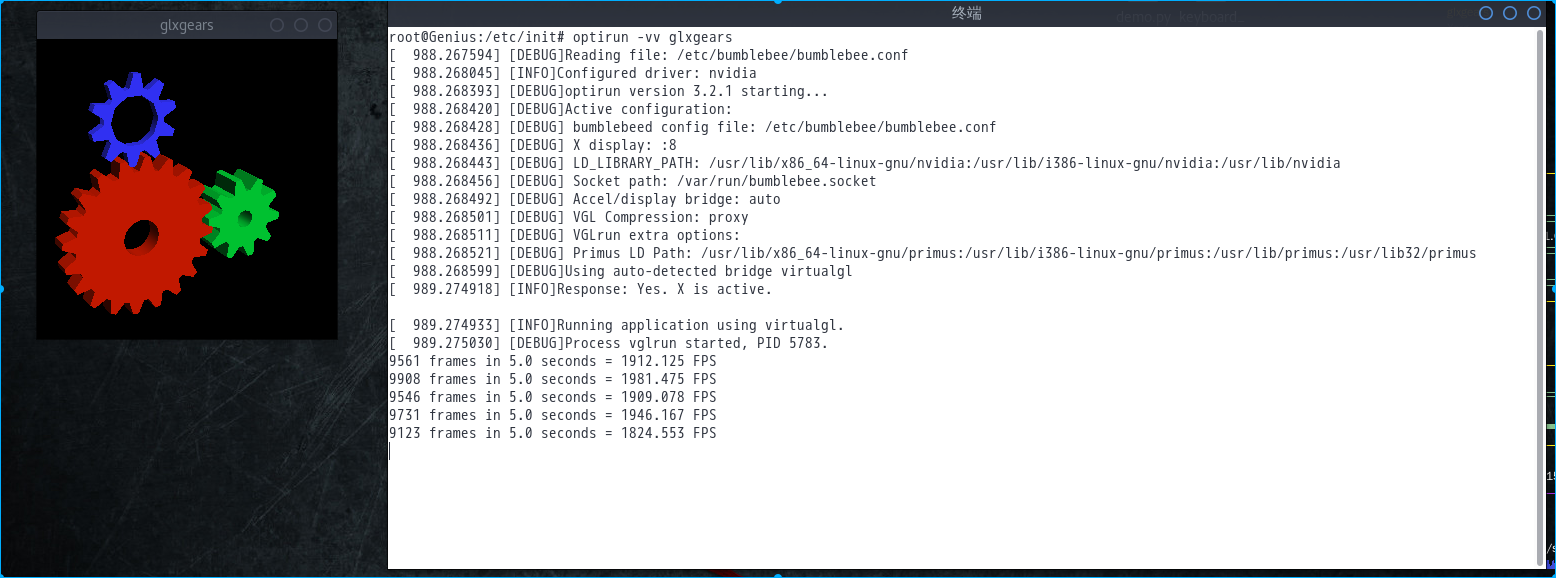
-------------------------------------
2018-04-5 通过bumblebee开发者沟通, 问题终于解决.
https://github.com/Bumblebee-Project/Bumblebee/issues/953
1vim /etc/default/sources.list
2# 加入以下源
3# deb http://mirrors.163.com/debian/ stretch-proposed-updates main non-free contrib
4# deb-src http://mirrors.163.com/debian/ stretch-proposed-updates main non-free contrib
5
6sudo apt update
7# 更新nvidia-driver到384.111-4~deb9u1
8sudo aptitude upgrade nvidia-driver
9
10
11vim /etc/default/grub
12# 修改一下内容
13# GRUB_CMDLINE_LINUX_DEFAULT="pcie_port_pm=off acpi_osi=! acpi_osi=\"Windows 2009\""
14
15sudo update-grub
-------------------------------------
本文可能不兼容所有机型, 如遇问题, 请卸载bumblebee
1apt-get autoremove --purge bumblebee* nvidia*
2
3# 如果重启后一直循环登陆, 请重新安装xserver-xorg-input-all
4apt-get instal xserver-xorg-input-all --reinstall