
作者:sprinkle_liz www.jianshu.com/p/1a28e48edd92
心跳机制
何为心跳
所谓心跳, 即在 TCP 长连接中, 客户端和服务器之间定期发送的一种特殊的数据包, 通知对方自己还在线, 以确保 TCP 连接的有效性.
注:心跳包还有另一个作用,经常被忽略,即:一个连接如果长时间不用,防火墙或者路由器就会断开该连接。
如何实现
核心Handler —— IdleStateHandler
在 Netty 中, 实现心跳机制的关键是 IdleStateHandler, 那么这个 Handler 如何使用呢? 先看下它的构造器:
1public IdleStateHandler(int readerIdleTimeSeconds, int writerIdleTimeSeconds, int allIdleTimeSeconds) {
2    this((long)readerIdleTimeSeconds, (long)writerIdleTimeSeconds, (long)allIdleTimeSeconds, TimeUnit.SECONDS);
3}
这里解释下三个参数的含义:
-
readerIdleTimeSeconds: 读超时. 即当在指定的时间间隔内没有从 Channel 读取到数据时, 会触发一个 READER_IDLE 的 IdleStateEvent 事件.
-
writerIdleTimeSeconds: 写超时. 即当在指定的时间间隔内没有数据写入到 Channel 时, 会触发一个 WRITER_IDLE 的 IdleStateEvent 事件.
-
allIdleTimeSeconds: 读/写超时. 即当在指定的时间间隔内没有读或写操作时, 会触发一个 ALL_IDLE 的 IdleStateEvent 事件.
注:这三个参数默认的时间单位是秒。若需要指定其他时间单位,可以使用另一个构造方法:IdleStateHandler(boolean observeOutput, long readerIdleTime, long writerIdleTime, long allIdleTime, TimeUnit unit)
在看下面的实现之前,建议先了解一下IdleStateHandler的实现原理。
下面直接上代码,需要注意的地方,会在代码中通过注释进行说明。
使用IdleStateHandler实现心跳
下面将使用IdleStateHandler来实现心跳,Client端连接到Server端后,会循环执行一个任务:随机等待几秒,然后ping一下Server端,即发送一个心跳包。当等待的时间超过规定时间,将会发送失败,以为Server端在此之前已经主动断开连接了。代码如下:
Client端
ClientIdleStateTrigger —— 心跳触发器
类ClientIdleStateTrigger也是一个Handler,只是重写了userEventTriggered方法,用于捕获IdleState.WRITER_IDLE事件(未在指定时间内向服务器发送数据),然后向Server端发送一个心跳包。
1/**
2 * <p>
3 *  用于捕获{@link IdleState#WRITER_IDLE}事件(未在指定时间内向服务器发送数据),然后向<code>Server</code>端发送一个心跳包。
4 * </p>
5 */
6public class ClientIdleStateTrigger extends ChannelInboundHandlerAdapter {
7
8    public static final String HEART_BEAT = "heart beat!";
9
10    @Override
11    public void userEventTriggered(ChannelHandlerContext ctx, Object evt) throws Exception {
12        if (evt instanceof IdleStateEvent) {
13            IdleState state = ((IdleStateEvent) evt).state();
14            if (state == IdleState.WRITER_IDLE) {
15                // write heartbeat to server
16                ctx.writeAndFlush(HEART_BEAT);
17            }
18        } else {
19            super.userEventTriggered(ctx, evt);
20        }
21    }
22
23}
Pinger —— 心跳发射器
1/**
2 * <p>客户端连接到服务器端后,会循环执行一个任务:随机等待几秒,然后ping一下Server端,即发送一个心跳包。</p>
3 */
4public class Pinger extends ChannelInboundHandlerAdapter {
5
6    private Random random = new Random();
7    private int baseRandom = 8;
8
9    private Channel channel;
10
11    @Override
12    public void channelActive(ChannelHandlerContext ctx) throws Exception {
13        super.channelActive(ctx);
14        this.channel = ctx.channel();
15
16        ping(ctx.channel());
17    }
18
19    private void ping(Channel channel) {
20        int second = Math.max(1, random.nextInt(baseRandom));
21        System.out.println("next heart beat will send after " + second + "s.");
22        ScheduledFuture<?> future = channel.eventLoop().schedule(new Runnable() {
23            @Override
24            public void run() {
25                if (channel.isActive()) {
26                    System.out.println("sending heart beat to the server...");
27                    channel.writeAndFlush(ClientIdleStateTrigger.HEART_BEAT);
28                } else {
29                    System.err.println("The connection had broken, cancel the task that will send a heart beat.");
30                    channel.closeFuture();
31                    throw new RuntimeException();
32                }
33            }
34        }, second, TimeUnit.SECONDS);
35
36        future.addListener(new GenericFutureListener() {
37            @Override
38            public void operationComplete(Future future) throws Exception {
39                if (future.isSuccess()) {
40                    ping(channel);
41                }
42            }
43        });
44    }
45
46    @Override
47    public void exceptionCaught(ChannelHandlerContext ctx, Throwable cause) throws Exception {
48        // 当Channel已经断开的情况下, 仍然发送数据, 会抛异常, 该方法会被调用.
49        cause.printStackTrace();
50        ctx.close();
51    }
52}
ClientHandlersInitializer —— 客户端处理器集合的初始化类
1public class ClientHandlersInitializer extends ChannelInitializer<SocketChannel> {
2
3    private ReconnectHandler reconnectHandler;
4    private EchoHandler echoHandler;
5
6    public ClientHandlersInitializer(TcpClient tcpClient) {
7        Assert.notNull(tcpClient, "TcpClient can not be null.");
8        this.reconnectHandler = new ReconnectHandler(tcpClient);
9        this.echoHandler = new EchoHandler();
10    }
11
12    @Override
13    protected void initChannel(SocketChannel ch) throws Exception {
14        ChannelPipeline pipeline = ch.pipeline();
15        pipeline.addLast(new LengthFieldBasedFrameDecoder(Integer.MAX_VALUE, 0, 4, 0, 4));
16        pipeline.addLast(new LengthFieldPrepender(4));
17        pipeline.addLast(new StringDecoder(CharsetUtil.UTF_8));
18        pipeline.addLast(new StringEncoder(CharsetUtil.UTF_8));
19        pipeline.addLast(new Pinger());
20    }
21}
注: 上面的Handler集合,除了Pinger,其他都是编解码器和解决粘包,可以忽略。
TcpClient —— TCP连接的客户端
1public class TcpClient {
2
3    private String host;
4    private int port;
5    private Bootstrap bootstrap;
6    /** 将<code>Channel</code>保存起来, 可用于在其他非handler的地方发送数据 */
7    private Channel channel;
8
9    public TcpClient(String host, int port) {
10        this(host, port, new ExponentialBackOffRetry(1000, Integer.MAX_VALUE, 60 * 1000));
11    }
12
13    public TcpClient(String host, int port, RetryPolicy retryPolicy) {
14        this.host = host;
15        this.port = port;
16        init();
17    }
18
19    /**
20     * 向远程TCP服务器请求连接
21     */
22    public void connect() {
23        synchronized (bootstrap) {
24            ChannelFuture future = bootstrap.connect(host, port);
25            this.channel = future.channel();
26        }
27    }
28
29    private void init() {
30        EventLoopGroup group = new NioEventLoopGroup();
31        // bootstrap 可重用, 只需在TcpClient实例化的时候初始化即可.
32        bootstrap = new Bootstrap();
33        bootstrap.group(group)
34                .channel(NioSocketChannel.class)
35                .handler(new ClientHandlersInitializer(TcpClient.this));
36    }
37
38    public static void main(String[] args) {
39        TcpClient tcpClient = new TcpClient("localhost", 2222);
40        tcpClient.connect();
41    }
42
43}
Server端
ServerIdleStateTrigger —— 断连触发器
1/**
2 * <p>在规定时间内未收到客户端的任何数据包, 将主动断开该连接</p>
3 */
4public class ServerIdleStateTrigger extends ChannelInboundHandlerAdapter {
5    @Override
6    public void userEventTriggered(ChannelHandlerContext ctx, Object evt) throws Exception {
7        if (evt instanceof IdleStateEvent) {
8            IdleState state = ((IdleStateEvent) evt).state();
9            if (state == IdleState.READER_IDLE) {
10                // 在规定时间内没有收到客户端的上行数据, 主动断开连接
11                ctx.disconnect();
12            }
13        } else {
14            super.userEventTriggered(ctx, evt);
15        }
16    }
17}
ServerBizHandler —— 服务器端的业务处理器
1/**
2 * <p>收到来自客户端的数据包后, 直接在控制台打印出来.</p>
3 */
4@ChannelHandler.Sharable
5public class ServerBizHandler extends SimpleChannelInboundHandler<String> {
6
7    private final String REC_HEART_BEAT = "I had received the heart beat!";
8
9    @Override
10    protected void channelRead0(ChannelHandlerContext ctx, String data) throws Exception {
11        try {
12            System.out.println("receive data: " + data);
13//            ctx.writeAndFlush(REC_HEART_BEAT);
14        } catch (Exception e) {
15            e.printStackTrace();
16        }
17    }
18
19    @Override
20    public void channelActive(ChannelHandlerContext ctx) throws Exception {
21        System.out.println("Established connection with the remote client.");
22
23        // do something
24
25        ctx.fireChannelActive();
26    }
27
28    @Override
29    public void channelInactive(ChannelHandlerContext ctx) throws Exception {
30        System.out.println("Disconnected with the remote client.");
31
32        // do something
33
34        ctx.fireChannelInactive();
35    }
36
37    @Override
38    public void exceptionCaught(ChannelHandlerContext ctx, Throwable cause) throws Exception {
39        cause.printStackTrace();
40        ctx.close();
41    }
42}
ServerHandlerInitializer —— 服务器端处理器集合的初始化类
1/**
2 * <p>用于初始化服务器端涉及到的所有<code>Handler</code></p>
3 */
4public class ServerHandlerInitializer extends ChannelInitializer<SocketChannel> {
5
6    protected void initChannel(SocketChannel ch) throws Exception {
7        ch.pipeline().addLast("idleStateHandler", new IdleStateHandler(5, 0, 0));
8        ch.pipeline().addLast("idleStateTrigger", new ServerIdleStateTrigger());
9        ch.pipeline().addLast("frameDecoder", new LengthFieldBasedFrameDecoder(Integer.MAX_VALUE, 0, 4, 0, 4));
10        ch.pipeline().addLast("frameEncoder", new LengthFieldPrepender(4));
11        ch.pipeline().addLast("decoder", new StringDecoder());
12        ch.pipeline().addLast("encoder", new StringEncoder());
13        ch.pipeline().addLast("bizHandler", new ServerBizHandler());
14    }
15
16}
注:new IdleStateHandler(5, 0, 0)该handler代表如果在5秒内没有收到来自客户端的任何数据包(包括但不限于心跳包),将会主动断开与该客户端的连接。
TcpServer —— 服务器端
1public class TcpServer {
2    private int port;
3    private ServerHandlerInitializer serverHandlerInitializer;
4
5    public TcpServer(int port) {
6        this.port = port;
7        this.serverHandlerInitializer = new ServerHandlerInitializer();
8    }
9
10    public void start() {
11        EventLoopGroup bossGroup = new NioEventLoopGroup(1);
12        EventLoopGroup workerGroup = new NioEventLoopGroup();
13        try {
14            ServerBootstrap bootstrap = new ServerBootstrap();
15            bootstrap.group(bossGroup, workerGroup)
16                    .channel(NioServerSocketChannel.class)
17                    .childHandler(this.serverHandlerInitializer);
18            // 绑定端口,开始接收进来的连接
19            ChannelFuture future = bootstrap.bind(port).sync();
20
21            System.out.println("Server start listen at " + port);
22            future.channel().closeFuture().sync();
23        } catch (Exception e) {
24            bossGroup.shutdownGracefully();
25            workerGroup.shutdownGracefully();
26            e.printStackTrace();
27        }
28    }
29
30    public static void main(String[] args) throws Exception {
31        int port = 2222;
32        new TcpServer(port).start();
33    }
34}
至此,所有代码已经编写完毕。
测试
首先启动客户端,再启动服务器端。启动完成后,在客户端的控制台上,可以看到打印如下类似日志:
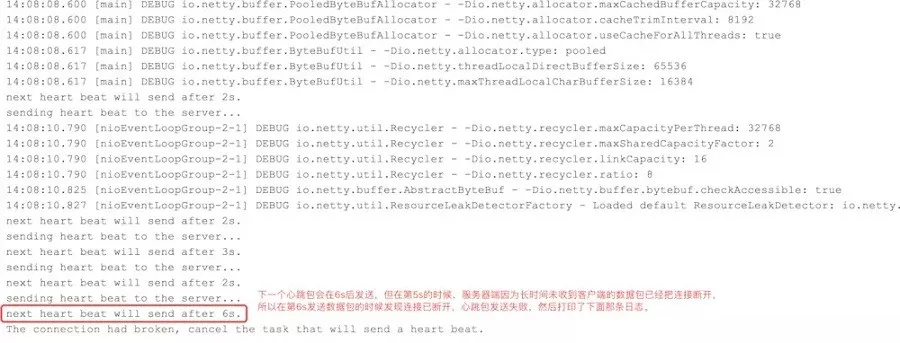
客户端控制台输出的日志
在服务器端可以看到控制台输出了类似如下的日志:
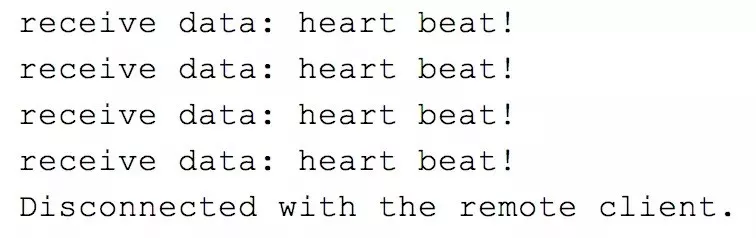
服务器端控制台输出的日志
可以看到,客户端在发送4个心跳包后,第5个包因为等待时间较长,等到真正发送的时候,发现连接已断开了;而服务器端收到客户端的4个心跳数据包后,迟迟等不到下一个数据包,所以果断断开该连接。
异常情况
在测试过程中,有可能会出现如下情况:
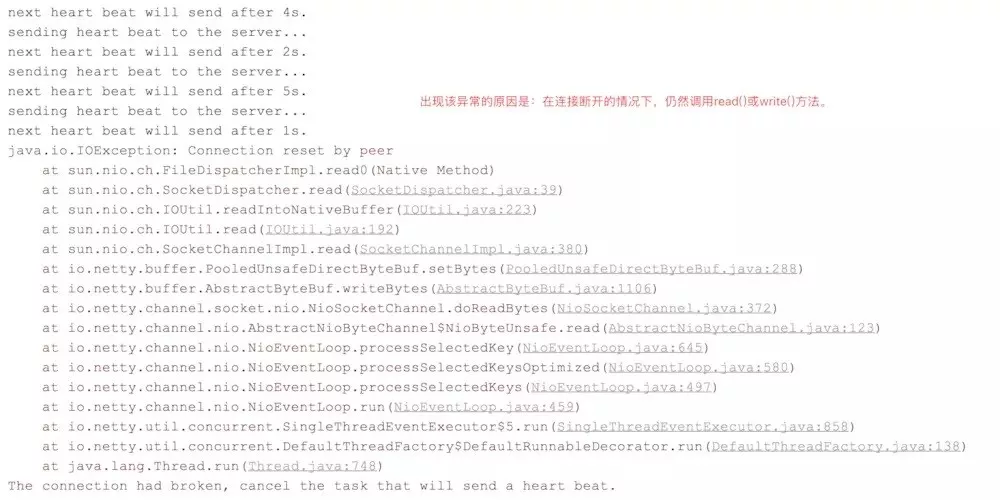
异常情况
出现这种情况的原因是:在连接已断开的情况下,仍然向服务器端发送心跳包。虽然在发送心跳包之前会使用channel.isActive()判断连接是否可用,但也有可能上一刻判断结果为可用,但下一刻发送数据包之前,连接就断了。
目前尚未找到优雅处理这种情况的方案,各位看官如果有好的解决方案,还望不吝赐教。拜谢!!!
断线重连
断线重连这里就不过多介绍,相信各位都知道是怎么回事。这里只说大致思路,然后直接上代码。
实现思路
客户端在监测到与服务器端的连接断开后,或者一开始就无法连接的情况下,使用指定的重连策略进行重连操作,直到重新建立连接或重试次数耗尽。
对于如何监测连接是否断开,则是通过重写ChannelInboundHandler#channelInactive来实现,但连接不可用,该方法会被触发,所以只需要在该方法做好重连工作即可。
代码实现
注:以下代码都是在上面心跳机制的基础上修改/添加的。
因为断线重连是客户端的工作,所以只需对客户端代码进行修改。
重试策略
RetryPolicy —— 重试策略接口
1public interface RetryPolicy {
2
3    /**
4     * Called when an operation has failed for some reason. This method should return
5     * true to make another attempt.
6     *
7     * @param retryCount the number of times retried so far (0 the first time)
8     * @return true/false
9     */
10    boolean allowRetry(int retryCount);
11
12    /**
13     * get sleep time in ms of current retry count.
14     *
15     * @param retryCount current retry count
16     * @return the time to sleep
17     */
18    long getSleepTimeMs(int retryCount);
19}
ExponentialBackOffRetry —— 重连策略的默认实现
1/**
2 * <p>Retry policy that retries a set number of times with increasing sleep time between retries</p>
3 */
4public class ExponentialBackOffRetry implements RetryPolicy {
5
6    private static final int MAX_RETRIES_LIMIT = 29;
7    private static final int DEFAULT_MAX_SLEEP_MS = Integer.MAX_VALUE;
8
9    private final Random random = new Random();
10    private final long baseSleepTimeMs;
11    private final int maxRetries;
12    private final int maxSleepMs;
13
14    public ExponentialBackOffRetry(int baseSleepTimeMs, int maxRetries) {
15        this(baseSleepTimeMs, maxRetries, DEFAULT_MAX_SLEEP_MS);
16    }
17
18    public ExponentialBackOffRetry(int baseSleepTimeMs, int maxRetries, int maxSleepMs) {
19        this.maxRetries = maxRetries;
20        this.baseSleepTimeMs = baseSleepTimeMs;
21        this.maxSleepMs = maxSleepMs;
22    }
23
24    @Override
25    public boolean allowRetry(int retryCount) {
26        if (retryCount < maxRetries) {
27            return true;
28        }
29        return false;
30    }
31
32    @Override
33    public long getSleepTimeMs(int retryCount) {
34        if (retryCount < 0) {
35            throw new IllegalArgumentException("retries count must greater than 0.");
36        }
37        if (retryCount > MAX_RETRIES_LIMIT) {
38            System.out.println(String.format("maxRetries too large (%d). Pinning to %d", maxRetries, MAX_RETRIES_LIMIT));
39            retryCount = MAX_RETRIES_LIMIT;
40        }
41        long sleepMs = baseSleepTimeMs * Math.max(1, random.nextInt(1 << retryCount));
42        if (sleepMs > maxSleepMs) {
43            System.out.println(String.format("Sleep extension too large (%d). Pinning to %d", sleepMs, maxSleepMs));
44            sleepMs = maxSleepMs;
45        }
46        return sleepMs;
47    }
48}
ReconnectHandler—— 重连处理器
1@ChannelHandler.Sharable
2public class ReconnectHandler extends ChannelInboundHandlerAdapter {
3
4    private int retries = 0;
5    private RetryPolicy retryPolicy;
6
7    private TcpClient tcpClient;
8
9    public ReconnectHandler(TcpClient tcpClient) {
10        this.tcpClient = tcpClient;
11    }
12
13    @Override
14    public void channelActive(ChannelHandlerContext ctx) throws Exception {
15        System.out.println("Successfully established a connection to the server.");
16        retries = 0;
17        ctx.fireChannelActive();
18    }
19
20    @Override
21    public void channelInactive(ChannelHandlerContext ctx) throws Exception {
22        if (retries == 0) {
23            System.err.println("Lost the TCP connection with the server.");
24            ctx.close();
25        }
26
27        boolean allowRetry = getRetryPolicy().allowRetry(retries);
28        if (allowRetry) {
29
30            long sleepTimeMs = getRetryPolicy().getSleepTimeMs(retries);
31
32            System.out.println(String.format("Try to reconnect to the server after %dms. Retry count: %d.", sleepTimeMs, ++retries));
33
34            final EventLoop eventLoop = ctx.channel().eventLoop();
35            eventLoop.schedule(() -> {
36                System.out.println("Reconnecting ...");
37                tcpClient.connect();
38            }, sleepTimeMs, TimeUnit.MILLISECONDS);
39        }
40        ctx.fireChannelInactive();
41    }
42
43    private RetryPolicy getRetryPolicy() {
44        if (this.retryPolicy == null) {
45            this.retryPolicy = tcpClient.getRetryPolicy();
46        }
47        return this.retryPolicy;
48    }
49}
ClientHandlersInitializer
在之前的基础上,添加了重连处理器ReconnectHandler。
1public class ClientHandlersInitializer extends ChannelInitializer<SocketChannel> {
2
3    private ReconnectHandler reconnectHandler;
4    private EchoHandler echoHandler;
5
6    public ClientHandlersInitializer(TcpClient tcpClient) {
7        Assert.notNull(tcpClient, "TcpClient can not be null.");
8        this.reconnectHandler = new ReconnectHandler(tcpClient);
9        this.echoHandler = new EchoHandler();
10    }
11
12    @Override
13    protected void initChannel(SocketChannel ch) throws Exception {
14        ChannelPipeline pipeline = ch.pipeline();
15        pipeline.addLast(this.reconnectHandler);
16        pipeline.addLast(new LengthFieldBasedFrameDecoder(Integer.MAX_VALUE, 0, 4, 0, 4));
17        pipeline.addLast(new LengthFieldPrepender(4));
18        pipeline.addLast(new StringDecoder(CharsetUtil.UTF_8));
19        pipeline.addLast(new StringEncoder(CharsetUtil.UTF_8));
20        pipeline.addLast(new Pinger());
21    }
22}
TcpClient
在之前的基础上添加重连、重连策略的支持。
1public class TcpClient {
2
3    private String host;
4    private int port;
5    private Bootstrap bootstrap;
6    /** 重连策略 */
7    private RetryPolicy retryPolicy;
8    /** 将<code>Channel</code>保存起来, 可用于在其他非handler的地方发送数据 */
9    private Channel channel;
10
11    public TcpClient(String host, int port) {
12        this(host, port, new ExponentialBackOffRetry(1000, Integer.MAX_VALUE, 60 * 1000));
13    }
14
15    public TcpClient(String host, int port, RetryPolicy retryPolicy) {
16        this.host = host;
17        this.port = port;
18        this.retryPolicy = retryPolicy;
19        init();
20    }
21
22    /**
23     * 向远程TCP服务器请求连接
24     */
25    public void connect() {
26        synchronized (bootstrap) {
27            ChannelFuture future = bootstrap.connect(host, port);
28            future.addListener(getConnectionListener());
29            this.channel = future.channel();
30        }
31    }
32
33    public RetryPolicy getRetryPolicy() {
34        return retryPolicy;
35    }
36
37    private void init() {
38        EventLoopGroup group = new NioEventLoopGroup();
39        // bootstrap 可重用, 只需在TcpClient实例化的时候初始化即可.
40        bootstrap = new Bootstrap();
41        bootstrap.group(group)
42                .channel(NioSocketChannel.class)
43                .handler(new ClientHandlersInitializer(TcpClient.this));
44    }
45
46    private ChannelFutureListener getConnectionListener() {
47        return new ChannelFutureListener() {
48            @Override
49            public void operationComplete(ChannelFuture future) throws Exception {
50                if (!future.isSuccess()) {
51                    future.channel().pipeline().fireChannelInactive();
52                }
53            }
54        };
55    }
56
57    public static void main(String[] args) {
58        TcpClient tcpClient = new TcpClient("localhost", 2222);
59        tcpClient.connect();
60    }
61
62}
测试
在测试之前,为了避开 Connection reset by peer 异常,可以稍微修改Pinger的ping()方法,添加if (second == 5)的条件判断。如下:
1private void ping(Channel channel) {
2        int second = Math.max(1, random.nextInt(baseRandom));
3        if (second == 5) {
4            second = 6;
5        }
6        System.out.println("next heart beat will send after " + second + "s.");
7        ScheduledFuture<?> future = channel.eventLoop().schedule(new Runnable() {
8            @Override
9            public void run() {
10                if (channel.isActive()) {
11                    System.out.println("sending heart beat to the server...");
12                    channel.writeAndFlush(ClientIdleStateTrigger.HEART_BEAT);
13                } else {
14                    System.err.println("The connection had broken, cancel the task that will send a heart beat.");
15                    channel.closeFuture();
16                    throw new RuntimeException();
17                }
18            }
19        }, second, TimeUnit.SECONDS);
20
21        future.addListener(new GenericFutureListener() {
22            @Override
23            public void operationComplete(Future future) throws Exception {
24                if (future.isSuccess()) {
25                    ping(channel);
26                }
27            }
28        });
29    }
启动客户端
先只启动客户端,观察控制台输出,可以看到类似如下日志:
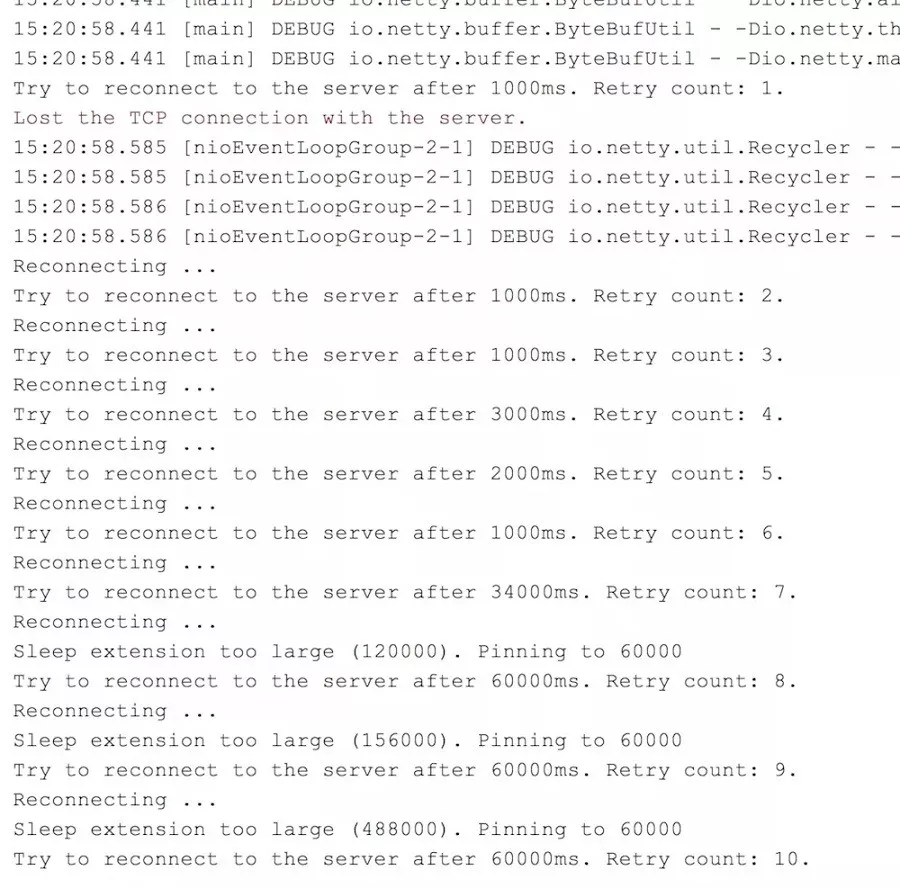
断线重连测试——客户端控制台输出
可以看到,当客户端发现无法连接到服务器端,所以一直尝试重连。随着重试次数增加,重试时间间隔越大,但又不想无限增大下去,所以需要定一个阈值,比如60s。如上图所示,当下一次重试时间超过60s时,会打印Sleep extension too large(*). Pinning to 60000,单位为ms。出现这句话的意思是,计算出来的时间超过阈值(60s),所以把真正睡眠的时间重置为阈值(60s)。
启动服务器端
接着启动服务器端,然后继续观察客户端控制台输出。
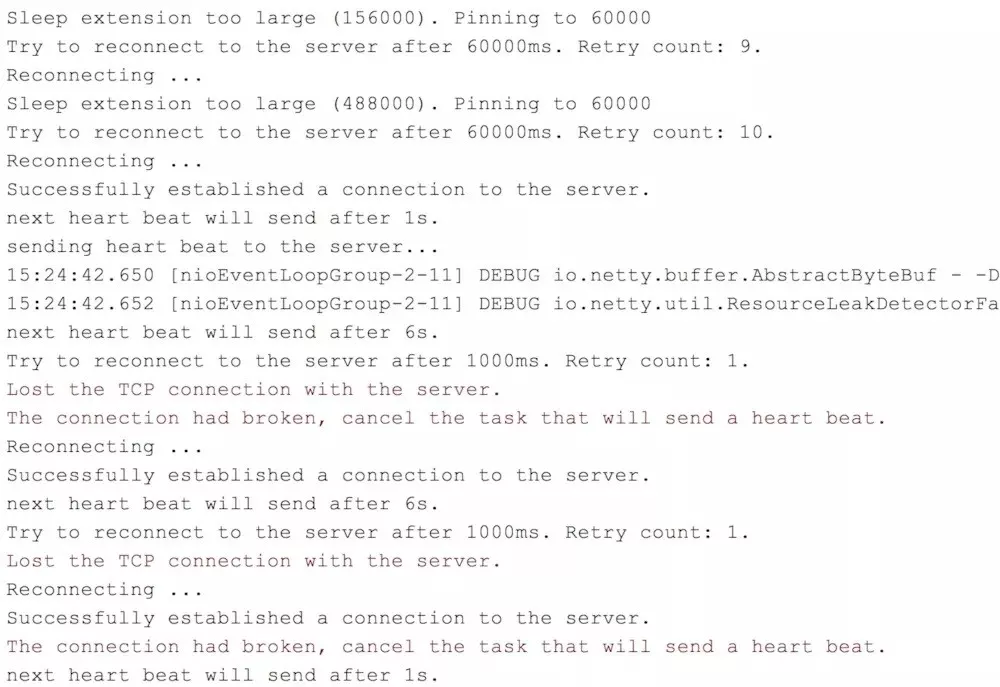
断线重连测试——服务器端启动后客户端控制台输出
可以看到,在第9次重试失败后,第10次重试之前,启动的服务器,所以第10次重连的结果为Successfully established a connection to the server.,即成功连接到服务器。接下来因为还是不定时ping服务器,所以出现断线重连、断线重连的循环。
扩展
在不同环境,可能会有不同的重连需求。有不同的重连需求的,只需自己实现RetryPolicy接口,然后在创建TcpClient的时候覆盖默认的重连策略即可。
完!!!
推荐去我的博客阅读更多:
2.Spring MVC、Spring Boot、Spring Cloud 系列教程
3.Maven、Git、Eclipse、Intellij IDEA 系列工具教程
觉得不错,别忘了点赞+转发哦!