
0.目录
1.遗失的关键字mutable
2.new / delete
3.new[] / delete[]
4.小结
5.C++语言学习总结
<span id = "jump1">1.遗失的关键字mutable</span>
笔试题: 统计对象中某个<font color=blue>成员变量的访问次数</font>
遗失的关键字:
- <font color=blue>mutable</font>是为了突破<font color=blue>const</font>函数的限制而设计的
- <font color=blue>mutable</font>成员变量将<font color=red>永远处于可改变的状态</font>
- <font color=blue>mutable</font>在实际的项目开发中被<font color=pink>严禁滥用</font>
<font color=blue>mutable</font>的深入分析:
- <font color=blue>mutable</font>成员变量<font color=pink>破坏了只读对象的内部状态</font>
- <font color=blue>const</font>成员函数保证只读<font color=red>对象的状态不变性</font>
- <font color=blue>mutable</font>成员变量的出现<font color=purple>无法保证</font>状态不变性
示例1——使用mutable实现成员变量的访问统计:
1#include <iostream>
2
3using namespace std;
4
5class Test
6{
7    int m_value;
8    mutable int m_count;
9public:
10    Test(int value = 0)
11    {
12        m_value = value;
13        m_count = 0;
14    }
15
16    int getValue() const
17    {
18        m_count++;
19
20        return m_value;
21    }
22
23    void setValue(int value)
24    {
25        m_count++;
26        m_value = value;
27    }
28
29    int getCount() const
30    {
31        return m_count;
32    }
33};
34
35int main(int argc, char *argv[])
36{
37    Test t;
38
39    t.setValue(100); // 满足普通对象
40
41    cout << "t.m_value = " << t.getValue() << endl;
42    cout << "t.m_count = " << t.getCount() << endl;
43
44    const Test ct(200); // 满足只读对象
45
46    cout << "ct.m_value = " << ct.getValue() << endl;
47    cout << "ct.m_count = " << ct.getCount() << endl;
48
49    return 0;
50}
运行结果为:
1[root@bogon Desktop]# g++ test.cpp
2[root@bogon Desktop]# ./a.out
3t.m_value = 100
4t.m_count = 2
5ct.m_value = 200
6ct.m_count = 1
示例2——不使用mutable实现成员变量的访问统计:
1#include <iostream>
2
3using namespace std;
4
5class Test
6{
7    int m_value;
8    int * const m_pCount;
9    /* mutable int m_count; */
10public:
11    Test(int value = 0) : m_pCount(new int(0))
12    {
13        m_value = value;
14        /* m_count = 0; */
15    }
16
17    int getValue() const
18    {
19        /* m_count++; */
20        *m_pCount = *m_pCount + 1;
21        return m_value;
22    }
23
24    void setValue(int value)
25    {
26        /* m_count++; */
27        *m_pCount = *m_pCount + 1;
28        m_value = value;
29    }
30
31    int getCount() const
32    {
33        /* return m_count; */
34        return *m_pCount;
35    }
36
37    ~Test()
38    {
39        delete m_pCount;
40    }
41};
42
43int main(int argc, char *argv[])
44{
45    Test t;
46
47    t.setValue(100); // 满足普通对象
48
49    cout << "t.m_value = " << t.getValue() << endl;
50    cout << "t.m_count = " << t.getCount() << endl;
51
52    const Test ct(200); // 满足只读对象
53
54    cout << "ct.m_value = " << ct.getValue() << endl;
55    cout << "ct.m_count = " << ct.getCount() << endl;
56
57    return 0;
58}
运行结果为:
1[root@bogon Desktop]# g++ test.cpp
2[root@bogon Desktop]# ./a.out
3t.m_value = 100
4t.m_count = 2
5ct.m_value = 200
6ct.m_count = 1
<span id = "jump2">2.new / delete</span>
面试题: <font color=blue>new</font>关键字创建出来的对象位于什么地方?
被忽略的事实: <font color=blue>new</font> / <font color=blue>delete</font>的本质是C++预定义的<font color=red>操作符</font> C++对这两个操作符做了严格的行为定义:
- <font color=blue>new</font>:
- 获取足够大的内存空间(<font color=pink>默认为堆空间</font>)
- 在获取的空间中调用构造函数创建对象
- <font color=blue>delete</font>:
- 调用析构函数销毁对象
- 归还对象所占用的空间(<font color=pink>默认为堆空间</font>)
在C++中能够重载<font color=blue>new</font> / <font color=blue>delete</font>操作符:
- 全局重载(<font color=pink>不推荐</font>)
- 局部重载(<font color=green>针对具体类进行重载</font>)
重载<font color=blue>new</font> / <font color=blue>delete</font>的意义在于<font color=red>改变动态对象创建时的内存分配方式</font>
<font color=blue>new</font> / <font color=blue>delete</font> 的重载方式: 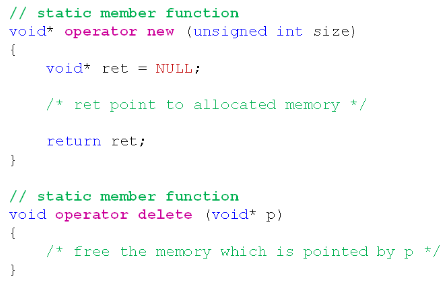 (new和delete默认就是静态成员函数,不管你写不写static。)
示例——静态存储区中创建动态对象:
1#include <iostream>
2
3using namespace std;
4
5class Test
6{
7    static const unsigned int COUNT = 4;
8    static char c_buffer[];
9    static char c_map[];
10
11    int m_value;
12public:
13    void* operator new (unsigned long size)
14    {
15        void* ret = NULL;
16
17        for(int i=0; i<COUNT; i++)
18        {
19            if( !c_map[i] )
20            {
21                c_map[i] = 1;
22
23                ret = c_buffer + i * sizeof(Test);
24
25                cout << "succeed to allocate memory: " << ret << endl;
26
27                break;
28            }
29        }
30
31        return ret;
32    }
33
34    void operator delete (void* p)
35    {
36        if( p != NULL )
37        {
38            char* mem = reinterpret_cast<char*>(p);
39            int index = (mem - c_buffer) / sizeof(Test);
40            int flag = (mem - c_buffer) % sizeof(Test);
41
42            if( (flag == 0) && (0 <= index) && (index < COUNT) )
43            {
44                c_map[index] = 0;
45
46                cout << "succeed to free memory: " << p << endl;
47            }
48        }
49    }
50};
51
52char Test::c_buffer[sizeof(Test) * Test::COUNT] = {0};
53char Test::c_map[Test::COUNT] = {0};
54
55int main(int argc, char *argv[])
56{
57    Test* pt = new Test;
58
59    delete pt;
60
61    return 0;
62}
运行结果为:
1[root@bogon Desktop]# g++ test.cpp
2[root@bogon Desktop]# ./a.out
3succeed to allocate memory: 0x601380
4succeed to free memory: 0x601380
(可以看到new和delete的重载函数确实被调用了。)
示例——进一步试验:
1int main(int argc, char *argv[])
2{
3    cout << "===== Test Single Object =====" << endl;
4
5    Test* pt = new Test;
6
7    delete pt;
8
9    cout << "===== Test Object Array =====" << endl;
10
11    Test* pa[5] = {0};
12
13    for(int i=0; i<5; i++)
14    {
15        pa[i] = new Test;
16
17        cout << "pa[" << i << "] = " << pa[i] << endl;
18    }
19
20    for(int i=0; i<5; i++)
21    {
22        cout << "delete " << pa[i] << endl;
23
24        delete pa[i];
25    }
26
27    return 0;
28}
运行结果为:
1[root@bogon Desktop]# g++ test.cpp
2[root@bogon Desktop]# ./a.out
3===== Test Single Object =====
4succeed to allocate memory: 0x6013a0
5succeed to free memory: 0x6013a0
6===== Test Object Array =====
7succeed to allocate memory: 0x6013a0
8pa[0] = 0x6013a0
9succeed to allocate memory: 0x6013a4
10pa[1] = 0x6013a4
11succeed to allocate memory: 0x6013a8
12pa[2] = 0x6013a8
13succeed to allocate memory: 0x6013ac
14pa[3] = 0x6013ac
15pa[4] = 0
16delete 0x6013a0
17succeed to free memory: 0x6013a0
18delete 0x6013a4
19succeed to free memory: 0x6013a4
20delete 0x6013a8
21succeed to free memory: 0x6013a8
22delete 0x6013ac
23succeed to free memory: 0x6013ac
24delete 0
(因为c_buffer的空间只能创建4个对象,因此for循环中的第5个对象就没有空间了,于是返回了空指针。) (可以使用这个方法加上二阶构造模式就可以将单例模式推广到多例模式!)
面试题: 如何在<font color=red>指定的地址</font>上创建C++对象?
解决方案:
- 在类中重载<font color=blue>new</font> / <font color=blue>delete</font>操作符
- 在<font color=blue>new</font>的操作符重载函数中<font color=red>返回指定的地址</font>
- 在<font color=blue>delete</font>操作符重载中<font color=purple>标记对应的地址可用</font>
示例——自定义动态对象的存储空间:
1#include <iostream>
2#include <cstdlib>
3
4using namespace std;
5
6class Test
7{
8    static unsigned int c_count;
9    static char* c_buffer;
10    static char* c_map;
11
12    int m_value;
13public:
14    static bool SetMemorySource(char* memory, unsigned int size)
15    {
16        bool ret = false;
17
18        c_count = size / sizeof(Test);
19
20        ret = (c_count && (c_map = reinterpret_cast<char*>(calloc(c_count, sizeof(char)))));
21
22        if( ret )
23        {
24            c_buffer = memory;
25        }
26        else
27        {
28            free(c_map);
29
30            c_map = NULL;
31            c_buffer = NULL;
32            c_count = 0;
33        }
34
35        return ret;
36    }
37
38    void* operator new (unsigned long size)
39    {
40        void* ret = NULL;
41
42        if( c_count > 0 )
43        {
44            for(int i=0; i<c_count; i++)
45            {
46                if( !c_map[i] )
47                {
48                    c_map[i] = 1;
49
50                    ret = c_buffer + i * sizeof(Test);
51
52                    cout << "succeed to allocate memory: " << ret << endl;
53
54                    break;
55                }
56            }
57        }
58        else
59        {
60            ret = malloc(size);
61        }
62
63        return ret;
64    }
65
66    void operator delete (void* p)
67    {
68        if( p != NULL )
69        {
70            if( c_count > 0 )
71            {
72                char* mem = reinterpret_cast<char*>(p);
73                int index = (mem - c_buffer) / sizeof(Test);
74                int flag = (mem - c_buffer) % sizeof(Test);
75
76                if( (flag == 0) && (0 <= index) && (index < c_count) )
77                {
78                    c_map[index] = 0;
79
80                    cout << "succeed to free memory: " << p << endl;
81                }
82            }
83            else
84            {
85                free(p);
86            }
87        }
88    }
89};
90
91unsigned int Test::c_count = 0;
92char* Test::c_buffer = NULL;
93char* Test::c_map = NULL;
94
95int main(int argc, char *argv[])
96{
97    char buffer[12] = {0};
98
99    Test::SetMemorySource(buffer, sizeof(buffer));
100
101    cout << "===== Test Single Object =====" << endl;
102
103    Test* pt = new Test;
104
105    delete pt;
106
107    cout << "===== Test Object Array =====" << endl;
108
109    Test* pa[5] = {0};
110
111    for(int i=0; i<5; i++)
112    {
113        pa[i] = new Test;
114
115        cout << "pa[" << i << "] = " << pa[i] << endl;
116    }
117
118    for(int i=0; i<5; i++)
119    {
120        cout << "delete " << pa[i] << endl;
121
122        delete pa[i];
123    }
124
125    return 0;
126}
运行结果为:
1[root@bogon Desktop]# g++ test.cpp
2[root@bogon Desktop]# ./a.out
3===== Test Single Object =====
4succeed to allocate memory: 0x7ffc6b2823d0
5succeed to free memory: 0x7ffc6b2823d0
6===== Test Object Array =====
7succeed to allocate memory: 0x7ffc6b2823d0
8pa[0] = 0x7ffc6b2823d0
9succeed to allocate memory: 0x7ffc6b2823d4
10pa[1] = 0x7ffc6b2823d4
11succeed to allocate memory: 0x7ffc6b2823d8
12pa[2] = 0x7ffc6b2823d8
13pa[3] = 0
14pa[4] = 0
15delete 0x7ffc6b2823d0
16succeed to free memory: 0x7ffc6b2823d0
17delete 0x7ffc6b2823d4
18succeed to free memory: 0x7ffc6b2823d4
19delete 0x7ffc6b2823d8
20succeed to free memory: 0x7ffc6b2823d8
21delete 0
22delete 0
<span id = "jump3">3.new[] / delete[]</span>
<font color=purple>new[]</font> / <font color=purple>delete[]</font> 与 <font color=blue>new</font> / <font color=blue>delete</font> 完全不同:
- 动态对象数组创建通过 new[] 完成
- 动态对象数组的销毁通过 delete[] 完成
- new[] / delete[] <font color=purple>能够被重载</font>,进而<font color=red>改变内存管理方式</font>
<font color=blue>new</font>[] / <font color=blue>delete</font>[] 的重载方式: 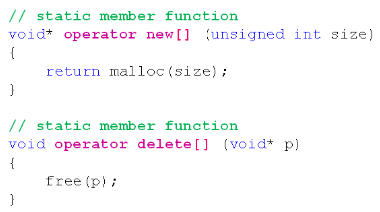
注意事项:
- <font color=blue>new</font>[]实际需要<font color=cyan>返回的内存空间<font color=pink>可能</font>比期望的要多</font>
- 对象数组占用的内存中<font color=red>需要保存数组信息</font>
- 数组信息用于确定构造函数和析构函数的调用次数
示例——动态数组的内存管理:
1#include <iostream>
2#include <cstdlib>
3
4using namespace std;
5
6class Test
7{
8    int m_value;
9public:
10    Test()
11    {
12        m_value = 0;
13    }
14
15    ~Test() { }
16
17    void* operator new (unsigned long size)
18    {
19        cout << "operator new: " << size << endl;
20
21        return malloc(size);
22    }
23
24    void operator delete (void* p)
25    {
26        cout << "operator delete: " << p << endl;
27
28        free(p);
29    }
30
31    void* operator new[] (unsigned long size)
32    {
33        cout << "operator new[]: " << size << endl;
34
35        return malloc(size);
36    }
37
38    void operator delete[] (void* p)
39    {
40        cout << "operator delete[]: " << p << endl;
41
42        free(p);
43    }
44};
45
46int main(int argc, char *argv[])
47{
48    Test* pt = NULL;
49
50    pt = new Test;
51
52    delete pt;
53
54    pt = new Test[5];
55
56    delete[] pt;
57
58    return 0;
59}
运行结果为:
1[root@bogon Desktop]# g++ test.cpp
2[root@bogon Desktop]# ./a.out
3operator new: 4
4operator delete: 0x150a010
5operator new[]: 28
6operator delete[]: 0x150a030
<span id = "jump4">4.小结</span>
- <font color=blue>new</font> / <font color=blue>delete</font> 的本质为操作符
- 可以通过<font color=red>全局函数重载</font> <font color=blue>new</font> / <font color=blue>delete</font> (<font color=red>不推荐</font>)
- 可以针对具体的类重载 <font color=blue>new</font> / <font color=blue>delete</font>
- <font color=purple>new[]</font> / <font color=purple>delete[]</font> 与 <font color=blue>new</font> / <font color=blue>delete</font> 完全不同
- <font color=purple>new[]</font> / <font color=purple>delete[]</font> 也是可以被重载的操作符
- <font color=blue>new</font>[] 返回的内存空间<font color=red>可能比期望的要多</font>
<span id = "jump5">5.C++语言学习总结</span>
本系列学习的是<font color=pink>“经典”</font>C++语言: <font color=pink>“经典”</font>指的是什么?
- C++ <font color=purple>98</font>/<font color=blue>03</font> 标准在实际工程中的常用特性
- 大多数企业的<font color=red>产品开发中需要使用的C++技能</font>
C++语言的学习需要<font color=red>重点在于以下几个方面</font>:
- C语言到C++的改进有哪些?
- <font color=blue>面向对象的核心</font>是什么?
- <font color=red>操作符重载的本质</font>是什么?
- <font color=purple>模板的核心意义</font>是什么?
- 异常处理的使用方式是什么?