
1、创建快照
已修改后的时刻为记录,进行制作镜像,选择要制作镜像的虚拟机,点击创建快照,在所弹出的对话框中输入所创建的镜像名称
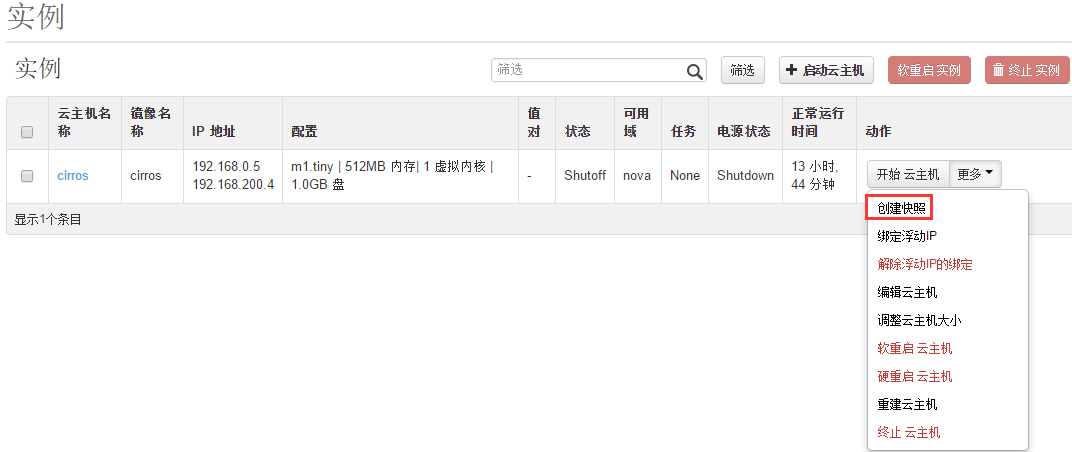
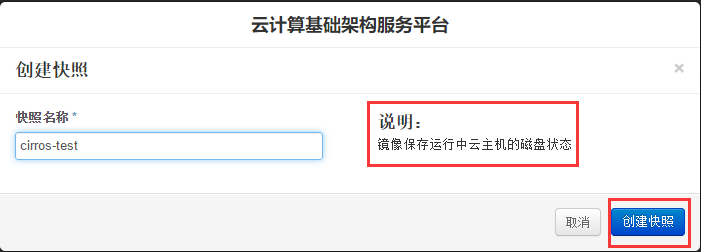
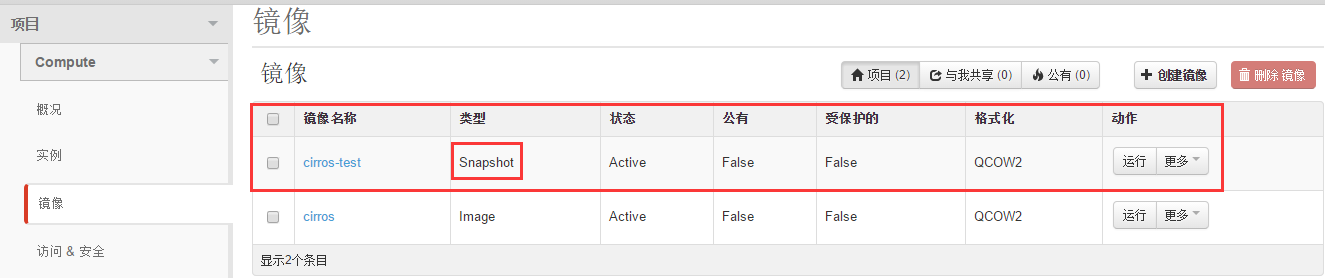
生成了一个镜像,类型为Snapshot
2、保存镜像
查看镜像列表
1[root@controller ~]# source /etc/keystone/admin-openrc.sh
2[root@controller ~]#
3[root@controller ~]# glance image-list
4+--------------------------------------+-------------+-------------+------------------+----------+--------+
5| ID                                   | Name        | Disk Format | Container Format | Size     | Status |
6+--------------------------------------+-------------+-------------+------------------+----------+--------+
7| b3f9088f-ca51-4a03-ab9a-66e9c4baacce | cirros      | qcow2       | bare             | 13287936 | active |
8| b408a7da-7fff-4238-8f17-9e48f34553ef | cirros-test | qcow2       | bare             | 22085632 | active |
9+--------------------------------------+-------------+-------------+------------------+----------+--------+
下载镜像
[root@controller ~]#
[root@controller ~]# glance image-download --file cirros_v1.0.qcow2 --progress cirros-test
[=============================>] 100%
[root@controller ~]# ll
total 2978932
-rw-------. 1 root root 1002 Jan 22 03:32 anaconda-ks.cfg
-rw-r--r--. 1 root root 22085632 Jan 22 18:44 cirros_v1.0.qcow2
-rw-r--r--. 1 root root 3028287488 Jan 20 02:44 Cloud_Centos6.5_64bit.qcow2
-rwxr-xr-x. 1 root root 26015 Jan 18 15:43 iaas-install-all-in-one.sh
-rw-r--r--. 1 root root 9072 Jan 22 03:32 install.log
-rw-r--r--. 1 root root 3161 Jan 22 03:31 install.log.syslog
[root@controller ~]#
3、上传镜像
将制作好的镜像上传到服务器上
1[root@controller ~]# glance image-create --name Cloud_Centos6.5_64bit --disk-format qcow2 --container-format bare < Cloud_Centos6.5_64bit.qcow2
2+------------------+--------------------------------------+
3| Property         | Value                                |
4+------------------+--------------------------------------+
5| checksum         | d6e6a71c69f1996350970489f9513402     |
6| container_format | bare                                 |
7| created_at       | 2019-01-22T10:48:31                  |
8| deleted          | False                                |
9| deleted_at       | None                                 |
10| disk_format      | qcow2                                |
11| id               | c6e2e980-935c-4337-94ae-0595988065d2 |
12| is_public        | False                                |
13| min_disk         | 0                                    |
14| min_ram          | 0                                    |
15| name             | Cloud_Centos6.5_64bit                |
16| owner            | 18e38545a20f4fbb8dba8944118d43bc     |
17| protected        | False                                |
18| size             | 3028287488                           |
19| status           | active                               |
20| updated_at       | 2019-01-22T10:51:16                  |
21| virtual_size     | None                                 |
22+------------------+--------------------------------------+
查看是否成功上传
1[root@controller ~]#
2[root@controller ~]# glance image-list
3+--------------------------------------+-----------------------+-------------+------------------+------------+--------+
4| ID                                   | Name                  | Disk Format | Container Format | Size       | Status |
5+--------------------------------------+-----------------------+-------------+------------------+------------+--------+
6| b3f9088f-ca51-4a03-ab9a-66e9c4baacce | cirros                | qcow2       | bare             | 13287936   | active |
7| b408a7da-7fff-4238-8f17-9e48f34553ef | cirros-test           | qcow2       | bare             | 22085632   | active |
8| c6e2e980-935c-4337-94ae-0595988065d2 | Cloud_Centos6.5_64bit | qcow2       | bare             | 3028287488 | active |
9+--------------------------------------+-----------------------+-------------+------------------+------------+--------+
查看镜像上传位置
1[root@controller ~]# cd /var/lib/glance/images
2[root@controller images]#
3[root@controller images]# ll
4total 2991864
5-rw-r-----. 1 glance glance   13287936 Jan 22 04:19 b3f9088f-ca51-4a03-ab9a-66e9c4baacce
6-rw-r-----. 1 glance glance   22085632 Jan 22 18:38 b408a7da-7fff-4238-8f17-9e48f34553ef
7-rw-r-----. 1 glance glance 3028287488 Jan 22 18:51 c6e2e980-935c-4337-94ae-0595988065d2
8[root@controller images]#
end