
1、IDEA创建maven工程(略)
2、 在maven项目的pom.xml 添加mybatis-generator-maven-plugin 插件和MySQL数据库驱动依赖
1<build>
2  <plugins>
3    <plugin>
4      <groupId>org.mybatis.generator</groupId>
5      <artifactId>mybatis-generator-maven-plugin</artifactId>
6      <version>1.3.5</version>
7      <configuration>
8        <verbose>true</verbose>
9        <overwrite>true</overwrite>
10      </configuration>
11    </plugin>
12  </plugins>
13</build>
14
15<dependency>
16  <groupId>mysql</groupId>
17  <artifactId>mysql-connector-java</artifactId>
18  <version>5.1.34</version>
19</dependency>
3、在maven项目下的src/main/resources 目录下建立名为 generatorConfig.xml的配置文件,作为mybatis-generator-maven-plugin 插件的执行目标,模板如下:
1<?xml version="1.0" encoding="UTF-8"?>
2<!DOCTYPE generatorConfiguration
3        PUBLIC "-//mybatis.org//DTD MyBatis Generator Configuration 1.0//EN"
4        "http://mybatis.org/dtd/mybatis-generator-config\_1\_0.dtd">
5
6<generatorConfiguration>
7    <!\-\- 配置mysql 驱动jar包路径.用了绝对路径 -->
8    <classPathEntry location="/Users/wangyongzhi/.m2/repository/mysql/mysql-connector-java/5.1.34/mysql-connector-java-5.1.34.jar" />
9
10    <context id="wangyongzhi\_mysql\_tables" targetRuntime="MyBatis3">
11        <!\-\- 防止生成的代码中有很多注释,加入下面的配置控制 -->
12        <commentGenerator>
13            <property name="suppressAllComments" value="true" />
14            <property name="suppressDate" value="true" />
15        </commentGenerator>
16
17        <!\-\- 数据库连接 -->
18        <jdbcConnection driverClass="com.mysql.jdbc.Driver"
19                        connectionURL="jdbc:mysql://127.0.0.1:3306/test?useUnicode=true&characterEncoding=UTF-8"
20                        userId="root"
21                        password="123456">
22        </jdbcConnection>
23
24        <javaTypeResolver >
25            <property name="forceBigDecimals" value="false" />
26        </javaTypeResolver>
27
28        <!\-\- 数据表对应的model层  -->
29        <javaModelGenerator targetPackage="me.zhige.domain" targetProject="src">
30            <property name="enableSubPackages" value="true" />
31            <property name="trimStrings" value="true" />
32        </javaModelGenerator>
33
34        <!\-\- sql mapper 映射配置文件 -->
35        <sqlMapGenerator targetPackage="me.zhige.mapper"  targetProject="src">
36            <property name="enableSubPackages" value="true" />
37        </sqlMapGenerator>
38
39        <!\-\- mybatis3中的mapper接口 -->
40        <javaClientGenerator type="XMLMAPPER" targetPackage="me.zhige.dao"  targetProject="src">
41            <property name="enableSubPackages" value="true" />
42        </javaClientGenerator>
43
44        <!\-\- 数据表进行生成操作 schema:相当于库名; tableName:表名; domainObjectName:对应的DO -->
45        <table schema="test" tableName="users" domainObjectName="User"
46               enableCountByExample="false" enableUpdateByExample="false"
47               enableDeleteByExample="false" enableSelectByExample="false"
48               selectByExampleQueryId="false">
49        </table>
50
51    </context>
52</generatorConfiguration>
4、使用maven运行mybatis-generator-maven-plugin插件:工程名->Plugins->mybatis-generator->mybatis-generator:generate->Run Maven Build


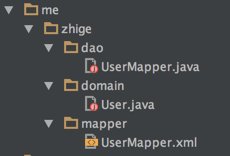
5、自动生成的结构如下:

如果觉得内容还不错,可以关注一下我哦
微信公众号:志哥 (ID: zhige-me)
期待与你相遇,一同成长前行!

